The best mini PCs with NPU combine compact designs with dedicated AI acceleration, efficient processors, and enough memory for everyday productivity or demanding workloads. The right model depends on more than TOPS: processor class, RAM, storage, graphics, ports, cooling, and upgradeability all matter.
We selected 10 current options ranging from affordable, efficient systems to high-performance AMD and Intel models. Use the guide below to match AI capability and overall hardware to the way you plan to work.
Best 10 Mini PC with Npu Picks for 2026
Best Balanced AMD Pick

- 38-TOPS integrated AI NPU
- Expandable DDR5 RAM and NVMe storage
- Quad 4K display support
Best For: Home offices, coding, multitasking, and light gaming
Best Quiet Creator Workstation

- Core Ultra 9 with dedicated NPU
- 24GB LPDDR5 memory at 5600 MT/s
- Quiet cooling and Linux support
Best For: Creators, developers, and noise-sensitive workspaces
Best High-NPU ARM Option

- Up to 80 TOPS Hexagon NPU
- 32GB high-speed LPDDR5x memory
- Qualcomm AI Hub access
Best For: AI development and ARM64 workflows
Best Expandable AI Workstation
BOSGAME VTA-439 Ryzen AI Mini PC

- 86 TOPS total AI performance
- Three PCIe 4.0 M.2 slots
- OCuLink eGPU expansion
Best For: Local AI, virtualization, creators, and expandable gaming
Best Compact Starter

- 24 TOPS combined AI performance with a 15 TOPS NPU
- Triple 4K display output and dual Gigabit LAN
- Compact 128×128mm chassis with Windows 11 Pro readiness
Best For: Everyday office work, learning, light editing, and multi-monitor setups
Best High-Performance AI Workstation

- Up to 86 TOPS local AI performance from Ryzen AI 9 HX 470
- 32GB DDR5, 1TB SSD, and support for major upgrades
- Quad 4K displays, dual 2.5GbE, Wi-Fi 7, and OCuLink
Best For: Local AI, advanced multitasking, video editing, and expandable workstations
Best Balanced Office Pick
GMKtec K15 Core Ultra 5 AI Mini PC

- Core Ultra 5 125U with an 11 TOPS Intel NPU
- 16GB DDR5, 1TB SSD, and broad upgrade support
- Four-display output, dual 2.5GbE, and selectable power modes
Best For: Office work, study, programming, and flexible small-business setups
Best Premium Pick

- Core Ultra 7 155H with built-in NPU
- 32GB DDR5 and 1TB PCIe 4.0 SSD
- Tool-free upgrades and extensive I/O
Best For: AI-assisted work, content creation, and demanding multitasking
Best Efficient Workstation

- Core Ultra 5 115U with AI Boost NPU
- Triple 8K display support
- Windows 11 Pro with Wi-Fi 6 and 2.5G LAN
Best For: Office work, local AI tasks, and multi-monitor productivity
Best Expandable Gaming Pick
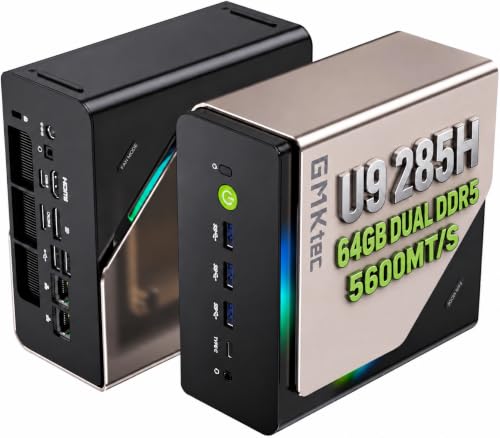
- Core Ultra 9 285H with AI Boost NPU
- 64GB DDR5 and Intel Arc 140T graphics
- Three M.2 slots plus Oculink expansion
Best For: Gaming, video editing, and upgrade-focused power users
Best Balanced AMD Pick – Ryzen 7 8845HS Mini PC
If you want a practical mini pc with npu for everyday productivity, development, and light gaming, this Glorlin model offers a capable Ryzen 7 processor, Radeon graphics, and an integrated NPU in a compact design. Its expandable memory and storage also leave room for future upgrades.
Best For: Home offices, coding, multitasking, multi-monitor workspaces, and light gaming.
Pros:
- Ryzen 7 8845HS provides 8 cores, 16 threads, and speeds up to 5.1GHz.
- Integrated AI NPU supports up to 38 TOPS for compatible AI workloads.
- Supports up to four 4K displays, dual 2.5G LAN, USB4, Wi-Fi 6, and Bluetooth 5.3.
- 16GB DDR5 RAM and 1TB NVMe storage are expandable.
Cons:
- The integrated Radeon 780M is intended for light gaming rather than high-end graphics.
- The supplied configuration has 16GB RAM; memory expansion may help with AI-intensive tasks.
This is a well-rounded choice for buyers who want NPU capability without giving up familiar AMD x86 compatibility, upgradeability, and strong connectivity.
Best Quiet Creator Workstation – GEEKOM IT13 MAX
The GEEKOM IT13 MAX is a strong mini pc with npu for creators and professionals who value quiet sustained performance. Its Core Ultra 9 platform combines a dedicated NPU with 24GB of fast LPDDR5 memory and support for Windows or major Linux distributions.
Best For: Video editors, designers, developers, Linux users, and quiet office or studio environments.
Pros:
- Intel Core Ultra 9 185H includes a dedicated NPU for local AI workloads.
- 24GB LPDDR5 memory runs at 5600 MT/s for responsive multitasking.
- IceBlast 3.0 cooling is designed for quiet operation and up to 65W sustained performance.
- Supports Windows and major Linux distributions, along with multiple displays.
Cons:
- The 500GB SSD provides less storage than several competing configurations.
- Onboard LPDDR5 memory is not presented as user-upgradable.
Choose this model when quiet operation, creator-focused performance, and OS flexibility matter more than maximum storage capacity or modular upgrades.
Best High-NPU ARM Option – ASUS Ascent QN10
For buyers prioritizing AI acceleration, the ASUS Ascent QN10 is a distinctive mini pc with npu. Its Snapdragon X2 Elite platform offers up to 80 TOPS of NPU performance, fast LPDDR5x memory, and access to the Qualcomm AI Hub for ready-to-use models and development tools.
Best For: AI development, efficient everyday computing, and users building ARM64-based workflows.
Pros:
- Qualcomm Hexagon NPU delivers up to 80 TOPS of AI processing.
- Snapdragon X2 Elite provides 18 cores and an integrated Adreno X2 GPU.
- 32GB LPDDR5x memory runs at up to 8533 MT/s.
- Supports four 4K monitors, Wi-Fi 7, Bluetooth 6.0, and seven USB ports.
Cons:
- Windows 11 Home is specified for ARM64, so software compatibility should be checked before purchase.
- Memory is onboard and limited to the configured 32GB.
This is the most AI-focused option in the group on paper, especially for developers who can take advantage of Qualcomm’s ARM64 ecosystem and AI Hub.
Best Expandable AI Workstation – BOSGAME VTA-439 Ryzen AI Mini PC
The BOSGAME VTA-439 is a high-end mini pc with npu for local AI, creative work, virtualization, and gaming. It pairs an AMD Ryzen AI 9 HX 470 with 32GB of DDR5 memory, three PCIe 4.0 M.2 slots, and OCuLink support for an external GPU.
Best For: AI developers, creators, virtual machines, large datasets, advanced networking, and expandable gaming setups.
Pros:
- Ryzen AI 9 HX 470 provides 12 cores, 24 threads, and up to 5.2GHz boost speed.
- Up to 86 TOPS total AI performance includes an XDNA 2 NPU rated up to 55 TOPS.
- 32GB DDR5-5600 memory and 1TB PCIe 4.0 SSD are expandable.
- OCuLink eGPU support, Wi-Fi 7, dual 2.5GbE, and quad-display output improve flexibility.
Cons:
- External GPU expansion requires additional hardware and cost.
- The system has a 1-year machine warranty, while the longer 3-year coverage applies to parts.
This is the strongest fit for buyers who need substantial local AI capability today and want unusually broad expansion options for storage, networking, and graphics.
Best Compact Starter – wo-we Core 3 304 AI Mini PC
If you want a compact mini pc with npu for everyday work, the wo-we H8 pairs Intel Core 3 304 processing with 24 TOPS of combined AI performance. Its small footprint, triple-display support, and dual Ethernet ports make it practical for office setups, learning, light editing, and home labs.
Best For: Basic local AI features, office multitasking, online learning, photo editing, and multi-monitor desks.
Pros:
- 24 TOPS combined AI performance, including a 15 TOPS NPU.
- Triple 4K@60Hz display support through HDMI, DisplayPort, and USB-C.
- Dual Gigabit LAN, Wi-Fi 6E, and Bluetooth 5.2.
- Compact 128×128mm design with Windows 11 Pro readiness.
Cons:
- Only 8GB of LPDDR5 memory, with no listed RAM upgrade path.
- Designed for light creation and productivity rather than demanding graphics workloads.
This is an appealing entry point for buyers who prioritize a small chassis and useful connectivity. The fixed 8GB memory makes it best suited to everyday workloads rather than heavier local AI models or extensive content production.
Best High-Performance AI Workstation – MINISFORUM AI X1 Pro-470
For buyers seeking a powerful mini pc with npu, the MINISFORUM AI X1 Pro-470 combines the Ryzen AI 9 HX 470 with up to 86 TOPS of local AI performance. It also includes 32GB of DDR5 memory, a 1TB PCIe 4.0 SSD, quad-display support, and OCuLink expansion for demanding workflows.
Best For: Local AI workloads, complex multitasking, 8K video editing, professional productivity, and expandable graphics setups.
Pros:
- Ryzen AI 9 HX 470 offers 12 cores, 24 threads, and up to 5.2GHz.
- Up to 86 TOPS of local AI performance for compatible applications.
- Supports up to 128GB DDR5, three M.2 SSDs, and 12TB total storage.
- Quad 4K display support, dual 2.5GbE, Wi-Fi 7, and OCuLink.
Cons:
- Its high-end capabilities may be excessive for basic office tasks.
- External dedicated graphics expansion requires compatible hardware through OCuLink.
The X1 Pro-470 is the strongest option here for buyers who want substantial local AI headroom and upgrade potential in a compact system. Its extensive expansion and connectivity make it better suited to demanding users than casual desktop buyers.
Best Balanced Office Pick – GMKtec K15 Core Ultra 5 AI Mini PC
The GMKtec K15 is a balanced mini pc with npu for office work, study, programming, and everyday creation. Its Core Ultra 5 125U includes an Intel AI Boost NPU, while 16GB of DDR5 memory, a 1TB SSD, flexible power modes, and four-display support give it room for varied workloads.
Best For: Office productivity, study, programming, video calls, digital signage, and home or small-business use.
Pros:
- Intel AI Boost NPU provides up to 11 TOPS, with up to 21 TOPS total platform AI performance.
- 16GB DDR5 memory and a 1TB PCIe SSD are included.
- Four-display 4K support, with individual HDMI and DisplayPort outputs specified up to 8K@60Hz.
- Dual 2.5GbE, dual USB-C, OCuLink, and selectable 15W/25W/35W power modes.
Cons:
- Its NPU performance is lower than the other two systems listed here.
- Actual multi-display results depend on the monitor, cable, and output combination.
The K15 makes sense for buyers who want current Intel AI features without moving to a higher-end workstation platform. Its expandable memory and storage, networking options, and configurable power profiles offer useful flexibility for long-term general-purpose use.
Best Premium Pick – ASUS NUC 14 Pro AI Mini PC
For buyers seeking a capable mini pc with npu, the ASUS NUC 14 Pro combines an Intel Core Ultra 7 155H processor, built-in NPU, Intel Arc graphics, 32GB of DDR5 memory, and a 1TB PCIe 4.0 SSD. Its compact, tool-free design also makes future upgrades straightforward.
Best For: AI-assisted work, content creation, business use, and demanding multitasking in a compact desktop.
Pros:
- Built-in NPU supports AI-intensive and AI-generated content applications.
- Strong Core Ultra 7 processor and Intel Arc graphics support gaming, editing, and 3D work.
- 32GB RAM, 1TB SSD, expansion options, and tool-free access improve long-term flexibility.
- Thunderbolt 4, 2.5G Ethernet, HDMI 2.1, and multiple USB ports offer broad connectivity.
Cons:
- Its higher-end hardware may be more than needed for basic office tasks.
- Integrated graphics are not equivalent to a separate desktop graphics card.
The ASUS NUC 14 Pro is a well-rounded choice when you want NPU-assisted computing without sacrificing processor performance, memory capacity, storage flexibility, or desk space.
Best Efficient Workstation – Bmax Core Ultra 5 AI Mini PC
This mini pc with npu focuses on efficient local AI performance for everyday work. The Bmax system pairs an Intel Core Ultra 5 115U with an Intel AI Boost NPU, 16GB of onboard LPDDR5 memory, a 512GB SSD, Windows 11 Pro, and support for up to three 8K displays.
Best For: Office productivity, privacy-conscious local AI tasks, conferencing, and multi-monitor workspaces.
Pros:
- Built-in NPU supports local tasks such as photo retouching, voice translation, and background blur.
- Low-power LPDDR5 memory is designed for responsive multitasking and integrated graphics performance.
- Supports triple 8K display output through HDMI 2.1, DisplayPort 2.1, and full-function USB-C.
- Windows 11 Pro, TPM 2.0, Wi-Fi 6, and 2.5G Ethernet suit business environments.
Cons:
- Memory is onboard, which limits user upgrade flexibility.
- The 512GB SSD provides less included storage than the other options here.
- Its integrated graphics are aimed at productivity and light creative work rather than high-end gaming.
The Bmax is a practical efficiency-focused pick for users who value local AI features, quiet everyday productivity, and extensive display connectivity over maximum expansion.
Best Expandable Gaming Pick – GMKtec Ultra 9 AI Mini PC
For buyers who want a performance-oriented mini pc with npu, the GMKtec EVO-T1 combines an Intel Core Ultra 9 285H processor, Intel AI Boost NPU, Arc 140T graphics, 64GB of DDR5 memory, and a PCIe 4.0 SSD. Its three M.2 slots and Oculink port make it especially flexible for storage and graphics expansion.
Best For: Gaming, video editing, heavy multitasking, multi-display setups, and users planning future expansion.
Pros:
- Core Ultra 9 285H reaches up to 5.4GHz and includes an AI Boost NPU rated up to 13 TOPS.
- 64GB DDR5 memory and Intel Arc 140T graphics support demanding creative and gaming workloads.
- Three M.2 expansion slots provide substantial storage flexibility.
- Oculink, 2.5GbE, Wi-Fi 6, and up to four high-resolution displays broaden its use cases.
Cons:
- Its larger, heavier design and dual-fan cooling are less minimalist than smaller office-focused systems.
- The NPU capability is listed at up to 13 TOPS, below some competing configurations.
- Storage and operating-system details should be checked carefully before purchase.
The EVO-T1 is the strongest choice here for expansion-minded users who want substantial memory, fast processing, gaming-oriented graphics, and Oculink connectivity in a mini-PC format.
How We Picked the Best Mini PC with Npu
We evaluated these systems as complete desktop platforms rather than judging NPU specifications in isolation. Our comparison considers processor performance, advertised NPU capability, integrated graphics, included memory and storage, display support, connectivity, upgrade potential, and the practicality of each system for its likely audience.
Because NPU support varies by operating system and application, TOPS figures should be treated as an indicator of AI acceleration—not a guarantee of faster performance in every workload. We also favored configurations that provide useful out-of-the-box hardware, such as 16GB or more of RAM and an SSD suitable for modern software.
Quick Comparison
| Best For | Recommended Type | What to Prioritize |
|---|---|---|
| Everyday AI productivity | Efficient Intel or AMD mini PC | 16GB RAM, fast SSD, quiet cooling |
| Local AI and multitasking | Higher-TOPS Ryzen AI or Core Ultra model | NPU performance, 32GB RAM, strong CPU |
| Creative work | Ryzen AI system with Radeon graphics | Graphics performance, memory bandwidth, USB4 |
| Gaming and expansion | Performance-focused mini PC | Radeon or Arc graphics, Oculink, extra M.2 slots |
| Business deployment | ASUS NUC-style system | Manageability, ports, reliability, serviceability |
Key Buying Factors for a Mini PC with Npu
NPU Capability and Software Support
A neural processing unit can handle supported AI tasks more efficiently than relying exclusively on the CPU or GPU. Look for compatibility with the applications you actually use, including video effects, background removal, transcription, image tools, and on-device assistants. A higher advertised TOPS rating is useful, but software support remains essential.
CPU, Graphics, and Memory
Choose the processor based on the whole workload. An NPU does not replace CPU speed for office applications, compiling, compression, or general multitasking. Integrated graphics also affect gaming, video editing, and multiple high-resolution displays. For heavier AI, creative, or professional use, 32GB of RAM is preferable; 16GB is a reasonable baseline, while 8GB is best limited to light workloads.
Storage and Upgradeability
A 1TB NVMe SSD offers a practical starting point for applications and local AI models. Check whether the system provides a second M.2 slot, replaceable memory, or support for larger drives. Expansion can extend the useful life of a compact PC and may matter more than a small difference in benchmark performance.
Ports, Displays, and Cooling
Count the ports you need before buying. USB4 or Thunderbolt-class connectivity can support fast storage and docks, while HDMI and DisplayPort outputs determine your monitor setup. Sustained performance also depends on cooling, so reviews that measure noise and long workloads are valuable for high-power processors.
Who Should Buy Which Mini PC with Npu?
Choose an efficient Core Ultra or Ryzen-based model for office work, streaming, web applications, and occasional AI features. Buyers focused on local AI experimentation or serious multitasking should prioritize the 32GB configurations and stronger Ryzen AI or Core Ultra processors. Creative users should favor models with faster Radeon or Intel Arc graphics, ample memory, and high-speed ports.
For gaming, select the system with the strongest integrated graphics and consider Oculink or other expansion options if you may add an external GPU. Business buyers may prefer the ASUS NUC-style design for its established ecosystem and practical connectivity. Finally, if your workload is light and price is the priority, a lower-TOPS model can still be a sensible compact desktop—provided its memory and storage meet your needs.