The right enclosure can turn an internal SSD into a fast, portable photo library for backups, editing, and on-location transfers. The best choice depends on your drive type, computer ports, speed needs, and how much protection your workflow requires.
We compared 10 popular NVMe and SATA enclosures to help photographers choose a reliable match for existing drives, travel kits, and everyday storage.
Best 10 SSD Enclosures for Photo Storage Picks for 2026
Best High-Speed NVMe Pick

- 10Gbps USB-C connectivity
- Tool-free NVMe installation
- Aluminum cooling design
Best For: Fast portable photo backups using an M.2 NVMe SSD
Best Budget SATA Option
ORICO 2.5-Inch USB-C Enclosure

- Fits 7mm and 9.5mm SATA drives
- Tool-free setup
- Includes USB-C-to-USB-A cable
Best For: Affordable photo storage using a 2.5-inch SATA SSD or HDD
Best for Mobile Creators

- 10Gbps NVMe storage access
- Magnetic phone stand included
- Supports up to 8TB SSDs
Best For: Mobile photo and video workflows with compatible USB-C devices
Best Versatile M.2 Pick
Sabrent NVMe and SATA Enclosure

- Supports NVMe and M.2 SATA
- 10Gbps USB-C connection
- Tool-free aluminum design
Best For: Photographers using different M.2 SSD types
Fast NVMe Pick

- Up to 10Gbps USB 3.1 Gen 2 performance
- Supports NVMe drives up to 8TB
- Compact design with broad OS support
Best For: Portable photo storage using an existing PCIe NVMe M.2 SSD
Simple SATA Value
SABRENT 2.5-Inch SSD Enclosure

- Tool-free 2.5-inch SATA drive installation
- Up to 5Gbps over USB 3.0
- Plug-and-play Mac and Windows support
Best For: Easy access to an existing 2.5-inch SATA photo drive
Rugged Dual-Format Pick
- Supports both NVMe PCIe and SATA M.2 SSDs
- Up to 10Gbps USB-C transfers
- MIL-STD-810H and IP68 protection
Best For: Rugged mobile photo storage with flexible M.2 drive support
Best USB-C/USB-A Pick
BENFEI 2.5-Inch SATA Enclosure

- Supports 2.5-inch SATA SSDs and HDDs up to 6TB
- USB-C and USB-A connectivity with up to 5Gbps transfers
- Tool-free installation and 18-month warranty
Best For: Photographers using a 2.5-inch SATA drive across newer and older computers
Best NVMe Speed Option

- Supports common M.2 NVMe sizes from 2230 through 2280
- USB 3.2 Gen 2 supports up to 10Gbps theoretically
- Tool-free design includes USB-C cable and USB-A adapter
Best For: Photographers transferring large libraries from a compatible M.2 NVMe SSD
Best Visible Drive Design

- Transparent case lets you identify the installed drive
- Supports 2.5-inch SATA drives up to 6TB
- Tool-free setup with UASP and a 50cm USB-A cable
Best For: Photographers managing multiple 2.5-inch SATA drives
Best High-Speed NVMe Pick – Sabrent USB-C NVMe Enclosure
For photographers who want fast ssd enclosures for photo storage, this Sabrent model pairs a USB-C 10Gbps connection with an aluminum design that helps transfer heat during sustained workloads. Its flip-open, tool-free construction makes installing or swapping a compatible NVMe drive straightforward.
Best For: Photographers and creators using M.2 NVMe SSDs for fast transfers, backups, or portable editing storage.
Pros:
- Supports M.2 NVMe drives in 2230, 2242, 2260, and 2280 sizes.
- USB 3.2 Gen 2 provides up to 10Gbps connectivity.
- Aluminum top and thermal pad help manage drive heat.
- Tool-free flip-open installation requires no screws or drivers.
Cons:
- Supports NVMe drives only; M.2 SATA SSDs are not compatible.
- USB-C connectivity may require an adapter for some older computers.
This is a strong choice when sustained transfer speed and simple drive access matter most. Confirm that your SSD is NVMe before buying.
Best Budget SATA Option – ORICO 2.5-Inch USB-C Enclosure
This ORICO enclosure is a practical option for photographers repurposing a 2.5-inch SATA SSD or hard drive for photo storage. Its tool-free design, included USB-C-to-USB-A cable, and broad host compatibility make it useful for backups, file recovery, and extra storage.
Best For: Users with a 2.5-inch SATA SSD or HDD who want an affordable enclosure for backups and portable photo libraries.
Pros:
- Supports 2.5-inch 7mm and 9.5mm SATA I/II/III drives.
- Tool-free installation and hot-swapping simplify drive access.
- UASP support can improve performance on compatible systems.
- Includes a USB-C-to-USB-A cable and EVA foam pad.
Cons:
- USB 3.1 connectivity is slower than 10Gbps NVMe enclosures.
- Plastic construction offers less rigidity than an aluminum enclosure.
- Not designed for M.2 SSDs.
Choose this model if you already have a conventional 2.5-inch SATA drive. It is less suitable when maximum transfer speed is the priority.
Best for Mobile Creators – ACASIS Magnetic SSD Enclosure
For mobile photographers and video creators, the ACASIS combines a 10Gbps NVMe enclosure with a magnetic phone stand. It can support direct storage workflows on compatible USB-C phones and tablets, while its aluminum construction and adjustable viewing angles add flexibility for filming or editing.
Best For: Mobile creators who want external NVMe photo or video storage alongside a magnetic phone stand.
Pros:
- Supports up to 8TB NVMe SSD capacity.
- 10Gbps performance suits photo, video, and high-bitrate file transfers.
- Dual-sided magnetic stand provides three adjustable angles.
- Works with listed USB-C iPhones, iPads, Macs, Android devices, and other USB-C hosts.
Cons:
- SSD is not included.
- New drives must be formatted for the intended operating system.
- External power is recommended for drives over 1TB or multiple connected devices.
This enclosure stands out for phone-centered workflows rather than simple desktop storage. Check your phone, SSD format, and power requirements before using it for large photo libraries.
Best Versatile M.2 Pick – Sabrent NVMe and SATA Enclosure
This Sabrent enclosure is a flexible choice for photographers with either an M.2 NVMe or M.2 SATA drive. It delivers USB 3.2 Type-C connectivity up to 10Gbps, uses a tool-free installation system, and includes a thermal pad for portable photo storage and drive reuse.
Best For: Users who want one enclosure that accommodates both M.2 NVMe and M.2 SATA SSDs.
Pros:
- Supports M.2 NVMe and M.2 SATA SSDs in 2242, 2260, and 2280 lengths.
- USB 3.2 Type-C supports up to 10Gbps connectivity.
- Tool-free design allows quick drive installation and removal.
- Works with Windows, macOS, and Linux without external power.
Cons:
- Does not fit 2.5-inch SATA or mSATA drives.
- There is no clearance for a drive with a pre-installed heatsink.
- SSD must be purchased separately.
Its broad M.2 compatibility makes it a useful long-term option if your drive collection includes both SATA and NVMe models. Verify the drive length and remove any attached heatsink before installation.
Fast NVMe Pick – ORICO M.2 NVMe Enclosure
For photographers using an M.2 NVMe drive, the ORICO M2PV is a compact option among ssd enclosures for photo storage. Its USB 3.1 Gen 2 interface supports up to 10Gbps, with UASP and potential read/write performance above 900MB/s when paired with a high-performance NVMe SSD.
Best For: Photographers who already have a PCIe NVMe M.2 SSD and want a portable, high-speed external photo drive.
Pros:
- Supports 2230, 2242, 2260, and 2280 NVMe M.2 drives up to 8TB.
- Includes USB-C to USB-C and USB-C to USB-A connectivity options, or an all-in-one 2-in-1 cable.
- Compact aluminum-and-plastic design includes a thermal pad and supports Windows, Mac, and Linux.
Cons:
- Works only with PCIe NVMe M-Key SSDs, not M.2 SATA or PCIe AHCI drives.
- Requires formatting before a new SSD can be used.
- The installation screw requires careful alignment and pressure.
The ORICO is a strong fit when speed and portability matter, but confirm your SSD is NVMe rather than SATA before buying.
Simple SATA Value – SABRENT 2.5-Inch SSD Enclosure
The SABRENT EC-UASP is a straightforward choice among ssd enclosures for photo storage if your drive is a standard 2.5-inch SATA SSD. Its tool-free design, USB 3.0 support, and UASP compatibility make it convenient for moving or accessing photo files.
Best For: Photographers using a 2.5-inch SATA SSD who prioritize easy installation and uncomplicated plug-and-play use.
Pros:
- Tool-free installation makes drive setup quick.
- Supports 2.5-inch SATA and SATA II notebook drives.
- Offers up to 5Gbps over USB 3.0 and works with USB 2.0 and 1.1 ports.
- Hot-swappable, plug-and-play operation requires no drivers on supported Mac and Windows systems.
Cons:
- Limited to 2.5-inch SATA drives rather than M.2 SSDs.
- USB 2.0 connections reduce transfer speeds to up to 480Mbps.
- Plastic construction may be less protective than a rugged metal enclosure.
This SABRENT model is a practical budget-friendly enclosure for an existing 2.5-inch SATA photo drive, though it is not the choice for NVMe performance.
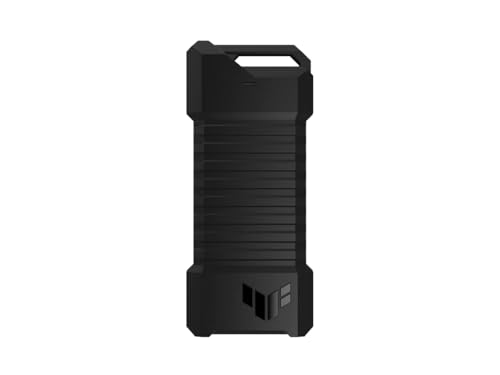
Rugged Dual-Format Pick – ASUS TUF Gaming A1 Enclosure
The ASUS TUF Gaming A1 stands out among ssd enclosures for photo storage when durability and drive flexibility are priorities. It accepts both M.2 NVMe PCIe and SATA SSDs, uses USB-C 3.2 Gen 2×1 for up to 10Gbps transfers, and adds MIL-STD-810H drop resistance plus IP68 water and dust resistance.
Best For: Photographers who want a rugged portable enclosure that can accommodate either M.2 NVMe or SATA drives.
Pros:
- Supports M.2 NVMe PCIe and SATA SSDs in 2242, 2260, and 2280 sizes.
- USB-C interface supports transfer speeds up to 10Gbps.
- Q-Latch mechanism simplifies SSD installation without emphasizing complex mounting.
- MIL-STD-810H drop resistance and IP68 water and dust resistance add protection for mobile use.
Cons:
- Heavier than compact basic enclosures at about 249g.
- Only a USB-C cable is listed, so a USB-A adapter or cable may be needed for older hosts.
- Drive capacity details supplied for the product list 2TB, rather than confirming support for larger capacities.
The ASUS is the most protective and format-flexible option here, making it appealing for photographers who carry drives between locations or work in demanding environments.
Best USB-C/USB-A Pick – BENFEI 2.5-Inch SATA Enclosure
For photographers using a 2.5-inch SATA SSD or hard drive, the BENFEI is a flexible choice among ssd enclosures for photo storage. Its USB Type-C/Type-A connectivity, tool-free design, and UASP support make it practical for moving photo files between newer laptops, older computers, and compatible devices.
Best For: Photographers who need a simple enclosure for one 2.5-inch SATA SSD and want both USB-C and USB-A connection options.
Pros:
- Supports 2.5-inch SATA I/II/III SSDs and HDDs up to 6TB.
- Includes USB Type-C/Type-A connectivity and supports up to 5Gbps transfer rates with UASP.
- Tool-free, plug-and-play installation with hot-swapping support.
- Works with Windows, Linux, and macOS systems.
Cons:
- Only supports 2.5-inch drives, not M.2 NVMe SSDs.
- Drive thickness is limited to 7mm or 9.5mm.
- The enclosure supports one drive at a time.
The BENFEI stands out when compatibility is more important than maximum NVMe performance. It is a straightforward option for accessing an existing 2.5-inch SATA drive as portable photo storage, and its 18-month warranty adds useful purchase protection.
Best NVMe Speed Option – FIDECO M.2 NVMe Enclosure
If your photo library is stored on an M.2 NVMe SSD, the FIDECO offers a faster-oriented solution among ssd enclosures for photo storage. USB 3.2 Gen 2 and UASP support provide theoretical speeds up to 10Gbps, while the tool-free sandwich design simplifies installation and includes thermal-pad contact for cooler operation.
Best For: Photographers with a compatible M.2 NVMe SSD who want a compact enclosure for faster file transfers.
Pros:
- Supports M-key and M+B-key NVMe SSDs in 2230, 2242, 2260, and 2280 sizes.
- USB 3.2 Gen 2 and UASP support offer theoretical transfer rates up to 10Gbps.
- Tool-free sandwich design and thermal-pad contact help simplify installation and cooling.
- Includes a USB-C cable with an attached USB-A adapter for travel flexibility.
Cons:
- Does not support M.2 SATA SSDs.
- Actual transfer speeds depend on the SSD, computer, and USB connection.
- A new SSD must be initialized before the computer can recognize it.
The FIDECO is the strongest fit here for users starting with an NVMe drive and prioritizing transfer speed. Confirm that your SSD is NVMe rather than M.2 SATA before buying, and note that the enclosure supports one drive at a time.
Best Visible Drive Design – ORICO 2.5-Inch SATA Enclosure
The ORICO combines straightforward SATA support with a transparent case that lets you identify the installed drive without opening it. For photographers comparing ssd enclosures for photo storage, it offers tool-free installation, UASP support, and a 50cm USB-A cable for connecting a 2.5-inch SSD to a computer, TV, or PS4.
Best For: Photographers who want an easy-to-identify 2.5-inch SATA enclosure with a visible drive and a longer USB-A cable.
Pros:
- Transparent crystal PC enclosure makes the installed drive easy to see.
- Supports 2.5-inch 7mm and 9.5mm SATA SSDs and HDDs up to 6TB.
- USB 3.0 with UASP supports up to 5Gbps and is backward compatible with USB 2.0 and 1.1.
- Tool-free, plug-and-play installation includes a blue activity indicator and 50cm USB-A cable.
Cons:
- Uses USB-A connectivity rather than providing the BENFEI’s USB-C/USB-A plug design.
- Limited to 2.5-inch SATA drives and one drive at a time.
- The plastic enclosure may be less protective than a metal-bodied design.
The ORICO is a practical, easy-to-monitor enclosure for an existing 2.5-inch SATA drive. Its transparent shell is especially useful when managing multiple drives, while UASP and USB 3.0 provide suitable performance for routine photo transfers.
How We Picked the Best SSD Enclosures for Photo Storage
We focused on enclosure compatibility, connection speed, installation simplicity, portability, and practical protection. The lineup includes NVMe M.2 models for higher transfer speeds, 2.5-inch SATA cases for older SSDs and hard drives, and hybrid enclosures that support more than one M.2 interface. We also considered features such as tool-free installation, UASP support, USB-C connectivity, thermal design, rugged construction, and included cables.
Advertised speeds depend on the installed drive, host computer, cable, and file sizes. For large RAW libraries and video projects, sustained performance and heat management matter more than a peak number on the product page.
Quick Comparison
| Best For | Recommended Type | What to Look For |
|---|---|---|
| Fast photo transfers | NVMe M.2 enclosure | USB 3.2 Gen 2, 10Gbps, and thermal control |
| Existing 2.5-inch SSD | SATA enclosure | USB 3.x, UASP, and tool-free access |
| Mixed drive collections | NVMe/SATA-compatible model | Correct M.2 key and interface support |
| Travel and field work | Rugged or compact enclosure | Secure closure, drop resistance, and water protection |
| Phone-based shooting | Magnetic or phone-stand enclosure | USB-C compatibility and sufficient sustained speed |
Key Buying Factors for SSD Enclosures for Photo Storage
Drive Compatibility
Confirm whether your SSD is NVMe PCIe, M.2 SATA, or 2.5-inch SATA. M.2 drives also vary by physical length, including 2230, 2242, 2260, and 2280. A connector that looks compatible may not support the drive’s protocol.
Speed and Sustained Transfers
A 10Gbps USB connection is a strong choice for moving large photo catalogs, although actual throughput will be lower. USB 3.0 SATA enclosures are slower but often sufficient for backups and older drives. UASP support can improve performance and responsiveness with compatible systems.
Heat, Cables, and Protection
NVMe drives can get warm during long transfers, so choose an enclosure with effective heat dissipation or a thermal pad. Check whether the package includes the USB-C, USB-A, or adapter cable you need. For travel, prioritize a secure shell and resistance to drops, dust, or moisture.
Who Should Buy Which SSD Enclosures for Photo Storage?
Choose an NVMe enclosure if you regularly edit directly from an external drive or move large RAW and video files. Choose a 2.5-inch SATA enclosure if you already own a SATA SSD or want an inexpensive way to reuse an older drive. Choose a hybrid model if your storage collection includes different M.2 interfaces. Choose a rugged enclosure for frequent travel, location shoots, or less controlled environments. Before ordering, verify the drive standard, size, operating-system support, and your computer’s available USB speed.