Choosing the right USB duplicator depends on more than the number of target ports. Drive type, copy speed, verification features, and whether you need standalone or computer-assisted operation all affect day-to-day results.
This roundup compares 10 USB duplicators under $500, covering flash-media towers, hard-drive cloners, M.2 docks, and compact options for occasional or small-batch duplication.
Best 10 USB Duplicators Under 500 Picks for 2026
Best Multi-Drive USB Workhorse

- Five-target standalone USB duplication
- File, sector, and secure erase modes
- LCD monitoring with Copy & Compare
Best For: IT teams managing multiple USB flash drives
Best Budget Drive Dock
ORICO Dual-Bay Hard Drive Cloner

- Offline SATA drive cloning
- Supports 2.5- and 3.5-inch drives
- USB 3.0 with up to 44TB capacity
Best For: Drive upgrades, backups, and removable SATA storage
Best Compact USB Eraser
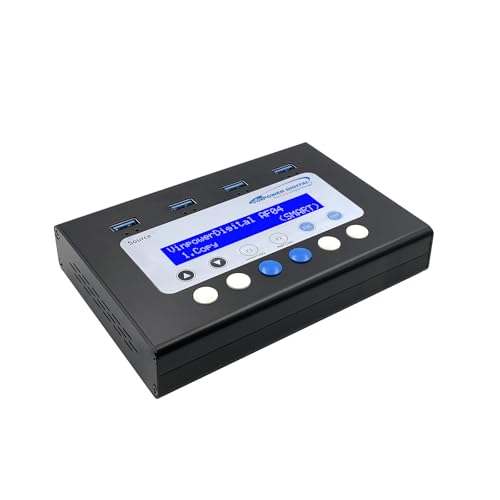
- Standalone duplication to three drives
- Smart and bit-by-bit copy modes
- DoD-standard USB erasure
Best For: Small-batch USB deployment and secure media reuse
Best High-Speed SATA Cloner
StarTech Dual-Bay SATA Duplicator Dock

- Standalone cloning up to 28GB/min
- Supports 2.5- and 3.5-inch SATA drives
- USB-to-SATA dock with 4Kn and TRIM
Best For: Fast professional HDD and SSD duplication
Best Standalone USB Flash Duplicator

- Copies one USB drive to two targets without a computer
- Supports Quick Copy and bit-for-bit Whole Media Copy
- Includes media testing, erase tools, LCD, and status LEDs
Best For: USB deployment, backup, and field duplication
Best Hard Drive Cloning Dock

- Clones SATA drives offline without drivers
- Accepts 2.5-inch and 3.5-inch HDDs or SSDs
- Supports drives up to 10TB and USB 3.0
Best For: SATA drive upgrades, cloning, and data access
Best SD Card Duplicator

- Duplicates SD and microSD cards to three targets
- Provides Smart Copy and bit-by-bit Raw Mode
- Can skip read errors and perform secure erase
Best For: Standalone SD/microSD duplication and recovery
Fast NVMe Cloning Station
Rosewill Dual-Bay M.2 Duplicator

- Dual-bay support for M Key and B+M Key NVMe SSDs
- USB 3.2 Gen 2x2 speeds up to 20Gbps
- One-button cloning with S.M.A.R.T. and TRIM features
Best For: Fast NVMe drive cloning and access
Multi-Drive Production Tool

- Copies up to 10 USB 3.0 or 2.0 drives simultaneously
- Works from images, flash drives, or selected files and folders
- Includes DupliM software for Windows and Mac
Best For: Batch USB flash-drive duplication
Versatile SATA Clone Dock
WAVLINK Dual-Bay Hard Drive Duplicator

- Supports 2.5-inch and 3.5-inch SATA HDDs and SSDs
- Offline cloning works without a computer
- Handles up to two 20TB drives with USB 3.0 and UASP
Best For: SATA drive cloning and backup
Best Multi-Drive USB Workhorse – StarTech 1:5 USB Duplicator
If you need usb duplicators under 500 for managing several flash drives at once, this standalone StarTech model offers five target ports and requires no computer. It supports file-level and sector-by-sector copying, plus several erase options for routine IT workflows.
Best For: IT technicians and teams creating boot drives, distributing data, or sanitizing USB media in batches.
Pros:
- Copies to up to five USB drives simultaneously.
- Supports USB 3.0, 2.0, and 1.1 flash drives and external USB storage.
- Includes quick erase, single-pass, and three-pass overwrite modes.
- LCD, activity LEDs, error scanning, and Copy & Compare verification improve monitoring.
Cons:
- Asynchronous copying is limited to source content under 64 MB.
- External USB devices may need their own power source.
- Its listed 1.5 GB/min copy rate is slower than the dedicated SATA duplicator below.
This is a practical choice when USB media duplication and secure erasure matter more than maximum throughput. Its standalone design and verification tools make it especially useful for repeatable small-batch deployments.
Best Budget Drive Dock – ORICO Dual-Bay Hard Drive Cloner
Among usb duplicators under 500, the ORICO is a flexible option for cloning SATA hard drives and SSDs without a computer. Its dual bays accept 2.5- and 3.5-inch drives, while USB 3.0 connectivity also supports everyday file access and backups.
Best For: Home users and small offices cloning SATA drives, transferring files, or adding removable drive storage to PCs and compatible devices.
Pros:
- Offline clone function works without connecting to a computer.
- Supports two 2.5- or 3.5-inch SATA I/II/III HDDs or SSDs.
- Supports up to 44TB total capacity and USB 3.0 transfer speeds up to 5Gbps.
- Toolless design enables quick drive swapping.
Cons:
- The target disk must be larger than the source disk for offline cloning.
- It will not power on without a hard drive inserted.
- Offline cloning is intended for SATA drives rather than USB flash-drive duplication.
The ORICO is best viewed as a dual-purpose dock and cloner rather than a multi-port flash duplicator. Its broad device compatibility and independent power supply make it a convenient choice for occasional drive upgrades and backups.
Best Compact USB Eraser – Vinpower 1:3 Flash Duplicator
For usb duplicators under 500 aimed at smaller deployment jobs, the Vinpower 1-to-3 unit combines standalone copying with secure USB erasure. Smart Copy handles accessible files quickly, while Raw Copy provides bit-by-bit duplication for bootable media, operating systems, and complete backups.
Best For: Businesses, schools, offices, and technicians duplicating or securely reusing a few USB drives at a time.
Pros:
- Duplicates up to three USB drives without a PC.
- Smart Copy and Raw Copy support different duplication needs.
- DoD 5220.22-M erasure helps remove sensitive data before reuse or disposal.
- Read Error Skip can bypass damaged sectors during duplication.
Cons:
- It has fewer target ports than five-drive USB duplicators.
- The supplied notes do not specify a copy-speed rating.
- It is designed for USB media rather than SATA hard-drive cloning.
This model stands out when secure media handling and flexible copy modes are more important than high-volume output. Its compact design and error-skipping feature are useful for routine business deployments involving aging or reused flash drives.
Best High-Speed SATA Cloner – StarTech Dual-Bay SATA Duplicator Dock
If your search for usb duplicators under 500 includes hard-drive cloning, this StarTech dual-bay dock offers standalone sector-by-sector duplication for 2.5- and 3.5-inch SATA drives. It also functions as a USB-to-SATA dock when you need direct access to a drive.
Best For: IT professionals upgrading, imaging, recovering, or duplicating SATA HDDs and SSDs.
Pros:
- Clones SATA drives without a computer at speeds up to 28GB/min.
- Supports 2.5- and 3.5-inch SATA drives of any capacity, including 4Kn media.
- Works with any file format through sector-by-sector copying.
- Toolless, trayless bays include drive doors, eject buttons, TRIM, and USB 3.2 Gen 2 connectivity.
Cons:
- The target drive must be equal to or larger than the source drive.
- It duplicates SATA drives, not USB flash drives.
- An IDE adapter is sold separately.
This is the strongest fit here for high-speed disk-to-disk cloning and professional drive maintenance. Choose it over a flash duplicator when your workflow centers on SATA HDDs and SSDs rather than USB thumb drives.
Best Standalone USB Flash Duplicator – UB300 1:2 USB 2.0 Duplicator
For shoppers comparing usb duplicators under 500, the BestDuplicator UB300 is a practical standalone option for copying one USB flash drive to two targets without a computer. Its Quick Copy and Whole Media Copy modes cover both accessible-file transfers and bit-for-bit cloning.
Best For: IT departments, schools, businesses, and technicians distributing or backing up USB flash-drive data.
Pros:
- Duplicates one source drive to two targets simultaneously without a computer.
- Offers Quick Copy and Whole Media Copy modes for flexible duplication.
- Includes erase, capacity-check, device-information, and read/write testing tools.
- Compact design with LCD navigation and individual port status LEDs.
Cons:
- Designed primarily for USB 1.1 and USB 2.0 media.
- SD, microSD, CF, and other card duplication requires a compatible USB card reader sold separately.
- Best performance requires source and target media with similar capacities.
The UB300 stands out when simple, repeatable USB duplication matters more than computer-based management. Its standalone controls and verification tools make it useful for field deployment, though users needing higher-speed USB 3.0 workflows should look elsewhere.
Best Hard Drive Cloning Dock – Sabrent Dual-Bay SATA Cloner
Among usb duplicators under 500, the Sabrent EC-HD2B is a strong fit for users who need to clone or access desktop SATA drives rather than USB flash media. Its two bays accept standard 2.5-inch and 3.5-inch SATA HDDs or SSDs and support offline cloning without drivers.
Best For: Users upgrading, duplicating, or reading SATA hard drives and SSDs with a dual-bay docking station.
Pros:
- Supports both 2.5-inch and 3.5-inch SATA hard drives and SSDs.
- Provides offline cloning without requiring a computer or drivers.
- Supports drives up to 10TB and USB 3.0 transfer speeds up to 5Gbps.
- Includes a power supply, USB 3.0 cable, and one-year warranty extendable to two years after registration.
Cons:
- Designed for SATA hard drives and SSDs, not USB flash-drive duplication.
- Offline cloning is listed at up to 60Mbps, below the dock’s maximum USB 3.0 transfer rate.
- Requires separate SATA drives for use.
The EC-HD2B is better categorized as a hard-drive dock and cloner than a traditional flash duplicator. Choose it when drive cloning and USB 3.0 access are priorities; choose a flash-focused unit for bulk USB-stick deployment.
Best SD Card Duplicator – Vinpower SDMiniDup 1:3
Vinpower SDMiniDup 1 to 3 Standalone SD/MicroSD Card Flash Memory Drive Duplicator Copier
Check Price On AmazonFor usb duplicators under 500 shoppers who actually need memory-card production, the Vinpower SDMiniDup provides standalone 1-to-3 duplication for SD and microSD cards. Smart Copy transfers accessible data quickly, while Raw Mode performs a bit-by-bit copy.
Best For: Field technicians and teams duplicating SD or microSD cards without a PC, including cards with recoverable read errors.
Pros:
- Copies one SD or microSD card to three targets without a computer.
- Offers Smart Copy and Raw Mode for fast transfers or complete duplication.
- Read Error Skip can continue copying around bad sectors to recover uncorrupted content.
- Secure Erase is designed to remove stored data using a process like DoD 5220.22-M standards.
Cons:
- Supports SD and microSD cards rather than USB flash drives or SATA drives.
- Raw Mode can copy all data and may be slower than Smart Copy.
- Standalone operation requires access to electricity.
The SDMiniDup is a specialized choice for memory-card workflows. Its three-target capacity, error-skipping feature, and secure erase make it especially useful for field work and card recovery, but it is not a general-purpose USB-stick duplicator.
Fast NVMe Cloning Station – Rosewill Dual-Bay M.2 Duplicator
For shoppers comparing USB duplicators under 500, the Rosewill RS-N2-CL is a versatile choice for cloning and accessing two compatible NVMe SSDs. Its tool-free dual-bay design, one-button offline cloning, and USB 3.2 Gen 2×2 connectivity make it especially appealing when speed matters.
Best For: NVMe SSD users who want fast drive access, standalone cloning, and health-monitoring features.
Pros:
- Supports both M Key and B+M Key NVMe SSDs in two bays.
- Offers USB 3.2 Gen 2×2 connectivity with transfer rates up to 20Gbps.
- Provides one-button standalone cloning, S.M.A.R.T. monitoring, and TRIM support.
- Includes USB-C and USB-A cables plus a 12V/2A power adapter.
Cons:
- Designed for compatible NVMe M.2 drives rather than SATA hard drives or SSDs.
- Standalone cloning is limited to the supported two-drive setup.
This is a strong fit for users who prioritize modern NVMe compatibility and high-speed connectivity over broad media support. The included cables and power adapter also make it ready for desktop or laptop use.
Multi-Drive Production Tool – DupliM 1-to-10 USB Duplicator
Among USB duplicators under 500, the DupliM Mini USB Duplicator stands out for copying up to 10 USB flash drives at once. Because it connects to a computer and works with supplied DupliM software, it can duplicate from image files, flash drives, or selected files and folders.
Best For: Windows and Mac users who need to produce multiple USB flash-drive copies simultaneously.
Pros:
- Duplicates up to 10 USB 3.0 or USB 2.0 drives simultaneously.
- Can copy from image files, flash drives, or selected computer files and folders.
- Includes software for Windows and Mac OS, a power adapter, and USB 3.0 cable.
- Offers U.S.-based technical support and a one-year parts-and-labor warranty.
Cons:
- Requires a connected computer rather than operating as a fully standalone duplicator.
- Intended for USB flash or pen drives, not internal hard-drive cloning.
- Computer use requires the listed operating system and hardware minimums.
The DupliM is better suited to repeated, batch-oriented flash-drive work than occasional single-drive copying. Its 10-port capacity and cross-platform software make it practical for preparing multiple USB devices in one session.
Versatile SATA Clone Dock – WAVLINK Dual-Bay Hard Drive Duplicator
For those comparing USB duplicators under 500 for SATA storage, the WAVLINK dual-bay dock supports both 2.5-inch and 3.5-inch HDDs and SSDs. Its offline clone button allows drive-to-drive copying without a computer, while USB 3.0 and UASP support help with connected transfers.
Best For: Users cloning or accessing two SATA HDDs or SSDs, including large-capacity 2.5-inch and 3.5-inch drives.
Pros:
- Supports 2.5-inch and 3.5-inch SATA I, II, and III HDDs and SSDs.
- Enables offline cloning without a computer, provided the target drive is at least as large as the source.
- Supports up to two 20TB drives and includes a protective fixed-bezel design.
- Works with Windows, Mac, Chrome OS, Linux, and Android devices with OTG support.
Cons:
- Offline cloning requires the target disk capacity to be greater than or equal to the source.
- Uses a USB 3.0 connection rather than the faster USB 3.2 Gen 2×2 standard.
- The listed warranty description covers the SATA interface only.
This dock is a practical choice when broad SATA compatibility matters more than the newest USB interface. Tool-free installation, hot-swapping, and included power and connection accessories simplify routine backups and drive transfers.
How We Picked the Best USB Duplicators Under 500
We focused on practical capabilities rather than port count alone. The selection includes standalone USB flash duplicators, dual-bay SATA docking stations, SD and microSD copiers, and an M.2 duplicator enclosure. We considered supported media, offline operation, advertised transfer rates, source-to-target capacity, erase functions, connectivity, and ease of use.
Because speeds vary with the source drive, target drives, file sizes, and interface generation, treat published rates as maximums rather than guaranteed real-world performance. A duplicator that supports verification and handles mixed workloads may be more useful than one with a higher headline speed.
Quick Comparison
| Best For | Recommended Type | What to Look For |
|---|---|---|
| Small flash-drive batches | Standalone USB duplicator | Multiple target ports, asynchronous copying, verification |
| One-to-one disk cloning | Dual-bay SATA dock | Offline cloning, 2.5- and 3.5-inch support, target capacity |
| Fast SSD duplication | USB 3.x or M.2 dock | NVMe or SATA compatibility and sustained cooling |
| Memory-card production | SD or microSD duplicator | Card-format support, simultaneous copying, error checking |
| Occasional home use | Compact dock or computer-connected copier | Simple controls, included cables, manageable footprint |
Key Buying Factors for USB Duplicators Under $500
Media Compatibility
Confirm whether the unit copies USB flash drives, SATA HDDs and SSDs, NVMe M.2 drives, SD cards, or microSD cards. A USB duplicator generally cannot replace a hard-drive dock, and an M.2 enclosure may support only a specific key or protocol.
Standalone Versus Computer-Connected Use
Standalone models copy directly from a source to one or more targets without software. They are convenient for repeat batches and field work. Computer-connected models can be more flexible, but they depend on operating-system support, available ports, and a host computer.
Copy and Erase Modes
Look for sector-by-sector or file-system-aware copying, source and target verification, and secure erase options when preparing used media. Check whether copying can occur asynchronously so completed targets do not wait for slower drives.
Speed, Capacity, and Reliability
Interface speed matters, but the slowest drive often sets the pace. Match target capacity to the source and avoid assuming that a larger destination automatically resolves incompatible partitions or file systems. For frequent workloads, prioritize cooling, clear status feedback, and a stable power supply.
Who Should Buy Which USB Duplicators Under 500?
Choose a standalone multi-port flash duplicator if you regularly prepare several USB drives and want a simple appliance. A dual-bay SATA dock is the better fit for cloning internal 2.5- or 3.5-inch HDDs and SSDs. Pick an SD or microSD duplicator for cameras, embedded devices, or removable-card distribution. An M.2 enclosure makes more sense when your workflow centers on modern PCIe NVMe drives.
For occasional backups or drive upgrades, a dual-bay dock may offer the best value and versatility. For repeated production, prioritize the correct media format, verification, and target count over the lowest price or highest advertised transfer rate.