Standalone optical disc duplicators make it possible to copy CDs and DVDs without a computer, making them useful for offices, archives, event media, software distribution, and small production runs.
We selected 10 models ranging from compact 1-to-1 towers to five-target systems, including options with M-Disc support, copy-protection features, SATA drives, and built-in storage. The guide below explains what separates them and how to choose the right configuration.
Best 10 Standalone Optical Disc Duplicators Picks for 2026
Best for Archival DVD Runs

- Standalone operation with no PC required
- Copies up to five discs per cycle
- Supports M-Disc and up to 24x DVD writing
Best For: Small-business and archival batch duplication
Best for Five-Copy Batches

- Produces five copies per cycle
- Supports major CD and DVD formats
- Includes verify, compare, and test modes
Best For: Recurring small-batch disc production
Best Compact Single-Disc Pick

- Standalone 1-to-1 copying
- Records to M-Disc DVD media
- Includes lifetime support and one-year warranty
Best For: Low-volume home and office duplication
Best for Simplified Operation

- Automatically starts when discs are detected
- No computer required
- Supports M-Disc and up to 24x DVD writing
Best For: Simple home, office, and archiving tasks
Best M-Disc Protection
1-to-3 DVD/CD Duplicator Tower

- Standalone one-to-three duplication
- Supports M-Disc DVD media
- Up to 24x DVD and 52x CD-R writing
Best For: Archival users and small-batch disc production
Best Single-Copy Flexibility

- Standalone 1-to-1 duplication
- Recognizes several special CD formats
- Supports M-Disc and compatible copy-protected DVDs
Best For: Personal, gaming, and business users making individual copies
Best Audio-CD Features
1-to-5 DVD/CD Duplicator Tower

- Standalone duplication to five targets
- DAO, TAO, and mix compilation modes
- Selectable DVD and CD-R write speeds
Best For: Audio-CD duplication and multi-copy workflows
Best Overall

- Standalone operation with no PC required
- Built-in 2TB hard drive and USB 3.0
- True CD audio comparison capability
Best For: Repeat duplication jobs and stored master projects
Best for Batch Duplication

- Burns up to three target discs simultaneously
- Standalone operation without a PC
- Supports M-Disc and up to 24x DVD writing
Best For: Small production runs and multi-copy jobs
Best for Audio Projects
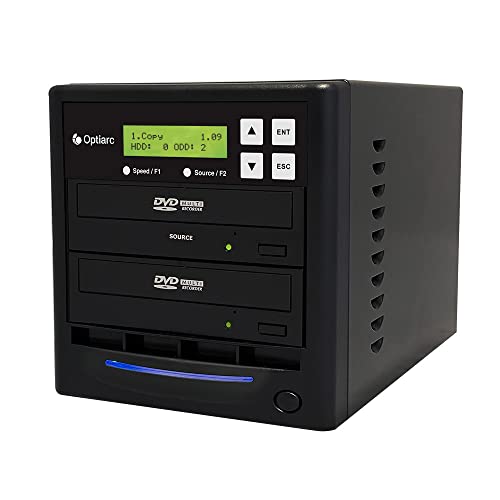
- Supports DAO, TAO, and mix-tape compilation
- Standalone operation with selectable write speeds
- Upgradeable drive firmware for selected brands
Best For: Audio CD copying and custom compilations
Best for Archival DVD Runs – 1-to-5 M-Disc Duplicator
For buyers comparing standalone optical disc duplicators, this 1-to-5 SATA tower combines no-PC operation with support for M-Disc DVD media. It can write DVDs at up to 24x and CD-Rs at up to 52x, while its included copy-protection feature is limited to compatible OptoDisc DVD Video media.
Best For: Small businesses and users creating multiple archival or DVD video copies from one master.
Pros:
- Duplicates without requiring a computer.
- Burns up to five target discs per cycle.
- Supports M-Disc DVD media for archival recording.
- Offers up to 24x DVD and 52x CD-R write speeds.
Cons:
- Will not copy encrypted discs.
- Copy-protected DVD Video creation requires compatible OptoDisc MID media.
- Its SATA connectivity is less convenient for users seeking a modern USB workflow.
This tower is a practical choice when batch capacity and M-Disc support matter more than portability. Confirm your media requirements before purchasing, particularly if you need to handle encrypted source discs.
Best for Five-Copy Batches – 1-to-5 SATA DVD Duplicator
This standalone optical disc duplicator is designed for straightforward five-disc production without a computer. Its LCD interface supports one-step copying, while test, verify, compare, source-analysis, and self-diagnostic functions help manage routine duplication jobs.
Best For: Users who need regular five-disc CD and DVD batches with broad blank-media compatibility.
Pros:
- Creates up to five copies in one burn cycle.
- Supports DVD±R, DVD±RW, dual-layer DVD, CD-R, and CD-RW media.
- Includes copy, test, verify, and compare functions.
- Offers up to 24x DVD and 52x CD-R write speeds.
Cons:
- At 26 pounds, it is relatively heavy for a duplicator described as portable.
- Will not copy encrypted discs.
- Uses SATA connectivity rather than a simple USB connection.
Choose this model when five-target throughput and disc-format flexibility are priorities. Its diagnostics and verification tools are useful for repeat jobs, but the large tower footprint and weight may be excessive for occasional home use.
Best Compact Single-Disc Pick – 1-to-1 M-Disc Duplicator
PlexCopier 24X 1 to 1 CD DVD M-Disc Supported Duplicator Copier Tower with Free Copy Protection
Check Price On AmazonAmong standalone optical disc duplicators, this 1-to-1 tower keeps the setup simple: insert a master and blank disc, then duplicate without a PC. It supports M-Disc DVD recording, reaches up to 24x DVD and 52x CD-R write speeds, and includes a one-year parts-and-labor warranty with lifetime technical support.
Best For: Home, office, and small-business users who need one copy at a time with archival-media support.
Pros:
- Operates independently of a computer.
- Supports M-Disc DVD media.
- Includes lifetime free technical support.
- Uses certified UL and TUV-compliant power-supply components.
Cons:
- Copies only one target disc at a time.
- Will not copy encrypted discs.
- Copy-protected DVD Video creation depends on OptoDisc media.
This is a sensible fit for low-volume duplication where a compact 1-to-1 workflow is enough. The warranty and ongoing support add reassurance, while M-Disc compatibility helps users planning long-term physical archives.
Best for Simplified Operation – AutoDupe 1-to-1 Tower
PlexCopier AutoDupe Easy to USE STANDALONE 24X 1 to 1 CD DVD Burner Writer Drive Duplicator Tower
Check Price On AmazonFor shoppers seeking easy standalone optical disc duplicators, the AutoDupe 1-to-1 tower is built around automatic operation. Once it detects a master and blank disc, it starts the duplication process without requiring button programming, making it suitable for simple home, office, and archiving tasks.
Best For: Users who prioritize an uncomplicated one-disc-at-a-time workflow.
Pros:
- Requires no PC to duplicate discs.
- Automatically starts after detecting the master and blank disc.
- Supports M-Disc DVD recording.
- Offers up to 24x DVD and 52x CD-R write speeds.
Cons:
- Handles only one target disc at a time.
- Will not copy encrypted discs.
- Its listed one-year manufacturer warranty is shorter than lifetime support coverage.
The AutoDupe is a good match for buyers who want minimal setup rather than high-volume throughput. Its automatic start feature simplifies occasional duplication, while M-Disc support extends its usefulness to personal archiving.
Best M-Disc Protection – 1-to-3 DVD/CD Duplicator Tower
PlexCopier 24X 1 to 3 CD DVD M-Disc Supported Duplicator Copier Tower with Free Copy Protection
Check Price On AmazonFor buyers seeking standalone optical disc duplicators with archival support and small-batch output, this PlexCopier tower offers one-to-three duplication without a computer. It supports up to 24x DVD and 52x CD-R writing, plus M-Disc DVD media.
Best For: Users archiving data to M-Disc or producing multiple DVD/CD copies without a PC.
Pros:
- Standalone operation requires no PC.
- Duplicates up to three discs at once from one master.
- Supports M-Disc DVD media for long-term archival recording.
- Can create copy-protected DVD video copies with compatible OptoDisc MID media.
Cons:
- It cannot copy encrypted discs.
- The unit weighs 14 pounds and uses a plastic enclosure.
This is a strong fit when M-Disc support and higher-volume output matter more than compactness. Its copy-protection feature is specialized and media-dependent, while encrypted retail content remains outside its capabilities.
Best Single-Copy Flexibility – 1-to-1 24x DVD/CD Duplicator
Vinpower Digital Standard 1 to 1 Target 24x DVD CD Disc Duplicator Tower SATA Optical Drives - Black
Check Price On AmazonThis 1-to-1 tower is a straightforward choice among standalone optical disc duplicators for personal, gaming, or business use. It works without a PC, supports common CD formats, and offers up to 24x DVD writing.
Best For: Buyers who usually need one disc copy at a time and want broad CD-format compatibility.
Pros:
- Standalone operation avoids requiring a computer.
- Recognizes common CD formats, including CD-TEXT, ISRC, and over-burned CDs.
- Supports M-Disc DVD recording.
- Includes free copy-protection capability for compatible DVD video workflows.
Cons:
- Its 1-to-1 design is less suited to producing several copies simultaneously.
- It cannot copy encrypted discs.
The Econ-S1T-DVD-BK makes sense for occasional or moderate duplication where format recognition is important. Choose a multi-target model instead if your workflow regularly requires several finished copies per cycle.
Best Audio-CD Features – 1-to-5 DVD/CD Duplicator Tower
Among standalone optical disc duplicators, this Optiarc tower stands out for audio-CD workflow options and five-target output. It runs independently, supports selectable speeds up to 24x for DVD and 52x for CD-R, and can compile tracks from multiple sources.
Best For: Users making several copies of audio CDs or building mix compilations with control over duplication modes and write speed.
Pros:
- Duplicates one master to up to five targets without a PC.
- Supports DAO, TAO, and Mix Audio Compilation modes.
- Offers selectable write speeds up to 24x DVD and 52x CD-R.
- Drive firmware can be upgraded for selected brands through the duplicator.
Cons:
- It cannot copy discs with copy-protection features.
- The 17-pound tower is less portable than a compact burner.
This model is the most compelling option here for audio-focused duplication and larger batches. Its inability to copy protected commercial movies, TV shows, or other protected discs should be considered before purchase.
Best Overall – SharkCopier 1-to-1 24X Tower
For buyers seeking standalone optical disc duplicators with flexible storage and convenient workflow options, the Vinpower SharkCopier combines one-target duplication with a built-in 2TB hard drive. It operates without a PC and supports common CD and DVD formats at speeds up to 24x for DVD and 52x for CD-R.
Best For: Users who want a standalone duplicator with project storage, USB 3.0 transfer, and advanced audio verification.
Pros:
- Works independently without a computer.
- Stores numerous master projects on its 2TB hard drive.
- Supports USB 3.0 file transfer through CopyConnect.
- Can compare CD audio content and supports CD-TEXT, ISRC, and over-burned CDs.
Cons:
- Copies one target disc at a time.
- Cannot copy protected discs, including typical retail movies and TV shows.
- Copy-protection creation requires compatible OptoDisc MID media.
The SharkCopier is a strong all-around choice when convenience and repeatable project access matter more than multi-disc output. Its hard drive and USB workflow reduce the need to keep locating a physical master disc.
Best for Batch Duplication – PioData 1-to-3 24X Tower
The PioData 1-to-3 is a practical option among standalone optical disc duplicators when producing several copies at once is the priority. Its three-target tower operates without a PC, supports M-Disc, and reaches speeds up to 24x for DVD and 52x for CD-R.
Best For: Users who need three simultaneous target copies from one master disc.
Pros:
- Duplicates to three target discs at the same time.
- Operates as a standalone unit without requiring a PC.
- Supports M-Disc and common CD formats, including CD-TEXT and ISRC.
- Offers DVD video copy-protection creation with compatible OptoDisc MID media.
Cons:
- Cannot copy encrypted or otherwise copy-protected discs.
- Does not list an integrated hard drive for storing projects.
- The tower weighs 13 pounds, making it less portable than smaller units.
With three burners, this model is better suited to short production runs than one-off copying. It is a sensible fit for users who value output volume and M-Disc support over onboard project storage.
Best for Audio Projects – Optiarc 1-to-1 24X Tower
The Optiarc 1-to-1 tower is a straightforward choice among standalone optical disc duplicators, with useful options for copying and compiling audio CDs. It runs without a PC, supports selectable write speeds, and can handle DVD writing up to 24x and CD-R writing up to 52x.
Best For: Audio-focused users who want DAO, TAO, and mix-tape compilation options.
Pros:
- Operates independently without a computer.
- Supports Disc at Once, Track at Once, and Mix Audio Compilation.
- Offers selectable write speeds up to 24x for DVD and 52x for CD-R.
- Drive firmware can be upgraded for selected brands through the duplicator.
Cons:
- Copies one target disc at a time.
- Cannot copy protected discs such as typical retail movies and TV shows.
- Its listed optical read speed is 8x, though the unit also lists 24x CD read capability.
This model makes the most sense for home studios, archivists, and music users who need flexible audio-copy modes rather than high-volume duplication. Its selectable speeds can also help balance throughput and media compatibility.
How We Picked the Best Standalone Optical Disc Duplicators
We compared these duplicators by the number of target drives, advertised write speed, supported disc formats, ease of operation, and useful extras. Models with M-Disc support can be appealing for archival projects, while multi-target towers are better suited to producing several copies at once. We also considered whether a unit includes a hard drive, USB connectivity, or copy-protection functionality.
Because real-world speed depends on the source disc, blank media, and selected write settings, advertised 24X performance should be treated as a maximum rather than a guaranteed sustained speed.
Quick Comparison
| Configuration | Best For | Main Advantage |
|---|---|---|
| 1-to-1 | Occasional copying | Lower cost and simpler operation |
| 1-to-3 | Small batch production | Good balance of capacity and footprint |
| 1-to-5 | Higher-volume copying | Creates more copies per cycle |
| Hard-drive-equipped | Frequent repeat jobs | Convenient source storage and reuse |
Key Buying Factors for Standalone Optical Disc Duplicators
Target Count and Workload
The target count determines how many blank discs can be written simultaneously. A 1-to-1 duplicator is practical for occasional use, testing, or personal projects. Choose a 1-to-3 or 1-to-5 model when reducing operator time matters more than minimizing equipment cost.
Disc Compatibility
Check whether the tower supports the media you plan to use, including CD-R, CD-RW, DVD-R, DVD+R, and rewritable formats. M-Disc support is valuable when long-term durability is a priority, but compatible M-Disc media is required.
Source Handling and Storage
Some units copy directly from a source disc, while models with internal storage can retain disc images for repeated jobs. A hard drive or USB connection can make recurring production more convenient, but confirm supported file formats and transfer workflow before buying.
Controls and Safeguards
Look for clear front-panel controls, status displays, automatic verification, and protection against failed or mismatched discs. Copy-protection features may help with authorized video distribution, but they do not override copyright restrictions.
Who Should Buy Which Standalone Optical Disc Duplicators?
Choose a 1-to-1 tower if you need an uncomplicated duplicator for occasional backups, client samples, or small office tasks. A 1-to-3 model is a strong middle ground for clubs, classrooms, photographers, and small businesses producing modest batches. A 1-to-5 unit makes more sense for frequent event, training, or distribution work where throughput is important. If you regularly reuse the same source material, prioritize a model with built-in storage or USB support. Before ordering, verify the tower’s drive count, power requirements, supported media, and warranty so its workflow matches your expected volume.