Adding a sit-stand converter can make a dual-monitor workstation more flexible without replacing your entire desk. The right model needs enough usable surface, dependable height adjustment, and a monitor setup that stays stable as you switch positions.
We compare 10 desk converters for dual monitors across electric and manual designs, wide platforms, integrated monitor mounts, and workstation layouts suited to different budgets and desk sizes.
Best 10 Desk Converters for Dual Monitors Picks for 2026
Best Overall
VIVO Dual Monitor Standing Desk Converter

- Supports two monitors up to 30 inches
- 4.5- to 20-inch manual height range
- Full-motion monitor arms and wide keyboard tray
Best For: Integrated dual-monitor mounting in a compact sit-stand setup
Best Electric Option
AVLT Motorized Dual Monitor Desk Converter

- Electric lift from 3.9 to 23.6 inches
- Three memory presets and standing timer
- Supports dual monitors up to 32 inches
Best For: Frequent sit-stand transitions with programmable height control
Best Extra-Wide Platform
Rocelco 46-Inch X-Frame Desk Converter

- 45.7-inch-wide platform for up to three monitors
- 45-pound capacity with dual gas-shock lift
- Fully assembled with retractable keyboard tray
Best For: Large multi-monitor setups requiring generous workspace
Best Large Dual-Monitor Setup
Mount-It! 47-Inch Dual Monitor Desk Converter

- 47.2-inch-wide surface with included monitor arms
- Fits two monitors up to 32 inches
- 5.9- to 19.3-inch gas-spring adjustment
Best For: Wide two-monitor workstations with adjustable screen positioning
Best Electric Dual-Monitor Riser

- Electric height adjustment from 1.4 to 21.1 inches
- Built-in arms support two monitors up to 32 inches
- Compact steel base with cable management
Best For: Compact powered dual-monitor workstations
Best Wide Mechanical Converter

- 40-inch surface suits dual monitors and a laptop
- Synchronized wide keyboard tray
- Mechanical spring lift adjusts to 19.6 inches
Best For: Large, organized multi-device workstations
Best Mid-Size Value Riser

- 36-inch surface fits a dual-monitor setup
- Spring-assisted adjustment reaches 19.6 inches
- Almost fully assembled for quick setup
Best For: Everyday home-office dual-monitor setups
Best Electric Upgrade
X-Large Electric Dual-Monitor Converter

- Push-button height adjustment from 6.3 to 19.3 inches
- Dual arm supports two monitors up to 32 inches
- 47.2-inch surface includes USB charging
Best For: Large workstations needing powered sit-to-stand adjustment
Best Manual Value
36-Inch Gas-Spring Dual-Monitor Converter
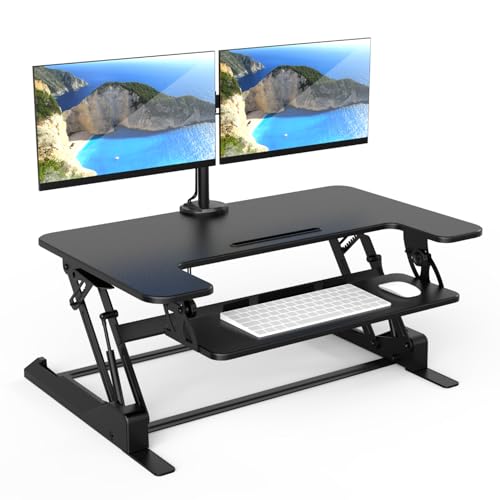
- Manual lift adjusts from 6.5 to 16.3 inches
- Integrated mounts support two 32-inch monitors
- 36-inch surface includes a keyboard tray
Best For: Users wanting a wide manual dual-monitor riser
Best Space-Saving Pick
Compact Dual-Monitor Desk Riser

- Compact 23.6-by-15.7-inch top platform
- Dual monitor mount supports screens up to 32 inches
- Gel wrist-pad keyboard tray and cable management
Best For: Smaller desks needing a two-monitor workstation
Best Overall – VIVO Dual Monitor Standing Desk Converter
For shoppers comparing desk converters for dual monitors, the VIVO DESK-V000K-M2 combines a 31.5-inch work surface with an integrated dual monitor mount. Its manual height adjustment, broad monitor compatibility, and steel frame make it a practical sit-stand upgrade for a standard desk.
Best For: Users who want an integrated dual-monitor stand with flexible screen positioning and a wide keyboard tray.
Pros:
- Supports two 13- to 30-inch monitors weighing up to 17.6 pounds each.
- Adjusts from 4.5 to 20 inches with a height-lock mechanism.
- Monitor arms tilt, swivel, rotate, and support portrait or landscape orientation.
- Includes a 31.3-inch keyboard tray and protective underside padding.
Cons:
- Monitor support is limited to screens up to 30 inches.
- Manual adjustment requires lifting rather than motorized operation.
This is a well-rounded choice when integrated monitor mounting matters more than an exceptionally large desktop. Verify your monitors use compatible VESA patterns and stay within the listed weight limit.
Best Electric Option – AVLT Motorized Dual Monitor Desk Converter
The AVLT-MT17-1 is a strong option among desk converters for dual monitors if you prefer push-button height changes. Its motorized lift, three memory presets, timer, and cable management system make it suited to users who change positions throughout the workday.
Best For: Workstations that benefit from electric adjustment, saved height settings, and a stable dual-monitor platform.
Pros:
- Motorized height range runs from 3.9 to 23.6 inches.
- Stores up to three height presets and includes an integrated standing timer.
- Supports dual 32-inch VESA-compatible monitors.
- 55-pound base capacity and included cable management help maintain a tidy setup.
Cons:
- The unit weighs 74.8 pounds, making it less convenient to reposition.
- The desktop is smaller than the extra-wide platforms in this roundup.
Choose this model when convenient electric adjustment is a priority. Its memory function and timer add useful structure for alternating between sitting and standing, while the sturdy base supports a substantial monitor setup.
Best Extra-Wide Platform – Rocelco 46-Inch X-Frame Desk Converter
The Rocelco R DADRB-46 stands out among desk converters for dual monitors with its 45.7-inch-wide platform. It can accommodate up to three monitors, a laptop, and other work essentials, while its straight vertical lift helps limit the extra desk depth often required by risers.
Best For: Multi-monitor workstations needing maximum surface area and a vertically lifting platform.
Pros:
- 45.7-by-23.6-inch work surface supports up to three monitors.
- Dual gas-shock lift adjusts manually from 5 to 20 inches.
- 45-pound load capacity suits a substantial workstation.
- Arrives fully assembled and includes a retractable keyboard tray.
Cons:
- Monitor arms are optional rather than included.
- At 42 pounds, the converter may be difficult to move.
- Its broad footprint requires a desk with sufficient width and depth.
This is the practical pick for users who need room beyond two monitors. The rear grommet can route cables or support a compatible optional Rocelco monitor arm, but budget for that accessory if you need integrated mounting.
Best Large Dual-Monitor Setup – Mount-It! 47-Inch Dual Monitor Desk Converter
The Mount-It! MI-8052 pairs a 47.2-inch-wide surface with built-in dual monitor arms, making it a compelling choice among desk converters for dual monitors. Its gas-spring lift and adjustable arms provide a flexible setup for two screens up to 32 inches each.
Best For: Users who want an extra-wide desktop with included adjustable monitor arms and space for accessories.
Pros:
- 47.2-by-33-inch overall platform accommodates two monitors up to 32 inches.
- Gas-spring adjustment moves the workstation from 5.9 to 19.3 inches.
- Dual monitor arms support tilt, swivel, and rotation adjustments.
- Includes a device channel, keyboard tray, and steel construction with rubber foot pads.
Cons:
- Manual lifting lacks the convenience of an electric mechanism.
- 33-inch depth and 63-pound weight require a spacious, sturdy desk.
- Listed load capacity is 33 pounds.
This model is a good fit when screen positioning and workspace width are equally important. Its included arms reduce the need for separate mounting hardware, but measure your desk carefully before choosing this particularly deep converter.
Best Electric Dual-Monitor Riser – Mount-It! MI-7952
For shoppers comparing desk converters for dual monitors, the Mount-It! MI-7952 stands out for its powered height adjustment and integrated monitor mounting arms. It supports two screens while keeping the footprint suitable for smaller desks.
Best For: Users who want a compact, electric sit-stand workstation for two monitors.
Pros:
- Supports two monitors up to 32 inches each, including curved screens, with VESA 75×75 and 100×100 compatibility.
- One-touch electric adjustment ranges from 1.4 to 21.1 inches.
- Independent monitor tilt, swivel, and 360-degree rotation support ergonomic positioning.
- Steel construction supports up to 55 pounds total and includes cable-management channels.
Cons:
- The 63-pound unit is substantially heavier than simpler desktop risers.
- Monitor capacity is limited to 17.6 pounds per screen.
- Assembly is only partially completed out of the box.
The MI-7952 is the most feature-rich option here for a true dual-display setup, especially if powered adjustment and flexible screen positioning matter more than portability.
Best Wide Mechanical Converter – SANODESK 40-Inch Riser
The SANODESK 40-inch riser is a spacious choice among desk converters for dual monitors. Its wide surface accommodates two displays and a laptop, while the synchronized keyboard tray creates a more organized sit-stand workstation.
Best For: Professionals who need broad workspace for dual monitors, a laptop, and full-size peripherals.
Pros:
- The 40-by-16.3-inch main surface provides room for a multi-device setup.
- A 34.6-by-12.2-inch keyboard tray moves with the top tier.
- The mechanical spring lift adjusts from 4.7 to 19.6 inches without relying on gas springs.
- Reinforced construction supports up to 33 pounds on top and 4.4 pounds on the tray.
Cons:
- Its 40-inch width and 24.9-inch depth require substantial desk space.
- Height adjustment is mechanical rather than electric.
- Users must attach the keyboard tray with screws and a screwdriver.
Choose the SANODESK when surface area is the priority. It offers a stable, minimalist platform for a dual-monitor and laptop arrangement, but measure your desk before buying.
Best Mid-Size Value Riser – FLEXISPOT 36-Inch Converter
The FLEXISPOT 36-inch converter offers a balanced approach for shoppers seeking desk converters for dual monitors without moving to the widest format. Its spring-assisted adjustment, keyboard tray, and 36-inch surface are sized for everyday home-office use.
Best For: Home-office users who want a practical mid-size dual-monitor riser with quick setup.
Pros:
- The 36-inch surface is designed to fit dual monitors with additional accessory space.
- A mechanical spring lift provides smooth height adjustment up to 19.6 inches.
- The reinforced steel frame supports up to 33 pounds on the main surface.
- It arrives almost fully assembled, requiring only keyboard-tray attachment.
Cons:
- The keyboard tray supports only 4.4 pounds.
- The supplied dimensions indicate a 24.9-inch depth, so it still needs a deep desktop.
- It uses manual spring adjustment rather than powered lifting.
The FLEXISPOT is a sensible middle ground: more compact than the SANODESK while retaining room for two monitors and a keyboard tray. Its near-ready setup is useful for busy home-office users.
Best Electric Upgrade – X-Large Electric Dual-Monitor Converter
For shoppers comparing desk converters for dual monitors, the Mount-It! MI-8054 stands out with powered height adjustment and an extra-large work surface. Its electric lift moves from 6.3 to 19.3 inches, while the included arm supports two screens up to 32 inches each.
Best For: Users who want push-button sit-to-stand adjustment, a spacious workstation, and an integrated dual-monitor setup.
Pros:
- Electric height adjustment with a 6.3- to 19.3-inch range.
- Supports two VESA-compatible monitors up to 32 inches and 22 pounds each.
- Large 47.2-by-23.2-inch surface with keyboard tray, device channel, and USB charger.
- Steel construction supports up to 33 pounds on the desktop.
Cons:
- Requires assembly despite being designed for minimal setup.
- Its extra-large footprint may not suit smaller desks.
- Monitor arms and desktop have separate weight limits to observe.
The MI-8054 is a strong choice when convenience and workspace are priorities. Choose it over a manual model if one-touch adjustment and room for accessories justify its larger footprint.
Best Manual Value – 36-Inch Gas-Spring Dual-Monitor Converter
The Mount-It! MI-7934 is a practical option for shoppers seeking desk converters for dual monitors without an electric motor. Its manual gas-spring lift adjusts from 6.5 to 16.3 inches and includes an integrated mount for two screens up to 32 inches.
Best For: Buyers who want a wide, manually adjustable workstation with built-in monitor support and cable organization.
Pros:
- Gas-spring lift provides a 6.5- to 16.3-inch height range.
- Integrated mount supports two monitors up to 32 inches each.
- 36-inch surface and large keyboard tray accommodate a dual-screen setup.
- Nonskid pads and cable management support a tidy, stable workspace.
Cons:
- Manual adjustment requires more effort than an electric converter.
- Monitor arms support up to 17.6 pounds each, which may limit heavier displays.
- The unit weighs 46.1 pounds, making relocation less convenient.
This model balances dual-monitor functionality with a straightforward manual mechanism. It is a sensible fit for users who prefer a broad work surface and do not need powered height changes.
Best Space-Saving Pick – Compact Dual-Monitor Desk Riser
For smaller work areas, the Mount-It! MI-7914 offers a compact approach to desk converters for dual monitors. Its gas-spring platform raises from 5.7 to 17.1 inches, while the monitor mount supports two screens up to 32 inches and 22 pounds each.
Best For: Office users who need dual-monitor support and an ergonomic keyboard tray without committing much desktop space.
Pros:
- Compact 23.6-by-15.7-inch top platform fits existing desks.
- Supports two VESA-compatible monitors up to 32 inches and 22 pounds each.
- Gas-spring lift adjusts from 5.7 to 17.1 inches.
- Keyboard tray includes a gel wrist pad and cable management.
Cons:
- The smaller platform offers less workspace than larger converters.
- Height adjustment is manual rather than electric.
- The listed desktop weight recommendation is 33 pounds.
The MI-7914 is a good compromise for a dual-screen setup in a constrained office. Its dedicated keyboard tray preserves the main platform, though users needing extensive accessory space may prefer a wider model.
How We Picked the Best Desk Converters for Dual Monitors
We evaluated these desk risers by focusing on the factors that matter most in a two-screen setup: platform width and depth, monitor-mount compatibility, height range, adjustment method, keyboard space, stability, and overall workstation flexibility. We also considered whether each converter is better suited to a lightweight office setup, a larger professional workstation, or a desk that must accommodate a laptop alongside two displays.
Because monitor sizes, stands, and VESA hardware vary, confirm the product’s stated weight capacity and mounting specifications before ordering. A converter that supports two screens on paper may still require careful balancing or separate monitor arms for heavier displays.
Quick Comparison
| Best For | What to Look For |
|---|---|
| Compact dual-monitor setup | A 32- to 36-inch platform with integrated or compatible monitor mounting |
| Large monitors and accessories | A 40- to 47-inch surface with generous depth and higher weight capacity |
| Fast position changes | An electric lift with smooth, powered height adjustment |
| Lower-cost flexibility | A manual riser with a stable frame and a broad adjustment range |
| Laptop plus two monitors | A wide platform with room for a laptop, keyboard, and pointing device |
Key Buying Factors for Desk Converters for Dual Monitors
Width, Depth, and Usable Workspace
Check the actual top dimensions rather than relying on the advertised monitor count. Two displays can consume most of the surface, leaving little room for a keyboard, mouse, speakers, or a laptop. Wide models are generally more comfortable for full-size keyboards and accessories, while compact converters work better on smaller desks.
Monitor Mounts and Stability
Integrated arms can free valuable surface area, but verify VESA compatibility, arm reach, tilt adjustment, and maximum screen weight. A sturdy base and low wobble are especially important when monitors are extended or when the converter is raised to standing height.
Electric Versus Manual Adjustment
Electric converters are convenient if you change positions frequently or use heavier equipment. Manual models are often simpler, quieter, and less expensive, but they may require more effort and can be slower to adjust. Consider how often you will alternate between sitting and standing.
Ergonomics and Desk Compatibility
Your screens should sit at a comfortable viewing height, with the keyboard positioned so your shoulders remain relaxed and wrists stay neutral. Measure the desk’s width and depth, check clearance for the converter base, and account for cable movement behind the unit.
Who Should Buy Which Desk Converters for Dual Monitors?
Choose a compact 32- or 36-inch converter if your desk is limited in size and your two monitors are relatively light. A wide 40- to 47-inch model is the better choice for larger displays, a laptop, or a more complete workstation. Select an electric converter for frequent sit-stand transitions and smoother operation; choose a manual riser when value, simplicity, and minimal maintenance matter more. If monitor positioning is your priority, favor a model with adjustable dual arms and confirmed VESA support rather than choosing by platform width alone.