A document camera with 4K output can make handwriting, books, lab work, and product demos much easier to see on modern displays. For teachers, trainers, and presenters, the right model can improve clarity without complicating setup.
In this roundup, we focus on versatile options that balance image quality, connectivity, and classroom-friendly features so you can choose confidently.
Best 10 Document Camera with 4K Output Picks for 2026
Portable HD Teaching Pick
IPEVO V4K 8MP USB Document Camera

- 8MP capture up to 3264 x 2448
- 30 fps Full HD live streaming
- Works with Mac, Windows, and Chromebook
Best For: Everyday classroom demos and remote teaching
Premium 4K Presentation Pick
Elmo MX-P3 4K Visual Presenter

- 4K Ultra HD at 30 fps
- USB-C, HDMI, and RGB connectivity
- Foldable 1.2 lb portable design
Best For: Users wanting true 4K imaging with flexible inputs
Value Classroom Presenter
Kitchbai 4K USB Document Camera

- 8MP capture with 2448p live output
- 3-level LED light and image reversal
- USB-C plug-and-play for major platforms
Best For: Teachers wanting affordable classroom-friendly controls
High-Zoom Classroom Pick
Elmo TT-12G 4K Interactive Camera
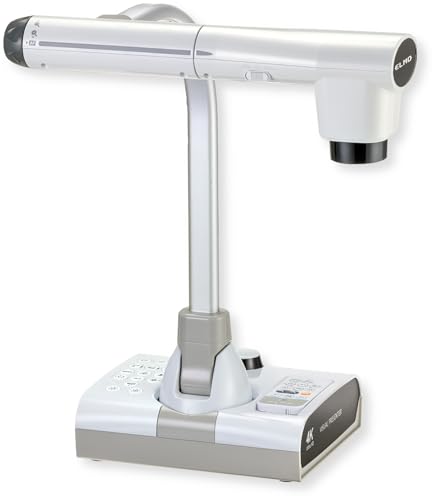
- 4K Ultra HD with 12MP sensor
- 192x total zoom and flexible arm
- HDMI, USB, and VGA outputs
Best For: Dedicated classrooms needing detailed close-up presentation
Foldable Classroom Pick
8MP Foldable USB Document Camera

- Up to 2448P/4K-class output at 30 fps
- Foldable A3-size design with LED lighting
- USB compatibility for Windows, macOS, and Chrome OS
Best For: Teachers and remote presenters who want a compact USB visualiser
Most Flexible Connection Pick
15MP HDMI/USB-C 4K Document Camera
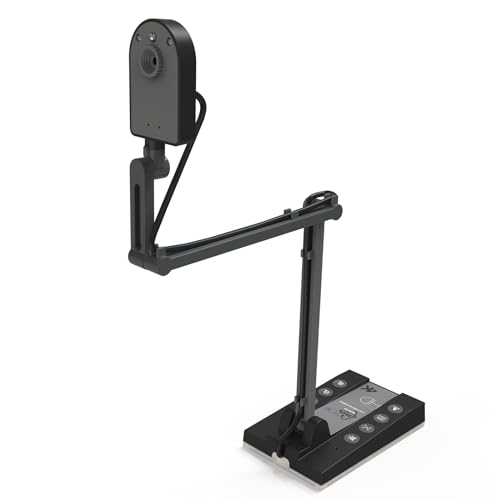
- 4K@15Hz USB output with 15MP imaging
- HDMI, USB-C, and TF card support
- Compatible with Windows, Mac, Chrome OS, and Linux
Best For: Classrooms and presenters who need HDMI plus USB versatility
AI Teaching Tool Pick
S2-4K AI-Tracking USB Document Camera

- 8MP Sony sensor with up to 3264 x 2448 capture
- OKIOPoint AI tracking plus annotation and recording tools
- Works with Windows, Mac, iPadOS, Chromebook, and interactive displays
Best For: Teachers who want software-assisted lessons and strong low-light performance
Joyusing Pick
JOYUSING V500-4k 13MP Triple-Mode Document Camera

- 4K streaming at 30 fps
- HDMI/VGA direct projection without a computer
- Autofocus with 100x digital zoom
Best For: Classrooms and remote teaching with mixed display setups
Okiocam Choice
OKIOCAM S2 Pro 13MP USB Document Camera

- True 4K UHD capture at 30 fps
- OKIOPoint smart tracking for demos
- Built-in light and mic
Best For: Interactive online teaching and live demos
Ipevo Runner-Up
IPEVO VZ-R Ultra Dual-Mode 13MP Document Camera

- HDMI 4K output plus USB software mode
- Up to 13MP capture at 4096 x 3072
- Built-in LED light with tactile controls
Best For: Classrooms and meetings needing direct display plus software flexibility
Portable HD Teaching Pick – IPEVO V4K 8MP USB Document Camera
If you want a document camera with 4k output-like sharpness without moving up to a bulkier professional unit, the IPEVO V4K is a practical USB option for live demos, distance learning, and web conferencing. Its 8MP sensor captures up to 3264 x 2448 images, while fast autofocus and high frame rates help keep demonstrations smooth and responsive.
Best For: Teachers and presenters who need a lightweight, easy-to-use camera for everyday classroom sharing and remote instruction.
Pros:
- 8MP sensor delivers ultra-high-definition images up to 3264 x 2448
- Streams up to 30 fps at Full HD for lag-free live use
- Fast autofocus helps reduce interruptions when switching materials
- Compatible with Mac, Windows, and Chromebook setups
Cons:
- Not a true 4K video output model
- Max higher-resolution streaming is more limited than its Full HD mode
- USB-only design may be less flexible than multi-output presenters
The V4K is best viewed as a dependable teaching and conferencing tool that prioritizes responsiveness and ease of use. If your buying decision centers on portability and clear live image capture, it covers the essentials well.
Premium 4K Presentation Pick – Elmo MX-P3 4K Visual Presenter
The Elmo MX-P3 is a strong document camera with 4k output for buyers who want sharper presentation imaging and flexible connections. It delivers 4K Ultra HD at 30 fps, supports USB-C, HDMI, and RGB connections, and folds down into a compact body that travels easily between classrooms, meetings, and training spaces.
Best For: Presenters who want a premium portable visual presenter with multiple connection options and true 4K imaging.
Pros:
- True 4K Ultra HD output at 30 fps
- USB-C, HDMI, and RGB connectivity for broad compatibility
- Foldable 1.2 lb design makes transport simple
- One-push autofocus helps keep images clear quickly
Cons:
- More expensive class of device than basic USB document cameras
- Uses a more presentation-focused setup than a simple plug-and-play webcam style unit
- Best value depends on needing its richer input options
For users who care about image quality and connection flexibility, the MX-P3 stands out as a polished presenter. It is especially appealing if you need one device that can move between modern USB-C gear and legacy display systems.
Value Classroom Presenter – Kitchbai 4K USB Document Camera
This document camera with 4k output is aimed at teachers who want useful image tools without a complicated setup. The Kitchbai visualiser offers 8MP capture, adjustable image reversal, three levels of LED brightness, and quick plug-and-play compatibility for Windows, macOS, and Chrome OS.
Best For: Budget-conscious educators who need a foldable, classroom-friendly document camera with helpful image controls.
Pros:
- 8MP sensor with 2448p live output and 30 fps capture
- Manually adjustable image reversal is useful for teaching workflows
- Three brightness levels help in darker or brighter rooms
- Built-in dual microphones support better audio for online sessions
Cons:
- Not a true 4K video capture model despite the 4K positioning
- Manual zoom and modest sensor specs are less advanced than premium units
- Large A3 coverage is useful, but the long folded body may still take some desk space
For everyday teaching and remote demonstration, this model focuses on practical controls rather than flagship imaging. It makes the most sense if you value adjustable lighting, easy setup, and classroom versatility.
High-Zoom Classroom Pick – Elmo TT-12G 4K Interactive Camera
The Elmo TT-12G is a robust document camera with 4k output designed for classrooms and training rooms that need more reach and flexibility. It combines 4K Ultra HD imaging, a 12MP sensor, 192x total zoom, and a flexible multi-angle arm, making it well suited for showing detailed objects and large materials.
Best For: Schools and presenters who need a powerful, fixed-setup document camera with extensive zoom and broad capture area.
Pros:
- 4K Ultra HD imaging with a 12MP sensor
- 192x total zoom helps reveal fine details
- Flexible multi-angle arm and 18.5 x 10.2-inch capture area
- HDMI, USB, and VGA outputs support modern and legacy devices
Cons:
- At 6.6 pounds, it is far less portable than compact models
- Larger physical footprint is better for dedicated setups than travel
- More feature-rich than needed for simple plug-and-play use
If you want a classroom centerpiece rather than a carry-around camera, the TT-12G is built for that job. Its zoom range, flexible arm, and output options make it a strong choice for detailed instruction and shared displays.
Foldable Classroom Pick – 8MP Foldable USB Document Camera
If you want a document camera with 4k output for live teaching, demos, or remote lessons, this THUSTAR model gives you a practical mix of resolution, portability, and easy controls. It captures up to 2448P/4K-class video at 30 fps, includes manual image inversion, and adds adjustable LED brightness for clearer shots in different lighting conditions.
Best For: Teachers, trainers, and remote presenters who want a foldable USB visualizer with simple setup and built-in microphones.
Pros:
- 8MP camera output with up to 2448P resolution and 30 fps streaming
- Foldable A3-size design that’s easy to pack and reposition
- 3-level LED lighting plus manual brightness adjustment
- Compatible with Windows, macOS, and Chrome OS, with dual microphones
Cons:
- USB-focused design, so it is less versatile than HDMI models
- No separate storage-focused feature like a card slot is listed
- Best fit is for desktop teaching setups rather than highly mobile use
This is a straightforward classroom-friendly option if you value plug-and-play simplicity and adjustable lighting more than advanced extras. Its foldable build and image controls make it a solid everyday presenter camera.
Most Flexible Connection Pick – 15MP HDMI/USB-C 4K Document Camera
For buyers comparing a document camera with 4k output, this TreasLin model stands out because it supports 4K@15Hz through USB, plus HDMI output for direct display use. The 15MP sensor, A3-size coverage, and built-in LED light make it a flexible pick for classrooms, online teaching, and presentations where image clarity matters.
Best For: Educators and presenters who want both USB and HDMI connectivity with 4K-capable output.
Pros:
- Supports up to 4K@15Hz via USB, with 1080P and 720P options too
- 15MP sensor with A3-size capture area
- Works with Windows, Mac OS, Chrome OS, and Linux PC
- HDMI, USB, and USB-C connectivity plus TF card storage support
Cons:
- 4K mode is rated at 15Hz rather than 30 fps
- Mac USB-C use requires an adapter for some setups
- Designed for stationary presentation use, not handheld portability
This is a strong all-around classroom document camera if you need flexible connection options and built-in capture features. Its mix of HDMI output, USB support, and storage capability makes it especially practical for teaching environments.
AI Teaching Tool Pick – S2-4K AI-Tracking USB Document Camera
If you’re shopping for a document camera with 4k output that leans into teaching features, the OKIOCAM S2-4K is built around smooth streaming, strong low-light performance, and AI-assisted presentation tools. It captures up to 3264 x 2448 images, streams at 30 fps, and pairs that with OKIOPoint tracking in the included software for more interactive lessons.
Best For: Teachers and hybrid presenters who want AI tracking, strong low-light imaging, and software tools.
Pros:
- 8MP Sony Exmor R sensor with up to 3264 x 2448 capture
- 30 fps streaming and fast autofocus for smoother live use
- OKIOPoint AI tracking, annotation, zoom, recording, and PIP in software
- Works with Windows, Mac, iPadOS, Chromebook, and interactive displays
Cons:
- 4K is listed as an output class, while the detailed capture spec tops out at 3264 x 2448
- Software features add value, but they may be more than basic users need
- No built-in LED light is emphasized; it’s designed to work well in low light without one
This model makes the most sense if you want presentation software features as much as raw camera specs. Its tracking tools, platform support, and low-light strength make it a polished choice for modern teaching setups.
Joyusing Pick – JOYUSING V500-4k 13MP Triple-Mode Document Camera
If you want a document camera with 4k output that can flex between HDMI, USB, and VGA, the JOYUSING V500-4k is built for practical classroom and meeting use. It delivers 4K streaming at 30 fps, supports direct projection without a computer in HDMI/VGA mode, and includes autofocus plus 100x digital zoom for close-up viewing and demos.
Best For: Teachers and presenters who need a versatile camera for classrooms, remote teaching, and direct-to-display use.
Pros:
- 4K output at 30 fps with a 13MP sensor for crisp image capture
- Direct HDMI/VGA projection without a computer required
- Autofocus, 100x digital zoom, and audio/video recording support
- Works with Windows and macOS, plus includes LED lighting
Cons:
- Software setup requires downloading from Joyusing’s support page
- Bulkier than simple USB-only document cameras at 2 kg
The V500-4k stands out if you need one unit that can handle both classroom projection and computer-based presentation workflows. Its combination of 4K output, multiple connection modes, and adjustable lighting makes it a strong all-around teaching tool.
Okiocam Choice – OKIOCAM S2 Pro 13MP USB Document Camera
The OKIOCAM S2 Pro is a document camera with 4k output aimed at presenters who want simple USB plug-and-play performance and interactive software tools. It captures true 4K resolution up to 3840×2160 at 30 fps, adds a built-in light and mic, and includes OKIOPoint for smart tracking during live demos.
Best For: Online teaching, web conferencing, and interactive presentations on PC, Mac, or Chromebook.
Pros:
- True 4K UHD capture up to 3840×2160 with 30 fps streaming
- OKIOPoint smart pointer adds interactive zoom-and-focus behavior
- Built-in LED light and microphone for presentations in dim spaces
- Compatible with Windows, Mac, Chromebook, Zoom, Teams, Google Meet, and Canvas
Cons:
- USB-only design means no direct HDMI display output
- Digital zoom is limited to 6x versus higher-zoom competitors
This model is a smart pick if your priority is live presenting rather than standalone display use. Its software features, strong compatibility, and true 4K capture make it especially useful for remote instruction and annotated walkthroughs.
Ipevo Runner-Up – IPEVO VZ-R Ultra Dual-Mode 13MP Document Camera
If you need a document camera with 4k output for both direct display and computer-connected workflows, the IPEVO VZ-R Ultra is a flexible classroom and meeting option. It offers HDMI mode for 4K 3840 x 2160 output without a computer, plus USB mode with up to 4096 x 3072 resolution for software-based teaching and OCR workflows.
Best For: Educators and presenters who want direct HDMI projection plus USB software support in one camera.
Pros:
- Dual HDMI and USB modes for flexible classroom or meeting setups
- 4K HDMI output and up to 13MP USB capture resolution
- Built-in LED light, autofocus, and fast image adjustment controls
- Compatible with IFPs, TVs, monitors, projectors, and multiple teaching tools
Cons:
- No zoom lens, so framing depends on position and stand placement
- Some scanning features rely on optional software/module add-ons
The VZ-R Ultra is a strong choice when you want one camera to handle both standalone presentation and software-assisted teaching. Its direct HDMI support, durable build, and broad compatibility make it especially practical for classrooms and shared display environments.
How We Picked the Best Document Camera with 4K Output
We prioritized models that make a Document Camera with 4K Output genuinely useful in real-world settings: clear image capture, dependable connectivity, flexible mounting or arm design, and features that help in classrooms, conference rooms, or remote teaching. We also considered compatibility across common platforms like Windows, Mac, and Chromebook, plus practical extras such as built-in lighting, microphones, OCR, and image inversion.
Quick Comparison
Some buyers will want a simple USB camera for plug-and-play teaching, while others need HDMI or multi-mode output for interactive displays, projectors, and hybrid presentations. If you mostly teach or present from a laptop, USB models are usually the easiest choice. If you need to connect directly to a monitor, TV, or interactive flat panel, look for HDMI or dual-mode support. Higher-resolution sensors can help with fine text and detailed objects, but ease of use often matters just as much.
Key Buying Factors for a Document Camera with 4K Output
Resolution and Sensor Quality
True output resolution and sensor size are not always the same thing. A good Document Camera with 4K Output should preserve detail well enough for small text, diagrams, and hands-on demonstrations. Look for models that pair 4K output with a sensor that can capture sharp, stable images.
Connectivity and Compatibility
Choose the connection type that matches your workflow. USB is ideal for computers, while HDMI or VGA can be better for direct display connections. If you work across different devices, broad OS support is a major advantage.
Lighting, Focus, and Frame Coverage
Built-in LEDs help in dim rooms, and autofocus or fast manual focus can save time during live lessons. Also check the capture area if you need to show A3 sheets, textbooks, or larger art projects.
Presenter Tools and Classroom Features
Features like image inversion, OCR, smart pointers, and built-in microphones can improve teaching and conferencing. These are especially helpful if you annotate, switch between live demos and documents, or present in hybrid environments.
Who Should Buy Which Document Camera with 4K Output?
If you want simple classroom reliability, a USB-first model is often the best fit. If you need the most flexible setup for TVs, projectors, or interactive panels, a dual-mode or multi-output option is smarter. Buyers who frequently show detailed materials should lean toward higher-sensor-count models, while anyone teaching remotely may benefit most from a Document Camera with 4K Output that also includes a mic, lighting, and easy device compatibility.
For most shoppers, the best choice comes down to where you present, what devices you already use, and how much control you want over framing and illumination.