Choosing an embroidery machine for home beginners can feel overwhelming, but the right model makes learning faster and far less frustrating.
This roundup focuses on machines that balance ease of use, helpful automation, and practical embroidery area options for first-time buyers.
Best 10 Embroidery Machine for Home Beginners Picks for 2026
Combo pick
Brother SE700 Sewing and Embroidery Combo

- Sewing and embroidery in one machine
- 135 embroidery designs and 103 stitches
- Wireless LAN, USB, and 3.7" touchscreen
Best For: beginners who want a versatile combo machine
Large-area pick
Poolin EOC07 Large Hoop Embroidery Machine

- Large embroidery area with four hoop sizes
- 7-inch touchscreen and easy file transfer
- Includes starter supplies and built-in designs
Best For: beginners who want bigger projects and room to expand
Embroidery-only pick
Brother PE545 Wireless Embroidery Starter

- Embroidery-only machine for focused learning
- 4" x 4" field with wireless and USB transfer
- 135 designs, 10 fonts, and touchscreen editing
Best For: beginners who only want embroidery, not sewing
Monogram pick
Janome MC400E Beginner-Friendly Monogram Machine

- 160 built-in designs and 6 monogram fonts
- 7.9" x 7.9" max area with 4 hoops
- Touchscreen editing with USB import support
Best For: beginners who want detailed embroidery and monogramming
Wireless Embroidery Starter Pick
Brother PE900 Wireless Embroidery Machine

- Wireless LAN and USB file transfer
- 5" x 7" embroidery field
- 193 built-in designs and 13 fonts
Best For: Beginners who want an embroidery-only machine with a larger field and easy design transfer
Large Hoop Learning Pick
Poolin EOC06 Large Hoop Embroidery Machine

- Up to 11 x 7.9 inch embroidery area
- 7-inch touchscreen with beginner-friendly controls
- Includes hoops, thread, bobbins, and stabilizers
Best For: Beginners who want a big hoop area and an all-in-one starter bundle
Combo Sewing and Embroidery Choice
Brother SE2000 Sewing and Embroidery Machine

- Sewing and embroidery in one machine
- Wireless LAN and USB design transfer
- 5" x 7" field with 190+ designs
Best For: Beginners who want one versatile machine for both sewing and embroidery
Beginner-Friendly Starter Pick

- Institch system keeps controls simple for new users.
- 130 built-in designs plus 8 fonts for quick personalization.
- Starter kit, tutorials, and support help you begin at home.
Best For: First-time embroidery users who want an easy all-in-one starter machine.
Versatile Sewing-and-Embroidery Choice
D492 4.5" x 7" Touchscreen Machine

- Embroidery and sewing in one space-saving machine.
- 7-inch touchscreen helps preview and adjust designs clearly.
- Auto threader and cutter reduce setup effort for beginners.
Best For: Beginners who want embroidery plus basic sewing in one machine.
Best for Bigger Beginner Projects
D777 6.7" x 11" HD Touchscreen
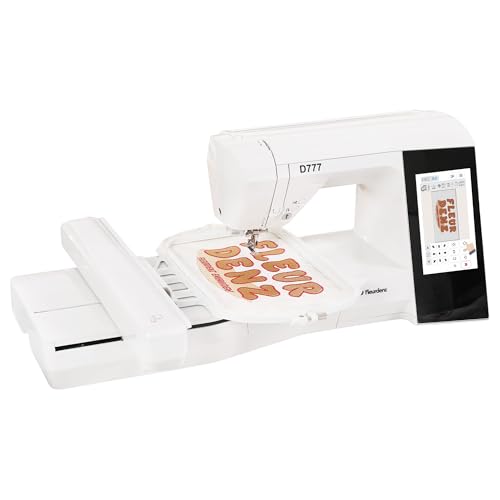
- Large 6.7" x 11" area handles bigger home embroidery projects.
- 7-inch HD touchscreen improves setup and design control.
- Auto threading, cutting, and bobbin winding save time.
Best For: Beginners who want more embroidery space and room to grow.
Combo pick – Brother SE700 Sewing and Embroidery Combo
If you want an embroidery machine for home beginners that can also handle everyday sewing, the Brother SE700 is a practical starting point. It combines sewing and embroidery in one machine, adds wireless file transfer through LAN, and gives you a 4″ x 4″ embroidery field with built-in designs and editing on the touchscreen.
Best For: Beginners who want a combo machine for both sewing and small embroidery projects.
Pros:
- Offers both sewing and embroidery in one machine.
- Includes 135 built-in embroidery designs and 103 sewing stitches.
- Wireless LAN and USB transfer make it easier to send designs.
- 3.7″ color touchscreen helps with previewing and editing designs.
Cons:
- 4″ x 4″ embroidery field limits design size.
- Only intended for use in the US at 120 volts.
For a beginner who wants room to grow without jumping into a large machine, the SE700 balances ease of use with useful creative features. Its built-in tutorials, auto needle threader, and included feet also help make the learning curve more manageable.
Large-area pick – Poolin EOC07 Large Hoop Embroidery Machine
The Poolin EOC07 is a strong embroidery machine for home beginners who want a larger workspace and a more guided setup. It offers a 7-inch touchscreen, wireless and USB file transfer, built-in designs, and multiple hoop sizes, making it a flexible choice for bigger home projects and custom items.
Best For: Beginners who want a large embroidery area and may grow into higher-volume projects.
Pros:
- Large embroidery area with multiple included hoop sizes.
- 7-inch color touchscreen for clearer previews and navigation.
- Wi-Fi and USB transfer support flexible file sending.
- Includes starter supplies like thread, stabilizers, and bobbins.
Cons:
- Its size and feature set may be more than a casual beginner needs.
- Designed with business and high-value projects in mind, not just simple hobby use.
If you know you want to take on larger designs or personalized home business projects, the EOC07 gives you more room than smaller entry-level machines. The included support materials and built-in patterns also make it easier to get started.
Embroidery-only pick – Brother PE545 Wireless Embroidery Starter
The Brother PE545 is an embroidery machine for home beginners who want a focused, embroidery-only setup without sewing functions to learn. It includes wireless LAN, a 4″ x 4″ embroidery field, a 3.7″ color touchscreen, and built-in designs and fonts for easy personalization.
Best For: Beginners who want a simple embroidery-only machine with wireless convenience.
Pros:
- Embroidery-only design keeps the learning curve more focused.
- Wireless LAN and USB transfer support easy file loading.
- 4″ x 4″ embroidery field is suitable for small home projects.
- Includes 135 built-in designs and 10 fonts.
Cons:
- Does not function as a traditional sewing machine.
- 4″ x 4″ hoop size limits larger embroidery work.
For beginners who mainly want to personalize items rather than sew garments, the PE545 keeps the setup straightforward. The touchscreen editing and included accessory pouch make it a friendly entry point into embroidery.
Monogram pick – Janome MC400E Beginner-Friendly Monogram Machine
The Janome Memory Craft C400E is a solid embroidery machine for home beginners who want more design flexibility without sacrificing usability. It offers 160 built-in designs, six monogram fonts, USB importing, and an LCD touchscreen that lets you rotate, resize, mirror, or combine patterns before stitching.
Best For: Beginners who want a more advanced embroidery-only machine with strong editing tools.
Pros:
- 160 built-in designs and 6 monogram fonts provide plenty of options.
- 7.9″ x 7.9″ maximum embroidery area supports larger projects.
- LCD touchscreen makes on-screen editing easy to manage.
- Auto return after thread break and automatic tension control help keep stitches consistent.
Cons:
- Embroidery-only design means no sewing function.
- Larger and heavier than simpler starter models.
If you want a beginner-friendly machine that still feels capable of more detailed work, the MC400E stands out. Its software support, hoop options, and clean on-screen controls make it a good bridge between entry-level and more serious embroidery use.
Wireless Embroidery Starter Pick – Brother PE900 Wireless Embroidery Machine
If you want an embroidery machine for home beginners that still leaves room to grow, the Brother PE900 is a practical embroidery-only option. It focuses on easy wireless file transfer, a clear touchscreen, and built-in designs, so you can spend less time managing setup and more time stitching.
Best For: Beginners who want a straightforward embroidery-only machine with wireless design transfer and a larger 5″ x 7″ field.
Pros:
- Wireless LAN and USB transfer make getting designs onto the machine easier.
- 5″ x 7″ embroidery area suits larger beginner projects.
- 193 built-in designs and 13 lettering fonts provide plenty of starting options.
- 3.7″ touchscreen supports editing, zooming, resizing, and repositioning.
Cons:
- Embroidery-only design means it does not sew regular stitches.
- Some convenience features depend on the Artspira ecosystem.
- Larger projects may still require learning hooping and alignment basics.
For home beginners who want a clean, modern entry into embroidery, the PE900 covers the essentials well without adding sewing functions you may not need yet. Its mix of wireless transfer, built-in content, and on-screen editing makes it easy to start simple and build confidence over time.
Large Hoop Learning Pick – Poolin EOC06 Large Hoop Embroidery Machine
The Poolin EOC06 is a strong embroidery machine for home beginners who want a large workspace and guided digital controls. With a beginner-friendly computerized system, a 7-inch color touchscreen, and multiple hoops included, it is set up to help you start projects right away.
Best For: New embroiderers who want a large hoop area, included supplies, and a touchscreen interface that feels easy to learn.
Pros:
- Large 11 x 7.9 inch maximum embroidery area handles bigger home projects.
- 7-inch color touchscreen makes editing and adjusting designs simple.
- Includes 200 built-in patterns, 8 fonts, and 10 languages.
- Comes with threads, bobbins, stabilizers, and multiple hoops to get started.
Cons:
- At 35 pounds, it is not the most portable option.
- Learning design transfer and digitizing may take time for true beginners.
- Several features are geared more toward embroidery-focused users than casual hobbyists.
If your priority is having enough hoop size to tackle larger beginner projects, the EOC06 stands out. It combines a roomy embroidery area with beginner-oriented controls and useful extras in the box, which can reduce the number of add-ons you need to buy separately.
Combo Sewing and Embroidery Choice – Brother SE2000 Sewing and Embroidery Machine
The Brother SE2000 is a smart pick if you want an embroidery machine for home beginners but also want the flexibility of a sewing machine. It combines embroidery, sewing stitches, wireless transfer, and a helpful touchscreen, making it a versatile machine for learning both crafts over time.
Best For: Beginners who want one machine for both sewing and embroidery, with easy file transfer and room to grow.
Pros:
- Combines sewing and embroidery in one machine.
- Wireless LAN and USB transfer simplify getting designs onto the machine.
- 5″ x 7″ embroidery field works well for larger beginner projects.
- 241 sewing stitches and 190+ built-in embroidery designs add versatility.
Cons:
- More functions can mean a steeper learning curve than an embroidery-only model.
- Some features depend on the Artspira and transfer software setup.
- The machine may be more than you need if you only want embroidery.
For beginners who are not sure whether they want embroidery alone or a true combo machine, the SE2000 offers a balanced path. Its sewing capability adds long-term value, while the touchscreen and wireless tools keep embroidery projects approachable from the start.
Beginner-Friendly Starter Pick – PooLin EOC03
If you want an embroidery machine for home beginners, the PooLin EOC03 keeps the learning curve simple with the Institch system, built-in guidance, and a starter kit right in the box. It offers 4×4 and 4×9.25 embroidery areas, so you can practice on small personal projects and still grow into slightly larger DIY work at home.
Best For: First-time users who want a simple setup, included starter supplies, and helpful learning support.
Pros:
- Institch system is designed to keep navigation and operation easy for beginners.
- Includes 130 built-in designs and 8 fonts for immediate personalization.
- WiFi design transfer and free software add more creative flexibility.
- Starter kit, tutorials, community support, and one-on-one online help are included.
Cons:
- Embroidery area is smaller than larger multi-use machines.
- Best suited to home DIY and beginner projects rather than big-format work.
The EOC03 is a practical first machine if you want to learn embroidery without a complicated setup. Its mix of guided controls, included supplies, and beginner support makes it easy to start stitching at home.
Versatile Sewing-and-Embroidery Choice – D492 4.5" x 7" Touchscreen Machine
The D492 is a strong embroidery machine for home beginners who also want basic sewing in the same setup. With a 4.5″ x 7″ embroidery area, 180 built-in designs, USB import, and a 7-inch touchscreen, it is built to make project selection and setup feel clearer and less intimidating from the start.
Best For: Beginners who want one machine for embroidery, personalization, and light household sewing.
Pros:
- Combines embroidery and sewing to save space and add more everyday use.
- 7-inch touchscreen helps preview designs and reduce setup mistakes.
- Automatic needle threading and thread cutting simplify repetitive steps.
- 180 built-in designs plus USB import provide plenty of project options.
Cons:
- Embroidery area is moderate, so it is not aimed at oversized projects.
- Includes more functions than a basic beginner-only machine, which may feel like extra capability if you only want embroidery.
If you want a beginner-friendly machine that can do more than embroidery alone, the D492 is a practical pick. Its touchscreen, automation features, and dual-function design make it useful for home crafting and simple fabric repairs.
Best for Bigger Beginner Projects – D777 6.7" x 11" HD Touchscreen
If you are comparing an embroidery machine for home beginners but want more room to grow, the D777 stands out with its 6.7″ x 11″ embroidery area and 7-inch HD touchscreen. It is set up for approachable operation while giving you extra space for bags, apparel accents, hats, and larger personalized gifts.
Best For: Beginners who want a larger embroidery field and more room for custom home projects.
Pros:
- Large 6.7″ x 11″ embroidery area supports bigger beginner and gift projects.
- 7-inch HD touchscreen makes setup and design preview easier to manage.
- Automatic needle threading, thread cutting, bobbin winding, and design import streamline use.
- Dual sewing-and-embroidery functionality adds value for home crafting and repairs.
Cons:
- Larger footprint and more capability may be more machine than a very casual beginner needs.
- Best value comes when you plan to use the extra space and features regularly.
The D777 is a smart choice if you want a beginner-friendly machine but do not want to outgrow it too quickly. Its larger hoop area and workflow helpers make it well suited to learning at home while taking on more ambitious projects over time.
How We Picked the Best Embroidery Machine for Home Beginners
For an Embroidery Machine for Home Beginners, we prioritized simple setup, clear controls, beginner-friendly design import options, and enough built-in designs to get started without extra software. We also looked at hoop size, stitch consistency, and whether the machine could grow with your skills.
Quick Comparison
The best choice depends on what you want to make. Compact 4"x4" models are easier to learn on and suit small monograms, while larger embroidery fields are better for shirts, bags, and multi-element designs. If you also want to sew, combo machines offer more flexibility but can take a little longer to master.
Key Buying Factors for an Embroidery Machine for Home Beginners
Embroidery Area
A larger hoop gives you more creative room, but smaller hoops are often simpler and less expensive. Beginners usually do well with a 4"x4" machine unless they already know they want bigger layouts.
Ease of Use
Look for touchscreen navigation, automatic thread features, wireless transfer, and simple editing tools. These reduce setup mistakes and help new users focus on stitching instead of troubleshooting.
Built-In Designs and Fonts
More built-in designs and monogram fonts can save time and money early on. USB or wireless import is also useful when you want to expand beyond the included patterns.
Machine Type
Dedicated embroidery models are usually easier for beginners who only want decorative stitching. Sewing-and-embroidery combos make sense if you plan to work on garments, repairs, and embroidery with one machine.
Who Should Buy Which Embroidery Machine for Home Beginners?
If you want the simplest learning curve, start with a compact model and a smaller hoop. If you plan to embroider home decor, bigger garments, or detailed custom pieces, choose a machine with a larger embroidery area and stronger file transfer options. If you also sew, a combo machine is the most versatile long-term pick for a beginner-friendly home setup.