If you want crisp monograms and polished logo work, the right machine matters as much as the design file. Hoop size, font options, and file transfer are the features that usually decide how easy the job will be.
Below, we focus on embroidery machines that make personalizing shirts, hats, towels, and small-brand items more practical in 2026.
Best 10 Embroidery Machine for Monograms and Logos Picks for 2026
Beginner-Friendly Pick
Poolin EOC05 for Home Embroidery

- Embroidery-only design for simpler learning
- 4" x 9.25" area for shirts, bags, and gifts
- WiFi, USB, touchscreen, and starter kit included
Best For: Beginners making home monograms, gifts, and personal designs
Design-Rich Pick
Brother NQ1700E for Bigger Custom Work

- 258 built-in designs plus 11 lettering fonts
- Large 6 x 10 embroidery area for bigger projects
- Wireless transfer and touchscreen editing
Best For: Users wanting more design variety and a larger workspace
Large-Area Pick
Poolin EOC06 for Bigger Monograms

- Up to 11" x 7.9" embroidery area
- USB and wireless transfer for easy file handling
- 200 built-in designs plus threads, bobbins, and stabilizers
Best For: DIY users who want larger hoops for monograms and logos
Combo Value Pick
Brother SE700 for Sewing and Embroidery

- Sewing and embroidery combo machine
- 135 embroidery designs and 103 stitches
- Wireless LAN plus 40+ accessories
Best For: Home users who want sewing plus small monogram embroidery
Best Home Embroidery Machine

- 160 built-in designs and 6 monogram fonts
- 7.9" x 7.9" embroidery area with 4 hoops
- Touchscreen editing plus USB design import
Best For: Home users who want monograms, custom designs, and a larger embroidery field
Best Commercial Logo Machine
Poolin 15 Needle Pro for Large Logos

- 15 needles and up to 1,200 stitches per minute
- 20" x 14" field for oversized logos and garments
- Wi-Fi, USB, and DST/DSB file support
Best For: Embroidery businesses needing speed, stability, and a large production field
Best Starter Pick
Brother PE545 Wireless Embroidery

- Wireless LAN plus USB upload for easy transfers
- 135 built-in designs and 10 fonts
- 4" x 4" field with touchscreen editing
Best For: Beginners who want a compact machine for small monograms and logos
Best with Extra Features
D492 Embroidery Machine with 4.5" x 7" Area

- 4.5" x 7" embroidery area with 180 built-in designs
- 7-inch touchscreen for previewing and adjusting designs
- Auto needle threading and thread cutting simplify setup
Best For: Beginners making monograms, small logos, and personalized gifts
Monogramming Specialist
Janome Memory Craft 100e Embroidery Machine
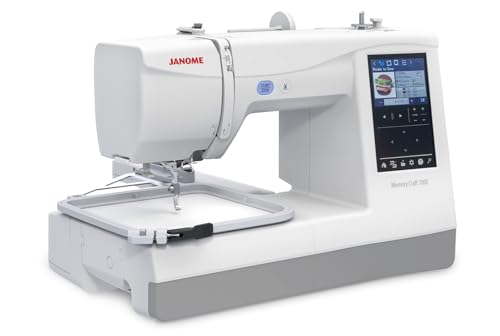
- 274 built-in designs with 11+ fonts for 2- and 3-letter monograms
- On-screen editing supports resize, rotate, combine, and more
- Free arm embroidery helps stitch finished garments more easily
Best For: Monograms, small logos, and garment embroidery on a compact machine
Connected Combo Choice
Brother SE700 Sewing and Embroidery Machine

- Wireless LAN and USB transfer for easy design import
- Artspira app supports custom pattern creation on mobile
- 4" x 4" hoop plus 103 stitches adds sewing versatility
Best For: Crafters wanting a compact, connected combo machine for small embroidery work
Beginner-Friendly Pick – Poolin EOC05 for Home Embroidery
If you want an embroidery machine for monograms and logos that feels approachable from day one, the Poolin EOC05 is built for beginners and home DIY users. Its embroidery-only design, 7-inch touchscreen, and simple control system make it easier to learn the basics while still leaving room for personal projects on shirts, bags, hoodies, and gifts.
Best For: Beginners who want a focused embroidery-only machine for home monograms, gifts, and personal logo projects.
Pros:
- 4″ x 9.25″ embroidery area suits common home items without being oversized
- 7-inch color touchscreen and Institch OS2 are designed for simple navigation
- WiFi and USB transfer add flexible design handling
- Includes free embroidery design software plus starter accessories and hoops
Cons:
- Embroidery-only machine, so it does not sew
- Best suited to personal projects rather than commercial mass production
- Smaller than large-format machines for bigger logo work
The EOC05 is a practical entry point if you want a machine that keeps things straightforward while still supporting custom lettering and design transfer options. It is especially appealing for first-time users who value guidance, simplicity, and home-friendly sizing.
Design-Rich Pick – Brother NQ1700E for Bigger Custom Work
The Brother Inno-vis NQ1700E is a strong embroidery machine for monograms and logos if you want plenty of built-in design support and a larger workspace. With a 6 x 10 embroidery area, wireless design transfer, and on-screen editing tools, it is built for users who want more room and more flexibility for custom embroidery.
Best For: Users who want a larger embroidery field and lots of built-in designs for monograms, logos, and personalized projects.
Pros:
- 258 built-in embroidery designs, 140 frame combinations, and 11 lettering fonts
- 6 x 10 embroidery area gives you more room for larger logo work
- Wireless Design Database Transfer means no USB needed from PC to machine
- 4.85″ color LCD touchscreen supports editing, zooming, resizing, and combining designs
Cons:
- Embroidery-only focus may not suit buyers wanting a combo machine
- More advanced feature set may be more than casual users need
- Accessory and software ecosystem may be unnecessary if you only need basic monograms
For shoppers who care about design variety and a roomier hoop size, the NQ1700E stands out as a capable customization machine. It is especially appealing when you want to move beyond basic names and into more polished logo-style embroidery.
Large-Area Pick – Poolin EOC06 for Bigger Monograms
If your embroidery machine for monograms and logos needs more hoop flexibility, the Poolin EOC06 is geared toward larger home projects. It offers multiple hoop sizes, wireless and USB transfer, and a beginner-friendly computerized system, making it a practical choice for clothing, towels, bags, and other personalized items.
Best For: Beginners and DIY users who want a larger embroidery area for bigger monograms, lettering, and logo-style projects.
Pros:
- Large max embroidery area up to 11″ x 7.9″ with multiple hoop sizes included
- USB and wireless transfer options make design loading flexible
- 7-inch touchscreen and InStitch i3 system are designed for easier operation
- Includes 200 built-in designs, 8 fonts, thread, bobbins, and stabilizers
Cons:
- Still aimed at personal and DIY use rather than mass production
- As an embroidery machine, it does not sew
- Larger size and feature set may be more than a basic starter needs
The EOC06 offers a lot of space and convenience for users who want to tackle larger lettering or logo work at home. If you want a more expansive setup without giving up beginner-friendly controls, this model is worth a look.
Combo Value Pick – Brother SE700 for Sewing and Embroidery
Brother SE700 Combo Embroidery & Sewing Machine with 4" x 4" Embroidery Hoop and 40+ Accessories
Check Price On AmazonThe Brother SE700 is a practical embroidery machine for monograms and logos if you also want a sewing machine in the same setup. Its 4″ x 4″ embroidery hoop, wireless LAN support, and built-in designs make it a flexible choice for hobbyists who want both garment sewing and personalization in one machine.
Best For: Users who want a combo sewing and embroidery machine for monograms, small logos, and everyday home projects.
Pros:
- Combines sewing and embroidery in one machine
- 135 built-in embroidery designs and 103 sewing stitches add versatility
- Wireless LAN and Artspira support provide modern design access
- Includes 40+ accessories plus a monogramming foot and embroidery foot
Cons:
- 4″ x 4″ hoop is smaller than large-format embroidery-only machines
- May be limiting for bigger logo work or larger garments
- Combo design may not be ideal if embroidery is your only focus
The SE700 is a smart pick when space, versatility, and bundled accessories matter more than a large embroidery field. It works well for smaller monograms and logo-style work while still giving you sewing capability for everyday projects.
Best Home Embroidery Machine – Janome MC400E for Monograms
If you want an embroidery machine for monograms and logos with room to grow, the Janome Memory Craft C400E is built for detailed personal projects and larger custom work. It combines 160 built-in designs, 6 monogram fonts, and a 7.9″ x 7.9″ maximum embroidery area, making it a practical pick for users who want flexibility without jumping to a commercial setup.
Best For: Home embroiderers who want a capable monogramming machine with a larger field and easy on-screen editing.
Pros:
- 160 built-in designs plus 6 monogramming fonts for personalization
- 7.9″ x 7.9″ maximum embroidery area with 4 included hoops
- Color touchscreen lets you rotate, resize, mirror, and combine patterns
- USB import and PC-compatible AcuStitch software expand design options
Cons:
- Embroidery-only machine, so it does not sew regular garments
- Smaller field than commercial machines for oversized logo work
Overall, the MC400E is a strong middle ground if you want a dependable embroidery machine for monograms and logos with useful editing tools and enough space for many custom projects.
Best Commercial Logo Machine – Poolin 15 Needle Pro for Large Logos
If your priority is an embroidery machine for monograms and logos at business scale, the Poolin PEM150101 is built for high-volume work. Its 15-needle setup, 20″ x 14″ embroidery area, 10″ touchscreen, and Wi-Fi or USB file transfer make it aimed at production jobs like jacket backs, uniforms, hats, and oversized logos.
Best For: Embroidery businesses and serious operators handling large logos, caps, and finished garments.
Pros:
- 15 needles and speeds up to 1,200 stitches per minute for efficient production
- Large 20″ x 14″ embroidery area for oversized logos and jacket backs
- Heavy-duty cast aluminum frame and reinforced steel structure for stability
- Wi-Fi and USB transfer plus support for DST and DSB files
Cons:
- Very large and heavy machine at 400 pounds
- More machine than most casual home users need
This is the kind of machine to choose when output, size, and workflow matter more than compact convenience. It is clearly geared toward commercial embroidery work rather than occasional personal projects.
Best Starter Pick – Brother PE545 Wireless Embroidery
The Brother PE545 is a compact embroidery machine for monograms and logos if you want wireless convenience and simple everyday personalization. With a 4″ x 4″ field, 135 built-in designs, 10 fonts, and a color touchscreen, it covers basic custom work without taking up much space.
Best For: Beginners and hobby users who want an easy embroidery-only machine for small monograms and logos.
Pros:
- Wireless LAN and USB upload make file transfer convenient
- 135 built-in designs and 10 fonts for personalization
- 3.7″ touchscreen supports drag-and-drop placement and previews
- Includes a 4″ x 4″ hoop and automatic thread cutter
Cons:
- 4″ x 4″ embroidery field limits larger logo projects
- Embroidery-only design means no traditional sewing function
If you mainly need a straightforward machine for names, small monograms, and simple logo work, the PE545 keeps the learning curve manageable while still offering useful wireless features.
Best with Extra Features – D492 Embroidery Machine with 4.5" x 7" Area
If you want an embroidery machine for monograms and logos that feels approachable from day one, the D492 is built around simpler setup and guided creation. Its 4.5″ x 7″ embroidery area, 180 built-in designs, USB import, and 7-inch touchscreen make it easier to preview, place, and stitch personalized names, initials, and small custom motifs at home.
Best For: Beginners who want an easy-to-use combo machine for monograms, small logos, and gift personalization.
Pros:
- 7-inch color touchscreen helps preview and adjust designs before stitching
- Automatic needle threading and thread cutting reduce setup and finishing effort
- Embroidery plus basic sewing adds everyday versatility for home projects
- USB import expands design options beyond the built-in library
Cons:
- Smaller embroidery area may limit larger logo work
- Designed with beginners in mind rather than advanced production use
- Best suited to home crafting and personal projects, not heavy commercial volume
The D492 is a practical choice if you want a lower-friction start and value convenience over advanced digitizing tools. For monograms, initials, and smaller logo-style designs, it offers a friendly workflow and useful automation in one machine.
Monogramming Specialist – Janome Memory Craft 100e Embroidery Machine
For an embroidery machine for monograms and logos with a more focused embroidery-first feature set, the Janome Memory Craft 100e offers 274 built-in designs, 11+ fonts, and on-screen editing tools. Its compact 5.5″ x 5.5″ hoop size keeps it aimed at smaller custom work, while USB transfer lets you bring in additional designs when you want more variety.
Best For: Users who want strong monogram support, on-screen editing, and a compact embroidery-only setup.
Pros:
- 11+ fonts support 2- and 3-letter monogramming
- On-screen editing includes resize, rotate, flip, duplicate, arc, group, and combine
- USB transfer adds flexibility for custom designs
- Free arm embroidery helps with cuffs, onesies, and pant legs
Cons:
- Smaller 5.5″ x 5.5″ hoop is not ideal for larger logos
- Embroidery-only design means no built-in sewing function
- Best suited to smaller, personalized projects rather than large-format work
The Memory Craft 100e stands out when monograms are a priority, especially if you value lettering options and direct on-screen editing. It is a compact, capable pick for shirts, garments, and small custom pieces that need a polished personalized finish.
Connected Combo Choice – Brother SE700 Sewing and Embroidery Machine
The Brother SE700 is a sewing-and-embroidery machine that gives you built-in designs, fonts, and wireless file transfer in a compact 4″ x 4″ format. If you’re shopping for an embroidery machine for monograms and logos and also want sewing features in the same setup, its touchscreen editing, Artspira mobile app support, and USB or wireless import options make it a flexible home craft option.
Best For: Crafters who want a compact combo machine with wireless design transfer and everyday sewing features.
Pros:
- Wireless LAN and USB transfer offer convenient design importing
- Artspira app lets you draw custom patterns on a mobile device
- 3.7″ touchscreen previews and edits designs before stitching
- Includes 103 sewing stitches and 8 sewing feet for added versatility
Cons:
- 4″ x 4″ embroidery field is relatively small for larger logos
- Not designed for users who need a large hoop size
- Better for home projects than higher-volume embroidery work
The SE700 is a strong pick if you want one machine for both sewing and embroidery without giving up modern connectivity. It is especially appealing for monograms, small logo-style designs, and personalized projects where convenience matters as much as creativity.
How We Picked the Best Embroidery Machine for Monograms and Logos
We looked for models that balance stitch quality, usable hoop sizes, font availability, design import options, and ease of setup. For an Embroidery Machine for Monograms and Logos, the best choices also need clear editing controls, dependable tension, and enough workspace for names, initials, and small graphics without constant rehooping.
We also considered beginner friendliness, since many buyers want a machine that can handle simple monograms now and more advanced logo projects later.
Quick Comparison
Smaller hoops are fine for initials, sleeve marks, and compact logo placements. Larger embroidery fields are better when you want to scale logos, stitch jacket backs, or reduce repositioning. Wireless transfer, USB support, and built-in lettering help speed up the workflow, while commercial multi-needle machines are the better fit for frequent production.
Key Buying Factors for an Embroidery Machine for Monograms and Logos
Hoop Size and Embroidery Area
A 4" x 4" hoop works for basic monograms, but a larger area gives you more freedom for logos and multi-line text. If you plan to stitch on bags, uniforms, or bigger garments, look for a machine with a wider field.
Built-In Fonts and Design Editing
Monogramming depends on readable fonts and easy spacing control. Logo work benefits from on-screen editing, rotation, resizing, and placement tools so you can adapt artwork without using separate software for every job.
Connectivity and Design Transfer
Wireless LAN, USB, and app-based transfer can save time, especially if you work from custom files. This is especially useful when you are moving between client logos and personal monogram templates.
Skill Level and Workflow
Beginners usually do best with simple controls, automatic threading aids, and built-in designs. More experienced users may prefer machines with larger hoops, stronger editing, or multi-needle capability for faster logo production.
Who Should Buy Which Embroidery Machine for Monograms and Logos?
If you are a beginner or a home crafter, a single-needle machine with built-in fonts and wireless or USB transfer is usually the most practical choice. If you want to embroider gifts, uniforms, and small brand items, prioritize a larger hoop and flexible editing.
If you plan to produce logos in volume, a commercial multi-needle model is the smarter investment because it improves speed and reduces thread changes. For most shoppers, the best Embroidery Machine for Monograms and Logos is the one that matches your average project size, your comfort with software, and how often you plan to stitch.