Enclosed CNC routers make desktop milling and engraving more approachable by containing chips, reducing noise, and adding a more controlled workspace. The right machine depends on your materials, work area, desired automation, and tolerance for setup and maintenance.
We selected 10 notable models spanning beginner-friendly enclosed machines, compact mills, all-metal routers, and 4-axis systems. Use the guide below to compare capabilities and choose a CNC platform that fits your projects rather than paying for features you may not use.
Best 10 Enclosed Cnc Routers Picks for 2026
Premium Compact Pick
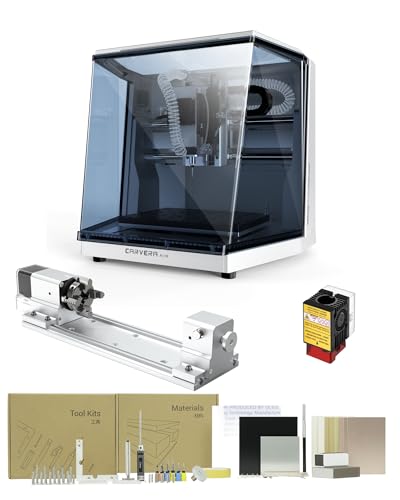
- Fully enclosed compact design
- Automatic probing and leveling
- Quick tool changer and 4th axis
Best For: Makers needing automated, multi-axis desktop machining
Metal-Capable Workhorse

- 710W variable-speed spindle
- Rigid all-metal construction
- Supports selected metal projects
Best For: Makers prioritizing rigidity and higher cutting power
Rotary Machining Choice

- True simultaneous 4th-axis machining
- Rotary work area for cylindrical parts
- Enclosed design with auto leveling
Best For: Makers producing rotary and complex 3D projects
Beginner-Friendly Enclosed Pick
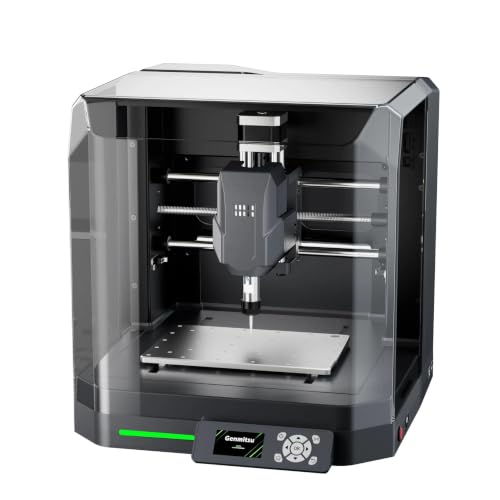
- Factory-assembled for easier setup
- Enclosure reduces dust and noise
- Supports auto Z-probing and mapping
Best For: Beginners learning desktop CNC on light-duty materials
Beginner-Friendly Pick
Makera Z1 Standard Desktop CNC

- Guided Makera software and learning resources
- Built-in camera and desktop dust management
- Cuts wood, plastics, PCBs, acrylic, and soft metals
Best For: Beginners and hobbyists making prototypes, crafts, and small parts
Metal-Cutting Upgrade Pick

- 800W router with 1.5kW spindle upgrade path
- Dual linear guides support rigid cutting
- Wi-Fi, GRBL 1.3a, and broad software compatibility
Best For: Home users focused on upgradeable light-duty metal cutting
Four-Axis Enclosed Pick

- Four-axis configuration for expanded project flexibility
- Built-in camera and dust-management features
- Makera ecosystem supports guided learning
Best For: Makers and prototyping users needing enclosed four-axis capability
Power-Packed Precision

- 800W spindle with 6,000–30,000 RPM range
- Ball screws and linear guides on all axes
- Pre-assembled design supports GRBL software
Best For: Multi-material desktop machining and precise maker projects
Best Heavy-Duty Pick
Genmitsu Cubiko Desktop CNC Router

- Integrated enclosure helps reduce noise and contain debris
- Pre-assembled for a simpler startup
- Auto Z-probing and surface mapping support precision
Best For: Beginners and home workshops needing a contained desktop workflow
Expandable Workshop Value
FoxAlien Masuter Pro CNC Router

- 400 x 400 x 60mm work area for larger projects
- All-aluminum frame with linear-rail Z-axis
- Supports spindle upgrades and optional Y-axis extension
Best For: Hobbyists seeking a spacious, customizable open-frame router
Premium Compact Pick – Carvera Air 4th Axis CNC
For makers seeking enclosed CNC routers with automated setup and expanded machining options, the Carvera Air combines a compact footprint with a 4th-axis module, quick tool changing, and cross-platform control. Its enclosed design is suited to desktops, labs, and small studios.
Best For: Makers, hobbyists, and small workshops working on prototypes, jewelry, electronics projects, custom parts, and detailed engravings.
Pros:
- Fully enclosed 19.7 x 17.7 x 17.7-inch design helps contain chips and dust while reducing noise.
- 11.8 x 7.9 x 5.1-inch workspace with automatic probing and surface leveling.
- Quick tool changer switches milling bits in about 10 seconds.
- Includes the 4th-axis module and supports Wi-Fi, USB, and multiple operating systems.
Cons:
- Its compact work area may limit larger projects.
- At about 100 pounds, it is substantial for a desktop machine.
The Carvera Air is a strong fit when convenience, enclosure, precision features, and 4th-axis capability matter more than maximum workpiece size.
Metal-Capable Workhorse – Genmitsu 3020-PRO Ultra
The Genmitsu 3020-PRO Ultra is an enclosed CNC router option for users who prioritize an all-metal frame and cutting power. Its 710W spindle, reinforced construction, and adaptable spindle-holder system support work across wood, acrylic, PCB materials, and selected metals.
Best For: DIY users and makers who want a rigid desktop router for wood, acrylic, PCB work, and light metal machining.
Pros:
- 710W spindle offers adjustable speeds from 6,500 to 30,000 RPM.
- All-metal construction uses dual linear rails, lead screws, and reinforced components.
- 60mm stepper motors provide up to 7.3 Nm of stated torque.
- Supports different spindle and laser-module configurations through included adapters.
Cons:
- It is not described as a fully enclosed machine; the notes emphasize enclosed mold materials.
- The 11.8 x 8.1 x 3.1-inch work area is relatively compact.
- Assembly is modular rather than fully pre-assembled.
This model stands out for its metal construction and spindle performance, making it a practical choice for tougher desktop jobs, provided its compact work area meets your needs.
Rotary Machining Choice – Carvera Air 4th Axis Kit
Among enclosed CNC routers, this Carvera Air configuration is aimed at users who want true 4th-axis machining in a compact desktop format. The rotary module supports cylindrical work, double-sided objects, and 3D shapes, while automatic probing and leveling simplify setup.
Best For: Advanced hobbyists and makers creating cylindrical parts, rotary engravings, double-sided objects, and detailed 3D models.
Pros:
- 4th-axis rotary work area measures 3.6 inches in diameter by 7.9 inches long.
- Supports true simultaneous 4th-axis machining for complex shapes.
- Quick tool changer transitions between tools in about 10 seconds.
- Enclosed design, Wi-Fi or USB control, and broad software compatibility support a streamlined workflow.
Cons:
- The rotary work area limits the diameter and length of cylindrical projects.
- Its approximately 99-pound weight makes relocation difficult.
- The compact desktop format is not intended for large workpieces.
If rotary capability is central to your projects, this package offers more flexibility than a standard 3-axis desktop router while retaining an enclosed, automated workflow.
Beginner-Friendly Enclosed Pick – Genmitsu Cubiko CNC Router
The Genmitsu Cubiko is one of the more approachable enclosed CNC routers for learning and light-duty creative work. It arrives factory-assembled and combines a reinforced one-piece frame with an enclosure designed to help reduce dust and noise.
Best For: Beginners, students, hobbyists, and maker workshops working on wood, acrylic, PCB boards, plastics, and selected soft metals.
Pros:
- Factory-assembled design reduces initial setup time.
- Enclosure helps contain dust and reduce operating noise.
- Cover-open stop pauses operation when the enclosure is opened.
- Supports auto Z-probing and height mapping, plus several popular software options.
Cons:
- Its 75W power rating suits light-duty projects rather than demanding cuts.
- The small 13 x 13 x 12.48-inch machine size limits workpiece capacity.
- Auto probing requires proper calibration and a conductive probe connection.
The Cubiko is a sensible starting point for enclosed desktop CNC work, especially when easy setup, basic safety features, and compact projects are priorities.
Beginner-Friendly Pick – Makera Z1 Standard Desktop CNC
The Makera Z1 Standard is one of the more approachable enclosed cnc routers for beginners, makers, and 3D-printing users. Its compact desktop design, guided Makera CAM/APP ecosystem, built-in camera, and dust-management features are designed to reduce setup friction while supporting projects in wood, acrylic, PCB materials, plastics, and soft metals such as aluminum.
Best For: Beginners and hobbyists who want a compact enclosed CNC for prototyping, crafts, robotics parts, and model making.
Pros:
- Beginner-focused tutorials, software, project resources, and maker community support
- Built-in camera helps monitor cuts in real time
- Supports wood, acrylic, PCBs, plastics, and soft metals
- Desktop-friendly design with stated ±0.05 mm machining accuracy and 0.02 mm positioning precision
Cons:
- Its listed material range is oriented toward soft metals rather than heavy-duty metal work
- The compact format may be limiting for larger projects
- At 18 kg, it is portable only with some effort
The Z1 Standard is a practical entry point when ease of learning and a cleaner, more visible workspace matter more than maximum cutting capacity. It is especially appealing for users who want an enclosed CNC platform with room to develop through the Makera ecosystem.
Metal-Cutting Upgrade Pick – 3030-Evo Max CNC Router
The 3030-Evo Max is a small, open-frame CNC router rather than an enclosed machine, but it stands out for buyers comparing enclosed cnc routers who need stronger metal-cutting capability. It combines an 800W trim router, dual linear guides on each axis, upgradeable ball screws and spindle options, and GRBL-based controls for work in aluminum, brass, stainless steel, wood, acrylic, MDF, and plastics.
Best For: Experienced home users who prioritize rigidity, upgradeability, and light-duty metal cutting over an enclosed workspace.
Pros:
- 800W router with six speed settings and an upgrade path to a 1.5kW spindle
- Dual MGN-15 linear guides provide rigidity and load support
- Supports materials including aluminum, brass, stainless steel, wood, and plastics
- Wi-Fi control, GRBL 1.3a features, and compatibility with several popular CNC programs
Cons:
- It is not enclosed, so dust and chip containment require additional workspace management
- Router speed adjustment uses a manual dial
- Assembly is still required, despite major components arriving pre-assembled
This model makes the most sense for users willing to trade enclosure convenience for a rigid, upgradeable platform. Its included router and metal-oriented construction offer useful capability, while the available spindle, ball-screw, motor, and table upgrades provide a path for future expansion.
Four-Axis Enclosed Pick – Makera Z1Pro Desktop CNC
The Makera Z1Pro with 4-Axis is a versatile enclosed CNC option for makers who want a guided desktop workflow and added rotary capability. Like the Z1 Standard, it uses the Makera CAM/APP ecosystem, built-in camera, and dust-management features, while supporting wood, acrylic, PCB materials, plastics, and soft metals such as aluminum.
Best For: Makers and prototyping users who want an enclosed desktop CNC with four-axis capability for more varied project work.
Pros:
- Four-axis configuration expands project flexibility beyond standard three-axis work
- Makera tutorials, CAM/APP tools, resources, and community support the learning process
- Built-in camera enables real-time cut monitoring
- Stated ±0.05 mm machining accuracy and 0.02 mm positioning precision
Cons:
- Material capability is focused on wood, plastics, PCBs, acrylic, and soft metals rather than heavy-duty machining
- The compact desktop format may restrict workpiece size
- Four-axis capability may add complexity for users who only need basic flat work
The Z1Pro is the stronger choice within this Makera pair for users who can take advantage of four-axis machining. It retains the beginner-oriented enclosed design while offering more flexibility for models, robotics components, crafts, and prototypes.
Power-Packed Precision – LUNYEE 3020 Nova CNC Router
For shoppers comparing enclosed cnc routers and compact desktop machines, the LUNYEE 3020 Nova stands out for its all-metal construction, ball screws, and linear guides. Its 800W spindle, fully assembled design, and support for GRBL software make it a practical choice for users who want broad material compatibility without a lengthy setup.
Best For: Makers who need a rigid desktop router for wood, acrylic, plastics, PCB work, and suitable aluminum or brass projects.
Pros:
- All three axes use 1204 ball screws and HG-15 linear guides for reduced backlash and stated accuracy of ±0.05mm.
- 800W spindle offers 6,000–30,000 RPM, six speed settings, and constant torque control.
- Arrives largely assembled with pre-connected wiring; supports GRBL software such as UGS, Fusion 360, Easel, and Candle.
Cons:
- Its 3020 desktop format may limit larger projects.
- The supplied notes do not identify an integrated enclosure, so chip and noise containment may require additional accessories.
The Nova is a strong fit when rigidity, spindle power, and material flexibility matter more than having a built-in enclosure. Its ready-to-use design also lowers the barrier to getting started.
Best Heavy-Duty Pick – Genmitsu Cubiko Desktop CNC Router
Among enclosed cnc routers, the Genmitsu Cubiko is designed for a straightforward desktop workflow. It arrives pre-assembled, includes an integrated enclosure that helps contain debris and reduce noise, and adds automatic Z-probing and surface mapping to simplify setup for beginners and PCB projects.
Best For: Beginners, home workshops, and maker spaces working on wood, acrylic, plastics, PCB projects, and suitable soft metals.
Pros:
- Pre-assembled design helps users move from unboxing to a first project more quickly.
- Integrated enclosure helps contain chips and debris, reduces operating noise, and pauses operation when the cover opens.
- Auto Z-probing, surface mapping, WiFi, app control, compatible PC software, and offline control provide a flexible workflow.
Cons:
- Its 96W power rating and 9,000 RPM maximum speed are more suited to the listed desktop materials than demanding heavy-duty cutting.
- The compact 13-inch-wide design may not suit larger workpieces.
The Cubiko is the most approachable option here for users prioritizing enclosure benefits and guided setup features. Automatic probing and surface mapping are especially useful when repeatable positioning matters.
Expandable Workshop Value – FoxAlien Masuter Pro CNC Router
The FoxAlien Masuter Pro is a practical alternative for shoppers considering enclosed cnc routers but who prefer an open, expandable machine. Its all-aluminum structure, 400 x 400 x 60mm work area, pre-wired components, and interchangeable spindle clamps make it well suited to hobby routing and future upgrades.
Best For: DIY users and hobbyists working on larger wood, acrylic, MDF, and nylon projects who value expandability.
Pros:
- All-aluminum structure and linear-rail Z-axis provide a stable platform for detailed work.
- 400 x 400 x 60mm engraving area accommodates larger projects than many compact desktop machines.
- Includes 52mm and 65mm spindle clamps, supports upgrade paths, and uses pre-wired components for a stated 10–15 minute setup.
Cons:
- It does not include an integrated enclosure, so users must plan for separate chip and noise management.
- The standard configuration is listed with a 60W spindle; higher-power options require compatible upgrades.
- The optional Y-axis extension kit and 69mm spindle clamp are additional purchases.
The Masuter Pro makes sense for hobbyists who need a generous work area and want to customize the machine over time. It is less turnkey for enclosed operation, but its aluminum frame and upgrade compatibility offer useful flexibility.
How We Picked These Enclosed Cnc Routers
We focused on machines that offer a practical desktop footprint, useful enclosure or enclosed-mill design, and clear appeal for hobbyists, makers, educators, and small workshops. We also considered construction materials, motion components, spindle or router power, supported workpieces, expandability, and the learning curve. Models with rotary or 4-axis options were included for users who want to work on cylindrical parts or more complex shapes.
Product names and configurations can vary, so verify the included spindle, enclosure, rotary kit, software, work area, and accessories before ordering. A machine listed with an optional upgrade may not include that accessory in every package.
Quick Comparison
| Best For | What to Prioritize | Models to Consider |
|---|---|---|
| Beginners and home use | Enclosure, simple setup, approachable software | Genmitsu Cubiko, Carvera Air |
| Metal engraving and light milling | Rigid all-metal frame, ball screws, dependable motion | Genmitsu 3020-PRO Ultra, LUNYEE 3020 Nova |
| 4-axis projects | Rotary compatibility, software support, clearance | Carvera Air, Makera Z1Pro |
| Larger or tougher stock | Work envelope, linear guides, router power | 3030-Evo Max, FoxAlien Masuter Pro |
Key Buying Factors for Enclosed Cnc Routers
Work Area and Materials
Check the usable X, Y, and Z travel against your actual stock. Small mills suit jewelry, signs, circuit boards, and model parts, while larger routers are better for plaques, panels, and thicker materials. Aluminum and brass require more rigidity and conservative feeds than wood or plastic.
Frame, Motion, and Cutting Hardware
All-metal frames, steel linear guides, and ball screws can improve rigidity and repeatability, but they do not eliminate the need for correct feeds, workholding, and tool selection. Compare the included spindle or trim router, collet sizes, speed control, and replacement-tool availability.
Enclosure, Safety, and Noise
An enclosure helps contain chips and can reduce noise, but it is not a substitute for supervision, ventilation, eye protection, or dust management. Look for a secure door, visibility, emergency-stop access, interlocks where applicable, and enough internal clearance for your tooling.
Software and Expandability
Confirm compatibility with your preferred design and CAM workflow, including file formats, controller software, probing, automatic tool changes, and offline operation. Add-on rotary axes and upgraded spindles are valuable only if the machine’s firmware and software support them smoothly.
Who Should Buy Which Enclosed Cnc Routers?
Choose an enclosed beginner model if you want a contained, compact setup for learning, signs, small parts, and light engraving. Choose an all-metal 3020-style machine if rigidity and metal capability matter more than maximum work area. Choose a 4-axis Carvera or Z1Pro configuration for cylindrical work, sculpted parts, and a more advanced workflow. Choose a larger 3030 or open-style router when stock size and routing power outweigh the convenience of a fully enclosed desktop mill.
Before buying, budget for cutters, spoilboards, clamps, dust extraction, software, and material testing. The best enclosed CNC router is the one whose work area, rigidity, support, and workflow match your projects without forcing unnecessary upgrades.