Good lighting can make a livestream look sharper, more professional, and far easier to watch. If you want cleaner skin tones, better exposure, and a setup that works day or night, the right light matters as much as the camera.
This roundup of led video lights for live streaming focuses on practical options for creators, presenters, and remote workers who need dependable, adjustable light without overcomplicating their desk or studio.
Best 10 LED Video Lights for Live Streaming Picks for 2026
Budget Dual-Light Starter Kit
2-Pack 15W Studio Lights with Tripods

- Two LED panels with tripod stands
- 2800K to 6500K color range
- High CRI 97+ and USB-C adapters
Best For: Beginners and home streamers
Brighter Creator Setup

- 30W lighting for dim rooms
- 3000K to 6500K with 1-9 levels
- Includes tripods, phone holders, remote
Best For: Streamers and online sellers needing more brightness
Portable Battery Panel

- 0.4-inch slim panel design
- Built-in 4000mAh batteries
- 3200K to 5600K with CRI 97+
Best For: Creators needing a lightweight battery-powered light
High-Output Desk Kit
26W 12-Inch LED Lights with Tripods

- 26W output with 3000 lumens
- 420 LEDs and CRI >97
- Includes tripods, phone holders, carry bag
Best For: Home streamers and creators wanting a bright kit
Studio-Grade Desk Light
LitONES Zoom Light for Crisp On-Camera Color
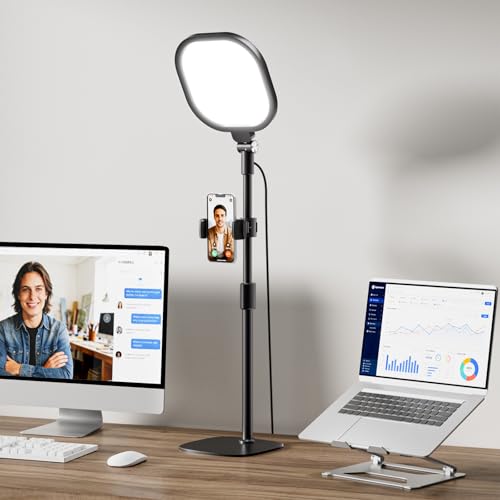
- CRI over 98 for accurate color rendering
- 30 lighting modes with memory function
- Soft panel reduces glare and eye strain
Best For: Streamers and remote workers needing a soft, desk-friendly light
Portable 2-Light Kit
EMART Panel Lights for Flexible Streaming
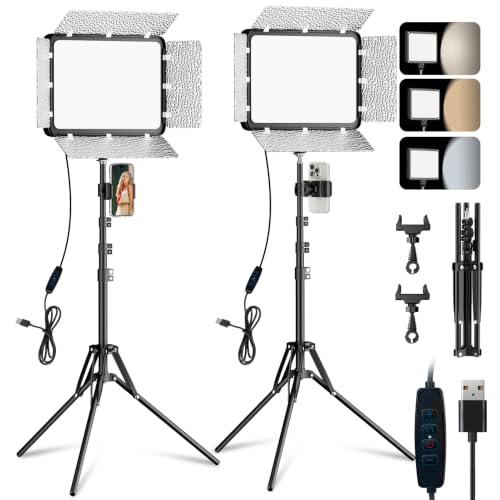
- Two-light kit for wider coverage
- Barndoors help control glare and direction
- Tripods extend to 73 inches for flexible angles
Best For: Vloggers and streamers who want a portable two-light setup
Adjustable Webcam Lamp
LitONES Desk Light for Live Calls

- CRI 97.8 for natural-looking video color
- 3 color temperatures and 10 brightness levels
- Stable metal base with adjustable height
Best For: Home office users and streamers who want compact desk lighting
Bi-Color Portable 2-Pack
NEEWER 13-inch 2-pack with stands

- 3200K-5600K bi-color control
- CRI 97+ for accurate-looking light
- Includes two stands and a carry case
Best For: portable live streaming and creator setups
Budget USB Tabletop Kit
USB 2-pack with mini tripods and filters

- USB-powered for easy desk setup
- 10%-100% dimming with 180-degree tilt
- Includes mini tripods and colored filters
Best For: beginners and tabletop live streaming
Compact Desk Light
NEEWER 9-inch desk panel with tripod

- 3200K-5600K with 1% adjustment steps
- CRI 95+ and built-in 4000mAh battery
- Includes mini tripod and cold shoe adapter
Best For: desk-based streaming and close-up video work
Budget Dual-Light Starter Kit – 2-Pack 15W Studio Lights with Tripods
If you want led video lights for live streaming that are easy to set up and flexible enough for everyday content, this 2-pack gives you a practical starting point. The panels offer three color temperatures, dimming from 10% to 100%, and a high CRI rating for more accurate color in video, streaming, and YouTube work.
Best For: Beginners, home streamers, and creators who want a complete two-light kit with tripods and phone holders.
Pros:
- 3 color temperatures: 2800K, 4800K, and 6500K
- High CRI 97+ for accurate color rendering
- Tripods extend up to 60 inches and tilt 180°
- Includes phone holders, storage bag, and USB-C adapters
Cons:
- Wall charger is not included
- 15W panels are better for modest setups than larger studio spaces
- USB-powered design may require a compatible charger or power bank
Overall, this kit stands out as a compact, affordable way to cover both face lighting and fill light for streaming or recording. It is especially useful if you want a portable two-light setup without buying extra accessories separately.
Brighter Creator Setup – 30W 12-Inch Video Light Kit
For creators comparing led video lights for live streaming, this Torjim kit is built around stronger output and a complete accessory bundle. The 30W lights, 12-inch panels, and adjustable color temperature make it a solid choice when dim rooms or weak overhead lighting are making your videos look flat.
Best For: Streamers, online sellers, and home creators who want brighter illumination and a ready-to-use two-light kit.
Pros:
- 30W high-brightness output for darker rooms
- 3000K to 6500K color temperature plus 1-9 brightness levels
- Includes two tripods, two phone holders, remote, and storage bag
- In-line controller lets you adjust settings during recording
Cons:
- Bulky compared with ultra-slim panel lights
- Designed for indoor creator setups rather than on-the-go use
- Brightness levels are step-based rather than fully continuous
This is a straightforward creator kit if brightness is your main priority. It offers enough flexibility for streaming, product shots, makeup tutorials, and video calls while keeping setup simple.
Portable Battery Panel – Ultra-Thin Bi-Color LED Light
If you need led video lights for live streaming that are portable and easy to mount, this NEEWER panel is a strong single-light option. Its ultra-thin body, built-in battery power, and bi-color dimming make it practical for quick shoots, interviews, and mobile creator setups.
Best For: Creators who want a lightweight battery-powered panel for video, streaming, and camera work.
Pros:
- Ultra-thin 0.4-inch panel is easy to carry
- 3200K to 5600K bi-color range with 0-100% dimming
- Built-in 4000mAh batteries provide up to 1.5 hours of use
- High CRI 97+ and LCD screen for viewing settings
Cons:
- Tripod stand is not included
- Carry bag is not included
- Cannot be used while charging, according to the notes
This light makes sense if portability matters more than a full kit. It is well suited to creators who already have a stand or want a compact panel they can move quickly between filming locations.
High-Output Desk Kit – 26W 12-Inch LED Lights with Tripods
For shoppers who want led video lights for live streaming with a simple, complete setup, this UBeesize kit covers the basics well. The 12-inch panels, 26W output, and 3000-lumen brightness are aimed at creators who need stronger indoor lighting for clearer faces and cleaner product shots.
Best For: Home streamers, gamers, and creators who want a bright two-light kit with phone holders.
Pros:
- 26W output and up to 3000 lumens of soft lighting
- 420 LED beads and CRI >97 for accurate color
- 3000K to 6500K color temperature with 1-9 brightness levels
- Includes tripod stands, phone holders, carry bag, and AC/DC adapters
Cons:
- Requires dedicated AC/DC adapters for power
- Not as compact as a single-panel portable light
- Best suited to indoor setups rather than travel use
This kit is a strong all-around option for creators who want more light without adding complexity. It combines adjustable color, solid brightness, and useful mounting accessories in one package.
Studio-Grade Desk Light – LitONES Zoom Light for Crisp On-Camera Color
If you want led video lights for live streaming that look polished without taking over your desk, this LitONES option is built for close-range creator and meeting setups. Its soft-panel design, high CRI output, and memory function make it a practical pick for consistent on-camera lighting.
Best For: Streamers, remote workers, and creators who want a soft, natural-looking desk light with easy adjustments.
Pros:
- CRI over 98 for accurate skin tones and true-to-life color.
- 30 lighting modes from 3 color temperatures and 10 brightness levels.
- 4-layer optical soft panel helps reduce harsh glare and eye strain.
- Adjustable metal stand, 360° rotation, and built-in memory function.
Cons:
- Desk-focused design is better for close-up use than wider studio coverage.
- Uses a stand/base setup rather than a more portable panel kit.
Overall, this is a smart choice if you need a compact, stable light that keeps your face evenly lit for Zoom calls, live streams, and other front-facing content. The combination of soft diffusion and high color accuracy makes it especially appealing for users who value a natural look on camera.
Portable 2-Light Kit – EMART Panel Lights for Flexible Streaming
For buyers comparing led video lights for live streaming, this EMART 2-pack is a flexible kit that covers more than one angle. The panel lights offer adjustable color temperature, dimming, and barndoors, making them useful for creators who want more control over shadows and light direction.
Best For: Vloggers, livestreamers, and studio users who want a portable two-light setup with adjustable light shaping.
Pros:
- 2-pack kit gives you a broader lighting setup right out of the box.
- 3 color temperatures and 10 brightness levels for easier tuning.
- Barndoors help focus light and reduce glare or shadows.
- Tripods extend up to 73 inches and support multiple shooting angles.
Cons:
- Wall charger is not included.
- Bulkier than a single desk light for small spaces.
This kit stands out if you need a more traditional video light setup for streaming, recording, or product-focused shooting. The included stands and light control features make it a versatile option for creators who want room to shape their lighting.
Adjustable Webcam Lamp – LitONES Desk Light for Live Calls
This LitONES desk model is a practical pick if you want led video lights for live streaming and everyday webcam use in one compact unit. With edge-lit soft illumination, a high CRI rating, and an adjustable height range, it is designed to make on-camera lighting easier without a complicated setup.
Best For: Home office users, online teachers, and streamers who need a stable desk light with simple controls.
Pros:
- CRI 97.8 helps render colors naturally on video.
- 3 color temperatures and 10 brightness levels for flexible tuning.
- 360° rotating light head and phone holder support multiple angles.
- Sturdy metal base with non-slip pad for desk stability.
Cons:
- 10W USB power is suited to close-up desk lighting rather than larger scenes.
- Single-light design may be less expansive than a dual-panel kit.
As a desk lighting solution, this model is best when you want consistent, soft light for meetings, recording, and live streaming from a laptop or monitor setup. The adjustable height and rotating head add useful flexibility while staying compact.
Bi-Color Portable 2-Pack – NEEWER 13-inch 2-pack with stands
If you want LED video lights for live streaming that can also handle filming, podcasts, and social clips, this NEEWER 2-pack is built around flexibility. The panels offer bi-color control from 3200K to 5600K, 0-100% dimming, and a high CRI 97+ to help keep skin tones and on-camera color looking consistent. The included tripod stands and carrying case make it easier to set up a simple two-light streaming kit.
Best For: Streamers and creators who want a portable two-light setup with battery power and adjustable bi-color output.
Pros:
- Bi-color output from 3200K to 5600K with 0-100% brightness control
- High CRI 97+ for more accurate-looking camera light
- Includes two 70-inch aluminum stands and a carrying case
- Built-in 4000mAh battery supports cordless use for up to about 90 minutes
Cons:
- Battery runtime is limited for longer, unplugged sessions
- At 13 inches, the panels are more compact than larger studio lights
- Not water resistant
This kit is a strong fit if you want an all-in-one streaming lighting setup that is easy to move and simple to adjust. It leans more toward practical creator use than heavy studio work, which is exactly what many live streamers need.
Budget USB Tabletop Kit – USB 2-pack with mini tripods and filters
For budget-friendly LED video lights for live streaming, this USB-powered 2-pack keeps things straightforward. Each panel is dimmable from 10% to 100% and comes with four color filters plus a mini tripod, so you can shape tabletop lighting for game streaming, YouTube recordings, or product shots without a complicated setup. Since it runs from USB, it also works well near a computer or power bank.
Best For: Tabletop streamers and beginners who want simple USB lighting with basic color options.
Pros:
- USB power makes it easy to run from a wall charger, PC, or power bank
- Brightness adjusts from 10% to 100%
- Includes mini tripods and red, blue, yellow, and white filters
- 180-degree panel tilt helps position the light for small setups
Cons:
- Power adapter is not included
- Mini tripods are designed for tabletop and low-angle use, not taller stands
- Color options come from filters rather than adjustable bi-color LEDs
This kit makes sense if you want a low-cost lighting pair for desk-based streaming and recording. It is less advanced than larger bi-color panels, but the USB convenience and included accessories make it practical for simple creator workflows.
Compact Desk Light – NEEWER 9-inch desk panel with tripod
If you need LED video lights for live streaming on a desk, this compact NEEWER panel is designed for close-range creator use. It offers 58 warm and 58 cool LEDs, 0%-100% dimming in 1% steps, and 3200K-5600K color temperature control, so you can fine-tune the look for webcam sessions, podcast recording, or makeup content. The included mini tripod and cold shoe adapter make it easy to mount and aim.
Best For: Desk streamers and creators who want a small, adjustable key light with built-in battery power.
Pros:
- Fine brightness and color adjustment in 1% steps
- Bi-color range from 3200K to 5600K with CRI 95+
- Includes mini desktop tripod, cold shoe adapter, and USB cable
- Built-in 4000mAh battery supports cordless use for about 1.5 hours
Cons:
- Battery life may be short for longer streaming sessions
- 9-inch panel is best for close-up lighting rather than broader coverage
- Not water resistant
This is a good choice if you want a compact, controllable light that fits neatly on a desk. It is especially appealing for creators who value precision over size, with enough included accessories to get started quickly.
How We Picked the Best LED Video Lights for Live Streaming
We prioritized brightness control, color temperature range, color quality, mounting flexibility, and overall value. For LED Video Lights for Live Streaming, ease of setup matters too, so we favored kits that work well on desks, tripods, or alongside a webcam and phone mount.
Quick Comparison
Think of the lineup in three buckets: compact single-panel lights for tight desks, two-pack kits for balanced face lighting, and higher-output creator kits for larger spaces or multi-camera use. If you stream from a small room, a dimmable desk-friendly light may be enough. If you need even, shadow-free coverage, a two-light kit is usually the better fit.
Key Buying Factors for LED Video Lights for Live Streaming
Brightness and Dimming
Look for enough output to light your face without running at full power all the time. Strong dimming helps you adapt to different rooms, times of day, and camera exposures.
Color Temperature Range
A bi-color range gives you more control over the mood and helps match ambient room lighting. Cooler settings can look crisp and modern, while warmer tones may feel softer and more natural.
Color Accuracy
High color rendering is important if you want accurate skin tones and product colors on camera. This matters especially for interviews, tutorials, makeup, and sales streams.
Mounting and Size
Desk stands, tripod mounts, and phone holders add convenience, but the right form factor depends on your space. Panel lights are usually easier to position for a clean, soft look, while ring-style or smaller lights can be better for simple webcam setups.
Power Options
USB power is convenient for desk use, while battery support adds flexibility for mobile shooting or rooms with limited outlets. Choose based on whether your setup stays fixed or needs to move often.
Who Should Buy Which LED Video Lights for Live Streaming?
If you want a simple upgrade for Zoom calls or webcam streaming, choose a compact single light. If you need fuller, more flattering coverage for face-forward content, go with a two-pack kit. Creators who film tutorials, product demos, or longer sessions may prefer brighter panels with better control. In short, the best LED Video Lights for Live Streaming are the ones that match your room size, camera distance, and how much setup you want to manage.