Finding the right vinyl cutter under $300 means balancing cutting accuracy, software, material compatibility, and ease of use. This roundup compares 10 options ranging from compact sticker makers to wider-format plotters.
Whether you are making decals, heat-transfer apparel, labels, or room décor, the best choice depends on your project size, preferred workflow, and how much automation you need.
Best 10 Vinyl Cutting Machines Under 300 Picks for 2026
Best Large-Format Value

- 24.8-inch maximum cutting width
- Includes five vinyl rolls and tools
- Windows-only compatibility
Best For: Large signs, banners, and wide heat-transfer projects
Best Portable Bundle

- Compact 4.5-inch cutting width
- Includes materials for up to 35 projects
- Bluetooth and print-then-cut support
Best For: Beginners making cards, labels, decals, and stickers
Best Multi-Device Flexibility

- Works with Mac, Windows, Android, and iOS
- Supports USB, Bluetooth, and USB drives
- Cuts, writes, and scores materials
Best For: Multi-device crafting and everyday DIY projects
Best AI Sticker Workflow

- AI voice and text-to-design features
- 8.5-inch cutting width for US Letter media
- USB-C and Bluetooth 5.0 connectivity
Best For: Custom stickers, HTV, cardstock, and room décor
Versatile 12-Inch Pick

- Cuts, writes, and scores
- 20,000+ built-in design resources
- USB, Bluetooth, and USB drive support
Best For: Multi-material DIY projects and detailed cards or decals
Compact AI Sticker Pick

- AI voice- and text-to-design tools
- 4.5-inch cutting width
- Bluetooth 5.0 and USB 2.0
Best For: Small stickers, school crafts, and party supplies
Touchscreen Control Pick

- Touchscreen operation
- 20,000+ built-in design resources
- Cuts, writes, and scores
Best For: Hands-on card, decal, apparel, and decor crafting
Best Precision Pick
VEVOR Automatic Edge-Detection Vinyl Cutter

- Automatic edge detection with claimed ±0.1 mm accuracy
- Cuts 100+ materials with 10 pressure settings
- Includes software and seven starter materials
Best For: DIY crafters needing precise, versatile material cutting
Best Connected Option
VEVOR 12-Inch Smart Vinyl Cutter

- Compatible with Mac, Windows, Android, and iOS
- Supports USB, Bluetooth, and USB drives
- Cuts, writes, and scores with 20,000+ designs
Best For: Multi-device households and multifunctional paper crafts
Best Button-Controlled Value
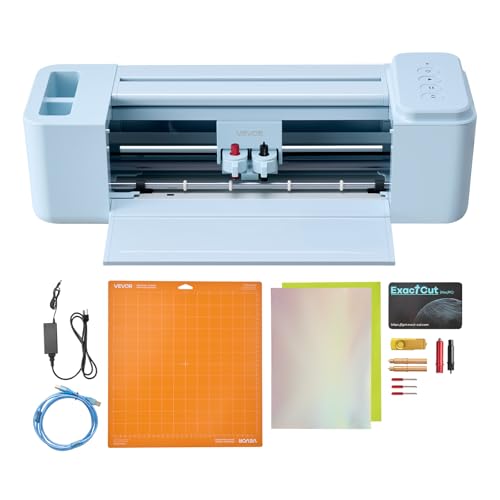
- No recurring software costs are noted
- Supports four major device platforms
- Cuts, writes, and scores multiple materials
Best For: Home crafters making cards, decals, apparel, and decor
Best Large-Format Value – VEVOR 28-Inch Vinyl Cutter
For shoppers comparing vinyl cutting machines under 300, the VEVOR 28-Inch model stands out when a wide cutting area matters more than portability. It offers a maximum 28.3-inch paper feed, a 24.8-inch cutting width, adjustable pressure and speed, and a substantial accessory bundle.
Best For: Large signs, banners, labels, heat-transfer projects, and users who primarily work on Windows PCs.
Pros:
- Wide 24.8-inch maximum cutter width for larger projects
- Adjustable 10–500 g cutting pressure and 10–800 mm/s speed
- Includes five vinyl rolls plus tools and accessories
- Supports vinyl, heat-transfer material, paper, cardstock, and paint masks
Cons:
- Not compatible with Mac systems
- At 39 pounds, it is less portable than compact cutters
- SignMaster software is supplied for Windows-based use
This is a practical choice for buyers who need commercial-style width and included materials at a budget-oriented price. Its Windows-only compatibility and large footprint are the main trade-offs.
Best Portable Bundle – Cricut Joy 2 Essential Bundle
Among vinyl cutting machines under 300, the Cricut Joy 2 is an especially convenient option for quick, smaller projects. Its compact 4.5-inch cutting width, Bluetooth connectivity, and bundled supplies make it easy to start creating cards, labels, decals, and stickers.
Best For: Beginners, small workspaces, portable crafting, cards, labels, simple decals, and full-color stickers.
Pros:
- Weighs just over 2 pounds for easy storage and portability
- Works with more than 75 materials, including vinyl, iron-on, and cardstock
- Bundle includes supplies for up to 35 projects
- Works with a home inkjet printer for full-color print-then-cut stickers
Cons:
- Its 4.5-inch cutting width limits project size
- Design Space requires a smartphone, tablet, or computer
- Some additional content may require separate purchases or a subscription
The Joy 2 favors simplicity and portability over large-format capability. It is a strong starter bundle for everyday crafts, though makers planning wide decals or signs will need a larger machine.
Best Multi-Device Flexibility – VEVOR 12-Inch Vinyl Cutter
For buyers seeking vinyl cutting machines under 300 that work across several platforms, this 12-inch VEVOR cutter offers a flexible setup. It supports Mac, Windows, Android, and iOS, includes wired and wireless connections, and provides built-in design resources without recurring software payments.
Best For: Crafters who switch between devices and want one machine for decals, cards, clothing designs, and decorative projects.
Pros:
- Compatible with Mac, Windows, Android, and iOS
- Supports USB, Bluetooth, and USB-drive access
- Handles cutting, writing/drawing, and scoring
- Works with PNG, JPG, SVG, and TIF files
Cons:
- Its 12-inch format is less suitable for very large signage
- The supplied notes do not specify the exact cutting pressure or speed range
- At 27.3 pounds, it is not as portable as small desktop cutters
This model is appealing when compatibility and connectivity are priorities. Its broader device support makes it more versatile than Windows-only plotters, while the 12-inch format keeps it practical for general DIY work.
Best AI Sticker Workflow – Likcut S41 Vinyl Cutter
Among vinyl cutting machines under 300, the Likcut S41 is designed for makers who want a guided sticker-making workflow. Its app supports voice- and text-based design prompts, while the 8.5-inch cutting width accommodates US Letter materials for stickers, cardstock, room décor, and heat-transfer projects.
Best For: Beginners and hobbyists creating custom stickers, cardstock projects, room décor, and HTV designs.
Pros:
- AI-assisted voice and text prompts can generate custom sticker designs
- 8.5-inch maximum width handles US Letter material in one process
- Supports wired and wireless connectivity
- Screen provides real-time status plus one-touch start, stop, load, and unload controls
Cons:
- Smaller cutting width than the 12-inch and 28-inch VEVOR machines
- Design features depend on the accompanying app
- The supplied notes do not list a broad material count or included project quantity
The S41 focuses on ease of use and quick personalization rather than maximum size. Its AI-assisted workflow and automatic calibration make it a compelling option for sticker-focused crafting, especially when 8.5-inch projects are sufficient.
Versatile 12-Inch Pick – VEVOR Smart Vinyl Cutter
For shoppers comparing vinyl cutting machines under 300, this 12-inch VEVOR model stands out for its broad material support and built-in design resources. It can cut, write, and score while working with common file formats and several connection options.
Best For: DIY crafters making decals, cards, apparel projects, labels, and home decor across multiple devices.
Pros:
- Includes design software with more than 20,000 built-in design resources and no recurring software payments.
- Supports PNG, JPG, SVG, and TIF files for detailed project work.
- Combines cutting, writing/drawing, and scoring functions.
- Works through USB, Bluetooth, or USB drive access with Mac, Windows, Android, and iOS compatibility.
Cons:
- At 27.3 pounds, it is less convenient to move or store than a compact cutter.
- The supplied details identify a 12-inch active surface but do not specify cutting speed.
This VEVOR is a practical choice when you want a full-size workspace and several project functions in one machine. Its heavier build may be worthwhile for a dedicated craft area, while the included software helps control ongoing project costs.
Compact AI Sticker Pick – Likcut S501 Vinyl Cutter
Among vinyl cutting machines under 300, the compact Likcut S501 is tailored to sticker making and everyday craft work. Its AI design features, small footprint, and Bluetooth or USB connectivity make it approachable for quick personalized projects.
Best For: Sticker makers, students, party-supply projects, and crafters who need a compact cutter with drawing capability.
Pros:
- Creates designs from voice commands or text prompts through its AI sticker-making features.
- Offers more than 1 million designs and over 1,200 fonts in the Likcut Design Store.
- Supports cutting and drawing with adjustable pressure and more than 50 material types.
- Bluetooth 5.0 and USB 2.0 connectivity, plus a front-cover storage compartment, support convenient daily use.
Cons:
- The 4.5-inch cutting width is more limited than a full-size 12-inch machine.
- Access to the online design store requires an internet-capable device.
- The listed operation mode is manual.
The S501 makes the most sense for small-format work rather than large decals or wide apparel designs. Its AI workflow and extensive design library can shorten the path from an idea to a ready-to-cut sticker.
Touchscreen Control Pick – VEVOR Smart4 Vinyl Cutter
For buyers evaluating vinyl cutting machines under 300, this touchscreen-controlled VEVOR offers a straightforward way to manage cutting, writing, and scoring projects. Its 12-inch format, built-in resources, and broad device compatibility suit varied home crafting needs.
Best For: Crafters who prefer touchscreen controls for cards, decals, clothing projects, decor, and handmade gifts.
Pros:
- Uses a touchscreen control system and includes more than 20,000 built-in design resources.
- Handles cutting, writing/drawing, and scoring in one machine.
- Supports PNG, JPG, SVG, and TIF imports and exports for detailed designs.
- Works with vinyl, heat transfer paper, cardstock, foil, and specialty paper across Mac, Windows, Android, and iOS.
Cons:
- The listed active surface area is 12 by 8.5 inches, which may not suit oversized projects.
- The supplied details do not list a cutting speed or included tool kit.
- Its 240-volt input specification may require buyers to confirm power compatibility.
This model is a strong fit if an integrated touchscreen matters more to you than portability. It provides the core functions and material flexibility needed for everyday craft projects without requiring recurring software payments.
Best Precision Pick – VEVOR Automatic Edge-Detection Vinyl Cutter
For shoppers comparing vinyl cutting machines under 300, this VEVOR model stands out for automatic edge detection, a 12-inch maximum cut size, and adjustable blade pressure. It also includes design software and starter materials for making stickers, cards, apparel projects, and signs.
Best For: DIY crafters and makers who want precise pattern cutting with broad material compatibility.
Pros:
- Automatic edge detection and claimed ±0.1 mm accuracy support precise cuts.
- Handles more than 100 materials, including adhesive vinyl, HTV, cardstock, and EVA foam.
- Includes design software, a large image library, and seven starter materials.
- Color touchscreen and 10 blade-pressure levels offer convenient control.
Cons:
- The maximum cut size is 13 inches wide, which may limit larger projects.
- SignMaster is listed for Windows, while Signcut is free for Mac for one year.
- At 16.4 pounds, it is not especially lightweight for frequent relocation.
With automatic registration-style edge detection and included supplies, this is a practical option for detailed craft work. Check the software compatibility and 13-inch cutting limit before buying.
Best Connected Option – VEVOR 12-Inch Smart Vinyl Cutter
Among vinyl cutting machines under 300, this 12-inch VEVOR cutter is a flexible choice for households using different devices. It supports wired and wireless connections, includes more than 20,000 built-in design resources, and can cut, write, or score.
Best For: Multi-device users making cards, decals, apparel designs, stickers, and home decor.
Pros:
- Works with Mac, Windows, Android, and iOS devices.
- Supports USB, Bluetooth, and USB-drive workflows.
- Cutting, writing, and scoring functions expand project options.
- Imports PNG, JPG, SVG, and TIF files and includes 20,000-plus design resources.
Cons:
- The 12-inch format may not suit wider signage or oversized garments.
- Its 18.1-pound weight makes it less convenient to move between work areas.
- The supplied notes do not specify blade-pressure settings or a detailed maximum material thickness.
This model is appealing when device compatibility and wireless access matter as much as cutting. Its multifunction design makes it especially useful for paper crafts and mixed-media projects.
Best Button-Controlled Value – VEVOR 12-Inch Vinyl Cutter
This button-controlled VEVOR model is worth considering among vinyl cutting machines under 300 if you want broad device support without recurring software costs. Its 12-inch format handles vinyl, heat-transfer paper, cardstock, foil, and specialty paper for everyday craft projects.
Best For: Beginners and home crafters creating cards, decals, clothing designs, gifts, and decor.
Pros:
- Includes design software with online and offline use options and no recurring payment noted.
- Supports Mac, Windows, Android, and iOS devices.
- Can cut, write, and score for varied craft applications.
- Works with PNG, JPG, SVG, and TIF files and offers 20,000-plus built-in resources.
Cons:
- The 12-inch active area is better suited to smaller projects than wide-format work.
- Button controls may be less direct than a touchscreen interface.
- At 18.1 pounds, it is relatively heavy for a compact craft machine.
Its combination of common file support, broad compatibility, and cut-write-score functionality gives it a useful all-around profile. Choose it when button controls are acceptable and your projects fit the 12-inch workspace.
How We Picked the Best Vinyl Cutting Machines Under 300
We focused on machines that fit a realistic beginner-to-intermediate craft budget while offering useful capabilities for vinyl projects. Our comparison considers cutting width, supported materials, included tools and supplies, design resources, connectivity, software compatibility, and workflow features such as automatic edge detection or print-then-cut support.
We also included a mix of compact machines, standard 12-inch cutters, and wider plotters so shoppers can compare portability with production capacity. Specifications and bundled accessories can vary, so confirm the current listing before purchasing.
Quick Comparison
| Best For | Look For |
|---|---|
| Small stickers and compact crafts | Portable design, simple controls, and narrow media support |
| Everyday decals and shirts | 12-inch cutting width, reliable pressure adjustment, and HTV support |
| Printed stickers | Print-then-cut functionality or accurate contour detection |
| Larger signs and batches | Wider feed capacity, stand stability, and efficient software |
| Beginners | Included materials, built-in designs, and an approachable interface |
Key Buying Factors for Vinyl Cutting Machines Under 300
Cutting Width and Project Size
A 12-inch machine is a versatile choice for decals, labels, apparel graphics, and most home craft projects. If you plan to make larger signs or run longer rolls, a wider cutter such as a 28-inch model may be more practical. Compact cutters are easier to store but limit material width.
Materials and Cutting Performance
Check whether the machine supports adhesive vinyl, heat-transfer vinyl, cardstock, sticker paper, and other materials you intend to use. Adjustable speed and pressure settings help prevent tearing, while a reliable blade and mat system make intricate designs easier to weed.
Software and Connectivity
Compatibility with Mac, Windows, Android, or mobile apps can matter more than raw cutting speed. Look for software that accepts common file formats and offers straightforward design tools. Built-in designs are convenient, but open file support provides more flexibility over time.
Automation and Included Accessories
Print-then-cut and automatic edge detection can simplify sticker production. Bundled blades, mats, tools, vinyl, and transfer materials reduce startup costs, although included supplies are often intended for testing rather than large projects.
Who Should Buy Which Vinyl Cutting Machines Under 300?
Choose a compact cutter if you value portability, make smaller stickers, or have limited workspace. A standard 12-inch machine is the safest all-purpose option for beginners handling decals, labels, cardstock, and shirts. Shoppers focused on sticker production should prioritize print-then-cut or edge-detection features. If you frequently create large graphics or long vinyl runs, choose a wider plotter and plan for additional space and accessories.
For the best result, match the cutter to your typical material size and software comfort rather than choosing solely by the largest advertised design library. A machine with dependable controls, suitable file support, and affordable replacement blades will usually deliver more value over time.