Legacybox 3 Items is a straightforward Legacybox 3 Items review for people who want to digitize a few irreplaceable memories without buying scanners, adapters, or capture gear.
If you are asking whether this Legacybox 3 Items package is worth it, the answer depends on how much convenience matters relative to doing the conversion yourself.
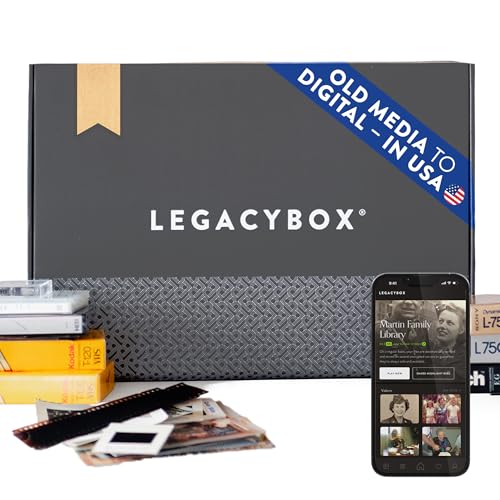
Legacybox 3 Items Review Summary
Legacybox 3 Items makes sense for a narrow but important buyer: someone with a small set of old tapes, photos, slides, negatives, film reels, or audio cassettes who values a managed service more than a DIY project.
The listing is built around simplicity, prepaid shipping, hand digitization, and flexible delivery, which is exactly the kind of setup many families want when the real goal is preservation, not equipment research.
Verdict: this is best for buyers who want a guided process and are comfortable mailing off media to be processed by a third party.
It is less compelling for people with large archives, tight timelines, or the patience to convert media themselves.
Review Scorecard
| Category | Score | Buyer-focused rationale |
|---|---|---|
| Convenience | 10/10 | Prepaid shipping, activation steps, and managed digitization reduce setup work. |
| Media breadth | 9/10 | Supports video, photo, slide, negative, and audio formats in one service flow. |
| Preservation focus | 9/10 | The process is designed around careful handling and tracked items, not quick-and-dirty conversion. |
| Output flexibility | 8/10 | Cloud, USB, and DVD/CD options cover common sharing and backup needs. |
| Small-order fit | 8/10 | The 3-item package matches modest archives better than bulk households. |
| DIY value | 4/10 | You are paying for service, not owning reusable conversion hardware. |
| Buyer confidence | 8/10 | Barcoded tracking and professional digitization should appeal to cautious buyers. |
Key Features and Specifications of Legacybox 3 Items
Legacybox 3 Items is a service bundle, not a piece of hardware.
The listing says the package includes a prepaid shipping label that is activated after purchase, one month of Legacybox Cloud, and a USB flash drive with digitized files.
It also says you can add a DVD/CD or extend cloud access during activation.
The core capacity is defined in “items” rather than raw physical counts.
According to the listing, one item can be one tape, a pack of 25 photos, or one reel of film.
That means the 3-item package can cover combinations such as 3 tapes, 75 photos, or 3 film reels, depending on what you send.
The supported media list is broad:
- Video formats such as VHS, VHS-C, Mini-DV, Hi8, Digital8, MicroMV, Betamax, and 8mm/16mm film reels
- Photo scanning for prints, 35mm negatives, and 35mm/126 slides
- Audio conversion for cassettes, micro-cassettes, and reel-to-reel
The listing also emphasizes that the items are digitized by hand in Chattanooga, Tennessee, with barcoding and tracking throughout the process.
That detail matters because the service is really about trust and chain-of-custody as much as it is about file delivery.
Pros and Cons of Legacybox 3 Items
Pros
- Very easy for buyers who do not want to buy or learn conversion equipment
- Broad media support across video, photo, slide, negative, and audio formats
- One package can be mixed across media types instead of forcing a single format
- Cloud, USB, and DVD/CD options make sharing and backup straightforward
- Barcoded tracking and hand digitization are reassuring for sentimental items
Cons
- Not ideal if you have a very large archive
- You still need to package, ship, and wait for processing
- It is a service purchase, so it will not replace owning your own digitizing gear
- Buyers seeking instant results will probably find the turnaround too slow
Who Should Buy Legacybox 3 Items?
Legacybox 3 Items is a strong fit for families, collectors, and anyone sitting on a small stack of aging media they cannot easily digitize themselves.
It is especially sensible if the items are mixed and you want one process for tapes, prints, slides, negatives, or audio without shopping for multiple devices.
It also suits buyers who care about organization and preservation.
The barcoded workflow and professional handling are the main reasons to choose this over a cheaper DIY route.
You should probably skip it if you have dozens of tapes, want to process everything immediately, or already own the tools and patience to scan and capture media at home.
In those cases, the service model may be more convenient than efficient.
Legacybox 3 Items Digitization Workflow
Activation and shipping
The purchase is only the start.
The listing says you activate the Legacybox package after receipt, which registers the prepaid shipping label and tells the team to expect your media.
That extra step is practical, but buyers should treat it as part of the workflow rather than a minor detail.
Media counting
The “3 items” structure is simple once you understand it, but it can also surprise first-time buyers.
A single box can represent only a few tapes or only a few sets of photos, so the package is best for defined, limited projects instead of sprawling family archives.
Output options
The delivery choices are flexible enough for most households.
Cloud access makes sharing easier, the USB drive gives you a local copy, and the DVD/CD add-on can help buyers who still want disc-based playback or storage.
Handling and trust
The listing leans heavily on careful handling, tracking, and professional digitization.
That emphasis is the real product story: Legacybox is selling peace of mind as much as it is selling file conversion.
Alternatives to Legacybox 3 Items
If you want a similar service with a different entry point, look at iMemories, which is often considered for family video and photo digitizing workflows.
For buyers who want more control over home conversion, ClearClick video converters are a credible alternative for capturing tapes and analog sources yourself.
If the real job is scanning prints or documents rather than sending items out, Epson photo scanners are worth considering for in-home archiving.
For people focused on slides and negatives, Plustek film scanners are a more hands-on but potentially more scalable route.
Is Legacybox 3 Items Worth It?
Legacybox 3 Items is worth it if you want a low-friction way to preserve a few meaningful media items and you value service, tracking, and flexible output over DIY control.
The package is most compelling for small archives, mixed formats, and buyers who would rather mail memories to professionals than build a conversion setup at home.
If you have a larger backlog or you mainly care about speed and cost efficiency, this is probably not the best match.
But for a modest, sentimental project, Legacybox 3 Items is a practical and well-targeted buy.