If you have boxes of negatives, slides, or old family film, the right scanner can turn them into shareable digital files without a complicated setup. The best film scanners for digitizing photos balance image quality, ease of use, and speed.
Below, we’ve narrowed the field to 10 practical picks for different budgets and workflow needs, from simple one-button models to larger-screen scanners with HDMI output and tray feeding.
Best 10 Film Scanners for Digitizing Photos Picks for 2026
Standalone archiving pick
Magnasonic 24MP All-in-One with 5" Display

- Supports 35mm, 110, 126, and Super 8
- 24MP scans saved as JPEGs
- 5" screen with HDMI viewing
Best For: People who want an easy standalone scanner for mixed photo and film formats
Simple slide-to-digital option
KODAK Slide N Scan Max 7" Scanner

- Handles 135mm, 110mm, and 126mm formats
- Saves directly to SD/SDHC cards
- 13MP sensor with 22MP interpolation
Best For: People who want a simple scanner for slides and negatives with direct card saving
Tray-friendly scanning choice
Magnasonic 24MP Long Tray Scanner

- Supports 35mm, 110, 126, and Super 8
- Long tray and slide holders improve workflow
- 24MP JPEG output with on-device edits
Best For: People digitizing mixed slide and negative collections who want smoother tray handling
Touchscreen-friendly digitizer

- 7-inch touch LCD for preview and editing
- 13MP sensor for color or B&W negatives
- USB and HDMI connectivity
Best For: Beginners who want easy on-device editing and a touch-screen workflow
Compact Stand-Alone Scanner
DIGITNOW! 135 Film Negative Scanner

- Saves scans directly to SD card
- Includes rapid slide feeder
- Built-in 2.4-inch LCD for setup
Best For: Simple 35mm slide and negative digitizing without a computer
Large-Screen All-in-One Scanner
22MP Film & Slide Scanner with 5" LCD

- Supports multiple film formats including 35mm and Super 8
- 5-inch LCD enables easy preview and playback
- One-touch scanning with memory-card support
Best For: Easy home digitizing with a larger display and broad film compatibility
Camera-Mounted Digitizing Kit
JJC Film Digitizer Scanner with Backlight
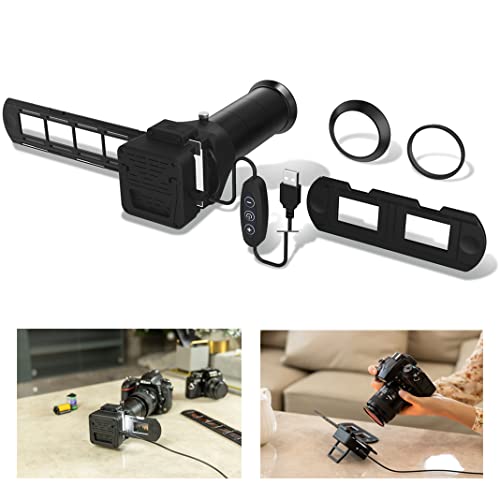
- Uses a compatible camera and macro lens
- Includes seven lens adapters
- 10-level 6500K LED backlight
Best For: Camera users who want to digitize 35mm film with a macro-lens setup
High-Resolution All-in-One Pick
PORTTA 22MP Film Scanner with 5" LCD

- Scans 35mm, 126, 110, and Super 8 photo-only film
- Select 16MP or enhanced 22MP output
- 5" LCD plus on-device image adjustments
Best For: Users who want a versatile standalone scanner with a bigger screen
Compact Beginner Option
35mm Film & Slide Scanner with Quick Feeder

- Converts 35mm negatives and slides to JPEG
- Quick slide feeder supports faster batch scanning
- 2.4" LCD plus TV-out for easy previewing
Best For: Beginners scanning 35mm collections at home
Portable Budget Choice
BEONEGLOBAL ClearScan MINI 16MP Scanner

- Up to 16MP output with a CMOS sensor
- Supports 35mm/135 and 126 film and slides
- Compact body with built-in editing controls
Best For: Users who want a lightweight scanner for quick, simple digitizing
Standalone archiving pick – Magnasonic 24MP All-in-One with 5" Display
If you want film scanners for digitizing photos without relying on a computer, the Magnasonic FS71 is built for simple at-home archiving. It scans 35mm, 110, 126, and Super 8 film plus matching slides, and lets you preview and adjust scans on its 5" LCD before saving JPEGs.
Best For: Users who want a straightforward standalone scanner with a large screen and broad film-format support.
Pros:
- Converts multiple film and slide formats, including 35mm, 110, 126, and Super 8
- 24MP JPEG output with onboard brightness and RGB correction
- 5" LCD plus HDMI output for direct viewing on a monitor or TV
- Fast, tray-based scanning that can handle each image in under 5 seconds
Cons:
- SD card is not included
- HDMI cable is not included
- Requires Windows 7 minimum system support if you connect to a computer
This is a practical pick if you want a no-fuss scanner that keeps the workflow on-device. Its mix of display, expandable storage, and format compatibility makes it a solid choice for rebuilding a photo archive from old negatives and slides.
Simple slide-to-digital option – KODAK Slide N Scan Max 7" Scanner
The KODAK Slide N Scan Max is aimed at anyone comparing film scanners for digitizing photos and wanting a simple, fast workflow. It handles 135mm, 110mm, and 126mm film, saves directly to SD/SDHC, and uses a smooth-moving tray to reduce constant repositioning while you scan.
Best For: Users who want an easy-to-use scanner for slides and negatives with direct SD saving.
Pros:
- Supports 135mm, 110mm, and 126mm slides and negatives
- Direct SD/SDHC card saving without a computer
- 13MP CMOS sensor with up to 4208×3120 output and 22MP interpolation
- Smooth tray feed helps streamline batch scanning
Cons:
- Maximum SD card support is 32GB
- USB connection only; no HDMI mentioned
- Resolution depends on interpolation for the highest file size claims
This scanner makes sense if simplicity and convenience matter more than advanced control. It is a practical option for quickly converting older slide collections and negatives into digital files with minimal setup.
Tray-friendly scanning choice – Magnasonic 24MP Long Tray Scanner
This Magnasonic model fits well if you are shopping for film scanners for digitizing photos and want a more streamlined slide-loading setup. It converts 35mm, 110, 126, and Super 8 negatives and slides, while the long tray and 35mm slide holders help keep the workflow moving.
Best For: People scanning mixed photo and film collections who want extended tray convenience.
Pros:
- Converts 35mm, 110, 126, and Super 8 film plus matching slides
- 24MP digital JPEG output with onboard brightness and RGB correction
- 5" LCD and HDMI support for previewing scans on-device or on a TV
- Built-in memory plus SD card support up to 128GB
Cons:
- HDMI cable is not included
- SD card is not included
- Windows 7 is listed as the minimum system requirement for computer use
The main advantage here is workflow convenience, especially if you have a lot of slides to process. If you want a standalone scanner that still offers storage flexibility and on-device adjustment, this version is easy to justify.
Touchscreen-friendly digitizer – HP FilmScan 7" Touch Scanner
The HP FilmScan is a useful option if you want film scanners for digitizing photos with a modern touch-screen workflow. Its 7-inch color LCD touch display lets you preview and edit scans directly on the device, while the quick-feed tray supports 135, 126, and 110 formats for fast conversion.
Best For: Beginners and casual archivers who want touch controls and easy on-device editing.
Pros:
- 7-inch touch LCD makes previewing and editing straightforward
- 13MP color CMOS sensor captures color and black-and-white negatives
- Quick-feed tray with 50mm adapter supports 135, 126, and 110 formats
- USB transfer and HDMI output add flexible sharing options
Cons:
- Resolution is listed as 1200 dpi rather than a high megapixel output spec
- No built-in SD card storage is mentioned in the supplied notes
- Format support is narrower than some all-in-one scanners
For users who prefer a guided, touch-based setup, this HP scanner keeps the process simple. It is especially appealing if you want to preview, crop, and display digitized memories without learning extra software.
Compact Stand-Alone Scanner – DIGITNOW! 135 Film Negative Scanner
If you want a straightforward option among film scanners for digitizing photos, this DIGITNOW! unit is built for quick, stand-alone conversion of 35mm film and slides. It scans directly to an SD card, includes a slide feeder, and offers a small built-in LCD so you can make adjustments without needing computer software.
Best For: Users who want a compact, no-computer film scanner for basic 35mm slide and negative digitizing.
Pros:
- Stand-alone workflow saves JPG files directly to an SD card.
- Includes an adjustable rapid slide feeder for easier batch scanning.
- Built-in 2.4-inch TFT LCD helps with on-device adjustments.
- Supports 1800 DPI scanning and USB connection if needed.
Cons:
- Supports 35mm film and slides rather than broader film formats.
- Screen is small compared with larger preview displays.
- Best suited to basic conversion rather than advanced editing.
As a practical digitizing tool, this model fits buyers who mainly want a simple way to copy old 35mm memories into shareable JPG files. It keeps the process compact and direct, which is useful if your priority is convenience over feature depth.
Large-Screen All-in-One Scanner – 22MP Film & Slide Scanner with 5" LCD
Among film scanners for digitizing photos, this 22MP model is aimed at buyers who want a larger screen and a simple one-touch process. It supports a wide range of film types, saves to internal memory or SD card, and can also output to a TV or transfer files to a computer through Type-C USB.
Best For: Families or home users who want an easy-to-use scanner with a larger preview screen and support for multiple film formats.
Pros:
- Supports 35mm/135, 110, 126 negatives, 50mm slides, and Super 8 film.
- 5-inch LCD makes previewing and playback easier.
- One-touch scanning keeps the process simple for beginners.
- Can save to built-in memory or an external SD card.
Cons:
- External SD card is not included.
- Built-in memory is limited to 128MB.
- Some users may prefer a more hands-on scanning workflow.
This is a solid pick if you want a guided, all-in-one digitizing setup with broad format support. The bigger display and easy controls make it especially practical for casual photo archiving and family viewing sessions.
Camera-Mounted Digitizing Kit – JJC Film Digitizer Scanner with Backlight
If you prefer a more camera-driven approach to film scanners for digitizing photos, this JJC digitizer kit is designed for re-photographing 35mm negatives and slides with select macro lenses. It includes multiple lens adapters, a 6500K LED backlight, and brightness control, so the scanning setup is built around your interchangeable-lens camera.
Best For: Photographers who want to digitize 35mm film using a compatible Canon, Nikon, or Sony camera and macro lens.
Pros:
- Works with select macro lenses on Canon, Nikon, and Sony cameras.
- Includes seven different lens adapters for flexible mounting.
- 6500K LED backlight has 10 brightness levels.
- Angle and tilt can be adjusted for fine-tuning the setup.
Cons:
- Requires a compatible camera and select macro lens.
- Manual focus is recommended, so it is less automatic than standalone scanners.
- Focused on 35mm film rather than broader format support.
This kit is best viewed as a specialist digitizing accessory rather than a plug-and-play scanner. It rewards users who already own the right camera gear and want more control over the capture process.
High-Resolution All-in-One Pick – PORTTA 22MP Film Scanner with 5" LCD
If you want film scanners for digitizing photos without relying on a computer, this PORTTA model is built for straightforward home archiving. It handles 35mm, 126, 110, and Super 8 photo-only film, and lets you preview, adjust, and save directly on the unit.
Best For: Home users who want a versatile standalone scanner with a larger screen and higher-resolution output.
Pros:
- Supports 35mm, 126, 110, and Super 8 photo-only film
- Offers 16MP standard or enhanced 22MP scans
- 5″ LCD makes alignment and preview easier
- Includes brightness, color, and orientation adjustments
Cons:
- Super 8 support is limited to photo only
- Uses SD card storage, which may be less convenient for some users
- Bulkier than compact mini scanners
Overall, this is a strong choice if you want a flexible, no-computer scanner with more control over the scan process. The larger display and 22MP option make it especially appealing for preserving family photos with a bit more detail.
Compact Beginner Option – 35mm Film & Slide Scanner with Quick Feeder
For shoppers focused on film scanners for digitizing photos in a simple, budget-friendly format, this 35mm-only scanner keeps the process basic and fast. It converts negatives and slides to JPEGs without a computer and includes a quick-loading feeder for batch work.
Best For: Beginners and hobbyists scanning 35mm negatives and framed slides in larger collections.
Pros:
- Standalone operation with no computer required
- Quick slide feeder helps speed up batch scanning
- 2.4″ LCD and TV-out support make previews easy
- Saves directly to SD card and supports USB transfer
Cons:
- Limited to 35mm negatives and slides
- 5/10MP sensor is lower resolution than some alternatives
- SD card support is capped at 32GB FAT32
This scanner makes sense if your archive is mostly 35mm and you want a simple workflow with quick feeding. It is less versatile than multi-format models, but it is practical for straightforward home digitizing.
Portable Budget Choice – BEONEGLOBAL ClearScan MINI 16MP Scanner
If you need film scanners for digitizing photos in a compact, easy-to-carry form, this BEONEGLOBAL MINI is designed for quick home scanning. It supports 35mm/135 and 126 film and slides, saves directly to an SD card, and includes basic editing controls on the device.
Best For: Users who want a lightweight scanner for fast, simple film digitizing on a small footprint.
Pros:
- Up to 16MP scans with a CMOS sensor
- Supports 35mm/135 and 126 film and slides
- Compact and lightweight for portability
- Built-in brightness, color, flip, and rotate controls
Cons:
- 2.31″ LCD is smaller than some competing models
- SD card is not included and maxes out at 32GB
- Does not list support for 110 or Super 8 film
This is a sensible pick if portability and simplicity matter more than a large display or broad film compatibility. It covers the basics well and keeps the workflow easy for casual archiving.
How We Picked the Best Film Scanners for Digitizing Photos
We focused on the features that matter most for Film Scanners for Digitizing Photos: supported film formats, resolution claims, display size, transfer method, and how easy the scanner is to operate day to day. We also looked for models that can handle common archival formats like 35mm negatives and slides, since those are the most common home preservation projects.
Quick Comparison
If you want the simplest path, choose a scanner with an onboard screen and built-in save function. If you want better review and editing control, a larger display or HDMI output can help. For a more hands-on workflow, compact digitizers with backlights and USB transfer may be enough, especially if you already have a computer-based photo library system.
Key Buying Factors for Film Scanners for Digitizing Photos
Supported Film Types
Check whether the scanner handles 35mm slides and negatives first, then look for broader support such as 126, 110, or Super 8. The more formats it supports, the more family archives it can cover.
Resolution and Output Quality
Higher megapixel claims can help, but real-world results also depend on optics, sensor quality, and how well the device handles color and dust. For casual restoration and sharing, midrange resolution is often sufficient.
Screen Size and Workflow
A larger LCD makes framing, previewing, and rescanning easier. Smaller screens can still work well, but they usually require more patience when aligning film and checking results.
Transfer and Saving Options
Some scanners save directly to an SD card, while others rely on USB or HDMI-connected workflows. Pick the method that fits how you plan to organize and back up your scans.
Ease of Loading
Tray-fed holders, quick-slide feeders, and simple negative mounts can save a lot of time if you are scanning large batches. If you only have a few keepsakes, a more basic model may be fine.
Who Should Buy Which Film Scanners for Digitizing Photos?
If you want the easiest all-in-one experience, choose a scanner with a built-in display and direct saving. If your priority is batch conversion of family archives, look for models with tray systems and multi-format support. If you only need to digitize a small number of slides or negatives, a compact unit with a backlight can be a practical, lower-cost option.
For most buyers, the best choice is the scanner that matches both your film formats and your preferred workflow. That way, you’ll actually finish the project instead of letting another box of memories sit untouched.