A desk converter can turn an existing workstation into a more flexible sit-stand setup without the cost or commitment of replacing your desk. The best choice depends on your monitor setup, available surface space, adjustment method, and daily workflow.
We evaluated 10 desk converters for home offices, ranging from compact manual risers to wide electric models built for multiple monitors. Use the guide below to narrow the list by size, stability, convenience, and value.
Best 10 Desk Converters for Home Offices Picks for 2026
Best Overall
VIVO Manual Height Adjustable Standing Desk Converter

- 31.5-inch surface fits dual monitors
- Synchronized keyboard tray
- 33-pound capacity with 3-year warranty
Best For: Balanced home-office sit-to-stand setups
Best Spacious Value
35-Inch Standing Desk Converter

- 35-inch dual-monitor work area
- Built-in phone or tablet slot
- Smooth 4.9- to 19.3-inch adjustment
Best For: Wide home-office workstations
Best Dual-Tier Design
VIVO Dual Tier Standing Desk Converter

- 36-inch surface for monitor setups
- Dual-tier storage layout
- Removable synchronized keyboard tray
Best For: Organized multi-screen home offices
Best Lightweight Option
TechOrbits 32-Inch Standing Desk Converter

- 16.7-pound design is easier to reposition
- 32-inch surface fits dual monitors
- 4.3- to 19.9-inch pneumatic adjustment
Best For: Flexible or space-conscious home offices
Compact Choice
VIVO 26-inch Standing Desk Converter
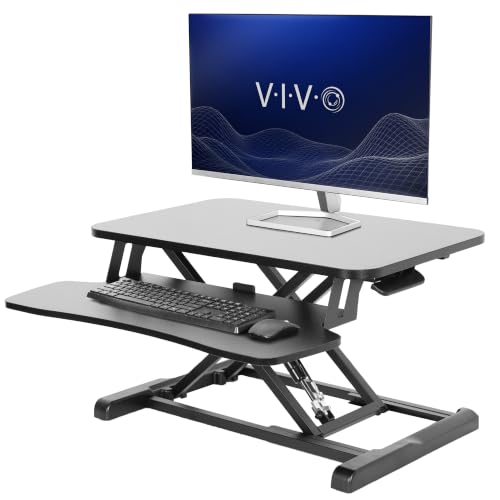
- 25.6-by-15.7-inch workspace for compact desks
- 33-pound desktop capacity with steel frame
- Minimal assembly and 4.5-to-16.9-inch height range
Best For: Compact home offices and straightforward manual adjustment
Wide White Workspace
JOY worker 32-inch Standing Desk Converter

- 31.5-inch-wide top tier for dual monitors
- 4.9-to-19.3-inch smooth height adjustment
- Removable keyboard tray with minimal assembly
Best For: Dual-monitor home offices wanting a white desktop riser
Stable Spring Lift
FLEXISPOT 32-inch Standing Desk Converter
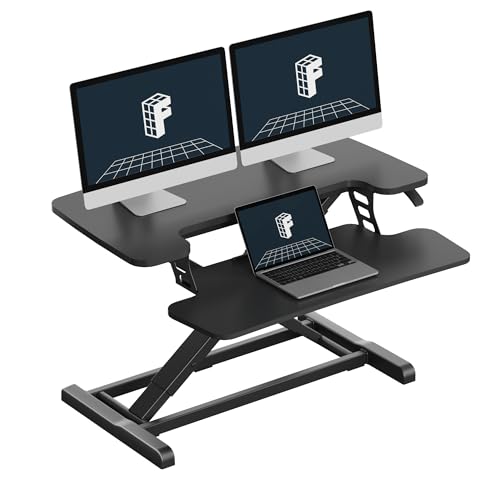
- Mechanical spring lift for smooth adjustment
- Reinforced steel frame supports up to 33 pounds
- Nearly assembled for quick home office setup
Best For: Stable laptop or dual-monitor workstations
Best Compact Manual Pick
VIVO 28-Inch Manual Desk Converter

- Compact 27.6-inch work surface
- Pneumatic lift from 4.9 to 17.2 inches
- Supports up to 28.6 pounds
Best For: Small home-office setups needing a simple manual riser
Best Electric Multi-Monitor Pick
PowerPro 48-Inch Electric Desk Converter

- Push-button motorized height adjustment
- Supports up to 80 pounds
- USB port and three cable-routing grommets
Best For: Large multi-monitor home-office workstations
Best Extra-Large Manual Pick
SANODESK 42-Inch Standing Desk Converter

- 41.7-inch-wide dual-monitor surface
- Adjusts from 4.7 to 19.6 inches
- 33-pound main-tier capacity
Best For: Spacious dual-monitor home-office workstations
Best Overall – VIVO Manual Height Adjustable Standing Desk Converter
For shoppers comparing desk converters for home offices, the VIVO Manual Height Adjustable Standing Desk Converter is a well-rounded option with a 31.5-inch work surface, synchronized keyboard tray, and a 4.5- to 20-inch adjustment range. Its pneumatic lift and steel construction are designed for straightforward sit-to-stand transitions.
Best For: Home-office users who want a balanced converter for one or two monitors.
Pros:
- 31.5-inch surface provides room for dual monitors.
- Keyboard tray raises with the desktop.
- Supports up to 33 pounds and includes a 3-year manufacturer warranty.
- Requires very minimal assembly.
Cons:
- Manual adjustment requires using the lift mechanism rather than an electric control.
- The converter weighs 26 pounds, which may make repositioning less convenient.
With its broad height range, included keyboard tray, and 33-pound capacity, this VIVO model is a practical starting point for a flexible home-office workstation.
Best Spacious Value – 35-Inch Standing Desk Converter
The 35-Inch Standing Desk Converter is a spacious choice among desk converters for home offices. It combines a 35-inch desktop with a lower keyboard tray, built-in device slot, and single-lever height adjustment from 4.9 to 19.3 inches.
Best For: Users who need a wide workstation for dual monitors and everyday accessories.
Pros:
- 35-inch desktop accommodates two monitors.
- Built-in slot holds a phone or tablet.
- Keyboard tray measures 31.5 by 11.8 inches.
- Gas-spring lift and steel frame support up to 28.7 pounds.
Cons:
- Its 28.7-pound capacity is lower than some similarly sized converters.
- Assembly is required for the keyboard tray.
The generous desktop and device slot make this riser especially useful when a home-office setup needs room for multiple screens without moving to a full standing desk.
Best Dual-Tier Design – VIVO Dual Tier Standing Desk Converter
For home offices that need extra organization, the VIVO Dual Tier Standing Desk Converter adds a second tier to its 36-inch workstation. The desktop supports single- or dual-monitor arrangements, while the synchronized keyboard tray and small front device slot help keep essential items organized.
Best For: Users who want a large surface and dual-tier organization.
Pros:
- 36-inch desktop offers room for monitor or laptop setups.
- Dual-tier layout provides additional storage space.
- Dual pneumatic springs support smooth height changes from 6.5 to 17 inches.
- Includes a removable keyboard tray and 3-year warranty.
Cons:
- Its 33-pound weight may be cumbersome to move.
- The supplied adjustment range starts higher than some competing models.
This model is a strong fit when desk organization matters as much as standing flexibility, particularly for users with multiple screens and accessories.
Best Lightweight Option – TechOrbits 32-Inch Standing Desk Converter
The TechOrbits 32-Inch Standing Desk Converter offers a broad work area in a relatively lightweight design. Among desk converters for home offices, it stands out for its 16.7-pound build, pneumatic adjustment from 4.3 to 19.9 inches, and room for a computer, dual monitors, keyboard, mouse, and accessories.
Best For: Home-office users who want a capable converter that is easier to reposition.
Pros:
- 32-inch surface accommodates dual monitors and accessories.
- Adjusts from 4.3 to 19.9 inches using a pneumatic lift.
- Supports up to 33 pounds.
- Lightweight 16.7-pound construction and minimal assembly.
Cons:
- Uses an engineered-wood top rather than a steel desktop.
- The keyboard tray must be attached before use.
Its combination of a full-size surface, broad height range, and lighter weight makes the TechOrbits a convenient choice for flexible home-office layouts or smaller spaces.
Compact Choice – VIVO 26-inch Standing Desk Converter
For shoppers comparing desk converters for home offices, the VIVO 26-inch riser is a space-conscious manual option with a two-tier layout. Its 25.6-by-15.7-inch work surface, adjustable height, and minimal assembly make it practical for smaller work areas.
Best For: Compact home office setups using a laptop or monitor.
Pros:
- Adjusts from 4.5 to 16.9 inches with a simple touch height-locking mechanism.
- Supports up to 33 pounds on the desktop and 4.4 pounds on the keyboard tray.
- Steel frame and included keyboard tray provide a sturdy, organized workstation.
- Requires minimal assembly and includes a three-year warranty.
Cons:
- The 26-inch surface is less spacious than larger converters.
- Height adjustment is manual rather than electric.
The VIVO is a sensible pick when desk space matters most. It offers useful height range and solid load capacity without requiring complicated setup, though users with large dual-monitor arrangements may want a wider model.
Wide White Workspace – JOY worker 32-inch Standing Desk Converter
Among desk converters for home offices, the JOY worker 32-inch riser stands out for its broad white desktop and generous height range. The two-tier design can accommodate a dual-monitor setup while keeping a removable keyboard tray available for seated or standing work.
Best For: Home office users who want a wide white workstation for dual monitors.
Pros:
- The 31.5-by-15.7-inch top tier provides room for up to two monitors.
- Adjusts smoothly from 4.9 to 19.3 inches by squeezing the handle and lifting.
- Removable keyboard tray measures 24.4 by 11.8 inches and raises with the top.
- Needs only a simple two-step keyboard-tray installation.
Cons:
- Top-tier capacity is limited to 28.6 pounds.
- The engineered-wood construction is heavier than a more compact riser, at 26.3 pounds.
- Its 31.5-inch width requires more desk space.
The JOY worker offers a useful balance of width and adjustability for a home office with multiple screens. Its higher maximum position is helpful for standing users, while the removable tray adds flexibility when configuring the desktop.
Stable Spring Lift – FLEXISPOT 32-inch Standing Desk Converter
For those evaluating desk converters for home offices, the FLEXISPOT 32-inch model combines a mechanical spring lift system with a reinforced steel frame. It is designed for laptop or dual-monitor workstations and arrives nearly assembled for a quick setup.
Best For: Users seeking a stable black riser for monitors, laptops, or dual-monitor work.
Pros:
- Mechanical spring system provides smooth height adjustment without relying on gas springs.
- Reinforced steel frame and thickened square tubes support stability at different heights.
- Desktop supports up to 33 pounds, while the keyboard tray supports 4.4 pounds.
- Nearly assembled design requires attaching the keyboard tray.
Cons:
- The product notes list a 32-inch item width but also describe it as a 36-inch desk riser, so shoppers should verify the current dimensions.
- At 31.9 pounds, it is relatively heavy to reposition.
- The supplied notes do not specify a height-adjustment range.
The FLEXISPOT is a strong candidate when stability and a spring-based lift system are priorities. Its capacity suits substantial equipment, but buyers should confirm the exact size and adjustment range before ordering.
Best Compact Manual Pick – VIVO 28-Inch Manual Desk Converter
For shoppers comparing desk converters for home offices, the VIVO DESK-V028S is a compact manual riser designed to add standing capability without replacing your existing desk. Its 27.6-by-15.8-inch work surface, synchronized keyboard tray, and pneumatic lift suit smaller setups while still supporting a laptop or dual monitors within its weight limit.
Best For: Small home-office workstations that need a straightforward, space-conscious sit-stand upgrade.
Pros:
- Compact two-tier surface helps conserve desk space.
- Manual pneumatic lift adjusts from 4.9 to 17.2 inches with a touch height-locking mechanism.
- Steel construction supports up to 28.6 pounds on the desktop.
- Requires minimal assembly; the keyboard tray attaches to the mostly ready-to-use riser.
Cons:
- Manual adjustment requires lifting rather than push-button operation.
- The 28-inch surface is less spacious than larger converters for extensive equipment.
- The keyboard tray raises in sync with the top, limiting independent positioning.
This VIVO converter is a practical choice when you want basic sit-stand flexibility and a compact footprint. Check your monitor and accessory weights against its 28.6-pound desktop capacity before buying.
Best Electric Multi-Monitor Pick – PowerPro 48-Inch Electric Desk Converter
Among desk converters for home offices, the PowerPro 48-inch model stands out for powered adjustment and a large workstation layout. Its motorized lift, two-tier design, USB charging port, cable-routing holes, and stated 80-pound capacity make it suited to multiple-monitor arrangements and equipment-heavy desks.
Best For: Home-office users who want push-button height changes and room for multiple monitors or a monitor-and-laptop setup.
Pros:
- Quiet electric motor provides push-button sit-to-stand adjustment.
- Wide workstation supports two or three monitors, or multiple monitors plus a laptop.
- Reinforced carbon steel construction is rated for up to 80 pounds.
- Built-in USB charging and three grommet holes help with device access and cable management.
Cons:
- Monitor arms and monitors are not included.
- Electric operation requires access to power.
- The product details list a one-year electronics warranty, while the frame has a lifetime warranty.
The PowerPro is the most feature-rich option here for a substantial multi-monitor workstation. Its larger footprint and powered mechanism are useful upgrades, provided your existing desk can accommodate the 48-inch riser.
Best Extra-Large Manual Pick – SANODESK 42-Inch Standing Desk Converter
The SANODESK 42-inch riser is a strong contender for desk converters for home offices when workspace and a broad height range matter most. Its 41.7-by-16.3-inch top tier accommodates dual monitors and accessories, while the wide keyboard tray and mechanical spring lift support a more spacious sit-stand arrangement.
Best For: Remote workers and creators who need a large manual surface for dual monitors, a keyboard, and a mouse.
Pros:
- Expansive 42-inch, two-tier workstation helps organize larger setups.
- Height adjusts from 4.7 to 19.6 inches for a broad range of working positions.
- Mechanical spring system is designed for consistent lifting without gas-spring air leakage or tension loss.
- Reinforced steel structure supports up to 33 pounds on the main tier.
Cons:
- Manual spring lifting is less convenient than an electric mechanism.
- The keyboard tray supports up to 4.4 pounds, so heavier equipment belongs on the main tier.
- Assembly requires attaching the keyboard tray with screws and a screwdriver.
This SANODESK model offers an appealing balance of generous workspace, high maximum height, and a durability-focused mechanical lift. It is best suited to desks with enough width and depth to support its 42-inch footprint.
How We Picked These Desk Converters for Home Offices
We focused on the practical features that matter in a home workspace: usable desktop width, height-adjustment style, keyboard-tray design, monitor capacity, footprint, and likely stability at standing height. The selection includes manual and electric converters, compact models for smaller desks, and wider workstations for dual-monitor or multi-device setups.
Because desk converters sit on an existing surface, we also considered how much desk space they consume and whether their dimensions suit common home-office layouts. Product specifications and intended configurations should always be checked before purchase, especially for heavier monitors or accessories.
Quick Comparison
| Best For | Recommended Type | What to Prioritize |
|---|---|---|
| Small desks or laptops | Compact 26- to 28-inch converter | Footprint, usable depth, and keyboard space |
| Typical home-office setup | 32- to 36-inch manual converter | Stability, adjustment range, and monitor support |
| Dual monitors | 32- to 42-inch wide converter | Top width, weight capacity, and cable clearance |
| Large multi-screen setups | 42- to 48-inch electric converter | Motorized adjustment, rigidity, and desk depth |
Key Buying Factors for Desk Converters for Home Offices
Size and Available Desk Space
Measure the width and depth of your current desk before choosing a riser. A wider platform provides more room for monitors, speakers, and accessories, but it may leave less space for writing or other tasks. Also account for the converter’s lowest position and the space needed for its base or lifting mechanism.
Monitor and Equipment Capacity
Check the listed weight limit and consider the combined weight of monitors, stands, laptops, keyboards, and accessories. A dual-monitor setup usually benefits from a broader, more rigid platform. If you use monitor arms, verify that your desk and converter can safely accommodate the clamp or mounting hardware.
Manual Versus Electric Adjustment
Manual converters are generally simpler and do not require power, making them a practical value choice. Electric models offer smoother push-button transitions and are convenient for frequent height changes, but they typically cost more and add another cable to manage.
Keyboard Tray and Ergonomics
A separate keyboard tray can create better spacing between the screen and typing surface, while a single-level platform may be more flexible for laptops. At standing height, your elbows should remain near a comfortable angle and the top of the screen should be close to eye level. A converter cannot compensate for an unsuitable chair, monitor height, or desk depth.
Who Should Buy Which Desk Converters for Home Offices?
Choose a Compact Converter If You Have a Small Desk
Models around 26 to 28 inches suit laptop users and lighter single-monitor arrangements. They are easier to fit into confined spaces and leave more of the original desk available.
Choose a 32- to 36-Inch Model for a Balanced Setup
This range is a sensible starting point for most home offices. It can support a laptop or one monitor comfortably, with some models offering enough room for a dual-monitor arrangement depending on equipment size.
Choose a Wide Converter for Multiple Monitors
Look to 42- or 48-inch platforms when you need space for several screens, a large keyboard, and accessories. Confirm your desk’s depth, the converter’s weight rating, and the amount of room left for your chair and other equipment.
Choose Electric Adjustment for Frequent Transitions
If you regularly alternate between sitting and standing throughout the day, a push-button model can make the change easier and more consistent. For occasional use or a tighter budget, a manual converter may deliver better value.