If you’re shopping for a camera slider for beginners, the goal is simple: smoother shots without a steep learning curve. The best options balance stability, ease of setup, and reliable movement.
Below, you’ll find beginner-friendly sliders in different sizes and formats, from compact manual rails to app-controlled motorized models, so you can choose the right one for your camera, style, and budget.
Best 10 Camera Slider for Beginners Picks for 2026
Beginner-Friendly Smooth Slider
NEEWER 16in Carbon Fiber Slider

- Manual slider with 4 smooth bearings
- Fits cameras, phones, and action cams
- Adjustable legs help on uneven surfaces
Best For: Beginners needing a portable, easy-to-use slider
Motorized Mini Motion Pick
IFOOTAGE Shark Slider Pico Pro

- Motorized 2-axis slider for smooth motion
- Works with phones, action cams, and Pocket 3/4
- Supports cameras up to 2.4 lb
Best For: Beginners wanting automated motion with lightweight gear
Compact Skater Dolly Choice

- Moves in straight lines or circles
- Quiet wheels work on flat surfaces
- Compact dolly with adjustable ball head
Best For: Beginners wanting a portable tabletop motion tool
Feature-Rich Motorized Rail
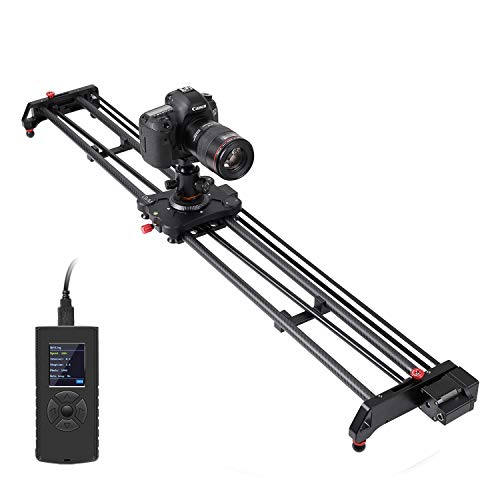
- 48-inch motorized rail with round-trip control
- Supports time-lapse and panoramic shots
- Includes battery, controller, and bag
Best For: Beginners ready for a larger motorized slider
Portable Manual Pick

- Lightweight 24" manual slider with carrying bag
- Four bearings and carbon fiber rails for smoother motion
- Works with small cameras, phones, and common mounts
Best For: Travel-friendly beginner use with lightweight gear
Smart Motorized Upgrade
NEEWER ER1 80cm Motorized Slider

- App control, 2.4G remote support, and time-lapse modes
- Silent stepper motor for smoother, quieter motion
- Carbon fiber build with 11 lb horizontal load capacity
Best For: Beginners who want automated video and time-lapse control
Budget Short-Rail Starter
Andoer 12-inch Aluminum Slider

- Compact 12-inch manual slider for small spaces
- Four bearings for smoother, quieter movement
- Multiple threads for tripod and accessory mounting
Best For: Learning basic camera motion with a simple compact rail
Compact Motorized Rail

- Smooth motorized rail for video and stills
- Supports time-lapse, video, and auto round-trip shooting
- Multiple mounting points and adjustable non-slip feet
Best For: Beginners needing a compact motorized slider for interviews and simple motion shots
Long Carbon Fiber Slider

- 6-in-1 shooting modes with tracking and panoramic options
- APP control from iOS or Android devices
- Carbon fiber rail with multiple mounting ports
Best For: Beginners who want a longer, app-controlled slider for learning multiple motion styles
Beginner-Friendly Smooth Slider – NEEWER 16in Carbon Fiber Slider
If you’re shopping for a camera slider for beginners, this NEEWER 16-inch carbon fiber model is a practical place to start. It keeps the setup simple with manual sliding, adjustable legs for balance, and a ball head that lets you add a camera, phone, or action cam without needing a complicated rig.
Best For: Beginners who want a lightweight, versatile slider for phones, action cameras, and compact cameras.
Pros:
- 4 precision bearings for smooth, quiet sliding
- Adjustable legs and bubble level help with uneven surfaces
- Works with cameras, phones, and action cameras via included mounts
- Lightweight build and carrying bag make it easy to transport
Cons:
- Manual operation means you control every move by hand
- 2 kg horizontal load limit may be restrictive for heavier rigs
- 16-inch rail is compact, so move range is limited
For first-time slider users, this is a straightforward way to get smoother video without a steep learning curve. The flexible mounting options and portable design make it especially useful for casual creators who want to experiment with motion shots indoors or outdoors.
Motorized Mini Motion Pick – IFOOTAGE Shark Slider Pico Pro
This motorized option is a strong pick if you want a camera slider for beginners without having to learn complex manual moves. The Shark Slider Pico Pro works with smartphones, action cameras, DJI Osmo Pocket 3/4, and cameras up to 2.4 lb, so you can create smooth motion shots with very little effort.
Best For: Beginners who want an easy motorized slider for phones, action cams, or lightweight cameras.
Pros:
- Motorized movement helps create smooth cinematic shots
- Compatible with smartphones, action cameras, and DJI Osmo Pocket 3/4
- Supports cameras up to 2.4 lb
- Designed to reduce shaky handheld footage
Cons:
- Heavier camera setups are not supported
- Motorized design is more involved than a simple manual slider
- Short 15.7-inch length limits travel distance
For new users who want polished motion without much technique, this slider lowers the barrier to entry. It is best suited to lightweight gear and creators who want a compact automated solution rather than a fully manual rig.
Compact Skater Dolly Choice – NEEWER SD001 Camera Dolly
If you want a camera slider for beginners but prefer a tabletop dolly style, the NEEWER SD001 is a compact way to practice straight and circular moves. Its adjustable wheels and included ball head make it useful for learning basic motion shots with a mirrorless camera, phone, or action camera.
Best For: Beginners who want a small, portable dolly for tabletop or floor-level motion shots.
Pros:
- Can move in straight lines or circles
- Quiet rubber-ring wheels suit indoor recording
- Ball head adds 360° rotation and 90° tilt
- Compact and lightweight for easy transport
Cons:
- Not suitable for telephoto lenses
- Phone clamp adapter is not included for every setup
- Best used on flat surfaces rather than as a rail-style slider
This is a good entry-level motion tool if you want to keep costs and complexity down. It is less like a traditional rail slider and more like a flexible skater dolly, which makes it easy to understand and simple to use for basic moving shots.
Feature-Rich Motorized Rail – GVM 48in Motorized Slider
This GVM model is a full-size camera slider for beginners who want to grow into more advanced motion work. It offers motorized control, round-trip automation, time-lapse support, and panoramic shooting, so you can explore more creative moves once you’re comfortable with the basics.
Best For: Beginners who want a long motorized slider with room to expand into time-lapse and panoramic shooting.
Pros:
- Motorized operation with adjustable speed, interval, and stop time
- Supports round-trip, time-lapse, and panoramic shooting
- 48-inch carbon fiber rail offers a larger movement range
- Includes battery, controller, cables, and carrying bag
Cons:
- Bulkier and heavier than compact beginner sliders
- More features may be overkill for simple casual use
- Requires more setup than a basic manual slider
For beginners who already know they want a more capable rig, this slider provides a lot of room to learn and experiment. The tradeoff is size and complexity, but it also gives you a broader path into more polished motion content.
Portable Manual Pick – Zecti 24" Carbon Fiber Slider
If you want a camera slider for beginners that keeps the setup simple, this Zecti 24"/60 cm manual rail is a practical place to start. It stays lightweight for travel, supports multiple mounting options, and works with a wide range of small cameras and smartphones.
Best For: Beginners who want a compact, travel-friendly manual slider for lightweight cameras and phones.
Pros:
- 24"/60 cm size with a 654 g lightweight build and carrying bag for easy travel.
- Four precision bearings and a double carbon fiber rail system for smoother, quieter movement.
- Adjustable legs, non-skid feet, and a bubble level help with basic setup and fine adjustment.
- Multiple 1/4" and 3/8" screw holes support ball heads and other common accessories.
Cons:
- Notes indicate it can make noise and may not move smoothly if screws are overtightened.
- Maximum weight recommendation is 4.4 pounds, so it is not suited to heavier rigs.
- It is a manual slider, so it does not offer motorized motion or app control.
For first-time buyers, the appeal here is portability and flexibility rather than advanced automation. It is best suited to light gear and learning the basics of slider movement without a complicated feature set.
Smart Motorized Upgrade – NEEWER ER1 80cm Motorized Slider
This camera slider for beginners is a strong step up if you want automated motion without giving up creative control. The NEEWER ER1 adds app control, remote support, and time-lapse modes, while still keeping the motion focused on smooth, quiet shots.
Best For: Beginners who want a motorized slider for controlled video, product shots, and time-lapse work.
Pros:
- Motorized movement with app control and 2.4G remote support for easier operation.
- Manual, video, and time-lapse modes help cover different shooting styles.
- Silent stepper motor is designed for quiet camera movement.
- Carbon fiber construction and 4 roller bearings add stability and anti-shake support.
Cons:
- The 8.7 lb unit is heavier and less portable than basic manual sliders.
- Remote control is noted as not included.
- Minor shake may occur when using it for macro photography.
If you are ready to move beyond a basic rail, this model gives beginners a more polished workflow for repeatable motion shots. Its battery power, smart controls, and longer 31.5" track make it better for planned video work than quick travel setups.
Budget Short-Rail Starter – Andoer 12-inch Aluminum Slider
For a camera slider for beginners who just want a simple, compact rail to practice basic moves, the Andoer 12-inch slider keeps things straightforward. Its short size and lightweight aluminum build make it easy to handle, while the bearing system is aimed at smoother, quieter sliding.
Best For: Beginners looking for a compact, low-fuss slider for learning basic camera movement.
Pros:
- Compact 12-inch version is easy to pack and use in small spaces.
- High-quality aluminum alloy body keeps the design simple and sturdy.
- Four precision bearings are designed for super smooth, silent sliding.
- Multiple 1/4" and 3/8" threads let you mount accessories like a tripod, light, monitor, or mic.
Cons:
- Short track length limits the range of motion compared with longer sliders.
- It is a manual rail, so there is no motorized movement or app control.
- The listed folded size is fairly bulky for such a short slider, so it is not the most pocketable option.
This is the simplest option in the group for learning slider basics on a budget. It suits users who value easy handling and accessory mounting more than long, cinematic moves.
Wireless 3-Wheel Dolly – NEEWER Motorized Mini Slider
If you want a camera slider for beginners that still leaves room to get creative, this NEEWER 3-wheel dolly is a flexible starting point. The wireless remote lets you adjust speed and direction without staying beside the rig, and the adjustable wheel angle can support straight moves, circular routes, and even pitch shooting with a bowl head.
Best For: Beginners who want a compact, remote-controlled dolly for simple motion shots and creative wheel-based moves.
Pros:
- Wireless remote changes speed, direction, and pause from up to 6m/19.7ft away.
- Three adjustable speeds make it easier to start slow and learn motion control.
- 180° adjustable wheel angle supports straight-line and circle-route movement.
- Built-in 1800mAh rechargeable battery offers up to 6 hours of use.
Cons:
- It is a dolly-style mover, not a traditional rail slider.
- Maximum load is 6.6 pounds, so heavier rigs may not fit.
- Accessories for phones and action cameras are not included.
This is a practical entry-level choice if you want powered movement without a complicated setup. The remote control and simple speed options make it approachable, while the adjustable wheel design adds more shot variety as your skills grow.
Compact Motorized Rail – GVM 27-inch Motorized Slider
If you’re looking for a camera slider for beginners with a more traditional rail feel, this GVM 27-inch motorized slider is built for smooth movement and straightforward video work. It supports time-lapse, video shooting, and auto round-trip shooting, and it can be used on the ground or paired with a tripod for more flexible setups.
Best For: Beginners who want a motorized rail slider for interviews, time-lapse, and basic motion shots.
Pros:
- Motorized movement is designed to stay smooth and stable for video and photography.
- Supports time-lapse, video shooting, and auto round-trip shooting.
- Multiple 1/4 and 3/8 screw holes help with different mounting setups.
- Adjustable non-slip feet make leveling easier on different surfaces.
Cons:
- Maximum weight recommendation is 2.5 kg, so it’s best for lighter rigs.
- At 27 inches, it offers less travel than longer sliders.
- It is not water resistant.
This model gives beginners a manageable rail slider with enough features to learn the basics of motion control. The size, mounting options, and built-in shooting modes make it a sensible step up from simple manual movement.
Long Carbon Fiber Slider – GVM 48-inch APP Control Rail
For beginners who want more room to grow, this GVM 48-inch motorized slider offers a feature-rich setup for a camera slider for beginners. It supports tracking, panoramic, time-lapse, and video capture, while the app-based control lets you manage movement from an iOS or Android device instead of relying only on a wired controller.
Best For: Beginners planning to learn multiple motion styles and want app control plus a longer rail.
Pros:
- 6-in-1 shooting modes include tracking, panoramic, time lapse, and video capture.
- APP control works with iOS and Android devices for easier adjustments.
- Carbon fiber build is described as stable and anti-shake.
- Multiple 1/4 and 3/8 screw ports support vertical, horizontal, and 45-degree shooting.
Cons:
- At 48 inches, it is larger and less portable than shorter sliders.
- Battery average life is listed at 2 hours.
- Maximum weight recommendation is 20 pounds, so gear balance still matters.
This slider is the most advanced option in the group, but it still makes sense for beginners who want to learn a wider range of shots from the start. The app control, long rail, and multiple shooting modes give you plenty of room to experiment as your workflow develops.
How We Picked the Best Camera Slider for Beginners
We focused on models that make sense for first-time buyers: straightforward controls, solid build quality, practical load support, and features that help you learn motion shots without frustration. For a Camera Slider for Beginners, ease of use matters just as much as smooth travel.
We also considered portability, mounting flexibility, and whether the slider supports both lightweight gear and more traditional DSLR or mirrorless setups.
Quick Comparison
Manual sliders are usually the easiest and cheapest way to start, while motorized sliders add consistency for video, timelapse, and repeatable moves. Shorter sliders are better for desks, travel, and tight spaces; longer rails give you more dramatic motion but need more room and often more setup time.
Key Buying Factors for a Camera Slider for Beginners
Length and Portability
Short sliders around 12 to 16 inches are easier to carry and learn on. Mid-length options around 24 to 31.5 inches offer a better balance of motion and convenience. Longer 48-inch models are more versatile, but they are less compact and usually better once you’re comfortable with slider workflow.
Manual Vs. Motorized
Manual sliders are ideal if you want a simple, hands-on start. Motorized sliders are worth considering if you want slow, repeatable moves for interviews, product videos, or timelapse work. For many beginners, a manual slider is the most forgiving first purchase, but a motorized one can save time once you start shooting regularly.
Mounting and Compatibility
Look for sliders that support your camera weight and include useful mounting options such as ball heads, phone clamps, or action camera adapters. Beginners often benefit from multi-device compatibility because it makes experimentation easier.
Stability and Smoothness
A slider should glide evenly without wobble. Carbon fiber models can help reduce weight while staying rigid, while aluminum options often deliver strong value. Bearings, wheels, and rail design all affect how fluid the motion feels.
Control Features
If you want timelapse, panoramic moves, or app-based control, motorized models are more advanced but still accessible. If your priority is learning basic sliding shots, keep the interface as simple as possible.
Who Should Buy Which Camera Slider for Beginners?
If you want the easiest starting point, choose a compact manual slider. If you shoot content for social media, product demos, or interviews and want smoother repeatable motion, a mid-length motorized model may be the better fit. If portability is most important, prioritize shorter rails and lighter materials. If you want maximum creative range, go longer and consider app control or automation once you’re ready for it.
The best choice is the slider that matches your camera, your space, and how often you plan to shoot. Start simple if you’re new, then upgrade as your shot list grows.