Enclosed resin printers can make a messy, odor-prone printing setup easier to manage while protecting equipment from dust, drafts, and accidental contact. The right enclosure or printer-and-enclosure combination depends on your workspace, print size, ventilation needs, and budget.
We compared 10 options ranging from complete high-resolution resin printers to ventilated enclosure tents and compatible enclosure kits, so you can choose a setup that fits your projects and room.
Best 10 Enclosed Resin Printers Picks for 2026
Large-Capacity Enclosure
YOOPAI Dual-Printer Resin Enclosure

- Fits a resin printer and curing machine
- Carbon filter and exhaust ventilation
- Large window with insulated interior
Best For: Makers needing a roomy enclosure for a two-device resin-printing setup
High-Resolution Bundle
ELEGOO Saturn 4 Ultra 16K Printer Kit

- 16K printing with up to 150 mm/h speed
- Smart tank heating to 30°C
- Includes 7.5-liter wash-and-cure station
Best For: Users assembling a high-resolution resin-printing and post-processing workflow
Adjustable Ventilation Pick
YOOPAI Pro Resin Printer Enclosure

- Variable-speed fan with carbon filter
- Fits many small and midsize printers
- Temperature and humidity display
Best For: Makers wanting adjustable airflow and monitoring in a ventilated workspace
Automation-Focused Printer

- 16K mono LCD with 14 × 19 μm pixels
- Up to 170 mm/h and large build volume
- Automated heating, RFID, and resin monitoring
Best For: Users wanting a high-resolution resin printer with advanced material automation
Best Large-Format Pick

- 18.3L build volume for large models or batch printing
- 14-inch 12K screen with LighTurbo 3.0
- Heated resin tank, auto-leveling, and AI monitoring
Best For: Print farms and engineering teams needing high-volume output
Best Beginner-Friendly Pick

- Factory pre-leveled platform simplifies initial setup
- 9K LCD with 18μm XY resolution
- USB, WiFi, and Creality Cloud connectivity
Best For: Beginners and creators making detailed miniatures
Practical Protection
VEVOR Ventilated Resin Printer Enclosure
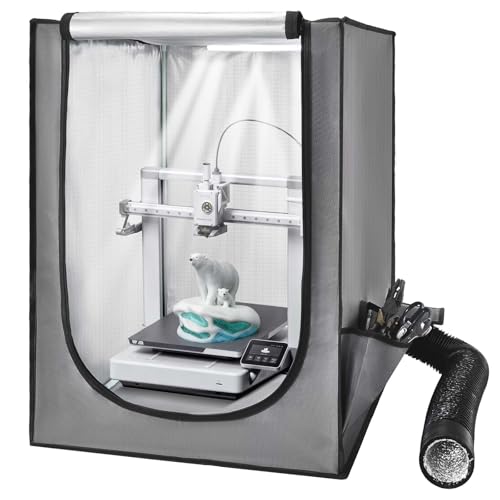
- Ventilation helps remove fumes and dust
- Constant-temperature design supports consistent prints
- Window and LED improve print visibility
Best For: Small LCD resin printers needing ventilation and enclosure protection
Shared-Space Choice
ELEGOO Resin Printer Enclosure Kit

- Exhaust fan and duct help control resin odor
- Protects prints from dust and debris
- Foldable design with rigid metal frame
Best For: Desktop printing in shared indoor workspaces
High-Capacity Setup
Large Dual-Printer Resin Enclosure Tent

- Fits two printers or a printer and wash station
- Adjustable fan with outdoor exhaust hose
- Windows and LED support print monitoring
Best For: Multi-machine resin-printing workspaces
Large-Capacity Enclosure – YOOPAI Dual-Printer Resin Enclosure
For makers comparing enclosed resin printers setups, the YOOPAI Large Resin 3D Printer Enclosure is designed to house both a resin printer and curing machine. Its full enclosure, carbon filter, exhaust fan, and expandable duct help create a cleaner, more contained workspace.
Best For: Users who need room for two resin-printing devices and want visibility, dust protection, and odor-management features in one enclosure.
Pros:
- 30 × 19.7 × 28.3-inch internal space can accommodate a printer and curing machine.
- Built-in carbon filter, exhaust fans, and expandable pipes support odor and emission control.
- Large transparent window allows monitoring without opening the cover.
- Insulated interior may help maintain a steadier printing temperature.
Cons:
- Its large footprint requires careful space planning and measurement before purchase.
- Airflow can slow when exhaust passes through the activated carbon filter.
- Additional exhaust piping may be needed to increase airflow.
The YOOPAI is a practical choice when capacity matters most. Confirm the enclosure’s internal dimensions and plan the exhaust route before ordering, particularly if your workspace is compact.
High-Resolution Bundle – ELEGOO Saturn 4 Ultra 16K Printer Kit
ELEGOO Saturn 4 Ultra 16K Resin 3D Printer and ELEGOO Mercury Plus V3.0 Wash and Cure Station
Check Price On AmazonFor shoppers seeking enclosed resin printers with post-processing equipment, this ELEGOO bundle pairs the Saturn 4 Ultra 16K printer with the Mercury Plus V3.0 wash-and-cure station. It combines high-resolution printing, a heated tank, and a large-capacity cleaning and curing unit.
Best For: Resin-printing users who want a coordinated printer, washing, and curing setup rather than purchasing each component separately.
Pros:
- 16K resin printer offers a detailed 10.1-inch display and 150 mm/h stated printing speed.
- Large 8.33 × 4.66 × 8.66-inch printing area supports substantial models.
- Smart tank heating to 30°C is designed to support more consistent resin conditions.
- Mercury Plus V3.0 provides a 7.5-liter wash-and-cure capacity.
Cons:
- This is a printer-and-wash/cure bundle, not a dedicated ventilation enclosure.
- The combined equipment requires more workspace than a printer alone.
- Actual print speed and results can vary with the model and printing settings.
This bundle stands out for buyers building a complete resin workflow. Choose it if high-resolution printing and integrated washing and curing are higher priorities than built-in odor containment.
Adjustable Ventilation Pick – YOOPAI Pro Resin Printer Enclosure
Among enclosed resin printers accessories, the YOOPAI Pro enclosure is a flexible option for small and midsize machines. It combines a variable-speed fan, enlarged carbon filter, exhaust duct, insulated interior, and front monitoring window in a compact tent-style setup.
Best For: Users with compatible LCD, SLA, or DLP printers who want adjustable ventilation and an at-a-glance view of temperature and humidity.
Pros:
- 12V variable-speed fan and carbon filter support adjustable odor ventilation.
- 18.9 × 18.9 × 28.3-inch dimensions fit several popular small and midsize printers.
- Amber-tinted window allows monitoring while helping reduce ambient UV exposure.
- Front display shows temperature and humidity without opening the enclosure.
Cons:
- Compatibility and lid clearance should be verified before ordering.
- It is intended for ventilated workshops, studios, and garages rather than unventilated spaces.
- Its exhaust system requires a suitable ventilation outlet.
The YOOPAI Pro offers more control than a basic printer tent, especially when fan speed and airflow management matter. Check your printer’s dimensions, lid movement, and available exhaust path first.
Automation-Focused Printer – Creality HALOT-X1 Combo
For buyers comparing enclosed resin printers with automated material handling, the Creality HALOT-X1 Combo emphasizes resolution, speed, and resin management. Its 16K mono LCD, heated resin system, RFID recognition, and included intelligent handling features are aimed at a streamlined printing workflow.
Best For: Experienced users who want high-resolution output, a large build volume, and automated resin monitoring in a substantial desktop printer.
Pros:
- 10.1-inch 16K mono LCD delivers 14 × 19 μm pixel size and detailed prints.
- Up to 170 mm/h stated speed and 211.68 × 118.37 × 200 mm build volume support efficient production.
- Resin heating, RFID parameter recognition, laser detection, and weight monitoring add automation.
- Fixed build plate design eliminates leveling, while dual rails and lead screws support 0.01 mm positioning precision.
Cons:
- At 38 pounds, it is relatively heavy and needs a sturdy, dedicated location.
- The printer’s 16.93 × 16.54 × 21.06-inch size requires significant workspace.
- Its advanced resin-management features may be more than beginners need.
The HALOT-X1 Combo is best suited to users prioritizing automation and precision over a lightweight setup. Its substantial size and weight make workspace planning important, and a separate ventilation solution may still be needed.
Best Large-Format Pick – ANYCUBIC Photon P1 Max
For shoppers comparing enclosed resin printers for production work, the ANYCUBIC Photon P1 Max stands out with its exceptionally large build volume, heated resin tank, and automated monitoring features. It is designed to handle oversized models or high-volume batches with less hands-on supervision.
Best For: Print farms, engineering teams, and makers who need large batches or oversized resin prints.
Pros:
- Large 18.3L build volume supports oversized models and dozens of smaller parts in one batch.
- 14-inch 12K screen and LighTurbo 3.0 light engine support fine, consistent detail.
- Auto-leveling, a heated 1.9L resin tank, and AI monitoring reduce setup and print-management work.
Cons:
- Its 29.53 x 21 x 20.1-inch footprint requires substantial workspace.
- At 62.9 pounds, it is difficult to move frequently.
The Photon P1 Max is a strong choice when throughput and print size matter more than a compact desktop footprint. Its temperature control and monitoring systems are particularly useful for extended production runs.
Best Beginner-Friendly Pick – Creality HALOT-X1 Neo
The Creality HALOT-X1 Neo is a compact option among enclosed resin printers, pairing a factory pre-leveled platform with straightforward file-transfer options. Its 9K display is suited to detailed miniatures and models without demanding a large workspace.
Best For: Beginners, tabletop gamers, miniature creators, and desktop DIY makers.
Pros:
- Factory pre-leveled build platform supports a simpler out-of-box setup.
- 6.8-inch 9K LCD delivers an 18μm XY pixel size for detailed models.
- Supports USB, 2.4GHz WiFi, and Creality Cloud transfers, plus several slicer options.
Cons:
- The 153.36 x 77.76 x 160 mm build volume is suited to smaller projects rather than large objects.
- Its AI 2D-to-3D generation feature can take up to 3.5 hours.
Choose the HALOT-X1 Neo if easy setup and detailed desktop-scale printing are your priorities. It offers a practical entry point for new resin users while retaining flexible connectivity for more experienced makers.
Best Premium Large-Format Pick – ELEGOO Jupiter 2
The ELEGOO Jupiter 2 is a premium large-format choice among enclosed resin printers, combining a 302.4 x 161.98 x 300 mm build area with 16K resolution and smart resin-management features. Its enclosed design also includes monitoring, spill protection, and temperature controls for more controlled printing.
Best For: Experienced makers and production users who want large prints, high resolution, and automated workflow features.
Pros:
- Large build volume accommodates bigger objects or multiple smaller prints in one job.
- 16K resolution and a fully enclosed light source support detailed, uniform exposure.
- Smart tank heating, automated resin supply, monitoring, alarms, and power-loss recovery add convenience.
- Double doors, a viewing window, drip tray, and quick-release components support maintenance.
Cons:
- Its 27.95 x 20.08 x 19.29-inch size calls for substantial workspace.
- At 63.8 pounds, it is not easy to reposition.
- The extensive feature set may be more than casual users need.
Jupiter 2 is best suited to users who will take advantage of its large capacity and automation. It is a substantial investment in space and equipment, but the combination of 16K detail, resin management, and safety-oriented monitoring is compelling for demanding workflows.
Practical Protection – VEVOR Ventilated Resin Printer Enclosure
For shoppers comparing enclosed resin printers setups, the VEVOR enclosure emphasizes ventilation, temperature stability, and visibility. Its 21.65 x 25.59 x 29.53-inch interior is designed for small printers and many LCD resin models, but measuring your equipment first is important.
Best For: Resin-printing workspaces that need a ventilated, dust-resistant tent with integrated lighting.
Pros:
- Ventilation system helps expel smoke, dust, gases, and particles after printing.
- Constant-temperature design may help reduce warping, cracking, clogging, and jamming.
- Flame-retardant construction and a closed structure add protective coverage.
- Transparent window and LED lighting make print monitoring easier.
Cons:
- Compatibility depends on the printer’s dimensions despite the broad model support.
- The enclosure is intended for smaller printers and may not fit larger equipment.
Choose this VEVOR model when temperature consistency and straightforward monitoring matter. Confirm your printer measurements before ordering to avoid fit issues.
Shared-Space Choice – ELEGOO Resin Printer Enclosure Kit
Among enclosed resin printers accessories, the ELEGOO enclosure kit focuses on odor control, cleaner printing, and use in shared indoor spaces. The rigid metal frame and foldable design balance stability with easier storage.
Best For: Desktop resin-printing setups in shared spaces where odor, dust, and workspace protection are priorities.
Pros:
- Included exhaust fan and duct help keep resin odors under better control.
- Helps protect printers and models from dust, debris, and other contaminants.
- Enclosure can help maintain more stable temperatures in colder environments.
- Rigid metal frame, foldable construction, and clear viewing window add convenience.
Cons:
- The supplied notes do not specify compatibility with particular printer models.
- Odor reduction is not the same as complete odor elimination.
This kit is a practical option for indoor desktop printing, especially where a cleaner and more contained setup is useful. Check the 23.62 x 19.29 x 28.35-inch dimensions against your printer and workspace.
High-Capacity Setup – Large Dual-Printer Resin Enclosure Tent
For shoppers comparing enclosed resin printers tents, this large model stands out for its dual-machine capacity. It can hold two resin printers or one printer with a wash-and-cure station, while adjustable ventilation, LED lighting, and clear windows support a more organized setup.
Best For: Users running two resin printers or combining one printer with a wash-and-cure station.
Pros:
- Large 33 x 29 x 23.5-inch design accommodates two printers or a printer and wash/cure station.
- Adjustable fan and 1.5-meter exhaust hose support active outdoor ventilation.
- Two high-transparency windows and included LED lighting aid monitoring.
- 600D Oxford fabric and stainless steel frame provide dust, splash, flame, and structural protection.
Cons:
- Its larger footprint requires more workspace than compact enclosures.
- The printer and wash/cure station are not included.
- The LED light requires a 5V power plug; incorrect voltage can damage it.
This enclosure is best suited to higher-capacity workflows rather than a single compact printer. Plan the ventilation route and verify both machine dimensions before purchase.
How We Picked These Enclosed Resin Printers
We selected products across the main categories buyers consider when building an enclosed resin-printing setup: complete printers, large-format models, printer bundles, and standalone enclosures. Our evaluation focuses on practical factors including enclosure compatibility, ventilation, access, lighting, temperature management, build volume, resolution, workflow features, and overall setup value.
Because an enclosure is not the same as a sealed industrial air-filtration system, buyers should treat ventilation as part of a broader safety plan. Resin printing should still be done in a suitable workspace with manufacturer-recommended handling, protective equipment, and appropriate waste disposal.
Quick Comparison
| Best For | Recommended Type | Key Advantage |
|---|---|---|
| Large or tall prints | Large-format printer or tent | More usable interior space |
| High-detail models | 16K resin printer | Fine layer and surface detail |
| Lower-cost enclosure upgrades | Compatible enclosure kit | Works with an existing printer |
| Odor and airflow management | Ventilated enclosure | Helps direct fumes away from the workspace |
| Hands-off workflow | Printer with Wi-Fi or smart features | Remote monitoring and easier control |
Key Buying Factors for Enclosed Resin Printers
Printer Size and Interior Clearance
Measure the printer itself, then allow additional room for the power supply, cables, resin handling, ventilation ducting, and door access. A tight enclosure can restrict maintenance and make spills harder to clean. Large-format models such as the ELEGOO Jupiter 2 and ANYCUBIC Photon P1 Max require especially careful dimension checks.
Ventilation and Filtration
Look for an enclosure with a compatible exhaust port, adjustable fan control, and ducting that can connect to a safe exhaust route. LED lighting is convenient, but it should not be treated as a substitute for ventilation. Confirm whether a listed kit includes the fan, duct, filter, and mounting hardware or only the fabric enclosure.
Temperature and Workspace Conditions
Resin performance can change with room temperature and drafts. A protective enclosure may help create more consistent conditions, while smart tank heating on a printer can offer more direct control. Avoid assuming that every enclosure actively heats the chamber; many are passive protective covers.
Resolution, Speed, and Workflow Features
Higher LCD resolution can improve detail, but it does not guarantee better results without suitable resin, exposure settings, leveling, and post-processing. Features such as pre-leveled platforms, Wi-Fi, AI-assisted model tools, wash-and-cure bundles, and larger build plates can have more day-to-day impact than resolution alone.
Cleaning and Maintenance
Choose wipe-clean materials with convenient front access and enough visibility to inspect a print. Check how easily you can remove the resin vat, replace the FEP film, clean spills, and route cables without dismantling the enclosure.
Who Should Buy Which Enclosed Resin Printers?
Choose a complete printer bundle if you are starting from scratch and want a coordinated setup, especially when a wash-and-cure station is included. The ELEGOO Saturn 4 Ultra bundle is suited to buyers prioritizing a ready-to-use workflow.
Choose a large-format printer if you regularly produce oversized models, multiple parts, or prototypes in fewer batches. Verify that your intended enclosure has sufficient clearance before buying.
Choose a standalone ventilated enclosure if you already own a compatible resin printer and mainly need better organization, dust protection, lighting, or airflow management. YOOPAI, VEVOR, ELEGOO, and similar enclosure options can be practical upgrades when their dimensions and ports match your machine.
Choose a high-resolution model if miniature detail, sharp text, or smooth small features matter most. Pair it with the right resin profile and a stable, clean environment to realize the benefit.