Finding the best label printer for a Mac means looking beyond print speed. Compatibility, wireless setup, label costs, and the types of labels you use every day can make a bigger difference.
We selected 10 practical options for shipping, organization, retail, and small-business workflows, with both USB and wireless models represented.
Best 10 Label Printers for Mac Picks for 2026
Best All-Around Shipping Choice
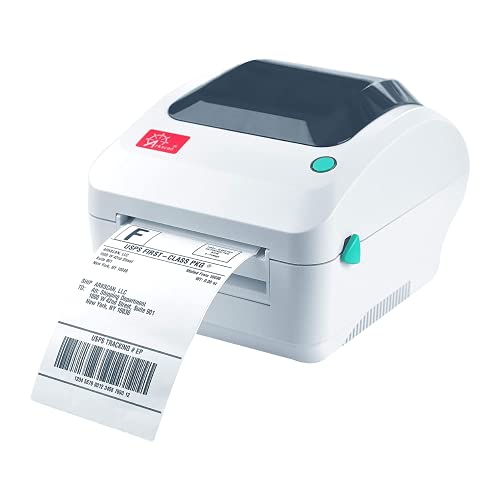
- USB Mac compatibility and broad marketplace support
- Prints roll or fanfold labels up to 5 inches per second
- Supports shipping, barcode, product, and warehouse labels
Best For: Multi-platform sellers printing varied label types
Best Wireless Office Label Printer

- USB and Wi-Fi connectivity for Mac and mobile devices
- Prints up to 110 address labels per minute
- Supports black-and-red labels with compatible DK media
Best For: Fast office and address labeling
Best Wireless 4x6 Option

- AirPrint, Wi-Fi, and USB support for Mac and other devices
- Prints one 4x6 label per second without ink or toner
- Compatible with major marketplaces and shipping services
Best For: Wireless e-commerce shipping workflows
Best Plug-and-Play Office Pick

- Mac-compatible USB setup with Plug & Label functionality
- Prints up to 93 labels per minute at 300 dpi
- Supports black-and-red labels and continuous tape
Best For: Fast wired office and organizational labeling
Best Wireless Shipping Pick
JADENS Bluetooth Thermal Label Printer

- USB and Bluetooth support for Mac
- Ink-free 203 DPI thermal printing
- Works with common shipping platforms
Best For: Mac users printing shipping and small-business labels
Best Multi-Platform Option
Phomemo 241BT Bluetooth Label Printer

- Bluetooth and USB support for Mac
- Prints labels up to 4.6 inches wide
- Fast black-and-white thermal output
Best For: Home or business users needing broad device compatibility
Best for Two-Label Workflows
DYMO LabelWriter 450 Twin Turbo
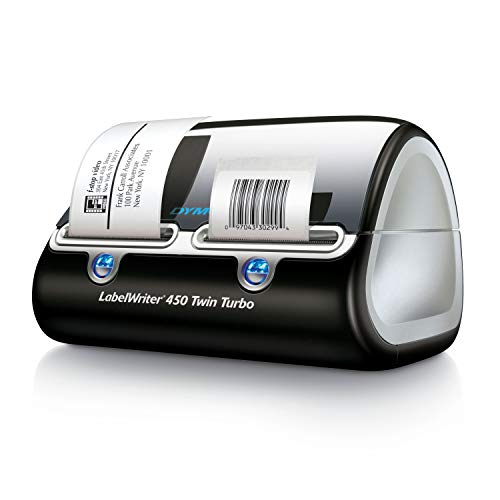
- Stores and switches between two label rolls
- Ink-free 300 DPI thermal printing
- Works with common Microsoft and Google contacts workflows
Best For: Home and office users alternating between two DYMO label types
Best Compact Mac USB Pick

- USB printing for Mac OS
- Up to 72 labels per minute
- Supports 1.54–4.1-inch labels
Best For: Mac users wanting a compact wired shipping-label printer
Best Template-Rich Mac Option

- USB and app-based macOS support
- 3,000+ templates and 5,000+ icons
- Prints labels up to 4.2 inches wide
Best For: Small businesses creating shipping and custom product labels
Best Wireless Mac Speed Pick

- Bluetooth supports macOS and M1/M2 Macs
- Up to 72 4x6 labels per minute
- Includes a 2-year manufacturer warranty
Best For: Mac users needing wireless and batch-printing flexibility
Best All-Around Shipping Choice – Arkscan 2054A for Mac
If you need label printers for Mac that can handle more than one marketplace, the Arkscan 2054A is a flexible shipping-focused option. It connects to a Mac via USB, supports common 4×6 shipping labels, and works with platforms including Amazon, eBay, Etsy, Shopify, PayPal, UPS, USPS, FedEx, and others.
Best For: Mac users printing shipping, barcode, product, and warehouse labels across multiple selling and carrier platforms.
Pros:
- Supports roll and fanfold label stock, including common 4×6 formats.
- Prints at up to 5 inches per second without ink or toner.
- Handles label widths from 0.75 to 4.25 inches and lengths up to 90 inches.
- Includes U.S.-based phone, live-chat, and remote technical support.
Cons:
- USB is the listed connection method, so it is not a wireless printer.
- The included BarTender UltraLite software is for Windows only.
The 2054A stands out for broad platform support and flexible media handling. Its Mac connectivity is straightforward, while the Windows-only design software is a limitation if you plan to create custom labels directly on macOS.
Best Wireless Office Label Printer – Brother QL-810W
The Brother QL-810W is a strong pick among label printers for Mac when wireless access and fast address-label production matter. It supports Mac operating systems listed in the specifications, connects by USB or Wi-Fi, and can print black-and-red labels with compatible DK media.
Best For: Offices and small businesses that need fast address, package, file-folder, name-badge, or postage labels from Macs and mobile devices.
Pros:
- Offers both USB and Wi-Fi connectivity for shared or mobile printing.
- Prints up to 110 standard address labels per minute at 300 dpi.
- Supports black-and-red printing with the DK 2251 roll.
- Works with AirPrint and Brother iPrint&Label on compatible mobile devices.
Cons:
- It uses Brother DK label rolls, limiting media choices compared with printers that accept broader stock.
- The 2.4-inch maximum paper width is narrower than dedicated 4×6 shipping-label printers.
Choose the QL-810W if convenient wireless access and rapid smaller-format labeling are priorities. It is less suited to standard 4×6 shipping workflows, but its speed, 300-dpi output, and black-and-red capability add versatility for office labeling.
Best Wireless 4×6 Option – Rollo Wireless for Mac
For shoppers comparing label printers for Mac, the Rollo Wireless combines AirPrint support with Wi-Fi and USB connectivity. It is designed around 4×6 shipping labels, works with Mac, iPhone, iPad, Windows, Chromebook, Linux, and Android devices, and does not require ink or toner.
Best For: E-commerce sellers who want wireless Mac printing for shipping labels across major carriers, marketplaces, and shipping platforms.
Pros:
- Uses AirPrint for direct printing from a Mac, iPhone, or iPad.
- Prints one 4×6 label per second at 203 dpi using direct thermal technology.
- Works with major platforms including Amazon, Shopify, Etsy, eBay, UPS, USPS, and FedEx.
- Accepts labels from 1.57 to 4.1 inches wide for custom label uses.
Cons:
- Its 203-dpi resolution is lower than the 300-dpi Brother models in this roundup.
- The included one-year manufacturer warranty is relatively limited.
The Rollo Wireless is a practical match for Mac-based shipping workflows that benefit from cable-free printing. Its 4×6 focus, AirPrint support, and broad platform compatibility make it especially convenient for online sellers, while the lower resolution is worth considering for very detailed labels.
Best Plug-and-Play Office Pick – Brother QL-800
The Brother QL-800 is a straightforward choice among label printers for Mac if you value quick USB setup and compact office labeling. Its Plug & Label functionality supports Windows and Mac systems, while 300-dpi output and optional black-and-red printing suit professional labels.
Best For: Mac users who need fast USB labeling for packages, file folders, name badges, postage, and office organization.
Pros:
- Supports Windows and Mac systems through USB connectivity.
- Prints up to 93 labels per minute at 300 dpi.
- Can produce black-and-red labels with compatible DK-2251 media.
- Includes an auto-cutter and supports pre-sized labels plus continuous tape up to 3 feet.
Cons:
- USB is the listed connectivity option, with no Wi-Fi capability noted.
- Its maximum media width is about 2.4 inches, so it is not intended for standard 4×6 shipping labels.
The QL-800 favors simple, high-speed desktop labeling over wireless shipping workflows. It is a good fit for Mac users who want a compact USB printer with sharp output and flexible office-label applications, but larger shipping labels require a different model.
Best Wireless Shipping Pick – JADENS Bluetooth Thermal Label Printer
The JADENS JD268BT is a practical option among label printers for Mac if you want wireless or USB connectivity for shipping and organization tasks. It supports Mac OS 10.9 and newer through USB, while Mac users can also print via Bluetooth. Its 203 DPI direct-thermal design avoids ink and toner.
Best For: Mac users printing shipping, warehouse, marketplace, or small-business labels.
Pros:
- Supports both Bluetooth and USB printing with Mac devices.
- Prints without ink or toner and works with roll or fanfold labels.
- Handles label widths from 1.57 to 4.1 inches and supports common shipping platforms.
- Includes setup materials and a one-year limited warranty.
Cons:
- Print resolution is limited to 203 DPI.
- Label calibration is required when changing label types.
- Bluetooth printing from Android and iOS requires the JADENS app.
Choose the JADENS if straightforward Mac compatibility and flexible shipping-label support matter more than high-resolution output. USB offers a direct connection, while Bluetooth adds convenience for compatible Mac setups.
Best Multi-Platform Option – Phomemo 241BT Bluetooth Label Printer
The Phomemo 241BT is a flexible choice among label printers for Mac, with Bluetooth and USB connection options. Mac users download the driver and can print through Bluetooth, while USB also supports Mac OS, Windows, Chrome OS, and Linux. It prints black-and-white labels up to 4.6 inches wide.
Best For: Home or business users who need broad platform support and fast 4×6-style label printing.
Pros:
- Supports Mac through Bluetooth or USB connections.
- Works with label widths from 1 to 4.6 inches.
- Prints text, barcodes, QR codes, forms, and templates.
- Direct thermal printing eliminates the need for ink or toner, with speeds up to 150 mm/s.
Cons:
- Printing is black and white only.
- Mac and PC users need to download the appropriate driver.
- The manufacturer recommends genuine Phomemo thermal label paper for consistent results.
The Phomemo stands out when compatibility and speed are priorities. Its wide label support and marketplace compatibility make it suitable for shipping workflows, while Bluetooth adds flexibility for Mac users who prefer a wireless setup.
Best for Two-Label Workflows – DYMO LabelWriter 450 Twin Turbo
The DYMO LabelWriter 450 Twin Turbo is a USB label printer for PC-focused home and office organization. Its two-roll design lets you switch between label types without replacing rolls, and 300 DPI direct thermal printing avoids ink and toner. Check current software and operating-system support if Mac compatibility is essential.
Best For: Home and office users who regularly alternate between two DYMO label types.
Pros:
- Holds two rolls and switches between them for a more efficient workflow.
- Direct thermal printing eliminates ink and toner costs.
- Supports label creation from Microsoft Word, Excel, Outlook, and Google Contacts.
- 300 DPI resolution is suited to crisp monochrome labels and barcodes.
Cons:
- Connectivity is USB rather than Bluetooth or Wi-Fi.
- It is designed for authentic DYMO LabelWriter labels for best performance.
- The supplied details list PC compatibility, so Mac support should be verified before purchase.
The Twin Turbo is most compelling for established DYMO workflows where two label rolls save time. It is less flexible than wireless models, and Mac shoppers should confirm current driver support before choosing it for a Mac setup.
Best Compact Mac USB Pick – Nelko PL70E-BT
If you need label printers for Mac, the Nelko PL70E-BT is a compact thermal option designed for macOS USB printing. It supports 4×6 shipping labels along with several narrower formats, prints without ink or toner, and works with major shipping platforms after labels are saved as PDFs.
Best For: Mac users who want a small, straightforward USB printer for shipping and product labels.
Pros:
- Supports Mac OS through USB and includes a USB-C adapter for Mac.
- Prints up to 72 4×6 labels per minute at 203 DPI.
- Handles roll and fanfold labels from 1.54 to 4.1 inches wide.
- Compact design and no-ink thermal printing help save desk space and supply costs.
Cons:
- Mac OS printing works through USB rather than Bluetooth.
- Shipping-platform labels must be saved as PDFs and uploaded to the Nelko app.
The Nelko is a practical choice when reliable wired Mac connectivity matters more than wireless flexibility. Its broad label-size support also makes it useful beyond standard shipping labels.
Best Template-Rich Mac Option – KNAON Y813BT
For shoppers comparing label printers for Mac, the KNAON Y813BT combines macOS support with Bluetooth and USB connectivity. Its FlashLabel Pro app adds templates, icons, and fonts, making it suitable for shipping labels as well as customized tags and small business packaging.
Best For: Small businesses that want Mac compatibility plus built-in design resources for varied label projects.
Pros:
- Supports macOS through both the FlashLabel Pro app and USB connectivity.
- Offers more than 3,000 templates, 5,000 icons, and 100 fonts in the app.
- Prints at up to 180 mm/s and supports paper widths from 1.5 to 4.2 inches.
- Works with Amazon, Etsy, Shopify, USPS, UPS, and other major platforms.
Cons:
- Bluetooth printing requires the FlashLabel Pro app rather than a direct device connection.
- Shipping labels need to be saved as PDFs and imported into the app.
The KNAON stands out for flexibility rather than simply shipping speed. Its app-based design tools are useful if you plan to print thank-you labels, barcodes, price tags, or name tags alongside mailing labels.
Best Wireless Mac Speed Pick – Hoorola BY-480BT
The Hoorola BY-480BT is one of the more flexible label printers for Mac, offering both Bluetooth and USB connections. It uses 203 DPI direct thermal printing, reaches up to 72 4×6 labels per minute, and supports macOS alongside Windows, Linux, and Chrome OS.
Best For: Mac users who want wireless convenience for lighter tasks and USB reliability for larger label batches.
Pros:
- Supports Bluetooth printing on macOS, including Apple M1 and M2 systems.
- USB connectivity is available for macOS and other major desktop operating systems.
- Prints up to 150 mm/s, or as many as 72 4×6 labels per minute.
- Includes a 2-year manufacturer warranty and lifetime technical support.
Cons:
- Bluetooth printing on mobile devices requires the Label Expert app.
- The supplied notes list a limited warranty rather than unlimited coverage.
The BY-480BT is a strong fit for users who do not want to be limited to wired Mac printing. Its dual connectivity and support for several label sizes make it suitable for both routine shipping and higher-volume workflows.
How We Picked the Best Label Printers for Mac
We focused on printers that clearly support macOS or offer Mac-friendly USB, Wi-Fi, or Bluetooth connectivity. The lineup includes dedicated 4×6 shipping-label printers, compact desktop models, and versatile label makers for address, organization, and retail labels.
We also considered setup convenience, supported label formats, printing speed, portability, software requirements, and the likely ongoing cost of compatible labels. Because product bundles and compatibility can change, verify the current macOS version, included accessories, and label specifications before ordering.
Quick Comparison
| Best For | What to Look For |
|---|---|
| Shipping labels | Direct thermal 4×6 printing, automatic label detection, and reliable wireless or USB connectivity |
| Office organization | Support for multiple label widths, easy design software, and fast everyday output |
| Small businesses | High print volume, broad platform support, and affordable replacement rolls |
| Portable use | Bluetooth connectivity, compact dimensions, and dependable battery or USB power |
| Color-coded labels | Printers that support black-and-red or other specialty media |
Key Buying Factors for Label Printers for Mac
Mac Compatibility and Connection Type
Confirm that the printer works with your version of macOS and the apps you use. USB is usually the simplest connection for one Mac, while Wi-Fi is better for shared home or office access. Bluetooth is convenient for mobile devices but may involve more setup limitations.
Label Size and Printing Method
Choose a 4×6 thermal printer if you mainly print carrier shipping labels. For folders, cables, shelves, or address labels, a model supporting several widths may be more useful. Direct thermal printers do not need ink, but they require compatible heat-sensitive labels and are generally best for short- to medium-term labeling.
Software and Workflow
Check whether the printer works with your selling platforms, shipping services, and label-design software. A model that integrates with your existing workflow can save more time than one with a higher advertised speed.
Running Costs and Maintenance
Compare replacement-label prices, roll availability, and proprietary-media requirements. Look for simple calibration, automatic label recognition, and accessible printheads. These features reduce wasted labels and make regular use easier.
Who Should Buy Which Label Printers for Mac?
Choose a dedicated 4×6 wireless model if you run an online store and need quick shipping-label output from a Mac, phone, or multiple computers. Pick a USB desktop printer if you value straightforward setup and print primarily from one workstation.
For home offices, filing, and inventory, a versatile Brother or DYMO-style label printer may be a better fit than a shipping-only device. If you move between workstations or need occasional mobile printing, consider a compact Bluetooth model. High-volume sellers should prioritize dependable connectivity, fast continuous printing, broad marketplace support, and readily available labels over the lowest upfront price.