Choosing among the best laptops for video editing means balancing processor speed, graphics performance, memory, storage, display quality, and portability. The right configuration depends on whether you edit occasional social clips, 4K projects, or demanding professional timelines.
This roundup compares ten laptops across workstation, creator, and budget-friendly categories so you can match performance and price to your editing workflow.
Best 10 Laptops for Video Editing Picks for 2026
Professional Workstation

- RTX 2000 Ada graphics with 8GB GDDR6
- 32GB CAMM RAM and 1TB NVMe SSD
- Supports up to four external 4K displays
Best For: Professional video editors and creative workstation users
Portable Apple Creator

- M5 chip with 16GB unified memory
- Light 2.71-pound design and up to 18 hours claimed battery
- Liquid Retina display with support for two external displays
Best For: Students and mobile Mac-based creators
High-Memory Workstation

- 16-core Core i9 processor up to 5GHz
- 64GB DDR5 RAM and 2TB NVMe SSD
- Dedicated RTX A2000 graphics with 4GB memory
Best For: Windows editors needing substantial RAM and storage
Upgradeable AMD Creator

- Ryzen 7 8745HS with 32GB DDR5 memory
- 1TB PCIe 4.0 SSD with upgradeable slots
- USB4, HDMI 2.1, and up to three external monitors
Best For: Students and creators wanting an upgradeable editing laptop
Best for Easy Setup

- Core i9-13950HX and 32GB CAMM RAM
- 1TB SSD with extensive workstation connectivity
- Integrated graphics limit GPU-heavy workflows
Best For: Professional creative and technical workloads
Upgradeable Creator Value
NIMO 15.6-inch AI Creator Laptop

- Ryzen 7 8745HS with Radeon 780M graphics
- USB4 supports external GPU expansion
- Upgradeable to 64GB RAM with dual SSD slots
Best For: Flexible entry-level and midrange creative work
Everyday Editing Choice
HP 15.6-inch Touchscreen Laptop
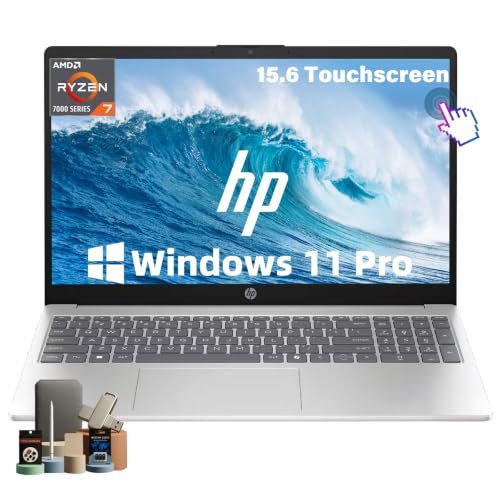
- 32GB RAM and 1TB NVMe SSD
- Ryzen 7 processor for everyday multitasking
- Integrated graphics and 45% gamut suit lighter editing
Best For: Students and casual video editors
Power Creator Pick
NIMO Ryzen 7 AI Creator Laptop

- Ryzen 7 8745HS for demanding editing and multitasking
- 32GB DDR5 RAM with 1TB PCIe 4.0 SSD
- Radeon 780M graphics and extensive monitor support
Best For: Editors and power users seeking strong integrated performance
Balanced Editing Value

- Ryzen 7 7735HS for responsive multitasking
- 16GB DDR5 RAM and 1TB PCIe 4.0 SSD
- Radeon 680M graphics for light creative work
Best For: Students and beginner creators editing lighter projects
Large-Screen Workhorse

- 17.3-inch Full HD display for spacious editing workflows
- 32GB RAM and 1TB SSD for multitasking and files
- Upgradeable memory and storage with Ryzen 5 6600H
Best For: Home users and students prioritizing screen space
Professional Workstation – Dell Precision 7680
For demanding laptops for video editing, the Dell Precision 7680 combines a workstation-class Core i7 processor, 32GB of DDR5 CAMM memory, a 1TB NVMe SSD, and dedicated NVIDIA RTX graphics. Its 16-inch FHD+ anti-glare display and broad port selection make it well suited to studio and office workflows.
Best For: Video editors, designers, engineers, and other professionals who need Windows workstation performance.
Pros:
- NVIDIA RTX 2000 Ada GPU with 8GB GDDR6 memory supports creative and video-editing workloads.
- 32GB DDR5 CAMM RAM and a 1TB PCIe NVMe SSD support multitasking and fast project access.
- Two Thunderbolt 4 ports, HDMI, USB ports, Ethernet, and support for up to four external 4K displays.
- Windows 11 Pro, ISV certifications, and MIL-STD-810H testing support professional use.
Cons:
- At 5.9 pounds, it is considerably less portable than an ultraportable laptop.
- The FHD+ display is listed at 45% NTSC, which may not suit color-critical finishing.
- The computer has been resealed for an SSD upgrade, with warranty coverage split between the seller and Dell.
This is a strong choice when GPU capability, expandability, and business-grade connectivity matter more than weight. Editors focused on final color grading may want to pair it with a calibrated external display.
Portable Apple Creator – MacBook Air 13-inch M5
The M5 MacBook Air is a lightweight option among laptops for video editing, offering 16GB unified memory, a 512GB SSD, a sharp Liquid Retina display, and up to 18 hours of claimed battery life. It is especially appealing for editors who prioritize portability and a quiet, flexible mobile setup.
Best For: Students, mobile creators, and Mac users editing lighter projects while traveling or working away from a desk.
Pros:
- M5 chip combines a faster CPU, next-generation GPU, and Neural Engine for creative and AI-oriented workflows.
- Light 2.71-pound design and claimed battery life of up to 18 hours support all-day mobility.
- 13.6-inch Liquid Retina display supports 1 billion colors for detailed viewing of photos and video.
- Two Thunderbolt 4 ports and support for up to two external displays provide useful desk flexibility.
Cons:
- 16GB memory and 512GB storage provide less headroom than the workstation models in this roundup.
- The 13.6-inch screen may feel restrictive for complex timelines and extended editing sessions.
- The supplied notes do not specify a dedicated GPU.
The MacBook Air is a practical travel-first editing laptop, particularly for macOS users and school or general creative work. For large footage libraries or sustained, highly demanding projects, an external drive and larger desktop display may be useful.
High-Memory Workstation – Dell Precision 7670
The renewed Dell Precision 7670 targets demanding laptops for video editing with a 16-core Core i9-12950HX processor, 64GB of DDR5 CAMM memory, a 2TB SSD, and an NVIDIA RTX A2000 GPU. Its generous memory and storage are useful for multitasking and keeping sizable project files available locally.
Best For: Editors who need abundant RAM and storage for Windows-based multitasking, photo work, and video projects.
Pros:
- 16-core Core i9 processor can boost up to 5GHz for demanding workloads.
- 64GB DDR5 RAM and a 2TB PCIe NVMe SSD provide substantial capacity for editing applications and media.
- Dedicated NVIDIA RTX A2000 graphics with 4GB GDDR6 memory supports photo and video editing.
- Windows 11 Pro includes professional features such as BitLocker and Active Directory support.
Cons:
- The 2022 model uses an older 12th-generation processor and RTX A2000 graphics.
- Its 5.8-pound chassis is better suited to desk-based work than frequent travel.
- It is renewed and includes a stated 90-day limited warranty.
This Precision 7670 stands out for editors who value memory and storage capacity over newer-generation hardware. Verify the renewed condition and warranty terms carefully if it will be used for professional production.
Upgradeable AMD Creator – NIMO 15.6-inch AI Laptop
The NIMO 15.6-inch model is a flexible pick among laptops for video editing, pairing an eight-core Ryzen 7 8745HS processor with 32GB DDR5 memory, a 1TB PCIe 4.0 SSD, and integrated Radeon 780M graphics. Its upgradeable slots, large battery, and extensive ports make it practical for creators who want room to grow.
Best For: Students, remote professionals, and creators handling 1080p work and moderate 4K editing without a dedicated GPU.
Pros:
- 45W Ryzen 7 8745HS processor has 8 cores, 16 threads, and speeds up to 4.9GHz.
- 32GB DDR5 memory and a 1TB PCIe 4.0 SSD support multitasking and fast storage.
- Dual SODIMM and dual M.2 slots allow expansion up to 64GB RAM and 4TB SSD.
- USB4, HDMI 2.1, three USB-A ports, microSD, and support for up to three external monitors improve connectivity.
Cons:
- Radeon 780M graphics are integrated rather than dedicated, limiting demanding GPU-accelerated workloads.
- The 15.6-inch display is FHD, so it offers less workspace than a higher-resolution editing panel.
- The claimed battery figures vary by workload, with heavy gaming listed at about 2.5 hours.
The NIMO offers an appealing balance of processing power, upgradeability, and connectivity for everyday editing and creator tasks. Choose a dedicated-GPU workstation instead if frequent complex 4K timelines, effects, or 3D work are central to your workflow.
Best for Easy Setup – Dell Precision 7680
For demanding laptops for video editing, the Dell Precision 7680 emphasizes workstation-class performance, expandability, and professional connectivity. Its Core i9 processor, 32GB of CAMM memory, and 1TB SSD are well suited to complex creative workflows, though the integrated graphics are worth considering before choosing it for GPU-intensive editing.
Best For: Professionals handling video editing, CAD, 3D rendering, engineering, and other demanding workloads.
Pros:
- Powerful Intel Core i9-13950HX processor with speeds up to 5.5GHz.
- 32GB DDR5 CAMM RAM and a 1TB PCIe NVMe SSD support substantial multitasking and media storage.
- Two Thunderbolt 4 ports, HDMI, Ethernet, USB-A, and USB-C support flexible workstation setups.
- Supports up to three external 4K monitors at 60Hz without a docking station.
Cons:
- Uses integrated Intel UHD Graphics rather than a dedicated GPU.
- The FHD+ display may be less appealing for editors seeking a higher-resolution or wider-gamut panel.
- The computer was resealed for an SSD upgrade, with separate warranty coverage described in the listing.
The Precision 7680 is a strong fit when CPU performance, ports, expandability, and professional durability matter most. Editors who rely heavily on GPU acceleration should verify software requirements and workflow compatibility first.
Upgradeable Creator Value – NIMO 15.6-inch AI Creator Laptop
The NIMO is a flexible option among laptops for video editing, pairing an AMD Ryzen 7 processor with Radeon 780M integrated graphics, a 1TB PCIe 4.0 SSD, and USB4 expansion. It is designed for everyday creative work and 1080p-focused use, with room to add memory, storage, or even an external GPU later.
Best For: Creators who want portable editing capability, upgrade flexibility, and a path to expanded graphics performance.
Pros:
- Ryzen 7 8745HS and RDNA 3 Radeon 780M graphics support mainstream creative software and 3D work.
- USB4 enables connection to an external GPU for additional performance potential.
- Upgradeable RAM supports up to 64GB, and dual SSD slots allow added storage.
- 1TB PCIe 4.0 SSD provides useful space for media files and fast program loading.
Cons:
- Includes 16GB of RAM initially, which may be limiting for larger editing projects.
- Integrated graphics are less capable than a dedicated GPU for demanding effects and rendering.
- The supplied notes do not specify display color-gamut coverage or professional color accuracy.
The NIMO stands out for its upgrade path and USB4 expandability. It makes the most sense for editors starting with 1080p work or those comfortable adding memory, storage, or an external GPU as their projects grow.
Everyday Editing Choice – HP 15.6-inch Touchscreen Laptop
The HP 15.6-inch touchscreen is a practical choice for lighter laptops for video editing and general productivity. Its 32GB of RAM and 1TB SSD support multitasking and file storage, while the Ryzen 7 processor handles everyday applications; however, integrated Radeon graphics and a 45% color-gamut display make it less suited to advanced professional editing.
Best For: Students, remote workers, and casual creators editing simpler projects while also managing office and school tasks.
Pros:
- 32GB RAM and a 1TB NVMe SSD provide ample multitasking headroom and storage.
- Eight-core, 16-thread Ryzen 7 7730U processor supports demanding everyday multitasking.
- 15.6-inch FHD IPS touchscreen offers clear 1920×1080 visuals and touch control.
- Lightweight 3.52-pound design, privacy-shutter camera, numeric keypad, and Windows 11 Pro suit mobile productivity.
Cons:
- Integrated Radeon graphics are not intended for demanding GPU-accelerated editing.
- The listed 45% color gamut is a limitation for color-critical video work.
- 60Hz FHD resolution provides less workspace than higher-resolution creator displays.
The HP offers strong memory and storage for the price-conscious multitasker, but its display and integrated graphics point toward basic editing rather than professional color grading or complex effects work.
Power Creator Pick – NIMO Ryzen 7 AI Creator Laptop
For shoppers comparing laptops for video editing, this NIMO model stands out with an 8-core Ryzen 7 8745HS processor, 32GB of DDR5 memory, and integrated Radeon 780M graphics. It is a strong fit for 4K editing, demanding multitasking, and creator workflows that benefit from upgradeable hardware.
Best For: Video editors, software engineers, and power users who want substantial memory, fast storage, and strong integrated graphics without a dedicated-GPU laptop.
Pros:
- Ryzen 7 8745HS supports demanding multitasking and 4K video-editing workloads.
- 32GB DDR5 RAM and a 1TB PCIe 4.0 SSD provide generous starting capacity.
- Radeon 780M graphics support smooth visual work and faster Premiere Pro exports.
- USB4, HDMI 2.1, multiple USB ports, and support for up to three external monitors add flexibility.
Cons:
- The 15.6-inch display is Full HD rather than a higher-resolution editing panel.
- Integrated graphics may be less suitable for especially demanding 3D or GPU-heavy projects than a dedicated GPU.
- Heavy workloads can reduce the stated battery performance compared with office use.
With its powerful processor, 32GB memory, upgradeable design, and creator-friendly connectivity, this is the most performance-oriented option in the group. Editors who prioritize portability and battery life over a dedicated GPU should find it a capable everyday workstation.
Balanced Editing Value – NIMO Ryzen 7 16GB Laptop
This NIMO is a practical choice among laptops for video editing when you want a capable processor, fast storage, and a reasonable everyday configuration. Its Ryzen 7 7735HS and Radeon 680M graphics are suited to light creative work, media tasks, and multitasking, though it is less equipped than the 32GB model for heavier editing projects.
Best For: Students, professionals, and beginner creators handling light video editing, photo work, office tasks, and large browser or application workloads.
Pros:
- Ryzen 7 7735HS offers useful performance headroom for multitasking and creative apps.
- 16GB DDR5 memory and a 1TB PCIe 4.0 SSD balance responsiveness and storage capacity.
- Radeon 680M graphics are suitable for light creation, media playback, and visual productivity.
- Two USB-C ports, HDMI, three USB-A ports, and a 2-year warranty improve everyday practicality.
Cons:
- 16GB RAM provides less headroom for complex timelines and heavier editing than 32GB configurations.
- Integrated Radeon 680M graphics are better suited to light creation than intensive GPU workloads.
- Confirmed notes do not provide exact runtime figures for the 53.58Wh battery.
This model makes sense for buyers who want a responsive general-purpose laptop that can also handle entry-level or light video editing. It offers a useful mix of processing power, storage, ports, and warranty coverage without positioning itself as a dedicated professional editing machine.
Large-Screen Workhorse – NIMO 17.3-Inch Ryzen 5 Laptop
For shoppers who prefer a spacious screen, this 17.3-inch NIMO offers a comfortable workspace for video editing basics, media handling, and split-screen productivity. The Ryzen 5 6600H, 32GB of RAM, and 1TB SSD make it well suited to multitasking, while its integrated Radeon 660M graphics point toward everyday rather than intensive professional editing.
Best For: Home-office users, students, and creators who value a large Full HD display, abundant memory, and comfortable multitasking.
Pros:
- 17.3-inch Full HD display gives timelines, spreadsheets, and split-screen work more room.
- 32GB RAM and a 1TB SSD support large files and everyday multitasking.
- Ryzen 5 6600H provides stronger sustained performance than many entry-level thin-and-light CPUs.
- Memory and storage can be upgraded up to 64GB RAM and 4TB SSD according to the supplied specifications.
Cons:
- Radeon 660M integrated graphics are better suited to everyday visual work and light editing than demanding projects.
- The 17.3-inch format may be less convenient for frequent travel than a smaller laptop.
- The 53.58Wh battery has less stated capacity than the 75Wh battery in the Ryzen 7 creator model.
The large display and 32GB memory make this a comfortable choice for editing short videos, organizing media, and managing several applications at once. Choose it when screen area matters more than maximum graphics performance or portability.
How We Picked These Laptops for Video Editing
We focused on the hardware that most directly affects editing: CPU performance for timeline work and exports, dedicated GPU capability for effects and accelerated encoding, sufficient RAM for multitasking, and fast SSD storage for media and applications. We also considered screen size, resolution, portability, and configuration value.
The selection includes high-performance Dell Precision workstations, Apple’s efficient MacBook Air platform, and several AMD-based creator laptops. Because specifications vary substantially, buyers should verify the exact display, graphics hardware, ports, cooling design, and operating-system compatibility before ordering.
Quick Comparison
| Best For | Recommended Type | What to Prioritize |
|---|---|---|
| Professional 4K and effects-heavy work | Dell Precision workstation | High-core-count CPU, dedicated RTX graphics, 32GB or more RAM |
| Portable editing and everyday creativity | MacBook Air with M5 | Battery life, unified memory, quiet operation, software compatibility |
| 1080p editing and school projects | AMD creator laptop | 16GB to 32GB RAM, 1TB SSD, strong integrated graphics |
| Large timelines and media libraries | Workstation with 2TB SSD | Storage capacity, sustained cooling, upgrade options |
Key Buying Factors for Laptops for Video Editing
Processor and Sustained Performance
Editing software benefits from both fast single-core performance and multiple cores. A high-end Intel Core i9 or comparable Ryzen processor is useful for complex timelines, background rendering, and exports. Thin laptops may be portable but can reduce performance under prolonged workloads because of heat and power limits.
Graphics Processing
A dedicated NVIDIA RTX GPU is the safer choice for GPU-accelerated effects, color work, 3D elements, and demanding 4K projects. Integrated graphics can handle basic editing and many 1080p workflows, but they offer less headroom for advanced effects and high-resolution footage.
Memory and Storage
Choose at least 16GB of RAM for basic editing; 32GB is a better target for 4K footage, large projects, and multitasking. A 1TB SSD provides a practical starting point, while 2TB is more comfortable for active project files. External SSD storage is still useful for archiving and backups.
Display, Ports, and Compatibility
A sharp, bright display makes timeline and color work easier, but resolution alone does not guarantee accurate color. Check color coverage and calibration when grading matters. Also confirm USB-C, USB-A, HDMI, card-reader, and external-monitor support. Make sure the laptop runs your preferred editor and plug-ins.
Who Should Buy Which Laptops for Video Editing?
Choose a Dell Precision workstation if reliability, sustained performance, dedicated graphics, and professional 4K workflows matter most. These systems are the strongest fit for editors working with effects, multicamera footage, or large timelines.
Choose the MacBook Air if portability, battery efficiency, and a quiet mobile setup are priorities. It suits lightweight to moderate editing, provided your software and accessories work well with macOS and the available memory and storage meet your needs.
Choose an AMD-based NIMO or HP laptop for budget-conscious 1080p editing, coursework, social content, and general productivity. Prefer 32GB configurations when possible, and plan on external storage if your projects use substantial source footage.