The best NAS enclosures for PC make it easier to build, expand, and manage reliable local storage without committing to a complete prebuilt server. The right choice depends on whether you need a simple backup device, a flexible DIY NAS chassis, or a high-capacity rackmount system.
We selected 10 options spanning USB-C DAS enclosures, hot-swap cages, desktop NAS cases, and multi-drive server chassis. Use the guide below to match drive capacity, connectivity, cooling, and form factor to your setup.
Best 10 Nas Enclosures for PC Picks for 2026
Easy Personal Storage

- Two-bay storage for up to 64TB
- Automatic cross-device backups
- AI photo organization and privacy features
Best For: Beginners and personal backup users
High-Capacity Rackmount
Rosewill RSV-L4500U 4U Server Chassis
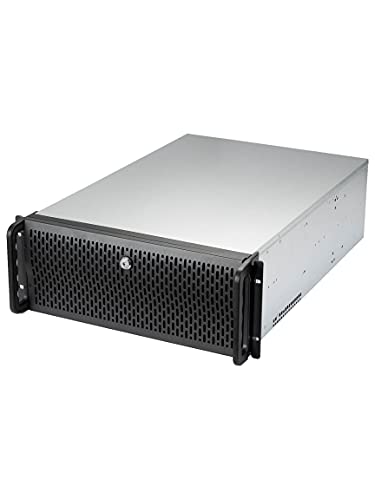
- 15 internal 3.5-inch drive bays
- E-ATX support with PCI expansion
- Multiple pre-installed cooling fans
Best For: Custom rackmount NAS and server builds
Fast Direct Storage
SABRENT DS-SC5B 5-Bay USB-C DAS

- Five trayless 3.5-inch drive bays
- 10Gbps USB-C direct-attached storage
- Hot-swap design with temperature-controlled cooling
Best For: Local multi-drive storage without network NAS features
DIY PC NAS Platform
DARKROCK Classico Storage Master

- Supports up to 13 hard drives
- Fits ATX, Micro-ATX, and Mini-ITX boards
- Supports 360mm radiators and mesh airflow
Best For: Custom full-tower NAS and storage PC builds
Best Hot-Swap Drive Cage

- Converts 3 x 5.25-inch bays to 4 drive bays
- Supports SATA hot-swapping and SAS 6Gbps
- Includes a rear 120mm exhaust fan
Best For: Internal NAS-style PC builds needing hot-swappable drives
Best Rackmount NAS Chassis

- Supports Micro-ATX and Mini-ITX boards
- Provides up to seven 3.5-inch drive bays
- Fits standard ATX power supplies
Best For: Shallow rackmount DIY NAS and home-server builds
Best External 4-Bay Enclosure

- Holds four 3.5-inch or 2.5-inch SATA drives
- Uses USB-C 3.2 with up to 10Gbps transfer rates
- Adds hot-swap bays, cooling fans, and HDMI output
Best For: External multi-drive storage for desktops and laptops
Flexible 8-Bay Build

- Supports 8 HDDs plus 2 SSDs
- Fits MATX, uATX, and ITX boards
- Flexible PSU and drive layouts
Best For: DIY builders needing high drive capacity
Simple External Expansion
CENMATE 4-Bay USB DAS Enclosure

- Holds four 2.5- or 3.5-inch SATA drives
- Tool-free hot-swappable design
- USB 3.0 with USB-A and USB-C cables
Best For: Direct-attached storage expansion for PCs and laptops
Easy Personal Storage – UGREEN NAS DH2300
For beginners comparing NAS enclosures for PC use, the UGREEN NAS DH2300 is a straightforward two-bay option for private file storage, photo backup, and personal entertainment. It includes 4GB of RAM, a 1GbE port, automatic backups across Windows, iOS, Android, and macOS, and support for up to 64TB with drives installed separately.
Best For: Beginners and personal users who want simple network storage and cross-device backups.
Pros:
- Two-bay design supports up to 64TB of storage with compatible drives.
- Automatic backups support phones, computers, tablets, and multiple operating systems.
- AI photo organization can tag faces, locations, text, and objects.
- Includes security features such as RAID modes, two-factor authentication, permissions, and encrypted transfers.
Cons:
- Drives are not included.
- Does not support Docker or virtual machines.
- Wi-Fi requires an external USB adapter; wired Ethernet is recommended.
The DH2300 is focused on easy personal storage rather than advanced server workloads. Its two bays, photo tools, and broad backup support make it a practical starting point for users moving away from cloud storage or scattered external drives.
High-Capacity Rackmount – Rosewill RSV-L4500U 4U Server Chassis
The Rosewill RSV-L4500U is a large 4U rackmount chassis for builders who need many internal drives. Among NAS enclosures for PC projects, it stands out with 15 internal 3.5-inch bays, E-ATX compatibility, seven PCI expansion slots, and extensive pre-installed cooling.
Best For: Home-lab builders and server users assembling a high-capacity rackmount storage system.
Pros:
- Provides 15 internal 3.5-inch HDD bays.
- Supports E-ATX motherboards and offers multiple PCI expansion slots.
- Eight listed cooling fans provide substantial airflow for drives and components.
- Front status LEDs, two USB 3.0 ports, and a locking front panel add practical utility.
Cons:
- Its 4U format and 31-inch depth require substantial rack or equipment space.
- The chassis weighs 31.1 pounds before components are installed.
- It is a case rather than a complete NAS system, so the motherboard, storage, and other components must be supplied separately.
This chassis is best suited to a custom server build where drive capacity and expandability matter more than compact size. Verify rack depth, power-supply requirements, and motherboard fit before purchasing.
Fast Direct Storage – SABRENT DS-SC5B 5-Bay USB-C DAS
The SABRENT DS-SC5B is a five-bay USB-C DAS dock rather than a network-attached NAS. For users considering NAS enclosures for PC storage, it offers a simpler direct-attached approach with five trayless 3.5-inch SATA bays, 10Gbps USB-C connectivity, and support for up to 100TB across installed drives.
Best For: Windows, macOS, and Linux users who need expandable local storage connected directly to one computer.
Pros:
- Holds up to five 3.5-inch SATA HDDs or SSDs, with a stated capacity up to 100TB.
- 10Gbps USB-C connection supports fast direct-attached transfers.
- Trayless hot-swap design provides tool-free drive insertion and per-bay power switches.
- PWM-controlled 120mm cooling fan adjusts airflow as drive temperatures rise.
Cons:
- It is DAS, not a NAS, so it connects directly to a computer rather than a network.
- It does not provide hardware RAID; drives mount individually in JBOD style.
- Drives are not included.
The DS-SC5B is a strong fit when direct USB-C access is more important than network sharing. Its independent bays and hot-swap design offer flexibility, but users specifically seeking remote network access or built-in RAID should choose a dedicated NAS instead.
DIY PC NAS Platform – DARKROCK Classico Storage Master
The DARKROCK Classico is a full-tower ATX computer case designed for storage-heavy PC builds. It is one of the more flexible NAS enclosures for PC projects, supporting up to 13 hard drives, ATX, Micro-ATX, and Mini-ITX motherboards, plus strong air- and water-cooling options.
Best For: DIY NAS builders who want a full-size PC platform with extensive drive capacity and upgrade room.
Pros:
- Supports up to 13 drives: ten 3.5-inch HDDs and three 2.5-inch SSDs.
- Compatible with ATX, Micro-ATX, and Mini-ITX motherboards.
- Supports a 360mm radiator on the top and front.
- Mesh panels, dust filtering, and included 120mm fans support airflow.
Cons:
- It is an empty computer case, not a complete NAS system.
- Its full-tower dimensions require considerable desk or floor space.
- Drive count, storage software, networking, and RAID capabilities depend on the components installed.
The Classico makes sense for users who want to build their own NAS around standard PC hardware. Its drive capacity and motherboard flexibility are useful for expansion, while the full-tower layout gives builders room for cooling and upgrades.
Best Hot-Swap Drive Cage – Rosewill RSV-SATA-Cage-34
If you are building a compact storage server and comparing NAS enclosures for PC use, the Rosewill RSV-SATA-Cage-34 is a practical internal hot-swap option. It converts three 5.25-inch bays into four bays for 3.5-inch or 2.5-inch SATA drives, with support for SAS 6Gbps and a rear 120mm exhaust fan.
Best For: PC builders who need four internal, hot-swappable drive bays in a compatible desktop or server chassis.
Pros:
- Converts three 5.25-inch bays into four SATA drive bays.
- Supports SATA I/II/III hot-swapping for convenient drive replacement.
- Includes a rear 120mm exhaust fan for active airflow.
- Uses durable steel and ABS construction.
Cons:
- Requires three available 5.25-inch bays and compatible mounting space.
- SAS support is limited to 6Gbps.
- Compatibility is specifically noted for select Rosewill systems.
This enclosure is best suited to an internal NAS-style build rather than a standalone external solution. Verify your case bay layout, cabling, and chassis compatibility before buying.
Best Rackmount NAS Chassis – RackChoice 2U Server Case
For buyers assembling a rack-based NAS, this RackChoice 2U chassis combines a short 15.75-inch depth with support for Micro-ATX and Mini-ITX motherboards. It provides up to seven 3.5-inch drive bays, front USB 3.0 ports, and compatibility with a standard ATX power supply.
Best For: DIY NAS and home-server builders who need a shallow 2U rackmount case with flexible motherboard and power-supply support.
Pros:
- Supports Micro-ATX and Mini-ITX motherboards.
- Offers seven 3.5-inch bays or six 3.5-inch bays plus one 2.5-inch bay.
- Accepts standard ATX power supplies with 120mm or 80mm fans.
- Includes two front-access USB 3.0 ports compatible with USB 2.0.
Cons:
- The 2U rackmount format limits internal component height.
- Its 15.75-inch depth excludes the handle and may not suit every rack.
- Cooling is described as top or side cooling, so installation airflow needs planning.
This is a strong foundation for a custom NAS enclosure for PC hardware when rack compatibility and drive capacity matter. Confirm rack clearance, motherboard dimensions, and the chosen power supply before installation.
Best External 4-Bay Enclosure – WAVLINK USB-C 10Gbps Dock
If you want NAS enclosures for PC storage expansion without installing a chassis internally, the WAVLINK four-bay enclosure connects over USB-C 3.2. It supports four 3.5-inch or 2.5-inch SATA drives, up to 128TB according to the product notes, and adds HDMI output plus an extra USB-C port.
Best For: Desktop and laptop users who want a high-capacity external multi-drive enclosure with fast USB-C connectivity.
Pros:
- Supports four 3.5-inch or 2.5-inch SATA drives.
- Offers USB-C 3.2 transfer rates up to 10Gbps.
- Includes independent power switches for each bay and hot-swappable flexibility.
- Dual fans activate automatically at 48°C for temperature-controlled cooling.
Cons:
- 2.5-inch drives require separate 2.5-to-3.5-inch mounting brackets.
- HDMI video requires a host USB-C port that supports video output and a USB-C-to-C cable.
- Drive capacity and performance depend on the connected system and installed drives.
The aluminum enclosure is a versatile choice for direct-attached storage, backups, and large media libraries. Its display features are useful extras, but buyers should confirm host USB-C video support and plan for the required drive brackets.
Flexible 8-Bay Build – AUDHEID 8-Bay NAS Chassis
For builders comparing nas enclosures for pc, this AUDHEID chassis offers substantial drive capacity with flexible motherboard and power-supply support. It accommodates up to eight 3.5-inch HDDs plus two 2.5-inch SSDs, making it suitable for a custom storage server or private cloud build.
Best For: DIY NAS builders who need eight hard-drive bays and compatibility with MATX, uATX, or ITX platforms.
Pros:
- Supports up to 8 HDDs and 2 SSDs.
- Offers three drive and power-supply configurations.
- Supports MATX, uATX, and ITX motherboards.
- Separated upper and lower layouts help organize components and airflow.
Cons:
- Diskless design requires separately purchased drives and components.
- GPU support is limited to half-height PCIe devices under 285 mm.
- No warranty is specified in the supplied details.
This is a capacity-focused enclosure with useful configuration flexibility, but buyers should verify their power supply, expansion-card, cooling, and motherboard requirements before building.
Home-Ready Storage Design – JONSBO N4 8-Drive NAS PC Case
This JONSBO N4 is one of the more distinctive nas enclosures for pc, pairing an 8-drive layout with a black walnut front accent. It supports six 3.5-inch HDDs, two 2.5-inch SSDs, Micro-ATX or ITX motherboards, and four hot-swap HDD bays for easier drive access.
Best For: Home-office, personal-server, and storage builds where compact compatibility and a furniture-friendly appearance matter.
Pros:
- Provides six 3.5-inch HDD positions and two 2.5-inch SSD positions.
- Includes four hot-swap bays and two non-hot-swap bays.
- Supports Micro-ATX and ITX motherboards with half-height expansion cards.
- Includes a built-in 120 mm fan and USB 3.2 Gen 2 Type-C front connectivity.
Cons:
- Requires an SFX power supply.
- CPU cooler height is limited to 70 mm.
- GPU length is limited to 230 mm.
The N4 balances storage access and a compact footprint with an attractive walnut exterior. Its component clearance limits make careful parts selection essential, especially for cooling and graphics hardware.
Simple External Expansion – CENMATE 4-Bay USB DAS Enclosure
Unlike a full PC chassis, this CENMATE unit is a four-bay external DAS enclosure for users seeking additional storage without building a complete NAS computer. It accepts 2.5-inch and 3.5-inch SATA HDDs or SSDs, connects over USB 3.0, and supports hot-swappable, tool-free drive installation.
Best For: Desktop and laptop users who want plug-and-play multi-drive storage rather than a RAID or network-attached system.
Pros:
- Holds four 2.5-inch or 3.5-inch SATA drives.
- Supports hot-swappable, tool-free installation.
- Includes USB-A and USB-C cables with transfer rates up to 5 Gbps.
- Aluminum construction and a built-in cooling fan help with enclosure durability and airflow.
Cons:
- It is DAS, not a NAS, and does not provide RAID functionality.
- Fan noise is rated around 40–50 dB.
- Requires its included 12V power adapter and a host computer connection.
This is a practical choice for direct-attached storage and backup expansion, but it should not be selected by buyers specifically needing independent network access or built-in RAID.
How We Picked the Best Nas Enclosures for PC
We compared these enclosures by the storage flexibility they offer, drive compatibility, connection speed, cooling design, installation convenience, and overall fit for common PC-based NAS projects. We also considered whether each product is a complete network-capable NAS, a USB-attached direct storage enclosure, or a bare chassis that requires a motherboard, processor, power supply, and operating system.
That distinction matters. A prebuilt NAS can be easier to configure, while a chassis or DAS enclosure may provide better upgrade potential or lower cost for users who already have suitable hardware.
Quick Comparison
| Type | Best For | Main Advantage | Watch For |
|---|---|---|---|
| Prebuilt 2-bay NAS | Beginners and personal backups | Simple setup and phone backup features | Limited expansion |
| USB-C DAS enclosure | Fast desktop storage | Easy connection and high throughput | Not a standalone network server |
| DIY NAS case | Custom PC builds | Choice of components and software | Requires compatible hardware |
| Hot-swap cage | Existing tower systems | Convenient drive replacement | Uses front drive bays |
| Rackmount chassis | Labs and server racks | High drive capacity and serviceability | Noise, depth, and rack requirements |
Key Buying Factors for Nas Enclosures for PC
Drive Capacity and Compatibility
Check the number of bays and supported drive sizes before buying. Most models accept 3.5-inch hard drives, while some add 2.5-inch SSD trays. Confirm SATA or SAS support, maximum stated capacity, and whether trays or mounting hardware are included.
Connection and Network Requirements
USB 3.0 is adequate for many backups, but USB-C 10Gbps can improve transfers between a DAS enclosure and a compatible computer. A USB enclosure is not automatically a NAS: network sharing depends on the connected PC or a built-in NAS operating system.
Cooling, Noise, and Power
Multiple hard drives generate heat, so look for front-to-back airflow, replaceable fans, temperature control, or clear ventilation. Rackmount cases and high-drive-count systems can be noticeably louder than compact desktop units.
Size and Hardware Fit
For DIY builds, verify motherboard format, power-supply position, CPU cooler clearance, expansion-card space, and chassis depth. Rackmount models also need an appropriate rack, rails, or shelf.
Who Should Buy Which Nas Enclosures for PC?
Choose a compact prebuilt unit if you want straightforward backups and minimal assembly. Select a USB-C four- or five-bay enclosure if you already have a computer and need removable, high-capacity desktop storage. A hot-swap cage suits an existing tower with available 5.25-inch bays.
For a customizable home server, choose a MicroATX, Mini-ITX, or ATX NAS case based on your planned motherboard and drive count. High-capacity DIY builders should prioritize airflow and accessible trays, while home-lab and business users may prefer a rackmount chassis with the required depth, power supply compatibility, and service access.