Adding M.2 NVMe cache can make a NAS feel more responsive while preserving the capacity and value of larger SATA drives. The right enclosure depends on more than cache support, however: drive layout, networking, processor power, cooling, and software all affect real-world performance.
We compare 10 options spanning compact hybrid enclosures, all-flash systems, and expandable multi-bay NAS platforms. Use the guide below to match each design with your workload, storage goals, and budget.
Best 10 Nas Enclosures with M2 Cache Picks for 2026
Simple UniFi Expansion
Ubiquiti 4-Bay NAS with M.2 Cache
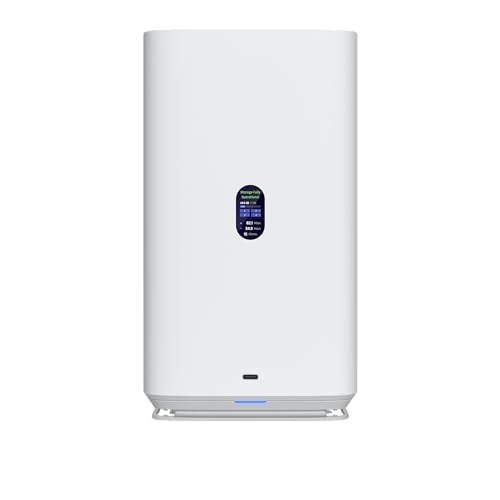
- Four 2.5/3.5-inch SATA drive bays
- Two M.2 NVMe cache slots
- 2.5GbE and USB-C connectivity
Best For: UniFi-focused home and small-office storage
High-Speed Professional Storage
TerraMaster F4-425 Plus 4-Bay NAS

- Three M.2 slots for cache or storage pools
- Dual 5GbE ports with up to 1020MB/s claimed speeds
- 16GB DDR5 and Intel N150 processor
Best For: Creative teams and demanding small-office workloads
Hybrid External Array
Cenmate SATA and NVMe Hybrid Enclosure

- Two SATA bays plus three M.2 NVMe slots
- Four modes including RAID 0 and RAID 1
- USB 3.2 Gen 2 with USB-A/C connectivity
Best For: Direct-attached hybrid storage on Windows, Mac, or Linux
Expandable Power User NAS

- Five SATA bays and three M.2 slots
- 10GbE plus 5GbE networking
- Ryzen 7 CPU and up to 96GB DDR5 RAM
Best For: Advanced home labs, media servers, and demanding teams
Best Hybrid DAS

- Four SATA bays plus four M.2 2280 NVMe slots
- Up to 10Gbps USB-C connectivity
- Eight independent drives; diskless design
Best For: Mixed HDD and NVMe expansion
Best All-Flash NAS

- Four M.2 NVMe bays with up to 32TB capacity
- 10GbE, Wi-Fi 6, and Intel Core i5 processing
- Supports RAID 0/1/5/6/10 and virtualization features
Best For: Creators and video editors
Best Six-Bay NVMe Enclosure

- Six M.2 NVMe bays across five supported lengths
- Up to 48TB with six 8TB SSDs
- USB-A/C 10Gbps connection and active cooling
Best For: High-density desktop NVMe expansion
Best All-SSD Performance

- Eight M.2 NVMe bays with up to 64TB capacity
- 16GB DDR5, Core i3-N305, and 10GbE
- Compact, quiet design with included heat sinks
Best For: High-speed home labs, creative workflows, and small businesses
Best Traditional NAS With M.2 Cache

- Six drive bays plus two M.2 NVMe cache slots
- Dual 2.5GbE ports with link aggregation support
- 8GB DDR5 RAM, expandable to 32GB
Best For: Expandable RAID storage and multi-user NAS workloads
Simple UniFi Expansion – Ubiquiti 4-Bay NAS with M.2 Cache
Ubiquiti 4-Bay NAS with 2.5/3.5" HDD Slots & 2 M.2 NVMe SSD Cache Slots by Ubiquiti
Check Price On AmazonIf you want one of the more straightforward NAS enclosures with M2 cache support, this Ubiquiti model combines four SATA drive bays with two M.2 NVMe cache slots. Its 2.5GbE networking and USB-C connectivity make it a practical fit for desktop or server storage setups.
Best For: UniFi users who want a compact four-bay NAS with HDD storage and dual NVMe cache expansion.
Pros:
- Four 2.5/3.5-inch HDD bays provide flexible drive compatibility.
- Dual M.2 NVMe SSD cache slots can help accelerate storage workflows.
- 2.5GbE networking offers faster transfers than standard Gigabit Ethernet.
Cons:
- The supplied specifications do not list advanced RAID or software features.
- It has fewer M.2 slots than several higher-expansion alternatives.
This is a focused choice for buyers already using Ubiquiti equipment or seeking a clean four-bay enclosure with basic NVMe cache support. Confirm software and RAID requirements before choosing it for a more advanced storage environment.
High-Speed Professional Storage – TerraMaster F4-425 Plus 4-Bay NAS
For demanding users comparing NAS enclosures with M2 cache support, the TerraMaster F4-425 Plus stands out with three M.2 slots, dual 5GbE ports, and 16GB of DDR5 memory. It is designed for fast file access, flexible storage pools, and heavier multimedia or business workloads.
Best For: Video editors, creative teams, small offices, and advanced home users who need high network throughput and multiple SSD options.
Pros:
- Three M.2 slots support SSD cache or independent storage pools.
- Dual 5GbE ports support link aggregation and SMB Multichannel.
- 16GB DDR5 memory and an Intel N150 quad-core CPU suit demanding applications.
- TRAID, snapshots, Docker, virtual machines, and multimedia-server support add flexibility.
Cons:
- It is diskless, so HDDs and SSDs must be purchased separately.
- Its broader feature set may be more than needed for basic file storage.
The F4-425 Plus is one of the most capable options here for users who want cache acceleration plus substantial networking and application support. Its aluminum chassis and push-lock trays also make it a practical long-term desktop NAS.
Hybrid External Array – Cenmate SATA and NVMe Hybrid Enclosure
This Cenmate unit is a hybrid alternative to traditional NAS enclosures with M2 cache: it combines two SATA HDD/SSD bays with three M.2 NVMe slots in a USB-connected enclosure. Its four RAID modes and up to 68TB stated capacity provide flexible direct-attached storage for compatible computers.
Best For: Windows, Mac, and Linux users who want mixed HDD-and-NVMe storage without deploying a full network-attached system.
Pros:
- Supports two SATA drives plus three M.2 2230/2242/2260/2280/22110 NVMe SSDs.
- Offers RAID 0, RAID 1, JBOD, and Normal modes.
- USB 3.2 Gen 2 with both USB-A and USB-C cable support simplifies connection.
- Tool-free trays and an aluminum chassis make installation and cooling convenient.
Cons:
- It is a USB enclosure rather than a standalone NAS with network services.
- The continuously running fans may be noticeable in quiet spaces.
- RAID configuration can result in data loss, so backups remain important.
Choose this model when direct-attached hybrid storage is more useful than remote multi-user NAS access. It offers unusual M.2 capacity and RAID flexibility, but its USB design means the connected computer manages the storage.
Expandable Power User NAS – Minisforum N5 Air 5-Bay NAS
The Minisforum N5 Air is a high-performance option among NAS enclosures with M2 cache, pairing five SATA bays with three M.2 slots. Its Ryzen 7 255 processor, dual high-speed network ports, expandable DDR5 memory, and rich expansion interfaces make it suitable for demanding storage and media workloads.
Best For: Power users, media enthusiasts, and small teams needing high storage capacity, fast networking, and extensive expansion options.
Pros:
- Five SATA bays support up to 174TB of stated capacity.
- Three M.2 slots allow SSD customization alongside HDD storage.
- 10GbE and 5GbE networking support link aggregation for high-speed transfers.
- Ryzen 7 processing, up to 96GB DDR5 RAM, RAID options, Docker, and ZFS features support advanced use.
Cons:
- Its extensive hardware and expansion features may be excessive for basic backups.
- OCuLink does not support hot-swapping.
- The supplied notes describe an included 64GB system SSD, but storage drives are not otherwise specified.
The N5 Air is the most expansion-oriented choice in this group. It is particularly compelling if you expect to run containers, manage large media collections, or add memory and PCIe-connected hardware over time.
Best Hybrid DAS – TerraMaster D8 Hybrid 2
For shoppers comparing NAS enclosures with M2 cache, the TerraMaster D8 Hybrid 2 offers a flexible direct-attached alternative. It combines four SATA bays with four M.2 2280 NVMe slots, letting you pair high-capacity hard drives with faster SSD storage in one diskless enclosure.
Best For: Users who want mixed HDD and NVMe expansion with eight independently managed drives.
Pros:
- Supports four SATA HDDs/SSDs and four M.2 NVMe SSDs, with up to 152TB of stated capacity.
- Provides eight independent disks without built-in RAID, allowing flexible drive management.
- USB 3.2 Gen 2 Type-C supports up to 10Gbps, with claimed reads up to 1,020MB/s using one M.2 SSD.
- Works with Windows, macOS, Linux, and NAS operating systems without requiring drivers.
Cons:
- It is a DAS enclosure rather than a complete network-attached storage system.
- Drives are not included, and RAID must be handled through third-party software if needed.
The D8 Hybrid 2 is a strong fit when capacity variety matters more than an integrated NAS operating system. Its independent-drive design and one-touch power modes add convenience, while the USB connection keeps setup straightforward.
Best All-Flash NAS – UGREEN DXP480T Plus
Among NAS enclosures with M2 cache, the UGREEN DXP480T Plus stands out as a purpose-built all-flash NAS. Its four M.2 NVMe slots, 10GbE networking, Wi-Fi 6, and creator-focused processor target fast local storage and demanding media workflows.
Best For: Video editors, creators, and power users seeking a high-speed four-bay NVMe NAS.
Pros:
- Four M.2 NVMe slots support up to 32TB of stated storage capacity.
- Includes a 10GbE port rated up to 1,250MB/s and built-in Wi-Fi 6.
- Uses a 12th-generation 10-core, 12-thread Intel Core i5 processor with 8GB DDR5 RAM.
- Supports JBOD, Basic, RAID 0, 1, 5, 6, and 10, plus Docker and virtual machines.
Cons:
- It is diskless, so compatible NVMe SSDs must be purchased separately.
- Actual transfer speeds depend on the network, processor, drives, and file sizes.
The DXP480T Plus is more than a simple M.2 enclosure: it is a feature-rich NAS platform with all-flash performance and broad RAID support. It makes the most sense for users who can take advantage of 10GbE and want centralized storage for creative work.
Best Six-Bay NVMe Enclosure – CENMATE 6-Bay M.2
If you need NAS enclosures with M2 cache but prefer a compact USB-attached design, the CENMATE six-bay enclosure offers unusually dense NVMe expansion. It accepts six M.2 drives in multiple lengths and connects through USB 3.2 Gen 2 for straightforward desktop storage expansion.
Best For: Users needing many simultaneous NVMe drives and up to 48TB of potential capacity.
Pros:
- Holds six M.2 2230, 2242, 2260, 2280, or 22110 NVMe SSDs.
- Supports up to 8TB per drive, for a stated maximum capacity of 48TB.
- Includes USB-A and USB-C 3.2 Gen 2 connectivity with claimed full-load read rates of 200–600MB/s.
- Aluminum construction and continuously running silent fans provide active cooling.
Cons:
- The fans continuously run and may not suit users sensitive to noise.
- It is a USB enclosure, not a standalone NAS with built-in network services.
- Drives are not included, and the listed warranty is one year.
The CENMATE is compelling for drive-count flexibility and high raw capacity in a single enclosure. Its always-on cooling is practical for sustained use, but buyers should account for the enclosure’s USB-attached workflow and potential fan noise.
Best All-SSD Performance – TERRAMASTER F8 SSD Plus
For buyers seeking NAS enclosures with m2 cache—and exceptionally fast all-flash storage—the TERRAMASTER F8 SSD Plus is a compact, diskless option. It supports eight M.2 2280 NVMe SSDs, includes 16GB of DDR5 memory, and adds 10GbE networking for demanding home or small-business workloads.
Best For: Virtualization, databases, post-production, multimedia serving, and quiet high-speed storage.
Pros:
- Eight M.2 NVMe bays support up to 64TB total capacity.
- Core i3-N305 processor, 16GB DDR5 RAM, and 10GbE connectivity.
- Compact design with heat sinks and quiet cooling; standby noise is rated below 19dB.
- TerraMaster Business Backup Suite includes centralized, cloud, off-site, and ransomware-protection tools.
Cons:
- Diskless design requires purchasing compatible NVMe SSDs separately.
- Storage support is focused on M.2 2280 NVMe drives rather than SATA disks.
The F8 SSD Plus is a strong fit when speed, low noise, and a small footprint matter more than conventional hard-drive capacity. Its eight-drive NVMe layout and 10GbE port make it especially appealing for performance-focused users.
Best Hybrid Expansion – CENMATE 4-Bay Hybrid Enclosure
The CENMATE hybrid enclosure suits shoppers comparing NAS enclosures with m2 cache who want external, mixed-media storage rather than a complete network-attached server. It combines one 2.5/3.5-inch SATA HDD or SSD bay with three M.2 NVMe slots and connects to a host computer over USB 3.2 Gen 2.
Best For: Expanding desktop or laptop storage with both high-capacity SATA drives and faster NVMe SSDs.
Pros:
- Combines one SATA drive bay with three M.2 NVMe slots.
- Supports up to 46TB across a 22TB SATA drive and three 8TB M.2 SSDs.
- USB 3.2 Gen 2 provides up to 10Gbps connectivity and includes USB-A and USB-C cables.
- Tool-free drive installation and aluminum construction with continuous fan cooling.
Cons:
- It is a USB enclosure, not a standalone NAS with built-in Ethernet networking.
- Continuous fan operation may be unsuitable for users highly sensitive to noise.
- Drive performance is listed at approximately 200–300MB/s under full load.
This enclosure is practical for users who want one flexible storage box for SATA and NVMe media. It is best viewed as direct-attached expansion for a computer or existing NAS, not as an independent network server.
Best Traditional NAS With M.2 Cache – TERRAMASTER F6-424
For a conventional multi-drive NAS with m2 cache support, the TERRAMASTER F6-424 offers six bays for standard NAS storage plus two M.2 NVMe slots for SSD caching. Its Intel N95 processor, 8GB of DDR5 memory, and dual 2.5GbE ports provide a balanced foundation for multi-user file access and business workloads.
Best For: Multi-user file storage, RAID arrays, application hosting, and business backup workflows.
Pros:
- Six drive bays support RAID 0/1/5/6/10, JBOD, Single, TRAID, and TRAID+ configurations.
- Two M.2 NVMe slots enable SSD caching without using the main drive bays.
- Dual 2.5GbE ports support link aggregation with bandwidth up to 5Gbps.
- 8GB DDR5 memory is upgradeable to 32GB, and BBS tools support centralized and ransomware-protected backups.
Cons:
- Diskless configuration requires separate hard drives and M.2 SSDs.
- Its six-bay chassis is less compact than an all-M.2 storage appliance.
- Supplied performance figures are based on a specific RAID 0 test configuration.
The F6-424 is the more traditional choice in this group, pairing expandable bulk storage with dedicated M.2 cache slots. It makes sense for buyers who need RAID flexibility, multiple network ports, and a broader NAS feature set.
How We Picked the Best Nas Enclosures with M2 Cache
We focused on systems that combine NAS or direct-attached storage functionality with M.2 NVMe support for caching, tiered storage, or fast primary capacity. The selection includes two-, four-, six-, and eight-bay designs, along with hybrid models that mix 2.5/3.5-inch SATA drives and NVMe SSDs.
We also considered processor capability, installed memory, upgrade potential, networking, cooling, RAID support, and the intended audience. Some products are complete NAS platforms, while others are storage enclosures that depend more heavily on a host computer or compatible software.
Quick Comparison
| Best For | Recommended Type | What to Prioritize |
|---|---|---|
| Home file storage | Four-bay hybrid NAS | Simple software, RAID 5 support, 2.5GbE or faster |
| Creators and video editors | All-flash or NVMe-heavy system | 10GbE, sustained cooling, fast SSD support |
| Large media libraries | Six- or eight-bay NAS | Drive expansion, memory, redundancy, quieter cooling |
| Compact storage projects | Direct-attached hybrid enclosure | USB 3.2 speed, host compatibility, enclosure airflow |
Key Buying Factors for NAS Enclosures with M.2 Cache
Drive Layout and RAID
Count the usable bays rather than the advertised raw capacity. SATA bays are better for affordable bulk storage, while NVMe slots offer speed at a higher cost. Confirm whether M.2 drives can be used as cache, storage pools, or both. RAID 1 protects against a single drive failure, but it is not a substitute for an external backup.
Networking and Connectivity
A fast SSD cache cannot overcome a slow network. Gigabit Ethernet limits transfers heavily, while 2.5GbE is a practical upgrade for many homes. Choose 10GbE if several users move large video files or if the NAS will serve as a workstation-adjacent storage system. For direct-attached models, check whether the USB-C or USB-A port actually supports the advertised 10Gbps class.
CPU, Memory, and Software
More CPU cores and RAM help with containers, virtual machines, indexing, encryption, and multiple simultaneous users. Hardware transcoding may matter for media servers, but compatibility varies by application. Review the operating system, backup tools, snapshots, user management, and drive health features before buying.
Cooling and Endurance
NVMe SSDs can throttle under sustained transfers, so look for an active fan, heatsinks, and sensible airflow. Also verify the supported SSD type, M-key or B+M-key compatibility, maximum capacity, and whether the enclosure supports single- or double-sided modules.
Who Should Buy Which Nas Enclosures with M2 Cache?
Choose a four-bay hybrid system if you want a balanced home NAS with affordable hard-drive capacity and a responsive cache. A compact USB hybrid enclosure is better for users who already have a computer or server and need flexible local storage without committing to a full NAS operating system.
Creators handling large projects should favor all-flash or NVMe-forward models with 10GbE and strong cooling. Buyers planning a growing media archive, backup target, or multi-user file server should consider six- or eight-bay systems, which provide more room for redundancy and future expansion. Finally, prioritize software maturity and support over headline specifications if this will hold your only copy of important files.