The right receipt printer keeps orders moving, receipts readable, and service running smoothly during the busiest shifts. For restaurants, the best choice depends on more than print speed: connection type, paper format, kitchen durability, and POS compatibility all matter.
This roundup compares 10 restaurant-ready printers, from compact USB thermal models to Ethernet-connected impact printers built for hot, humid kitchen environments.
Best 10 Receipt Printers for Restaurants Picks for 2026
Heat-Resistant Kitchen Choice
Star Micronics SP742ME Impact Printer
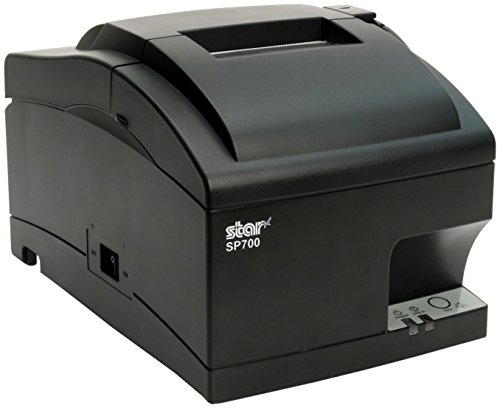
- Impact printing suits hot, humid kitchens
- Ethernet connection for network setup
- Drop-in loading and internal power supply
Best For: Kitchen order stations exposed to heat and humidity
Reliable POS Workhorse
Epson TM-T20II Thermal Printer

- USB and serial connectivity
- 1.5-million-cut auto-cutter rating
- Supports Epson ePOS-Print and coupon printing
Best For: POS counters seeking a durable wired thermal printer
Fast Networked Thermal Pick
Star Micronics TSP143IIILAN Thermal Printer

- 250mm/s printing and 43 receipts per minute
- Ethernet connectivity with iOS, Android, and Windows support
- Drop-in loading and De-Curl function
Best For: Busy Ethernet-connected bars and restaurant server stations
Best High-Speed Value
Rongta RP326 80mm Thermal Printer

- Prints up to 250 mm/s with an auto-cutter
- USB, Ethernet, and serial connectivity
- Wall-mountable, inkless, and cash-drawer compatible
Best For: Fast wired POS printing in restaurants and commercial counters
Best Kitchen Impact Printer

- Two-color dot-matrix printing highlights exceptions
- Prints kitchen orders right-side up
- Ethernet, auto-cutter, and drop-in paper loading
Best For: Restaurant kitchens and bars needing readable impact orders
Best Established Network Model
Epson TM-T88VI Thermal Receipt Printer

- Built-in Ethernet and USB connectivity
- Broad Windows, iOS, Android, Mac, and Linux support
- Optional wireless and Bluetooth accessories listed
Best For: Networked restaurant POS systems using Epson-compatible software
Best Wired Kitchen Value
Rongta RP850P 80mm Receipt Printer
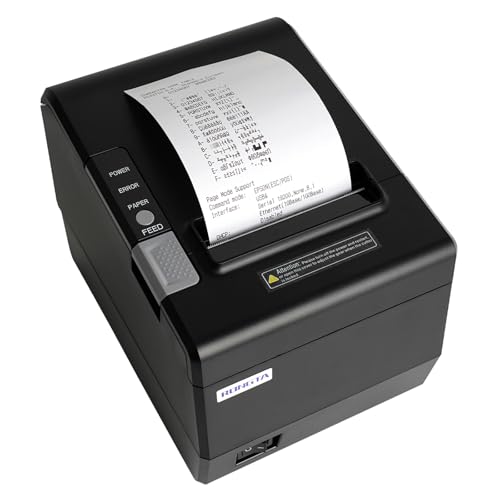
- 300 mm/s printing with auto cutter
- USB, serial, and Ethernet connectivity
- Supports 80mm and 58mm thermal paper
Best For: Computer-based restaurant POS systems needing fast wired printing
Best for Modern POS Flexibility
Epson TM-T20IV Thermal Receipt Printer

- 310 mm/s printing speed
- USB, serial, and Ethernet interfaces
- Epson ePOS support for Windows, Android, and iOS
Best For: Restaurants with mixed devices or mobile-enabled POS systems
Best Traditional POS Workhorse
Rongta RP850 80mm Receipt Printer

- USB, Ethernet, and serial connectivity
- Auto cutter and configurable order reminder
- Supports Windows, Mac, and Linux
Best For: Fixed restaurant POS stations using wired computer connections
Flexible Connectivity Pick – vretti 80mm Thermal Receipt Printer
For restaurants needing adaptable receipt printers for restaurants, the vretti V330M offers USB, serial, and LAN connectivity in a compact 80mm thermal format. It prints at up to 260mm/s and includes an auto-cutter, making it suitable for counter or kitchen use when wired connections are acceptable.
Best For: Restaurants, retail counters, and kitchens that need multiple wired connection options or wall mounting.
Pros:
- Supports USB, serial, and LAN connections.
- Prints up to 260mm/s on 80mm thermal paper.
- Includes partial auto-cutting and supports wall mounting.
- Starter kit includes cables, adapter, test paper, and user manual.
Cons:
- Does not support Bluetooth or Wi-Fi.
- Not compatible with several listed platforms and payment systems, including Clover, Shopify, and Square.
The V330M is a practical wired option with strong interface flexibility, but compatibility should be confirmed before purchase, especially if your restaurant uses a specific POS or mobile payment platform.
Heat-Resistant Kitchen Choice – Star Micronics SP742ME Impact Printer
The Star Micronics SP742ME is an impact printer designed for restaurant environments where heat and humidity can affect printed kitchen orders. Its Ethernet connection, clamshell paper loading, and internal power supply make it a focused choice among receipt printers for restaurants.
Best For: Restaurant kitchens and food-service stations that need impact printing for kitchen orders.
Pros:
- Impact printing is designed for environments with heat and humidity.
- Ethernet setup supports networked printing.
- Drop-in clamshell design simplifies paper loading.
- Compact footprint and internal power supply help save counter space.
Cons:
- Print speed is listed at 13 receipts per minute, slower than the thermal models here.
- Uses plain paper rather than direct thermal paper.
- Ethernet is the listed printer connectivity option.
Choose the SP742ME when kitchen durability and impact printing matter more than maximum speed. Its simple Ethernet setup and compact design suit dedicated order-printing stations.
Reliable POS Workhorse – Epson TM-T20II Thermal Printer
Epson TM-T20II Direct Thermal Printer USB - Monochrome - Desktop - Receipt Print C31CD52062
Check Price On AmazonThe Epson TM-T20II is a monochrome thermal printer for POS and retail environments, with USB and serial connectivity. Its rated 60,000,000-line MCBF and 1.5-million-cut auto-cutter rating make it a dependable option for restaurants comparing receipt printers for restaurants.
Best For: Restaurant POS counters that use USB or serial connections and prioritize long-term duty ratings.
Pros:
- Supports USB and serial connectivity.
- Rated for 60,000,000 lines and 1.5 million auto-cutter cuts.
- Supports flexible coupon printing on receipts.
- Epson ePOS-Print supports direct printing from mobile devices or web applications.
Cons:
- Does not list Ethernet as the printer connectivity type.
- Print speed is listed at 2 black-and-white pages per minute in the supplied specifications.
- Warranty information lists 90 days.
The TM-T20II fits restaurants with established USB or serial POS setups and a preference for Epson’s stated reliability ratings. Confirm software and connection requirements before ordering.
Fast Networked Thermal Pick – Star Micronics TSP143IIILAN Thermal Printer
The Star Micronics TSP143IIILAN combines Ethernet connectivity with thermal printing up to 250mm/s, or 43 receipts per minute. Its drop-in loading, De-Curl function, and compact internal power supply make it a strong fit for restaurants needing fast, flat receipts from a networked station.
Best For: Bars, server stations, and restaurant counters using Ethernet and compatible iOS, Android, or Windows systems.
Pros:
- Prints up to 250mm/s or 43 receipts per minute.
- Ethernet connection supports networked operation.
- Drop-in paper loading makes replacement quick.
- De-Curl function helps produce flat receipts; internal power supply saves space.
Cons:
- LAN is the listed connectivity option, with no USB or wireless connection specified.
- Its best use is away from heat, such as a bar or server station.
- Compatibility depends on the restaurant’s operating system and POS setup.
For Ethernet-based restaurant systems where speed matters, the TSP143IIILAN is one of the strongest options in this group. Its loading design and compact footprint are especially useful in busy service areas.
Best High-Speed Value – Rongta RP326 80mm Thermal Printer
For restaurants needing fast receipt printing without ink or ribbons, the Rongta RP326 is a practical option. It prints at up to 250 mm per second and includes USB, Ethernet, and serial interfaces, but it does not support Wi-Fi or Bluetooth.
Best For: Restaurants, retail counters, and other commercial settings that need fast wired receipt printing with flexible mounting.
Pros:
- Prints at up to 250 mm per second and includes an auto-cutter.
- USB, LAN, and serial ports support a range of POS setups.
- Can sit on a counter or mount to a wall, helping save space.
- Inkless thermal printing and cash-drawer support help reduce operating costs.
Cons:
- No Wi-Fi or Bluetooth connectivity.
- Not compatible with platforms including Square, Clover, Lightspeed, and several delivery services.
The RP326 is a strong fit when speed, wired connectivity, and low consumable costs matter most. Confirm compatibility with your restaurant POS platform before buying.
Best Kitchen Impact Printer – Epson TM-U220B
The Epson TM-U220B is designed for restaurant receipt and kitchen printing where impact output and dependable network connectivity are useful. Its dot-matrix mechanism supports two-color printing, right-side-up kitchen orders, and paper widths from 58 to 76 mm.
Best For: Restaurant kitchens, bars, and mobile POS setups that need impact printing and easy drop-in paper loading.
Pros:
- Dot-matrix printing can produce two-color output for highlighting offers or order exceptions.
- Prints kitchen orders right-side up for easier reading.
- Ethernet connectivity and DHCP support simplify network integration.
- Drop-in paper loading and an included auto-cutter support routine service.
Cons:
- Print speed is up to 6.0 lines per second, slower than many thermal printers.
- Uses a ribbon cassette, which adds a consumable beyond thermal paper.
- Paper width is limited to 58, 70, or 76 mm rather than standard 80 mm rolls.
Choose the TM-U220B when kitchen readability and impact printing are more important than maximum speed. Its Ethernet connection makes it especially suitable for a networked restaurant environment.
Best Established Network Model – Epson TM-T88VI Thermal Receipt Printer
The Epson TM-T88VI is a commercial thermal receipt printer with built-in Ethernet and USB connectivity, plus support for additional interfaces or wireless accessories depending on the configuration. It is a good candidate for restaurants that want a proven wired POS printer with broad operating-system support.
Best For: Restaurants seeking a networked Epson thermal printer for Windows, iOS, Android, Mac OS X, or Linux POS environments.
Pros:
- Built-in Ethernet and USB support standard wired POS connections.
- Supports Windows, iOS, Android, Mac OS X, and Linux through listed drivers or SDKs.
- Optional wireless, Bluetooth, and beacon accessories are listed for compatible configurations.
- Includes a one-year warranty description and a compact desktop footprint.
Cons:
- The supplied specifications list a 180 dpi resolution, lower than some newer receipt printers.
- Wireless and Bluetooth functionality may require separate compatible accessories or a dedicated model.
- The listing’s speed specifications are inconsistent, so verify actual throughput for your POS workload.
The TM-T88VI makes sense for restaurants already using Epson software tools or a wired networked POS. Check the exact interface configuration and accessory requirements before ordering.
Best Wired Kitchen Value – Rongta RP850P 80mm Receipt Printer
For restaurants that run their POS from a Windows, Mac, or Linux computer, the Rongta RP850P is a practical choice among receipt printers for restaurants. It combines USB, serial, and Ethernet connectivity with 300 mm/s printing, an auto cutter, and support for 80mm or 58mm thermal paper. However, it is strictly wired and does not support mobile devices or several popular delivery and POS platforms.
Best For: Computer-based restaurant POS setups that need fast wired receipt printing and optional wall mounting.
Pros:
- Prints at up to 300 mm/s with an automatic cutter.
- Offers USB, serial, and Ethernet interfaces, including TCP/IP installation.
- Supports 80mm and 58mm paper, ESC/POS and OPOS commands, and wall mounting.
Cons:
- No Wi-Fi or Bluetooth; it does not work with iPhone, iPad, Android devices, or Chromebook.
- Not compatible with Square, Clover, Grubhub, Uber Eats, DoorDash, and other listed platforms.
- Requires driver setup, particularly for Mac installations.
The RP850P makes sense when your restaurant uses a traditional desktop or laptop POS and values speed, flexible wired connections, and a compact wall-mountable design. Confirm platform compatibility before ordering.
Best for Modern POS Flexibility – Epson TM-T20IV Thermal Receipt Printer
The Epson TM-T20IV is a strong all-around option for restaurants seeking receipt printers for restaurants with broader device support. It prints at up to 310 mm/s and includes USB, serial, and Ethernet connectivity, while Epson ePOS support enables printing from Windows, Android, and iOS environments. Its paper-saving mode, compact installation options, and included accessories add convenience for busy counters.
Best For: Restaurants using mixed POS hardware, tablets, smartphones, or web-based systems that need flexible connectivity.
Pros:
- Fast 310 mm/s printing helps reduce customer wait times.
- Supports USB, serial, Ethernet, and Epson ePOS mobile printing.
- Includes auto cutter, wall-mount bracket, starter roll, and a three-year limited warranty as listed.
Cons:
- It is a wired printer rather than a Wi-Fi or Bluetooth model.
- Paper-saving features and mobile printing depend on compatible software or POS systems.
- The supplied listing contains differing warranty references, so verify coverage before purchase.
With the highest listed print speed and the broadest stated platform support in this group, the TM-T20IV is a versatile restaurant-counter printer. Its triple-interface design also makes it easier to integrate into an existing POS setup.
Best Traditional POS Workhorse – Rongta RP850 80mm Receipt Printer
The Rongta RP850 is a straightforward option for restaurants using Windows, Mac, or Linux computers. As receipt printers for restaurants go, it focuses on dependable wired integration: USB, Ethernet, and serial ports, ESC/POS and OPOS command support, an auto cutter, and sound-and-light order reminders. It works with 80mm or 58mm thermal paper but is not designed for mobile or cloud-platform flexibility.
Best For: Traditional restaurant POS stations that need a wired printer with Ethernet or serial connectivity and order alerts.
Pros:
- Supports USB, Ethernet, and serial connections, including TCP/IP installation.
- Includes auto cutter, wall-mounting holes, and adjustable sound, language, and print-density settings.
- Works with Windows, Mac, Linux, ESC/POS, and OPOS systems.
Cons:
- No Wi-Fi or Bluetooth and no support for iPhone, iPad, or Android devices.
- Not compatible with Square, Clover, Shopify, Lightspeed, and several delivery platforms listed by the seller.
- Driver installation may require using the included USB flash drive or downloading files separately.
The RP850 is best suited to a fixed restaurant workstation rather than a tablet-led operation. Its wired interfaces and configurable order reminder make it useful for established POS systems, provided your software is on the compatibility list.
How We Picked the Best Receipt Printers for Restaurants
We focused on printers suited to common restaurant workflows, including front-counter receipt printing, kitchen order tickets, bar stations, and multi-terminal POS systems. The selection covers 80mm thermal printers, impact models for heat-sensitive areas, and units with USB, serial, or Ethernet connectivity.
We also considered practical features such as automatic cutters, print speed, ESC/POS support, internal power supplies, compact footprints, and the reputation of established POS-printer brands. Because restaurant setups vary, no single model is ideal for every location.
Quick Comparison
| Best For | Recommended Type | Why It Works |
|---|---|---|
| Basic counter receipts | Compact thermal printer | Quiet, fast, and easy to maintain |
| Multiple POS terminals | Ethernet thermal printer | Supports networked printing and flexible placement |
| Hot or humid kitchens | Impact printer | Uses paper that is less affected by heat |
| High-volume service | Commercial thermal printer | Faster output and stronger duty-cycle performance |
| Budget-conscious setups | USB thermal printer | Lower upfront cost and simple installation |
Key Buying Factors for Receipt Printers for Restaurants
Thermal or Impact Printing
Direct thermal printers are quiet, quick, and usually require less maintenance because they do not use ink or ribbons. However, their paper can fade or react to heat. Impact printers use ribbons and multi-ply paper, making them better for kitchen tickets or locations exposed to heat, steam, and sunlight.
Connectivity and POS Compatibility
USB is straightforward for a single nearby terminal. Ethernet is more useful when several devices need to access a shared printer over a restaurant network. Serial and DK-port connections may be important for older POS hardware. Before buying, verify operating-system support, driver availability, and whether the POS platform supports ESC/POS commands.
Speed, Paper Width, and Cutter Design
Most models here use 80mm, or 3 1/8-inch, receipt paper. Check that your existing rolls match the printer’s width and diameter limits. Faster print speeds help during rushes, while an automatic cutter reduces manual tearing and keeps the counter moving.
Placement and Durability
Measure the available counter or kitchen space, including room for cables and paper-roll access. For kitchens, prioritize a suitable impact design or protected placement away from grease and splashes. A reliable Ethernet connection and easy paper loading can matter more than a small difference in advertised speed.
Who Should Buy Which Receipt Printers for Restaurants?
Choose a compact USB thermal model for a small café, food truck, or single checkout station. Pick an Ethernet thermal printer when multiple terminals, online orders, or remote kitchen stations need dependable network access. For a kitchen printer exposed to heat or steam, an impact model is usually the safer choice. High-volume restaurants should favor established commercial units with automatic cutters, faster output, and serviceable replacement parts.