Teleprompters can make on-camera delivery smoother, faster, and far more consistent—especially when you need to present, teach, or record without memorizing every line.
If you’re shopping for teleprompters for laptops, the best choice depends on screen size, portability, setup speed, and whether you want a built-in display or a tablet-based workflow.
Best 10 Teleprompters for Laptops Picks for 2026
Portable All-Metal Starter
Glide Gear TMP 75 Teleprompter

- Pre-assembled and ready to use
- All-metal body with carry bag included
- Uses smartphone prompting with DSLR/webcam setups
Best For: Portable creators who want a sturdy, no-assembly prompt setup
Conference-Ready Display Rig
Proaim Professional Speech Teleprompter

- Supports laptops and monitors up to 17 inches
- Includes 60/40 beam splitter glass
- Telescopic stand aids height positioning
Best For: Professional presenters needing a larger laptop-compatible teleprompter
Ultra-Compact Personal Pick
Little Prompter Original Compact Teleprompter

- Tiny 6-inch cube design
- Works with built-in laptop cameras and webcams
- Less than a pound for easy portability
Best For: Solo creators who need a tiny laptop-camera teleprompter
All-In-One Screen Mirroring
NEEWER X11 2 in 1 Teleprompter

- Built-in 9-inch LCD monitor included
- Connects to laptops through USB-C or HDMI
- Works with Windows and macOS as an external display
Best For: Streamers who want an integrated laptop-connected teleprompter
Portable Tablet-Camera Pick
Desview P13 13-Inch Teleprompter

- No-assembly design for quick setup
- Bluetooth remote and free app control
- 7H glass with carry bag and sun hood
Best For: Portable prompting with tablets, phones, or DSLR cameras
All-in-One Streaming Choice
Elgato Prompter Built-In Screen

- Built-in display removes extra tablet need
- Desktop-controlled with PC, Mac, and Stream Deck
- Supports webcams, DSLR cameras, smartphones, and laptops
Best For: Laptop streamers and presenters who want an integrated screen
Budget-Friendly Workhorse
NEEWER X12 14-Inch Teleprompter

- 75% transmittance glass for readable text
- Remote, app, case, and phone holder included
- Collapsible aluminum design for easier storage
Best For: Affordable prompting for teaching, vlogging, and live streaming
Large-format portable teleprompter
Desview P17 for Camera Recording

- 17-inch prompting surface with adjustable text settings
- Bluetooth remote and app control for pacing
- Foldable sunshade and carry bag support travel use
Best For: Creators needing a portable, larger-screen prompting setup
Durable mid-size teleprompter
Moman MT12 12-inch Teleprompter

- 12-inch tempered glass with up to 15-foot reading range
- Adjustable angle and sturdy metal structure
- App control for countdown, speed, and text settings
Best For: Creators wanting a sturdy, easy-to-set-up prompting kit
Quick-setup portable teleprompter
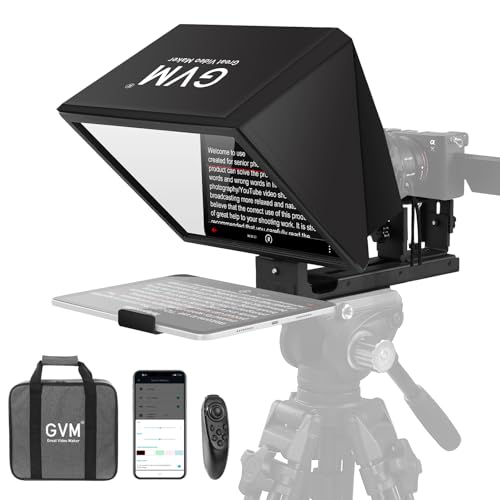
- Installation-free collapsible design
- Optical glass with clear text and long reading range
- Remote and app control for speed and font size
Best For: Creators who want a simple, portable prompting kit
Portable All-Metal Starter – Glide Gear TMP 75 Teleprompter
Glide Gear TMP 75 Teleprompter - Laptop, DSLR, Smartphone - Carry Case, No Assembly
Check Price On AmazonIf you want teleprompters for laptops in a compact, travel-friendly setup, the Glide Gear TMP 75 is built for straightforward use with DSLR, mirrorless, or webcam rigs while prompting from a smartphone. It ships pre-assembled, keeps the footprint small, and uses industry-standard beam-splitting glass for clear script readability.
Best For: Creators who want a durable, no-assembly teleprompter for laptop-adjacent recording setups with a phone-based script display.
Pros:
- Pre-assembled design saves setup time
- All-metal build feels sturdy and travel-ready
- Includes carry bag, protective hood, and 15mm rails
- Compatible with DSLR, mirrorless cameras, and webcams
Cons:
- Does not support iPad tablets
- No teleprompter app is included
- Requires a smartphone app with mirror text support
This is a practical pick if you value portability and a simple, professional teleprompting workflow over tablet-based flexibility. Its compact size and included accessories make it easy to move between home studio and on-location use.
Conference-Ready Display Rig – Proaim Professional Speech Teleprompter
Among teleprompters for laptops, the Proaim Professional Speech Teleprompter stands out for larger presentation screens and a telescopic conference stand. It supports tablets, laptops, and monitors up to 17 inches, making it a strong fit for formal speaking, broadcasting, and corporate video work.
Best For: Presenters who need a laptop-compatible teleprompter for conferences, speeches, and professional studio sessions.
Pros:
- Supports devices up to 17 inches
- 60/40 beam splitter glass helps preserve line of sight
- Telescopic stand supports comfortable height positioning
- Well suited to broadcasting, training, and live presentations
Cons:
- Weighs 18.5 pounds, so it is not especially portable
- Bulkier footprint than compact personal units
- Designed more for professional setups than casual use
If your priority is a serious presentation rig rather than a grab-and-go accessory, this model offers the screen size support and stand adjustability needed for polished delivery. It is best suited to fixed or semi-fixed setups where laptop integration matters.
Ultra-Compact Personal Pick – Little Prompter Original Compact Teleprompter
The Little Prompter is a compact choice for teleprompters for laptops when you want a very small footprint and an easy setup with built-in laptop cameras, webcams, or DSLRs. It uses BeamSplitter 70/30 glass and works with a smart device running a teleprompter app for script display.
Best For: Instructors, professionals, and churches that want a tiny, lightweight teleprompter for laptop camera use.
Pros:
- Very compact 6″ x 6″ x 6″ design
- Weighs less than a pound for easy transport
- Compatible with laptops, webcams, and DSLRs
- Uses 70/30 BeamSplitter glass for script viewing
Cons:
- Requires a separate teleprompter app on a smart device
- Smaller size may be less suited to larger production rigs
- Does not include a built-in display
This model is a good fit if you want maximum portability and a simple way to improve eye contact on camera. It is especially appealing for solo creators who need a lightweight, no-studio-required solution.
All-In-One Screen Mirroring – NEEWER X11 2 in 1 Teleprompter
If you want teleprompters for laptops with built-in display support, the NEEWER X11 combines a teleprompter with a 9-inch LCD monitor for screen mirroring and live prompting. It can connect to a computer through USB-C or HDMI, and it also supports Windows and macOS as an external monitor for broadcasting and video conferencing.
Best For: Streamers and video presenters who want a laptop-connected teleprompter with an integrated monitor.
Pros:
- Built-in 9-inch LCD monitor with 1024 x 768 resolution
- Supports computer connection via USB-C or HDMI
- Works with Windows and macOS as an external display
- Includes phone clamp, base, hood, and cable set
Cons:
- Voice sync is not supported
- First HDMI setup requires a driver
- Phone mirroring is limited to iPhone and Android devices with DP protocol only
This is the most feature-rich option here if you want a more self-contained workflow and less dependence on a separate tablet or phone. The integrated monitor makes it especially appealing for creators who value fast setup and flexible use across streaming and conferencing.
Portable Tablet-Camera Pick – Desview P13 13-Inch Teleprompter
If you want teleprompters for laptops that also stay flexible for tablets and phones, the Desview P13 is a practical travel-friendly option. Its no-assembly design, included remote, and free Desview app make it easy to get set up for video recording, video conferences, or live online speaking without constantly looking away from the lens.
Best For: Creators and presenters who want a portable teleprompter that works with a laptop setup plus tablets, phones, or DSLR cameras.
Pros:
- Supports iPad/tablets up to 13 inches, plus phone and DSLR/camcorder use.
- Includes Bluetooth remote and free Desview app control.
- 7H beam splitter glass with 70/30 transmission is designed for clear reading, even outdoors.
- Comes with a detachable sun hood and Oxford cloth carry bag for easier transport.
Cons:
- Requires a compatible camera and lens setup for best results.
- Does not include built-in display hardware.
The P13 is a strong pick if portability and quick setup matter more than an all-in-one screen. It offers solid teleprompting fundamentals without making the rig feel overly complicated.
All-in-One Streaming Choice – Elgato Prompter Built-In Screen
Among teleprompters for laptops, the Elgato Prompter stands out because it uses a built-in display instead of asking you to place a tablet or phone inside the unit. That makes it a streamlined choice for reading scripts, Twitch chat, or meeting notes while staying face-to-face on Zoom, Teams, or streaming setups.
Best For: Streamers, remote presenters, and laptop users who want an integrated teleprompter with no separate screen to mount.
Pros:
- Built-in 9-inch display removes the need for a tablet or smartphone.
- Works with PC or Mac and supports desktop-controlled setup.
- Compatible with webcams, DSLR cameras, smartphones, personal computers, and laptops.
- Supports the Camera Hub app and works with Stream Deck.
Cons:
- DisplayLink software is required on Mac and Android.
- Uses proprietary firmware, so it is less open than app-only options.
If you want a cleaner desk setup and prefer keeping your script on a built-in screen, this is the most streamlined option here. It is especially appealing for frequent laptop-based recording and live communication.
Budget-Friendly Workhorse – NEEWER X12 14-Inch Teleprompter
The NEEWER X12 is a straightforward choice if you need teleprompters for laptops or tablet-based recording without overcomplicating the setup. It includes app control, a remote, and a carrying case, while its aluminum alloy frame and collapsible design make it easier to store, move, and use for teaching, vlogging, or live streaming.
Best For: Users who want an affordable, easy-to-store teleprompter for laptop-adjacent workflows, tablets, and basic camera setups.
Pros:
- 75% light transmittance beam splitter glass helps keep text readable.
- Includes remote control, app support, phone holder, and carrying case.
- Collapsing design makes storage and transport easier.
- Fits many smartphones and tablets up to 9.84″ x 8.68″.
Cons:
- Not compatible with wide-angle lenses.
- Lens focal length must be greater than 28mm.
- Not compatible with iPad Pro 12″.
The X12 covers the essentials well and keeps setup simple, which is exactly what many buyers want in a practical teleprompter. Just make sure your lens and tablet dimensions match the compatibility limits before buying.
Large-format portable teleprompter – Desview P17 for Camera Recording
If you are comparing teleprompters for laptops, the Desview P17 stands out more as a larger-screen prompting kit for camera setups than a basic laptop-only option. Its 17-inch size, foldable sunshade, and adjustable script controls make it practical for creators who want smooth, readable delivery during recording, live streams, and presentations.
Best For: YouTubers, live streamers, and video creators who want a portable teleprompter with flexible app-based script control.
Pros:
- Supports mirror/rotate screen modes with adjustable speed, font size, and text color.
- Bluetooth remote offers play/pause, speed control, and page navigation.
- Works with iPhone, Android, and tablets through the Desview app.
- Foldable sunshade and included storage bag help with portability and glare reduction.
Cons:
- Designed around tablets and phones, not directly around laptops.
- At 8.5 lbs, it is less compact than smaller prompting kits.
- Requires the Desview app for full file import and control features.
The P17 is a strong choice when you want a larger teleprompter with more control over script display and pacing. It is especially appealing for creators who value a studio-style setup and do not mind using a tablet or phone instead of a laptop as the source device.
Durable mid-size teleprompter – Moman MT12 12-inch Teleprompter
For shoppers evaluating teleprompters for laptops, the Moman MT12 is better understood as a tablet- and camera-friendly prompting system with a solid metal build. Its 12-inch beamsplitter glass, adjustable angle, and app-based control make it a practical option for creators who want a straightforward way to read scripts naturally on camera.
Best For: Video recording, live streaming, interviews, and conference use with tablets, phones, and cameras.
Pros:
- 12-inch tempered beamsplitter glass offers up to a 15-foot reading range.
- Adjustable reflective angle helps match sitting or standing sight lines.
- Supports tablets up to 12.9 inches and includes a phone clamp.
- Works with the Moman Prompter app for countdown, speed, and text adjustments.
Cons:
- Not marketed as a laptop-specific teleprompter.
- Requires a compatible tablet or smartphone for the prompt source.
- Heavier than some compact foldable options at 6.05 pounds.
The MT12 is a dependable mid-size choice if you want a durable teleprompter with easy setup and strong reading clarity. It fits creators who value a metal frame, adjustable prompting angle, and app control more than ultra-light portability.
Quick-setup portable teleprompter – GVM 12-inch Teleprompter
If you are looking at teleprompters for laptops, the GVM 12-inch model is a compact all-in-one option that focuses on quick setup and simple transport. Its installation-free collapsible design, optical glass, and remote-app control make it useful for creators who need a portable prompting solution for recording or streaming.
Best For: Portable video recording, live streaming, and presentations with minimal setup.
Pros:
- Installation-free collapsible design makes setup fast and simple.
- High-quality optical glass supports clear text and up to a 15-foot reading range.
- Wireless remote and app allow play/pause, speed, and font-size control.
- Foldable form and carry bag make storage and transport easier.
Cons:
- Tablet compatibility is limited to devices up to 8.6 inches.
- Not designed as a direct laptop-first prompting system.
- May be less suitable if you need a very large screen source device.
The GVM 12-inch teleprompter is a practical pick for users who want a no-assembly setup and dependable remote control. It is best suited to creators who prioritize portability and simplicity over support for larger devices.
How We Picked the Best Teleprompters for Laptops
We focused on laptop-friendly models that balance clear text visibility, stable mounting, and practical setup for solo creators, presenters, educators, and teams. Priority went to products that support common recording setups, offer useful accessories like remotes or carry cases, and reduce friction during setup.
Quick Comparison
In this roundup, you’ll see a mix of installation-free kits, portable foldable designs, and more advanced options with built-in screens. Some Teleprompters for Laptops are better for travel and fast turnaround, while others are aimed at studio-style workflows where reliability and screen size matter more than compactness.
Key Buying Factors for Teleprompters for Laptops
Compatibility
Check whether the unit is designed for a laptop directly, or whether it actually expects a tablet, phone, or separate monitor as the text source. Also confirm whether your laptop’s display can fit the hood or mirror setup cleanly if that’s your intended workflow.
Screen Size and Readability
Bigger glass and larger viewing areas can make text easier to read from a natural speaking distance. For Teleprompters for Laptops, readability is often more important than raw size, especially if you’ll be reading for long sessions.
Setup Time
If you move between rooms or shoot on the go, look for no-assembly or collapsible designs. If the teleprompter will live on a permanent rig, a more robust system with extra adjustment options may be worth the added complexity.
Mounting and Stability
Make sure the stand, tripod mount, and camera support match your gear. A stable frame helps preserve alignment and keeps your text readable without constant recalibration.
Remote or App Control
Auto-scrolling, wireless remotes, and app control can save time and reduce mistakes, especially during longer scripts or live presentations.
Who Should Buy Which Teleprompters for Laptops?
If you want the easiest setup, choose a no-assembly or collapsible model. If you need a more polished studio workflow, built-in-screen teleprompters may be the better fit. Creators who travel often should favor lightweight, portable designs, while educators and business presenters may prefer larger, steadier units with simple app or remote control. The best teleprompter for your laptop is the one that fits your space, script length, and production style without slowing you down.