Picking the right teleprompter can make livestreams sound smoother, look more confident, and keep you on message without sounding scripted. The best models balance readability, setup speed, and compatibility with your camera, phone, or tablet.
In this roundup, we focus on practical teleprompters for livestreaming that are easy to use, stable on a desk or rig, and suited to solo creators, educators, and small teams.
Best 10 Teleprompters for Livestreaming Picks for 2026
Built-In Screen Streaming Prompter
Elgato Prompter with Built-In Screen

- Built-in display for scripts and chat
- Drag-and-drop workflow from PC or Mac
- Works with many cameras and Stream Deck
Best For: Streamers and presenters who want a built-in screen teleprompter for chat and scripts
Budget Tablet Prompter
NEEWER X12B 12-inch Teleprompter

- Installation-free aluminum alloy design
- 12-inch HD display with remote and app control
- Foldable and portable with carry case
Best For: Budget-minded creators who want a simple tablet teleprompter for streams and presentations
Foldable Phone Teleprompter
LENSGO TC7S Mini Prompting Kit

- Folds in one second for easy travel
- Bluetooth remote and app control scripts
- Works with smartphones and smaller tablets
Best For: Mobile creators and vloggers who want a fast-fold phone teleprompter
All-in-One Monitor Prompter
NEEWER X11 with Built-In Screen

- Built-in monitor for mirrored scripts
- Can also serve as a computer display
- 11-inch beam splitter glass reduces ghosting
Best For: Streamers and presenters who want a teleprompter with an integrated monitor
All-in-One Streaming Choice

- Supports smartphones, tablets, and DSLR cameras
- Free app imports txt/docx and adjusts display settings
- Bluetooth remote enables hands-free script control
Best For: creators who want one teleprompter for livestreaming and recording
Ultra-Compact Portable Pick
The Little Prompter Compact Teleprompter

- Tiny 6-inch cube weighs less than a pound
- Works with DSLR, webcam, and laptop cameras
- Uses BeamSplitter 70/30 glass and a teleprompter app
Best For: portable livestreaming and video setups in tight spaces
On-the-Go Wide-Angle Option
LENSGO TC12P Wide-Angle Teleprompter
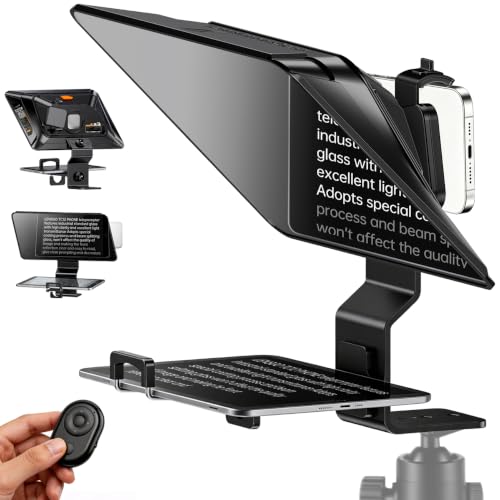
- Built for walk-and-talk and mobile recording
- 14.5-inch HD glass supports longer scripts
- Bluetooth remote and free app control scrolling
Best For: mobile livestreamers and creators making short-form or talk-to-camera videos
Tablet Camera Prompter Kit
13 Inch Teleprompter with App Remote

- Supports DSLR, mirrorless, and camcorder setups
- Uses tablet script display with beam splitter glass
- Includes wireless remote plus app control
Best For: Presenters and livestreamers who want a tablet-based camera teleprompter
Portable Pro Streaming Prompter

- Fits tablets up to 12.9 inches, including iPad Pro
- Foldable light shield helps block glare
- Bluetooth remote and app support simplify prompting
Best For: Mobile creators who need a foldable tablet-friendly teleprompter
Built-In Screen Streaming Prompter – Elgato Prompter with Built-In Screen
If you want teleprompters for livestreaming that feel more like a true production tool than an accessory, the Elgato Prompter stands out with its built-in display. You can drag and drop a script, Twitch chat, or any app window onto the Prompter’s screen, so you do not need to mount a tablet or phone. It is built for creators who want easy desktop control and strong camera compatibility for polished on-camera delivery.
Best For: Streamers and presenters who want a built-in screen teleprompter for chat, scripts, and video calls.
Pros:
- Built-in 9-inch display removes the need for a separate tablet or smartphone
- Drag-and-drop setup lets you move apps, scripts, or Twitch chat onto the screen
- Supports more cameras than many alternatives, including wide lenses
- Works with PC or Mac and integrates with Stream Deck
Cons:
- Mac setup requires free DisplayLink software
- Android use requires free DisplayLink Presenter software
- More feature-rich than basic prompters, so it may be more than casual users need
The Elgato Prompter is a strong fit if you want a cleaner, more integrated prompting setup for livestreams and calls. Its biggest advantage is convenience: everything runs from the desk without extra mounting or mobile-device workarounds.
Budget Tablet Prompter – NEEWER X12B 12-inch Teleprompter
For buyers comparing teleprompters for livestreaming on a budget, the NEEWER X12B focuses on the essentials. It is designed for tablet and DSLR use, with an installation-free aluminum alloy build, a 12-inch reflective display, and remote plus app control. This is a practical pick if you want a straightforward prompting setup without extra complexity.
Best For: Budget-minded creators who want a simple tablet teleprompter for streams, tutorials, and presentations.
Pros:
- Installation-free design makes setup simple
- 12-inch HD display with 75% light transmittance
- Remote and app control for play, pause, scroll speed, and font size
- Foldable structure and carry case improve portability
Cons:
- Not for phone shooting
- Does not function as a monitor or provide direct self-viewing
- Best suited to tablet-based workflows rather than all-in-one use
The X12B keeps the feature set focused on reliable prompting rather than extras. If you already plan to use a tablet and want an easier, lower-cost livestreaming teleprompter, it is a sensible option.
Foldable Phone Teleprompter – LENSGO TC7S Mini Prompting Kit
If you need a compact option among teleprompters for livestreaming, the LENSGO TC7S is built around portability. It folds in one second, uses beam splitter glass for a clear reflective prompt, and pairs with a Bluetooth remote and app for controlling scripts. The design is aimed at creators who record on the move and want a simple prompting tool for phone-based shooting.
Best For: Mobile creators, vloggers, and live sellers who want a fast-fold phone teleprompter.
Pros:
- One-second fold design makes it easy to pack and carry
- Beam splitter glass is designed for clear, high-definition prompting
- Bluetooth remote and TCQI app support script control and speed changes
- Compatible with smartphones and smaller tablets, with vertical and horizontal placement support
Cons:
- Best suited to phones and smaller tablets rather than larger devices
- It is a compact 7.9-inch unit, so the viewing area is limited
- Phone-focused setup may not fit more advanced camera workflows
The TC7S is a good match when portability matters more than a large prompting surface. For travel, vlogging, and quick livestream setups, it offers a straightforward way to stay on script while facing the camera.
All-in-One Monitor Prompter – NEEWER X11 with Built-In Screen
For teleprompters for livestreaming that try to simplify the whole workflow, the NEEWER X11 combines a built-in monitor with a teleprompter body. You can mirror scripts from a phone or tablet, or use the screen as a second monitor for a computer on Windows or macOS. That makes it a flexible choice if you want one unit that can serve both prompting and display duties.
Best For: Streamers and presenters who want a teleprompter with an integrated monitor for scripts or computer display.
Pros:
- Built-in 9-inch HD LCD monitor supports screen mirroring without a tablet or phone
- Can also work as an external computer monitor for Windows and macOS
- 11-inch beam splitter glass reduces ghosting and keeps text readable
- Adjustable holder supports camera alignment and quick release mounting
Cons:
- First-time HDMI setup requires a driver
- Screen mirroring works with iPhone and Android smartphones only if they use DP protocol
- Voice sync is not supported
The X11 is especially appealing if you want more than a basic prompting frame. Its built-in display adds flexibility for streaming and video conferencing, while still keeping the camera centered for eye contact.
All-in-One Streaming Choice – Desview T5 Teleprompter
If you want teleprompters for livestreaming that can handle both phone-first setups and camera-based production, the Desview T5 is built for that mixed workflow. It supports smartphones, tablets under 11 inches, and DSLR cameras, and the included app and Bluetooth remote make script control straightforward during live sessions.
Best For: Creators who need one teleprompter for livestreaming, mobile video, and DSLR shooting.
Pros:
- Works with smartphones, tablets under 11 inches, and DSLR cameras.
- Includes 49/52/55/58/62/67/72/77/82mm adapter rings for broad lens compatibility.
- Free Desview app supports txt/docx import, formatting controls, mirror mode, and timer tools.
- Bluetooth remote adds hands-free play/pause and page turning.
Cons:
- Tablet support is limited to devices under 11 inches.
- Some setup steps still depend on aligning the camera and phone holder carefully.
- Best features rely on using the brand app and remote together.
This is a practical pick if you want a flexible teleprompter that adapts to different devices without pushing you into a single recording style. The coated glass, light-seal foam, and adjustable panel make it better suited to cleaner on-camera results than bare-bones budget options.
Ultra-Compact Portable Pick – The Little Prompter Compact Teleprompter
For teleprompters for livestreaming where portability matters more than a large studio footprint, The Little Prompter keeps the setup simple. It is a compact 6-inch cube that works with DSLR cameras, webcams, and built-in laptop cameras, making it useful for creators who record in small spaces or move between locations.
Best For: Instructors, business users, journalists, and small teams that need a lightweight teleprompter.
Pros:
- Very compact at 6″ x 6″ x 6″ and under a pound.
- Compatible with DSLR cameras, webcams, and built-in laptop cameras.
- Includes BeamSplitter 70/30 glass for teleprompter use.
- Works with iOS or Android through a separate teleprompter app.
Cons:
- Requires a smart device and teleprompter app to display the script.
- Smaller size may not suit users who want a larger viewing area.
- Compatibility is focused on camera and laptop setups rather than tablets.
The Little Prompter is a strong choice if you value a minimal, easy-to-carry teleprompter over extra hardware and features. Its small footprint and broad camera support make it a convenient option for straightforward livestreaming and video work.
On-the-Go Wide-Angle Option – LENSGO TC12P Wide-Angle Teleprompter
If your teleprompters for livestreaming needs lean toward mobile shoots, the LENSGO TC12P is designed for walking recordings and quick setup. It supports smartphones and tablets, includes a Bluetooth remote, and uses a large 14.5-inch HD beam splitter glass that can make long scripts easier to follow.
Best For: Mobile creators filming YouTube, TikTok, Zoom, or walk-and-talk content.
Pros:
- Designed for on-the-go shooting and walk-and-talk recording.
- Supports smartphones and tablets, with 4 universal adapter rings included.
- Large 14.5-inch HD glass helps reduce scroll breaks and eye strain.
- Free app and Bluetooth remote support script import, mirror mode, and scrolling control.
Cons:
- Fits devices up to 7.3 inches in horizontal orientation.
- Larger glass and frame may be less compact than smaller teleprompter designs.
- Best suited to mobile shooting rather than ultra-minimal setups.
This model stands out if you want a teleprompter that keeps eye contact natural while still being easy to assemble and move. The anti-glare coated glass and light-seal foam add polish for creators who record outside a traditional studio.
Compact Dual-Phone Desk Teleprompter – Dual Phone Clip Teleprompter for Livestreams
If you want teleprompters for livestreaming without adding a bulky rig, this compact desk version is built around a dual phone clip setup. It lets one phone handle the camera while the other shows your script, and it supports both horizontal and vertical shooting for live webcast, courseware videos, vlogs, and speeches. The collapsible design also makes it easier to store and transport between sessions.
Best For: Streamers and solo creators who want a lightweight, phone-based prompting setup for desktop live sessions.
Pros:
- Dual phone mounts let you use one phone for camera and one for prompting
- Supports both portrait and landscape shooting for flexible livestream formats
- Easy 2-minute setup with a collapsible, backpack-friendly design
- Adjustable height and 360-degree rotation add positioning flexibility
Cons:
- Not suitable for tablets or foldable phones
- Tripod is not intended for overly heavy camera setups
- Maximum height is limited compared with larger studio teleprompters
This is a practical choice if you need a simple teleprompter that keeps your delivery natural while staying highly portable. It is best suited to lighter smartphone setups rather than heavier production gear.
Tablet Camera Prompter Kit – 13 Inch Teleprompter with App Remote
For creators comparing teleprompters for livestreaming, this 13-inch model is designed for more traditional camera-based setups. It supports DSLR, mirrorless, and camcorder use while letting a tablet act as the script display, and the beam splitter glass is meant to keep the text clear without sacrificing image quality. The included wireless remote and app support make it easier to manage scrolling during live sessions and recordings.
Best For: Livestreamers, teachers, and presenters who want a tablet-based teleprompter with camera support.
Pros:
- Compatible with DSLR, mirrorless cameras, camcorders, and tablet script displays
- Beam splitter glass is designed for clear script reflection and good image quality
- Adjustable height and 50°-90° viewing angle help match different rigs
- Includes wireless remote and app support for script control
Cons:
- Heavier than compact phone-based teleprompters
- Requires a tablet for script display, not just a phone-only workflow
- Best suited to structured setups rather than ultra-light mobile use
This kit makes sense if you want a more professional prompting setup that still stays approachable for solo production. Its mix of camera compatibility and remote control is especially useful when consistency matters on live video.
Portable Pro Streaming Prompter – Desview P13 for iPad and DSLR
If portability is a priority in your teleprompters for livestreaming, the Desview P13 is built to travel without giving up pro features. It supports tablets up to 12.9 inches, including iPad Pro, and pairs that with a foldable light shield and premium beam splitter glass for clearer prompting in brighter environments. The Bluetooth remote and app support make it easy to scroll scripts hands-free during streams or recordings.
Best For: Mobile streamers and creators who want a foldable teleprompter that works with larger tablets.
Pros:
- Supports tablets up to 12.9 inches, including iPad Pro
- Foldable light shield helps reduce ambient glare
- Lightweight 1.7 kg build with padded storage bag
- Bluetooth remote and app support streamline hands-free prompting
Cons:
- Still larger than a phone-only teleprompter
- Designed for tablets, so it is not the smallest travel option
- May be more setup than casual one-off livestreams need
This is a strong pick if you want a portable prompting solution that still feels built for professional use. The combination of tablet support, glare control, and remote operation makes it well suited to moving between studio and field work.
How We Picked the Best Teleprompters for Livestreaming
We prioritized Teleprompters for Livestreaming that offer a clear reflective display, solid device support, and a form factor that fits real-world streaming setups. We also considered ease of assembly, remote or app control, compatibility with smartphones, tablets, DSLR and mirrorless cameras, and overall portability.
For livestreaming, convenience matters as much as optical quality, so we favored options that reduce setup friction and make it easier to keep eye contact while reading smoothly.
Quick Comparison
Compact phone-based teleprompters are best for creators who stream from a desk or travel often. Tablet- and monitor-based models typically give you more readable text at greater distances and are better for longer scripts. Built-in screen designs can simplify cabling and reduce device juggling, which is helpful for frequent streams or a fixed studio setup.
Key Buying Factors for Teleprompters for Livestreaming
Display Size and Reading Distance
Choose a larger reflective area if you sit farther from the camera or read longer scripts. Smaller units are fine for short-form livestreams, but they can feel cramped if you need large text or slower pacing.
Device Compatibility
Check whether the unit supports your preferred source device: phone, tablet, or a dedicated display. Some teleprompters work best with iPads or larger tablets, while others are optimized for smartphones or built-in monitors.
Camera and Lens Fit
Make sure the opening accommodates your camera or lens length without vignetting. Adapter rings and adjustable mounts can make a big difference if you switch between camera bodies or lenses.
Control Method
Remote control, app support, and screen-mirroring features can speed up live adjustments. That matters when you need to change scroll speed or page position without breaking flow mid-stream.
Portability and Setup Time
If you stream in different locations, look for foldable designs and lighter materials. If your setup stays put, prioritize stability and glass quality over the smallest footprint.
Who Should Buy Which Teleprompters for Livestreaming?
Solo streamers and mobile creators usually do best with compact phone or tablet teleprompters that pack quickly and travel well. Educators, coaches, and presenters who use longer scripts should lean toward larger tablet or monitor-compatible models for easier reading. If you want the simplest all-in-one workflow, a built-in-screen teleprompter can be worth the premium. For a fixed home studio, choose the most stable option that fits your camera and lets you read at your normal speaking distance.
In short, the best choice depends on how often you stream, what device you use to read, and how much speed or flexibility you need during production.