Teleprompters can make on-camera delivery smoother, faster, and more confident whether you are filming YouTube videos, teaching online, or running livestreams.
Below, we focus on practical teleprompters for real-world setups, from compact smartphone-friendly models to larger options for tablets, DSLRs, and studio workflows.
Best 10 Teleprompters Picks for 2026
Budget-Friendly, No-Assembly Pick
NEEWER BASICS X12B 12" Teleprompter

- Installation-free setup
- Remote and app control
- Folds flat for transport
Best For: tablet users who want a simple, portable teleprompter
All-in-One Built-In Screen Choice
Elgato Prompter with Built-In Screen

- Built-in 1080p display
- No tablet or phone needed
- Good for streaming and calls
Best For: streamers and video callers who want an integrated desktop teleprompter
Portable Tablet-and-Phone Option
NEEWER X12 14" Aluminum Teleprompter

- Supports tablets and phones
- Remote and app control
- Collapsible with carrying case
Best For: creators who need a flexible, portable teleprompter for camera recording
Monitor-Included Streaming Pick
NEEWER X11 2-in-1 Teleprompter

- Built-in 9-inch LCD monitor
- Works with computer and mirroring setups
- Adjustable holder and mounting
Best For: streamers who want a self-contained teleprompter with an integrated screen
Premium large-format pick
Desview T12S 12.9" Metal Teleprompter
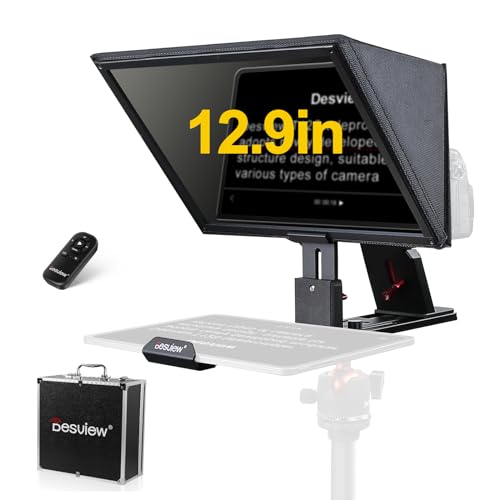
- Fits cameras and tablets up to 12.9 inches.
- Bluetooth remote and app control simplify script handling.
- Metal body and carry case suit frequent travel.
Best For: Creators who need a durable teleprompter for larger tablets and camera setups.
Large-screen studio option
NEEWER X17 II 17" HD Teleprompter

- 17-inch HD beamsplitter supports confident reading.
- No-assembly design speeds up setup.
- Remote and app control add easy script management.
Best For: Presenters and video creators who want a large, ready-to-use teleprompter.
Compact creator-friendly pick
Desview T3 Compact Teleprompter

- Fits smartphones and tablets up to 10 inches.
- Includes adapter rings for common camera lenses.
- Bluetooth remote and app control support easy scripting.
Best For: Creators who want a compact teleprompter for phone-first or small-camera setups.
Install-Free Creator Pick
GVM 12" Collapsible Teleprompter
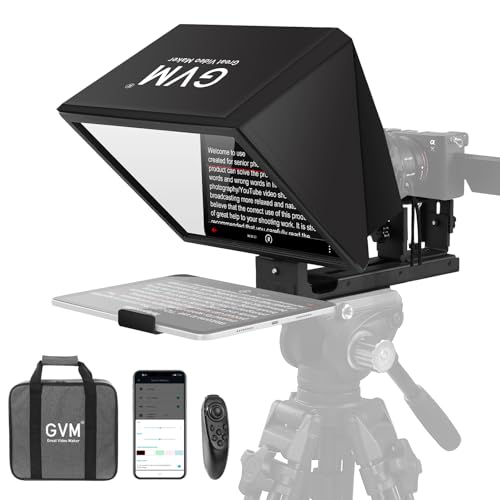
- No-assembly collapsible design
- 12-inch anti-reflective optical glass
- Remote and app control included
Best For: Creators who need a portable teleprompter for phones, tablets, and cameras
Compact Streaming Choice
LENSGO 9.7" Fold-in-One Teleprompter

- Folds in one second
- HD glass with clear reflection
- App and Bluetooth remote control
Best For: Streamers, teachers, and interview setups that need a compact teleprompter
All-in-One DSLR Upgrade

- Supports phones, tablets, and DSLR cameras
- App adds txt/docx import and display controls
- Adjustable shooting modes with coated glass
Best For: Creators who want a flexible teleprompter for switching between mobile and camera shooting
Budget-Friendly, No-Assembly Pick – NEEWER BASICS X12B 12" Teleprompter
If you want a straightforward teleprompter for presentations, online courses, or tutorial recording, the NEEWER BASICS X12B keeps things simple. It uses an installation-free design, aluminum alloy construction, and app-plus-remote control so you can focus on delivery instead of setup.
Best For: Creators who want an easy, compact teleprompter for tablet-based scripting and recording.
Pros:
- No-assembly design saves time at setup.
- Included remote and app let you control scrolling, font size, and page turns.
- 75% light-transmittance beam splitter glass improves readability up to 10 ft.
- Foldable frame and carry case make storage and transport easier.
Cons:
- Not for phone shooting.
- Does not function as a monitor or allow direct on-screen self-viewing.
This is a practical entry-level choice if you already use a tablet or iPad and want a teleprompter that travels well. It covers the core job without extra complexity.
All-in-One Built-In Screen Choice – Elgato Prompter with Built-In Screen
The Elgato Prompter stands out among teleprompters because it includes its own display, so you do not need to mount a tablet or phone. That makes it a clean option for streaming, video calls, and scripted recording when you want a more desktop-style setup.
Best For: Streamers and remote presenters who want an integrated teleprompter with a built-in screen.
Pros:
- Built-in display means no extra tablet or phone is required.
- Can show scripts, Twitch chat, or apps while keeping eye contact with the camera.
- Supports a wide range of cameras and is highly customizable through Camera Hub.
- Desktop-based setup is simple: attach the camera, plug in, and go.
Cons:
- Mac and Android use require separate DisplayLink software downloads.
- Designed around a computer-connected workflow, not a mobile-first one.
If you want a teleprompter that behaves more like a dedicated external display, this model offers a polished, flexible approach. It is especially appealing for creators who switch between scripts, chat, and calls.
Portable Tablet-and-Phone Option – NEEWER X12 14" Aluminum Teleprompter
The NEEWER X12 is a versatile teleprompter for creators who want to use a smartphone or tablet with a camera setup. It combines beam splitter glass, remote/app control, and a collapsible aluminum alloy frame for a practical balance of readability and portability.
Best For: Users who want a flexible teleprompter for tablet-based scripting and DSLR-style recording.
Pros:
- Works with smartphones and tablets up to 9.84″ x 8.68″.
- Remote and app control make it easy to pause, speed up, slow down, and turn pages.
- Collapsible aluminum alloy build supports portability and storage.
- Readability is strong, with text visible up to 10 ft away.
Cons:
- Not compatible with wide angle lenses.
- Camera lens focal length must be more than 28mm.
- Not compatible with iPad Pro 12″.
This is a good teleprompter if you need broad device compatibility and a travel-friendly package. Just be sure your camera lens meets the stated requirements before buying.
Monitor-Included Streaming Pick – NEEWER X11 2-in-1 Teleprompter
The NEEWER X11 is a teleprompter built for people who want a built-in screen instead of relying on a separate tablet. It combines an 11-inch beam splitter glass setup with a 9-inch LCD monitor, making it useful for live streaming, video conferencing, and mirrored script prompts.
Best For: Creators who want a teleprompter with an integrated monitor for streaming or desk-based production.
Pros:
- Built-in 9-inch LCD monitor removes the need for a tablet or phone for prompts.
- Supports screen mirroring from compatible smartphones with the included cable.
- Works as a second display for Windows and macOS computers.
- Adjustable holder and mounting points add flexibility for tripod and accessory setups.
Cons:
- Voice sync is not supported.
- Some connections require drivers or specific protocols.
- Only compatible with iPhone and Android smartphones using DP protocol for mirroring.
This model is a strong option if you want one teleprompter that can handle both script prompting and monitor duties. Its integrated display makes the workflow more self-contained than tablet-based units.
Premium large-format pick – Desview T12S 12.9" Metal Teleprompter
If you want a teleprompter that feels built for real production use, the Desview T12S is a strong fit. It supports DSLR, mirrorless cameras, camcorders, and tablets up to 12.9 inches, while the beam splitter glass is designed for clear, zero-ghosting reading in a range of shooting conditions.
Best For: YouTube creators, podcasters, educators, and livestreamers who need a durable, travel-ready teleprompter with tablet support.
Pros:
- Supports cameras plus iPads and tablets up to 12.9 inches.
- Includes Bluetooth remote and free Desview app control for script speed and text size.
- Anti-reflective beam splitter glass is rated for clear, zero-ghosting viewing.
- Tool-free assembly makes it easier to set up quickly on location or in studio.
Cons:
- Not water resistant.
- At 3 kg, it is not the lightest option for minimal carry needs.
- Designed for larger setups, so it may be more than some smartphone-only users need.
The T12S is aimed at creators who want a sturdier teleprompter with straightforward setup and broad device compatibility. Its included carry case and metal construction make it especially appealing if you move between shoots often.
Large-screen studio option – NEEWER X17 II 17" HD Teleprompter
The NEEWER X17 II is built for creators who want a larger teleprompter with minimal setup friction. Its 17-inch HD beamsplitter, no-assembly design, and app-based remote control make it a practical choice for speeches, tutorials, livestreams, and other scripted video work.
Best For: Studio and on-location presenters who want a large teleprompter with quick mounting and no assembly.
Pros:
- No assembly required, so it is ready to use out of the box.
- 17-inch HD beamsplitter and 45° tilt help support clear reading positions.
- RT113 remote and app control let you pause, change speed, and turn pages.
- Upgraded quick-release plate is compatible with Manfrotto 501PL and supports fast camera switching.
Cons:
- Tablets and phones must fit within 9.3 inches wide.
- At 6.6 pounds, it is heavier than compact teleprompter options.
- It is a larger system, so it may be overkill for very simple mobile setups.
If you want a teleprompter that feels ready for production work right away, the X17 II stands out. It pairs a large readable screen with smart controls and a fold-flat design for storage and transport.
Compact creator-friendly pick – Desview T3 Compact Teleprompter
The Desview T3 is a compact teleprompter designed for smaller devices and flexible shooting styles. It supports smartphones and tablets up to 10 inches, mounts to DSLR and mirrorless cameras with included adapter rings, and uses beam splitter glass made for readable, ghost-free prompting.
Best For: Smartphone creators, compact tablet users, and camera shooters who need a smaller teleprompter for vertical or horizontal video.
Pros:
- Supports phones and tablets up to 10 inches.
- Includes 9 adapter rings for common DSLR and mirrorless lens thread sizes.
- Wide-angle support helps reduce vignetting in supported focal ranges.
- Bluetooth remote and free app allow simple script control on iOS and Android.
Cons:
- Not meant for 12.9-inch iPads or larger tablets.
- Best results depend on using the recommended focal length ranges.
- Point-and-shoot cameras without lens filter threads are not the ideal match.
The T3 is a practical choice if you want a smaller teleprompter that still covers both phone and camera workflows. Its compact size and included remote make it especially useful for social-first content and lighter travel kits.
Install-Free Creator Pick – GVM 12" Collapsible Teleprompter
If you want teleprompters that are quick to set up and easy to move, this GVM 12-inch model is built around convenience. The installation-free design, foldable body, and included carry case make it a practical choice for solo creators, presenters, and anyone who needs a portable prompting setup for video recording or live sessions.
Best For: Creators who want a collapsible, no-assembly teleprompter for tablets, phones, and DSLR use.
Pros:
- Installation-free, all-in-one collapsible design
- 12-inch optical glass with anti-reflective coating for clear prompting
- Works with smartphones, tablets up to 8.6 inches, and DSLR/mirrorless cameras
- Includes remote control, app support, and carry bag
Cons:
- Tablet support is limited to devices under 8.6 inches
- At 5.68 pounds, it is not the lightest option
The GVM is a strong fit if you value fast setup and broad device support over a more compact footprint. It looks especially useful for recurring recording sessions where portability and remote text control matter.
Compact Streaming Choice – LENSGO 9.7" Fold-in-One Teleprompter
The LENSGO 9.7-inch teleprompter is aimed at creators who need a compact prompting solution without giving up useful controls. It folds in one second, uses high-definition beam splitter glass, and supports phone, tablet, and camera workflows, which makes it a flexible option for teaching, interviews, and livestreaming.
Best For: Streamers and presenters who want a smaller teleprompter with app-based script control.
Pros:
- Folds in one second for fast setup and travel
- High-definition coated glass for clear reading and prompting
- Free app and Bluetooth remote for speed, play/pause, and display adjustments
- Supports smartphones, tablets under 9.7 inches, and DSLR shooting
Cons:
- Smaller screen size may feel limiting for larger tablets
- Some app users may need updates before full use
This model makes sense when speed and portability are priorities. Its compact size and multi-device compatibility give it a nice balance for mobile creators who still want hands-free prompting control.
All-in-One DSLR Upgrade – Desview T5 Teleprompter
The Desview T5 teleprompter is built for users who want a more adjustable setup for smartphones, tablets, and DSLR cameras. With universal adapter rings, coated glass, and support for horizontal or vertical phone shooting, it is a versatile option for video creators who switch between different recording styles.
Best For: Multi-device creators who want flexible shooting modes and a more adjustable teleprompter rig.
Pros:
- Supports smartphones, tablets under 11 inches, and DSLR cameras
- Includes 49/52/55/58/62/67/72/77/82mm adapter rings
- Desview app supports txt/docx import, font controls, mirror/rotate, and timer functions
- Coated glass, light-seal foam, and adjustable front panel help improve readability and alignment
Cons:
- More adjustable features may mean a slightly more involved setup than simpler units
- Tablet support tops out under 11 inches
For creators who change devices often or want more control over framing, the T5 brings useful flexibility. Its mix of app tools, shooting modes, and hardware adjustment makes it a strong all-around teleprompter choice.
How We Picked These Teleprompters
We prioritized models that balance readability, compatibility, and ease of setup. Strong Teleprompters should offer a clear beam splitter, stable mounting, and enough device support for your workflow without adding unnecessary complexity.
We also looked at screen size, remote or app control, portability, and whether the design works well for solo creators, educators, and production teams.
Quick Comparison
Smaller Teleprompters are usually best for smartphone use, tight desks, and travel-friendly kits. Mid-size Teleprompters tend to suit tablets and most home studio cameras. Larger options are better when you want a bigger reading window, longer scripts, or more comfortable delivery at a slightly greater distance.
Key Buying Factors for Teleprompters
Screen Size and Viewing Distance
Choose a teleprompter that matches how far you will sit from the camera. A larger display is easier to read from farther away, while compact models work well in close setups.
Device Compatibility
Check whether the teleprompter supports your phone, tablet, or dedicated monitor. Some Teleprompters are built for quick smartphone use, while others are better for iPads, larger tablets, or DSLR rigs.
Mounting and Setup
Look for stable camera mounting, simple assembly, and enough adjustment for lens position. Fast setup matters if you switch locations often or need a repeatable solo workflow.
Remote Control and App Features
Remote and app support can make a big difference when you need to adjust scrolling speed or pause scripts without leaving frame. This is especially helpful for teaching, presentation, and live production.
Portability and Build Quality
Aluminum frames, carry cases, and foldable designs are useful if you move between studios or events. A sturdier frame can also improve long-term reliability, especially for frequent use.
Who Should Buy Which Teleprompters?
If you need a simple setup for short videos or online teaching, a compact model is often enough. If you film longer scripts, use a tablet, or want more comfortable reading at a distance, consider a mid-size or larger teleprompter.
Creators who want the cleanest all-in-one experience may prefer a model with a built-in display or strong app control. For mobile-first users, smartphone-compatible Teleprompters are usually the most flexible and affordable choice.
In short, the best Teleprompters are the ones that fit your script length, camera distance, and production style. Match those basics first, and you will get a setup that feels natural from the first recording onward.