The best 3D scanners for sculpture can capture fine contours, organic forms, and surface details far faster than traditional measurement methods. The right model depends on your sculpture’s size, finish, level of detail, and how much cleanup you are willing to do afterward.
This roundup compares 10 handheld and desktop-friendly scanners across accuracy, tracking, color capture, scanning speed, portability, and ease of use. Whether you are digitizing clay work, reproducing a finished piece, or preparing a model for 3D printing, these picks cover a range of practical workflows and budgets.
Best 10 3d Scanners for Sculpture Picks for 2026
Precision Studio Pick

- Up to 0.01 mm single-frame precision
- Scans dark and shiny surfaces without spray
- Includes automatic turntable and color capture
Best For: Precision sculpture digitization and industrial-style modeling
Beginner-Friendly Choice

- 0.07 mm accuracy and 0.10 mm resolution
- Markerless AI tracking helps recover lost scans
- Integrated JMStudio workflow for editing and optimization
Best For: Beginners and hobbyists scanning sculptures for 3D printing
Versatile Color Capture

- 0.05 mm accuracy and up to 30 fps scanning
- Captures full-color textures with a built-in RGB camera
- Scans dark and metallic objects without spray
Best For: Colorful sculptures, figurines, artwork, and varied object sizes
Professional Laser Workflow

- Up to 0.01 mm precision and 0.02 mm accuracy
- Five modes include deep-hole and turntable scanning
- Wi-Fi 6 and temperature monitoring support stable workflows
Best For: Professional, high-accuracy sculpture scanning and reverse engineering
Best All-in-One Pick

- Up to 0.03 mm accuracy
- 1000 × 750 mm field of view
- Scans, edits, and fuses without a computer
Best For: Sculptors seeking a self-contained workflow for small to life-size pieces
Best Portable Pro Option

- 190 g body with Wi-Fi 6.0
- Up to 0.05 mm accuracy
- Full-color capture and dual scanning modes
Best For: Mobile sculptors scanning varied surfaces indoors and outdoors
Best Lightweight Starter

- 105 g portable design
- One-click beginner-friendly scanning
- 24-bit color and dark-object scanning
Best For: Beginners and makers wanting simple, portable studio scanning
Best Overall
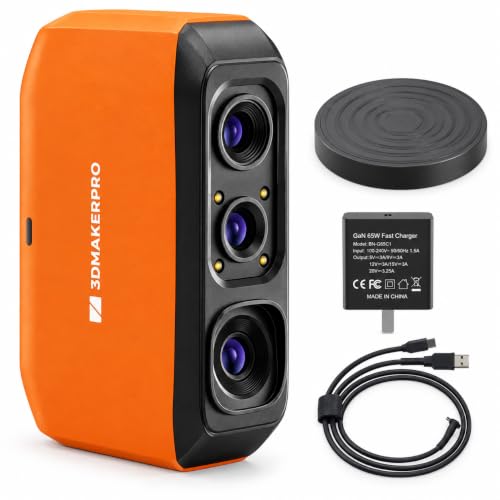
- Up to 0.07mm accuracy
- Marker-free AI SLAM tracking
- One-click model processing
Best For: Detailed sculpture scanning and 3D-printing workflows
Best Wireless Option

- Wi-Fi 6 wireless scanning
- Full-color 24-bit capture
- Scans objects up to 2000mm
Best For: Portable, full-color sculpture digitization
Best for Fast Scanning

- Up to 30 FPS point-cloud capture
- 0.1mm high-accuracy mode
- Built-in full-color camera
Best For: Fast handheld scanning with flexible capture modes
Precision Studio Pick – Revopoint MetroX Pro
For sculpture workflows that demand highly accurate digital capture, the Revopoint MetroX Pro is one of the more capable 3d scanners for sculpture. Its blue-laser modes are designed to preserve fine dimensions, edges, and surface details, including on shiny or dark objects without scanning spray.
Best For: Sculptors, designers, and makers who need precision modeling, inspection, or 3D-printing-ready scans.
Pros:
- Up to 0.01 mm single-frame precision and 0.02 mm single-frame accuracy.
- Multiple modes cover fine features, flat surfaces, dark or shiny objects, and marker-free scanning.
- Automatic dual-axis turntable scanning and real-time mobile viewing support efficient workflows.
- HD RGB capture adds color detail in automatic turntable mode.
Cons:
- At 14.82 pounds in its package, it is less portable than lightweight handheld options.
- Revo Design and Revo Measure are paid software and support Windows only.
The MetroX Pro is a strong choice when dimensional accuracy matters more than simplicity or portability. Its combination of laser modes, tracking options, and automated scanning makes it suitable for detailed sculpture digitization and downstream modeling.
Beginner-Friendly Choice – 3DMakerpro Fox
The 3DMakerpro Fox is an approachable option among 3d scanners for sculpture, especially for hobbyists beginning to digitize physical models. It combines medium-format scanning with markerless AI tracking and integrated software for scanning, editing, and optimization.
Best For: Beginners and hobbyists who want a straightforward scanner for sculpture, 3D printing, and modeling projects.
Pros:
- Entry-level design makes it accessible for new users.
- 0.07 mm accuracy and 0.10 mm resolution capture useful sculptural detail.
- Markerless AI visual tracking can recover a scan when the scanner briefly loses the object.
- JMStudio combines scanning, editing, and optimization in one software environment.
Cons:
- The supplied notes do not specify color scanning or compatibility across mobile operating systems.
- Its stated accuracy and resolution are less precise than the professional laser models in this roundup.
Fox makes the most sense when ease of use and an approachable learning curve are priorities. It should suit smaller creative projects and practical 3D-printing workflows without requiring the advanced scanning modes of industrial-oriented equipment.
Versatile Color Capture – Creality Otter Lite Basic
The Creality Otter Lite Basic is a versatile pick among 3d scanners for sculpture, covering objects from small coins to items up to 78 inches. Its quad-camera design, 0.05 mm accuracy, and full-color texture capture make it useful for sculptures where both form and appearance matter.
Best For: Artists and makers scanning sculptures, figurines, artwork, or larger objects with realistic color textures.
Pros:
- 0.05 mm accuracy and scanning speeds up to 30 frames per second.
- Handles dark and metallic surfaces without scanning spray and can work outdoors in up to 30,000 lux sunlight.
- 24-bit color capture with LED fill lights records detailed textures.
- Supports marker, geometry, and texture alignment plus PLY, OBJ, STL, 3MF, GLTF, and FBX exports.
Cons:
- The optional Scan Bridge handle is sold separately for added stability.
- The supplied warranty description is one year.
Otter Lite Basic is a well-rounded option for sculpture digitization when portability, broad object-size coverage, and color reproduction are important. Its support for Windows, macOS, iOS, and Android also gives it a flexible setup profile.
Professional Laser Workflow – Revopoint MetroY Pro
The Revopoint MetroY Pro is built for demanding 3d scanners for sculpture applications where repeatable detail and flexible capture modes are important. Its blue lasers, deep-hole mode, marker-free structured light, and automatic turntable cover a broad range of sculptural forms.
Best For: Professional sculptors, reverse-engineering work, and detailed 3D-printing workflows that need high accuracy.
Pros:
- Up to 0.01 mm precision and 0.02 mm accuracy for detailed capture.
- Five scanning modes include cross-line, parallel-line, single-line deep-hole, structured-light, and automatic turntable modes.
- Scans dark and shiny surfaces without spray at up to 2,000,000 points per second.
- Built-in Wi-Fi 6, real-time streaming, and temperature monitoring support flexible, stable operation.
Cons:
- The listed Windows requirements include at least 32GB RAM and an RTX 3060-class GPU.
- Revo Design and Revo Measure are paid add-ons and support Windows only.
MetroY Pro is the most specialized choice here for users who want advanced laser control and professional processing options. It is best matched with a capable computer and a workflow that benefits from deep-feature capture, inspection, or reverse engineering.
Best All-in-One Pick – 3DMakerpro Toucan
For creators who want a streamlined option among 3d scanners for sculpture, the 3DMakerpro Toucan combines scanning, editing, and model fusion in one handheld device. Its claimed accuracy of up to 0.03 mm and large field of view make it suitable for projects ranging from small figurines to life-size sculptures.
Best For: Sculptors who want an integrated, computer-free workflow for capturing larger and more complex forms.
Pros:
- All-in-one scanning, editing, and model-fusion workflow without a computer
- Up to 0.03 mm accuracy for detailed captures
- Large 1000 × 750 mm field of view supports life-size sculptures
- Orientation recognition helps fill gaps around undersides and internal structures
Cons:
- At 7.04 pounds, it is substantially heavier than the portable alternatives here
- The supplied information does not specify supported computer or mobile operating systems
The Toucan stands out when convenience and broad scan coverage matter more than minimum weight. Its self-contained workflow can reduce setup friction for sculptors working on varied-size pieces.
Best Portable Pro Option – Revopoint INSPIRE 2
The Revopoint INSPIRE 2 is a versatile choice among 3d scanners for sculpture, especially for artists who scan in different locations. It supports wireless operation, outdoor scanning in up to 20,000 lux lighting, full-color texture capture, and two scanning modes for varied surfaces and sizes.
Best For: Sculptors who need a lightweight scanner for studio, outdoor, and mixed-material work.
Pros:
- Lightweight 190 g design with Wi-Fi 6.0 for flexible scanning
- Up to 0.05 mm accuracy and 0.03 mm precision
- Infrared structured light and multi-line laser modes handle different materials
- Captures synchronized full-color textures with its built-in RGB camera
Cons:
- Revo Design is paid separately and supports Windows only
- Computer and mobile use requires meeting the listed hardware and operating-system requirements
INSPIRE 2 is the most flexible pick for artists who move between locations or need color alongside geometry. Its outdoor capability and dual scan modes broaden its usefulness beyond a dedicated studio setup.
Best Lightweight Starter – Creality CR-Ferret SE
For beginners comparing 3d scanners for sculpture, the Creality CR-Ferret SE emphasizes simple operation and stable handheld capture. Its one-click workflow, anti-shake technology, and 24-bit full-color scanning make it approachable for studio modeling and smaller scanning projects.
Best For: Beginners and makers who prioritize portability, straightforward operation, and color capture.
Pros:
- One-click scanning and beginner-friendly workflow
- Anti-shake technology helps reduce hand-tremor interference
- Scans dark and metallic objects without spray or markers
- Very light 105 g design with 24-bit full-color capture
Cons:
- Its stated 0.1 mm precision is lower than the listed accuracy of the Toucan and INSPIRE 2
- The supplied information specifies Mac and Windows compatibility but not a computer-free workflow
The CR-Ferret SE is a practical entry point for sculptors who want minimal setup and easy transport. Choose it for convenience and color-focused projects rather than the highest stated precision in this group.
Best Overall – Fox Portable 3D Scanner
For artists comparing 3d scanners for sculpture, the Fox is a versatile handheld option that combines marker-free AI SLAM tracking with up to 0.07mm accuracy. Its 40–1200mm scanning range suits many sculptures and helps move from physical form to printable or editable digital models.
Best For: Sculptors who want detailed, portable scanning with straightforward model processing.
Pros:
- Up to 0.07mm accuracy and 0.10mm resolution for detailed geometry.
- Marker-free tracking can reduce setup time and re-lock after interruptions.
- One-click processing handles alignment, fusion, noise reduction, and mesh optimization.
- Exports OBJ, STL, PLY, and ASC files for modeling and 3D-printing workflows.
Cons:
- Requires a compatible Windows or macOS computer.
- The 40–1200mm range may not cover especially large sculptures in one workflow.
The Fox stands out when accuracy and convenience matter equally. Its 210g body, guided JMStudio software, and reduced surface-preparation needs make it a strong fit for digitizing sculptures without an overly complex setup.
Best Wireless Option – Creality CR-Scan Ferret Pro
The Creality CR-Scan Ferret Pro is a practical choice among 3d scanners for sculpture when wireless portability and full-color capture are priorities. Wi-Fi 6 connectivity, anti-shake tracking, and support for objects from 50mm to 2000mm make it suitable for studio, home, and outdoor projects.
Best For: Beginners and mobile creators who want wireless, full-color scanning of medium-to-large sculptures.
Pros:
- Wireless scanning works with compatible Windows, macOS, Android, and iOS devices.
- Full-color 24-bit scanning preserves visual texture in the digital model.
- Anti-shake technology and beginner-friendly operation support smoother capture.
- Includes a tripod, power bank, phone holder, Wi-Fi box, and carrying case.
Cons:
- Reflective, transparent, and very dark surfaces can be difficult to scan.
- Not intended for very small or highly detailed objects such as jewelry or precision parts.
- Mobile use requires compatible devices, including iPhone 11 or newer for iOS.
Ferret Pro is especially appealing for artists who value freedom of movement and realistic color. Its 0.1mm accuracy is suitable for many sculpture projects, though highly intricate small forms may require a more specialized scanner.
Best for Fast Scanning – Creality CR-Scan Ferret
For shoppers seeking 3d scanners for sculpture with responsive capture, the Creality CR-Scan Ferret combines dual scanning modes with an ASIC processing chip. It captures point clouds at up to 30 FPS and includes a color camera for models with more realistic surface appearance.
Best For: Creators who want fast handheld scanning with flexible wide-range and high-accuracy modes.
Pros:
- Up to 30 FPS point-cloud capture supports smoother handheld scanning.
- High-accuracy mode reaches up to 0.1mm precision with 0.16mm resolution.
- Dual modes accommodate broader coverage and finer-detail work.
- RGB color capture adds realistic textures to scanned sculptures.
Cons:
- Mobile scanning is limited to compatible Android devices; iOS support is listed for the Ferret Pro.
- Requires a compatible computer or device with at least 8GB RAM in the listed configurations.
- Some features may depend on updating the scanner through the official website.
The Ferret is a well-rounded option for artists who prioritize scan speed and flexible capture modes. Its full-color camera and portable power options are useful for sculpture work, while the 0.1mm precision mode supports more detailed results.
How We Picked the Best 3d Scanners for Sculpture
We evaluated these scanners by focusing on the demands of sculpture work rather than headline specifications alone. Important considerations included stated accuracy, scanning range, tracking reliability, frame rate, color capture, portability, and compatibility with common computers and 3D-printing workflows.
We also considered how each scanner handles practical challenges such as large forms, fine edges, dark or reflective surfaces, outdoor use, and movement during handheld capture. A scanner’s software and workflow matter just as much as its optical hardware, especially when creating a watertight mesh for editing or printing.
Quick Comparison
- Best for advanced detail: Revopoint MetroX Pro and MetroY Pro, with blue-laser scanning modes designed for demanding capture work.
- Best for larger subjects: 3DMakerpro Toucan and Fox models, which emphasize broader fields of view and medium-format scanning.
- Best budget-friendly options: Creality CR-Scan Ferret and Ferret SE, plus the Creality Otter Lite for accessible full-color scanning.
- Best for portable workflows: Revopoint INSPIRE 2, Fox, and Ferret Pro, particularly when you need handheld or location-based scanning.
Key Buying Factors for 3d Scanners for Sculpture
Accuracy and Resolution
Choose accuracy based on the smallest details you need to preserve. High-accuracy scanners are useful for facial features, carved textures, tool marks, and small decorative elements. For large sculptures or reference models, moderate accuracy may be sufficient and can make scanning faster.
Scanning Volume and Tracking
Match the scanner’s recommended subject size to your work. A narrow field of view can capture detail effectively but may require more passes on a large statue. Reliable tracking helps maintain alignment across those passes; markers, texture, or a stable turntable can improve results when the sculpture has a uniform surface.
Surface, Color, and Lighting
Dark, glossy, translucent, or highly uniform materials can challenge many scanners. Color cameras and texture capture are helpful for documenting painted work, but they do not replace geometric accuracy. Controlled lighting and temporary scanning spray may still be necessary.
Software and Output
Check whether the scanner supports the operating systems, file formats, and editing tools in your workflow. Look for practical features such as automatic alignment, hole filling, mesh optimization, and one-click modeling, while remembering that complex scans may still require manual cleanup.
Who Should Buy Which 3d Scanners for Sculpture?
Artists digitizing detailed originals should prioritize the highest practical accuracy and dependable alignment, making the advanced blue-laser models worth considering. Studios scanning medium or large sculptures may benefit more from a wider field of view and faster coverage than from maximum resolution.
Beginners, hobbyists, and makers preparing models for 3D printing can start with an affordable full-color handheld scanner, especially if they are comfortable refining meshes in software. Choose a lightweight portable model for workshops, outdoor references, or on-location documentation, and select a more stable desktop-oriented option when repeatability and controlled capture are the main priorities.