If you need cleaner capture, better monitoring, or a more flexible production workflow, the right external recorder can make a big difference. SDI support is especially valuable for longer cable runs, pro cameras, and studio setups.
Below, we focus on practical options for creators, broadcasters, and field shooters who want dependable performance without guesswork.
Best 10 Camera External Recorders with Sdi Input Picks for 2026
HDR Monitor Recorder
Blackmagic Design Video Assist 5" 12G HDR Recording Monitor

- 2500-nit 7-inch display for brighter monitoring
- 12G-SDI input/output with embedded audio support
- HDMI 2.0a I/O adds camera connection flexibility
Best For: Shoots that need a bright HDR monitor-recorder with SDI connectivity
Compact 4K SDI Camera
MOKOSE 4K Digital Camera with Manual Zoom Lens
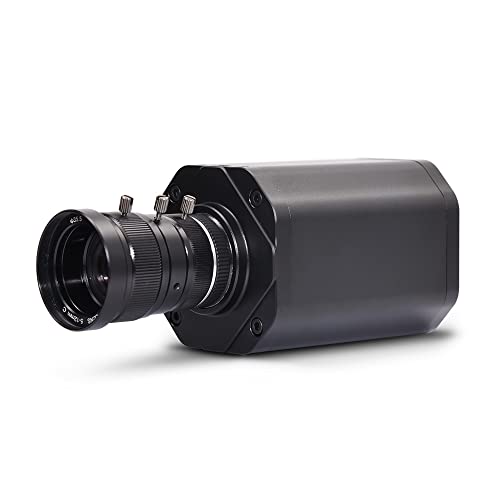
- HDMI, SDI, and USB outputs in one compact body
- 4K/30fps recording over HDMI with Sony IMX577 sensor
- Interchangeable CS/C-mount lens design
Best For: Compact camera setups needing SDI output and flexible lenses
Compact SDI Studio Recorder
Blackmagic Design HyperDeck Studio HD Mini

- 3G-SDI video input for studio capture
- Also includes HDMI, USB, and RCA connectivity
- Compact recorder with 2-year warranty
Best For: Dedicated studio recording from an SDI source
SDI Live Encoder
Magewell Ultra Encode SDI Plus 53160

- 4K SDI encoding up to 4096×2160p30
- Streams via RTMP, SRT, NDI|HX, HLS, and more
- Records internally, to USB, or to network storage
Best For: Live production and streaming workflows built around SDI input
Rack-Width Studio Recorder

- 6G-SDI input/output for studio recording
- Dual SD card slots with USB-C output
- Timecode, reference, and RS-422 support
Best For: Studio racks and multi-camera SDI workflows
Portable Monitor-Recorder

- 3G-SDI input/output with HDMI conversion
- Records up to 1080p30 to USB flash drive
- 6-inch touch screen with exposure tools
Best For: Portable monitoring with simple SDI recording
Ultra HD Deck Recorder

- 12G-SDI input/output for Ultra HD recording
- Two SSD slots plus two SD card slots
- Records ProRes, DNxHD, and H.264/H.265
Best For: Ultra HD studio recording and post workflows
Portable HDMI Recorder
Atomos Ninja TX GO 5-inch Camera Monitor-Recorder

- 5-inch 1500-nit touchscreen
- Records ProRes, ProRes RAW, DNx, H.265/H.264
- HDMI, Wi‑Fi 6E, and NDI support
Best For: HDMI camera rigs needing a bright monitor-recorder with RAW support
Rackmount SDI Recorder
Blackmagic Design HyperDeck Studio HD Plus Recorder

- 6G-SDI recording and playback up to Ultra HD 30fps
- SDI loop out plus 3G-SDI monitoring output
- USB-C webcam and external recording support
Best For: Studio and live-production workflows centered on SDI
Compact SDI Capture Interface
Blackmagic Design UltraStudio Mini Recorder 12G

- 1 SDI input with up to 12G-SDI support
- 16 embedded audio channels over SDI
- Compact capture-focused desktop device
Best For: Small SDI ingest and capture setups
HDR Monitor Recorder – Blackmagic Design Video Assist 5" 12G HDR Recording Monitor
If you need one of the most capable camera external recorders with sdi input for on-set monitoring and capture, the Blackmagic Design Video Assist 5″ 12G HDR is built for the job. Its 2500-nit display, 12G-SDI I/O, and HDR support make it a practical choice when you want a bright, durable recorder-monitor combination for professional video production.
Best For: Camera crews and solo shooters who want a bright HDR monitor-recorder with 12G-SDI connectivity.
Pros:
- 2500-nit 7-inch screen is easier to view in bright environments.
- Supports 12G-SDI video input/output with embedded audio.
- Also includes HDMI 2.0a input/output for flexible camera use.
- Designed for professional video production with durable construction.
Cons:
- Single SDI and HDMI port layout may be limiting for more complex rigs.
- 1080p display resolution is lower than the 12G video workflow it supports.
For buyers comparing camera external recorders with sdi input, this model stands out more for monitoring strength and broadcast-style connectivity than for simplicity. It is a solid fit when brightness, HDR, and embedded audio support matter more than keeping the rig minimal.
Compact 4K SDI Camera – MOKOSE 4K Digital Camera with Manual Zoom Lens
The MOKOSE HSC20 is a compact option for buyers looking at camera external recorders with sdi input workflows, especially when the camera itself needs HDMI, SDI, and USB output. It records 4K/30fps over HDMI, uses a Sony IMX577 sensor, and adds an interchangeable CS/C-mount lens setup that can suit industrial, teaching, and live streaming use.
Best For: Users who want a compact 4K camera with SDI output and flexible lens options.
Pros:
- Supports HDMI, SDI, and USB output for multiple capture setups.
- Records 4K/30fps over HDMI and 1080p over USB.
- Interchangeable CS/C-mount design expands lens flexibility.
- Built-in microphone plus external mic support for improved audio options.
Cons:
- 4K output is listed for HDMI only, not all outputs.
- Manual focus and manual zoom may not suit hands-off operation.
This is a useful niche camera if you need a small, adaptable source for SDI-based capture or monitoring. It is especially appealing when the priority is output flexibility and lens choice rather than a fully automated camera experience.
Compact SDI Studio Recorder – Blackmagic Design HyperDeck Studio HD Mini
If your priority is recording from a professional SDI source, the Blackmagic Design HyperDeck Studio HD Mini is a straightforward studio recorder for camera external recorders with sdi input workflows. It offers 3G-SDI video input, broad device compatibility, and a compact studio-focused design that suits permanent or rack-style setups.
Best For: Studio setups that need a compact SDI recorder for dependable capture.
Pros:
- 3G-SDI video input is the core feature for SDI capture.
- Supports HDMI, USB, SDI, and RCA connectivity.
- Compatible with cameras including Canon EOS R5, Sony A7S III, and Nikon Z6 II.
- Compact studio-recorder design with a 2-year warranty.
Cons:
- Notes do not list built-in monitoring or display features.
- Media format is SD card-based, which may not suit every workflow.
This model is best viewed as a dedicated recording box rather than an all-in-one monitor-recorder. If your SDI chain is already built and you mainly need a reliable studio capture device, it fits that role well.
SDI Live Encoder – Magewell Ultra Encode SDI Plus 53160
The Magewell Ultra Encode SDI Plus is aimed at users who need camera external recorders with sdi input for streaming, encoding, and recording rather than simple file capture. With 4K SDI input, multi-protocol streaming, internal storage, and PoE support, it is built for professional live production and contribution workflows.
Best For: Live production teams that need SDI encoding, recording, and streaming in one device.
Pros:
- Encodes SDI video up to 4096×2160p30 with H.264 or H.265.
- Supports RTMP, RTMPS, SRT, NDI|HX, HLS, and TS over UDP/RTP.
- Can stream and record simultaneously to internal, USB, or network storage.
- Includes PoE, Wi-Fi, web UI, and API control options.
Cons:
- Designed for workflow integration, so it is more complex than a basic recorder.
- Built-in storage is 128 GB, which may be modest for long recording sessions.
For buyers who need SDI input plus network delivery, this is one of the most workflow-friendly options in the group. It is especially valuable when you want to encode, stream, and record from the same compact device.
Rack-Width Studio Recorder – HyperDeck Studio HD Pro
If you need camera external recorders with sdi input for a studio or rack setup, the Blackmagic Design HyperDeck Studio HD Pro is built around flexible 6G-SDI recording and monitoring. It supports Ultra HD recording, adds HDMI 2.0, USB Type-C recording output, and includes dual SD card slots plus timecode, reference, and RS-422 connections for a more integrated workflow.
Best For: Multi-camera studios, live production racks, and camera workflows that need SDI, HDMI, and timecode in one recorder.
Pros:
- 6G-SDI input and output with SDI loop-out and monitor output
- Dual SD card slots plus USB Type-C recording output
- Timecode input on XLR, reference input, and RS-422 device control
- Built-in speaker, jog/shuttle wheel, and full rack-width design
Cons:
- Uses SD card-based recording rather than built-in SSD slots
- Power cord is not listed in the supplied notes
- Rack-width format may be more than some portable setups need
Overall, this model is a strong fit when you want a deck-style recorder that integrates cleanly into a studio rack and offers broad SDI connectivity. It is especially practical if your workflow depends on timecode and control connections alongside camera recording.
Portable Monitor-Recorder – CUT6S SDI Touch Recorder
For buyers looking at camera external recorders with sdi input in a field-monitor form factor, the FEELWORLD CUT6S combines a 6-inch touch display with 3G-SDI input and output. It can record up to 1080p30 to a USB flash drive, and it also supports HDMI 2.0 input up to 4K 60Hz, making it useful when you want monitoring and basic recording in one compact unit.
Best For: Run-and-gun shooters and on-camera setups that need a compact SDI monitor with simple USB recording.
Pros:
- 3G-SDI input and output with SDI to HDMI conversion
- USB 2.0 recording to FAT32 flash drive up to 1080p30
- 6-inch 1920×1080 touch screen with focus and exposure tools
- HDMI 2.0 input supports up to 4K 60Hz signals
Cons:
- Recording is limited to 1080p30 according to the notes
- NP-F battery is not included in the package
- USB recording requires a compatible FAT32 flash drive
This is a practical choice if you want an SDI-capable monitor first and a recorder second. It offers helpful image-analysis tools and easy USB recording, but it is best suited to simpler capture needs rather than higher-end deck-style recording.
Ultra HD Deck Recorder – HyperDeck Studio 4K Pro
If your priority is camera external recorders with sdi input for an Ultra HD workflow, the Blackmagic Design HyperDeck Studio 4K Pro is the most expandable option here. It features 12G-SDI input and output, HDMI 2.0, dual SSD slots, dual SD card slots, and USB Type-C recording output, so it is designed for faster file-based recording and studio integration.
Best For: Higher-end studio and post-production setups that want 12G-SDI, SSD recording, and deck-style control.
Pros:
- 12G-SDI input and dual 12G-SDI outputs for Ultra HD workflows
- Two 2.5-inch SSD slots plus two SD card slots
- Records ProRes, DNxHD, uncompressed, and H.264/H.265 10-bit 4:2:2
- Includes USB-C output, built-in LCD, speaker, jog wheel, and RS-422
Cons:
- Power cord is not included in the supplied notes
- Larger 1RU deck format is less portable than monitor-style recorders
- May be more recorder than needed for basic 1080p capture
Compared with simpler field options, this recorder is aimed at more serious studio and workflow demands. The combination of 12G-SDI, SSD support, and broad codec compatibility makes it a strong fit when recording quality and integration matter most.
Portable HDMI Recorder – Atomos Ninja TX GO 5-inch Camera Monitor-Recorder
Atomos Ninja TX GO 5-inch Camera Monitor-Recorder, HDMI CFexpress Wi-Fi HDR Touchscreen ProRes RAW
Check Price On AmazonIf you’re shopping for camera external recorders with sdi input, the Atomos Ninja TX GO is worth a look for rigs that use HDMI rather than SDI. It combines a bright 5-inch 1500-nit touchscreen with recording to ProRes, ProRes RAW, Avid DNx, H.265, and H.264, plus camera control and professional monitoring tools for on-set use.
Best For: Shooters who want a compact HDMI monitor-recorder with RAW capture, wireless features, and fast touchscreen workflow.
Pros:
- 1500-nit 5-inch touchscreen is easy to see in bright conditions
- Records in ProRes/ProRes RAW, Avid DNx, H.265, and H.264
- Supports up to 6K RAW to CFexpress Type B or USB-C storage
- Includes HDMI input/output, Wi-Fi 6E, and NDI streaming support
Cons:
- Uses HDMI rather than SDI, so it’s not the right choice for SDI-only workflows
- Some extras like network adaptor, calibration probe, and cloud storage services are sold separately
This is a strong pick if your priority is a lightweight recorder-monitor with modern codec support and wireless workflows. Just make sure your camera setup is HDMI-based, since this model is not an SDI recorder.
Rackmount SDI Recorder – Blackmagic Design HyperDeck Studio HD Plus Recorder
Among camera external recorders with sdi input, the HyperDeck Studio HD Plus stands out as a rack-style option built around 6G-SDI workflow support. It records and plays back ProRes up to Ultra HD 30fps, adds SDI loop out and HDR support, and also includes HDMI plus USB-C webcam/external recording functions for flexible studio use.
Best For: Studio or live-production users who need SDI-based recording, playback, and monitoring in a rackmount unit.
Pros:
- 6G-SDI supports recording and playback ProRes up to Ultra HD 30fps
- Includes SDI loop out, HDR support, and dedicated 3G-SDI monitoring output
- Offers HDMI, USB-C webcam, and external recording options
- Front-panel transport controls, headphone socket, and built-in speaker improve usability
Cons:
- Designed as a rack-style unit, so it’s less portable than camera-mounted recorders
- Primary media format listed is SD card, which may not suit every workflow
This is the most clearly SDI-focused recorder in the group, making it a practical fit for studio racks and production setups. If you need dependable SDI routing, monitoring, and recording rather than an on-camera monitor-recorder, it makes a lot of sense.
Compact SDI Capture Interface – Blackmagic Design UltraStudio Mini Recorder 12G
If you need camera external recorders with sdi input for capture rather than standalone recording, the UltraStudio Mini Recorder 12G is a compact SDI interface to consider. It accepts one SDI input, supports rates from 270Mbit through 12G-SDI, and carries 16 embedded audio channels over the SDI signal for studio capture workflows.
Best For: Users who want a small SDI capture device for editing or ingest workflows.
Pros:
- Single SDI input with support for 270Mbit, 1.5G, 3G, 6G, and 12G-SDI
- Includes 16 embedded audio channels on SDI input
- Very compact form factor for desktop or travel setups
Cons:
- Only one SDI input and one SDI loop output are listed
- Not described as a standalone recorder, so it is better for capture than on-device recording
This model is best viewed as a capture-focused tool for SDI workflows, not a full monitor-recorder. If your priority is getting SDI footage into a computer or production system in a small package, it does the job efficiently.
How We Picked the Best Camera External Recorders with Sdi Input
We prioritized Camera External Recorders with Sdi Input that make sense for real-world use: stable recording performance, useful monitoring features, compatible codecs or workflows, and practical connectivity for studio or field setups. We also looked for models that fit different budgets and production roles, from portable on-camera units to rack-style decks and capture devices.
Quick Comparison
The right choice depends on how you work. On-camera monitor-recorders are best for run-and-gun shooting and focus checking. Deck-style recorders are better for studio ingest, playback, and multi-camera post workflows. Encoder-style products are useful when you need recording plus streaming or networked distribution.
Key Buying Factors for Camera External Recorders with Sdi Input
SDI Standard and Signal Needs
Check whether you need 3G-SDI, 6G-SDI, or 12G-SDI. Higher-bandwidth SDI supports more demanding resolutions and frame rates, while 3G-SDI is often enough for HD workflows. Make sure the recorder matches your camera output and cable length needs.
Recording Format and Codec Support
Consider whether you need ProRes, ProRes RAW, uncompressed capture, or simple internal-style recording to SSD, CFexpress, or other media. Format support affects editing speed, storage cost, and compatibility with your post-production pipeline.
Monitoring and Workflow Extras
If you shoot on set or in the field, features like waveform, false color, LUT support, touchscreen control, and bright displays can be just as important as recording itself. For studio users, timecode, playback controls, and reliable loop-through connections may matter more.
Power, Portability, and Mounting
Portable units are easier for cameras and mobile rigs, while larger decks are better for racks and fixed installations. Pay attention to power options, battery compatibility, fan noise, and how easily the unit integrates into your rig.
Who Should Buy Which Camera External Recorders with Sdi Input?
If you want an all-in-one on-camera solution, choose a monitor-recorder with SDI input and strong assist tools. If your priority is ingest, archiving, or studio recording, a HyperDeck-style deck is usually the better fit. If you also need live streaming or IP distribution, look for a recorder/encoder hybrid. In short, the best Camera External Recorders with Sdi Input are the ones that match your signal type, media workflow, and shooting environment—not just the highest spec sheet number.