Engineering students need more than small, detailed prints. The right resin printer should produce accurate prototypes reliably while fitting a student budget, workspace, and workflow.
These 10 picks cover high-resolution MSLA printers, beginner-friendly models, fast machines, and bundles that include washing and curing equipment. Use the guide below to match features with your projects and lab setup.
Best 10 Resin Printers for Engineering Students Picks for 2026
High-Resolution Pick

- 16K resolution with 14 x 19 μm XY detail
- Automatic resin heating and leveling
- 150 mm/h speed with AI monitoring
Best For: Detailed engineering models and larger prototypes
Advanced Materials Pick

- Dual-color or dual-material printing
- Handles resin viscosity up to 8,000 cps
- Auto-leveling and AI inspection
Best For: Material experiments and multi-color engineering projects
Complete Workflow Pick
Saturn 4 Ultra Wash-and-Cure Bundle

- Includes 16K Saturn 4 Ultra printer
- Adds a 7.5-liter wash-and-cure station
- 150 mm/h printing with 30°C tank heating
Best For: Students needing an all-in-one printing workflow
Balanced Precision Pick

- 14K LCD for crisp fine details
- Auto-leveling with four-corner feedback
- Supports resins up to 8,000 cps
Best For: Detailed prototypes and advanced student projects
Precision Speed Pick
Reflex RS Turbo Resin 3D Printer

- High-contrast amber screen supports detailed, fast resin printing.
- Automated model repair, supports, and auto-leveling simplify setup.
- Force sensing and a precision Z-axis target repeatable results.
Best For: Engineering students producing accurate prototypes in a dedicated workspace.
High-Detail Workflow Pick
UniFormation GK3T 16K Resin Printer

- 16K resolution targets highly detailed, smooth prints.
- Factory pre-leveling and smart resin features simplify operation.
- Heating and remote monitoring support more consistent workflows.
Best For: Students needing fine-detail prototypes and a convenient printing workflow.
Compact Value Pick
ANYCUBIC Photon Mono 4 10K Resin Printer

- 10K resolution and 17-micrometer pixels support detailed prints.
- Compact 7.7-pound design suits smaller student workspaces.
- Power-loss recovery and improved platform adhesion help reduce waste.
Best For: Students seeking detailed desktop printing without a heavy machine.
Easy-Start Precision
ELEGOO Mars 5 Resin 3D Printer
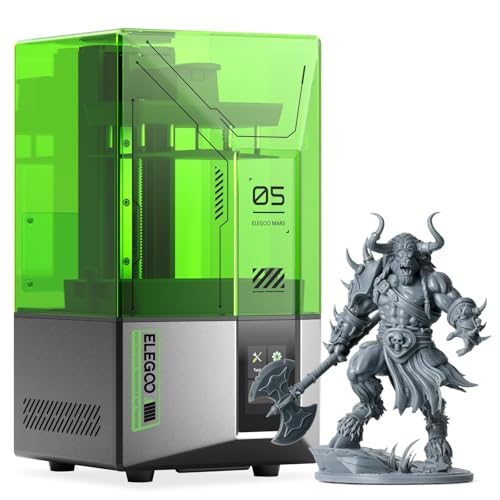
- One-click automatic leveling
- 4K mono LCD for detailed models
- Self-check and residue detection features
Best For: Students prioritizing simple setup and detailed prototypes
High-Resolution Production
Creality Halot-X1 Combo Resin 3D Printer

- 16K LCD with 14×19 μm pixels
- Large 211.68 × 118.37 × 200 mm build volume
- Automated heating, RFID, and resin monitoring
Best For: Students producing larger, detailed parts at higher throughput
Smart MSLA Workflow
ELEGOO Mars 5 MSLA Resin 3D Printer

- Sensors monitor resin, film, objects, and overheating
- Automatic leveling with laser-engraved build plate
- 4K LCD with 35×35 μm XY resolution
Best For: Students wanting guided setup and monitored MSLA printing
High-Resolution Pick – Saturn 4 Ultra 16K
For engineering students who need resin printers for engineering students projects involving fine details and larger prototypes, the ELEGOO Saturn 4 Ultra 16K combines very high resolution with a generous build volume. Its automatic resin heating, self-checks, and monitoring features also help reduce setup and print-management work.
Best For: Detailed engineering models, larger prototypes, and students who value automated monitoring and leveling.
Pros:
- 16K LCD provides 14 x 19 μm XY resolution for intricate details.
- Automatic resin-tank heating activates below 25°C to support more consistent printing conditions.
- 150 mm/h printing, Wi-Fi transfer, power-on resume, automatic leveling, and an AI camera streamline operation.
- Smart sensors monitor resin dosage, foreign objects, build-plate leveling, and material shortages.
Cons:
- Its 35.4-pound weight and 21.5-inch height require substantial workspace.
- The advanced feature set may be more than beginners need for small, simple models.
The Saturn 4 Ultra 16K is a strong choice when precision, build capacity, and automation matter more than a compact footprint.
Advanced Materials Pick – Photon P1 Dual-Color
The Anycubic Photon P1 is a practical option for engineering students exploring resin printers for engineering students applications that use multiple colors or materials. Its dual-material capability, automatic checks, and support for resins up to 8,000 cps make it suited to more specialized experimentation.
Best For: Students testing different materials, colors, and higher-viscosity resins in engineering or creative projects.
Pros:
- Dual-color or dual-material printing can reduce resin consumption for small models.
- Supports ultra-high-viscosity resins up to 8,000 cps.
- Factory-calibrated auto-leveling and preconfigured Anycubic resin settings simplify setup.
- AI inspection checks the build plate, bottom-layer separation, resin level, and vat residue.
Cons:
- At 39 pounds, it is relatively heavy for a student workspace.
- The dual-material capability may be unnecessary for standard single-resin coursework.
Choose the Photon P1 when material flexibility and automated inspection are priorities, especially for projects that go beyond basic standard-resin printing.
Complete Workflow Pick – Saturn 4 Ultra Wash-and-Cure Bundle
ELEGOO Saturn 4 Ultra 16K Resin 3D Printer and ELEGOO Mercury Plus V3.0 Wash and Cure Station
Check Price On AmazonThis Saturn 4 Ultra bundle is a convenient starting point for engineering students comparing resin printers for engineering students because it includes both the printer and a Mercury Plus V3.0 wash-and-cure station. The package combines detailed, high-speed printing with post-processing equipment in one setup.
Best For: Students who want an integrated print, wash, and cure workflow for larger detailed models.
Pros:
- Includes the Saturn 4 Ultra 16K printer and Mercury Plus V3.0 wash-and-cure station.
- Printer offers a 8.33 x 4.66 x 8.66-inch build volume and 150 mm/h speed.
- Smart tank heating at 30°C supports resin preparation during printing.
- The wash-and-cure station has a 7.5-liter capacity and broad printer compatibility.
Cons:
- The combined equipment requires more storage and workspace than a printer alone.
- The bundle may be excessive if you already own suitable washing and curing equipment.
For students building a complete resin-printing station, this bundle offers a straightforward way to cover both model production and post-processing.
Balanced Precision Pick – Photon P1 14K
The Anycubic Photon P1 14K is a balanced choice for engineering students seeking resin printers for engineering students coursework, especially when crisp small features and dependable setup are important. Its auto-leveling, AI monitoring, and support for high-viscosity resins reduce some of the routine calibration burden.
Best For: Detailed student prototypes and advanced creator projects that need reliable setup and fine feature reproduction.
Pros:
- 14K LCD delivers 13,312 x 5,120-pixel resolution and 16.8 x 24.8 μm XY pixel size.
- Can reproduce details with a minimum aperture of 0.3 mm.
- Smart Leveling 3.0 performs self-checks and provides four-corner pressure feedback.
- Supports resins up to 8,000 cps and includes AI monitoring for common print issues.
Cons:
- The listed dimensions indicate a sizable footprint for a dorm or small workbench.
- Its advanced resin capability may be unnecessary for introductory projects.
The Photon P1 14K makes sense for students who want high detail and process assistance without specifically needing the dual-color or dual-material configuration.
Precision Speed Pick – Reflex RS Turbo Resin 3D Printer
For engineering students who need resin printers for engineering students that prioritize dimensional consistency and faster workflows, the Reflex RS Turbo combines a high-contrast amber screen with automated setup and monitoring features. Its claimed tolerances and industrial-style Z-axis hardware make it especially suited to detailed prototypes and repeatable parts.
Best For: Engineering students making detailed prototypes, functional models, and repeat prints where accuracy and process monitoring matter.
Pros:
- High-contrast amber screen is designed for crisp details and faster curing with standard or high-speed resins.
- One-click slicing can repair common model defects and generate supports automatically.
- Force sensors can detect resin residue, pause prints, and produce a diagnostic report after each job.
- C5 ball-screw Z-axis is rated for repeat positioning accuracy of up to 2 micrometers, with claimed printing tolerances of 0.05 mm or less.
Cons:
- At 50.6 pounds, it is comparatively heavy for a student workspace.
- The 15 x 23 x 15-inch dimensions require substantial desk or lab space.
- Its advanced systems may be more than beginners need for basic models.
The Reflex RS Turbo is an accuracy-focused option for students working on demanding prototypes. Its automated correction, adaptive motion controls, and failure-detection features could reduce hands-on troubleshooting, although its size and weight make it better suited to a dedicated lab or workshop.
High-Detail Workflow Pick – UniFormation GK3T 16K Resin Printer
The UniFormation GK3T is a strong candidate among resin printers for engineering students who want very fine surface detail without a complicated setup. Its 16K screen, factory pre-leveling, resin heating, and remote monitoring features support a more streamlined prototyping workflow.
Best For: Students printing intricate prototypes, small mechanical details, miniatures, or other models that benefit from high resolution and convenient monitoring.
Pros:
- 16K resolution and 14 x 19 micrometer pixels are designed for sharp, smooth model surfaces.
- Factory pre-leveling, smart resin feeding, an anti-drip platform, and a quick-release build plate support easier operation.
- Built-in heating is designed to maintain resin fluidity in temperatures as low as 0°C/32°F.
- App and slicer controls provide remote start/stop, progress monitoring, and timelapse photography.
Cons:
- Its 52.8-pound weight may be inconvenient for students who need to move equipment frequently.
- The 12.99 x 15.75 x 20.47-inch footprint needs a sizable, stable workspace.
- The all-in-one post-processing workflow depends on compatible wash and cure equipment.
The GK3T emphasizes detail and convenience rather than a minimal footprint. It is a practical fit for engineering students who value plug-and-play features, temperature stability, and remote oversight, especially when the printer can remain set up in a dedicated workspace.
Compact Value Pick – ANYCUBIC Photon Mono 4 10K Resin Printer
For engineering students comparing resin printers for engineering students, the ANYCUBIC Photon Mono 4 offers high-resolution output in a relatively compact, lightweight package. Its 10K mono LCD, uniform light source, and generous build volume make it suitable for everyday prototypes and detailed project parts.
Best For: Students who want detailed resin prints, a manageable desktop footprint, and straightforward manual leveling.
Pros:
- 7-inch 10K resolution with 17 x 17 micrometer pixels supports fine model detail.
- LighTurbo matrix lighting is designed to provide balanced exposure and reduce layer lines.
- The 153.4 x 87 x 165 mm build volume accommodates a range of student projects.
- Laser-engraved platform improves adhesion, while power-loss recovery can reduce wasted material.
Cons:
- It uses a four-point leveling process, so initial setup still requires hands-on adjustment.
- The supplied notes state that Anycubic APP service is not supported.
- It lacks the built-in heating, remote monitoring, and advanced sensing described for the other options.
The Photon Mono 4 is an approachable choice when resolution and space efficiency matter more than advanced automation. Its 7.7-pound weight and 10 x 10 x 15-inch dimensions make it easier to place in a student workspace, while the 10K screen supports detailed academic and prototype work.
Easy-Start Precision – ELEGOO Mars 5 Resin 3D Printer
For engineering students seeking resin printers for engineering students, the ELEGOO Mars 5 emphasizes straightforward setup, dependable safeguards, and detailed output. One-click automatic leveling and a built-in self-check can reduce calibration time, while its 4K mono LCD is suited to intricate prototypes and models.
Best For: Students who want detailed resin prints with minimal setup and useful print-protection features.
Pros:
- One-click automatic leveling simplifies initial setup.
- 4K mono LCD and COB light source support detailed prints.
- Residue detection, resin-shortage alerts, and self-check functions help reduce failed prints.
- Overheat protection automatically stops printing if LED temperature exceeds 80°C.
Cons:
- The supplied notes do not specify the build volume.
- Resin printing still requires appropriate setup and material handling.
The Mars 5 is a practical choice when ease of use and print reliability matter more than documented capacity. Its automatic checks and detailed-resolution display make it appealing for student prototyping and model work.
High-Resolution Production – Creality Halot-X1 Combo Resin 3D Printer
Among resin printers for engineering students, the Creality Halot-X1 Combo stands out for its large build volume, very high resolution, and automated resin-management system. Its fixed build plate removes leveling from the setup process, while the 16K LCD and stable dual-rail Z-axis target precise, repeatable models.
Best For: Engineering students printing larger or multiple detailed parts and valuing automated material management.
Pros:
- 16K mono LCD provides 14×19 μm pixel size for highly detailed prints.
- 211.68 × 118.37 × 200 mm build volume supports larger models.
- Up to 170 mm/h printing speed can improve workflow efficiency.
- Resin heating, RFID parameter recognition, and weight monitoring streamline material handling.
Cons:
- At 38 pounds, it is substantially heavier than the other listed models.
- Its 16.93 × 16.54 × 21.06-inch footprint may require dedicated workspace.
- The greater number of automated systems may be more than beginners need.
The Halot-X1 Combo is the strongest fit for students who need capacity and throughput alongside fine detail. Its fixed-plate design and resin automation could reduce routine setup, provided there is enough lab or workspace room.
Smart MSLA Workflow – ELEGOO Mars 5 MSLA Resin 3D Printer
The ELEGOO Mars 5 MSLA is a practical option for engineering students comparing resin printers for engineering students, combining automatic leveling with sensors that monitor common printing problems. Its 6.6-inch 4K monochrome LCD, 35×35 μm XY resolution, and print speeds up to 70 mm/h support detailed student projects.
Best For: Students who want a compact, user-friendly MSLA printer with guided setup and print monitoring.
Pros:
- Intelligent sensor detects low resin, foreign objects, film issues, and overheating.
- Automatic leveling and a laser-engraved build plate help simplify reliable adhesion.
- 4K LCD and COB illumination support high-precision, smooth models.
- One-touch plate locking and dual pouring spouts make routine handling easier.
Cons:
- The supplied notes do not provide the build volume.
- Users must still configure settings, add supports, and clean the resin tank promptly.
- Its listed print speed is lower than the Halot-X1 Combo’s stated maximum.
This Mars 5 is well suited to coursework and prototyping where ease of operation matters. Its sensors and automatic leveling can reduce preventable issues, but students still need to learn slicing, support placement, and resin cleanup.
How We Picked the Best Resin Printers for Engineering Students
We focused on the practical requirements of student engineering work: dimensional detail, print consistency, setup complexity, operating cost, and overall value. Resolution matters for gears, enclosures, fluid-system components, and scale models, but it is not the only factor. A printer with dependable leveling, exposure controls, monitoring, and straightforward maintenance can save more time than a higher pixel count alone.
We also considered the range represented here, including compact entry-level printers, high-resolution 16K models, dual-color or dual-material designs, and packages with wash-and-cure equipment. Since resin printing requires ventilation, gloves, cleaning supplies, and post-processing, the complete workflow matters as much as the printer itself.
Quick Comparison
| What matters most | Look for | Best suited to |
|---|---|---|
| Fine detail | 10K–16K mono LCD and a small XY pixel size | Detailed prototypes, miniatures, and fit-check models |
| Easy setup | Auto-leveling, sensors, guided controls, and stable build platforms | First-time users and busy students |
| Workflow speed | Fast exposure settings, reliable release mechanics, and efficient post-processing | Iterative design projects and team labs |
| Lower entry cost | Compact printer with affordable replacement vats and screens | Personal workspaces and occasional printing |
| Complete workflow | Compatible wash-and-cure station or a bundled package | Students without existing post-processing equipment |
Key Buying Factors for Resin Printers for Engineering Students
Resolution and Accuracy
Higher screen resolution can improve fine features, but real-world accuracy also depends on exposure calibration, resin shrinkage, mechanical rigidity, and model orientation. Check the printer’s XY resolution and usable build volume against the size of your typical parts.
Build Volume
A larger platform lets you print bigger housings or multiple components at once, while a compact machine is easier to place in a dorm, apartment, or shared lab. Remember that larger prints consume more resin and may require longer cleaning and curing.
Ease of Operation
Auto-leveling, mechanical sensors, stable release systems, and clear touchscreen controls reduce setup errors. These features are especially useful when several students share one printer or when you need to focus on CAD and testing rather than troubleshooting.
Post-Processing and Safety
Resin prints must be washed and fully cured, so budget for a wash-and-cure station or suitable separate equipment. Use ventilation, nitrile gloves, eye protection, and the resin manufacturer’s handling instructions. Resin printers are not a substitute for a safe lab setup.
Running Costs
Compare resin prices, replacement film, screen availability, vats, filters, gloves, and cleaning alcohol. A low-priced printer may cost more over time if consumables are difficult to source or the workflow creates frequent failed prints.
Who Should Buy Which Resin Printers for Engineering Students?
Choose the ELEGOO Mars 5, Mars 5 MSLA, or ANYCUBIC Photon Mono 4 if you want a relatively approachable, compact option for learning, small prototypes, and coursework. These models make sense when space and initial cost matter most.
Consider the ELEGOO Saturn 4 Ultra, UniFormation GK3T, or Creality Halot-X1 Combo for students who prioritize high resolution, larger output, or more demanding prototyping. Their capabilities are better suited to repeated design iterations and detailed assemblies.
The ANYCUBIC Photon P1 models and Reflex RS Turbo are worth considering when setup convenience, specialized printing features, or fast project turnaround are more important than choosing the simplest entry-level machine. If you do not already own post-processing equipment, the Saturn 4 Ultra bundle with the ELEGOO Mercury Plus V3.0 is a practical starting point because it addresses more of the complete resin-printing workflow.