The best 3D printers for artists make it easier to turn digital concepts into sculptures, props, figurines, prototypes, and functional artwork. The right choice depends on whether you prioritize fine surface detail, vivid multicolor output, speed, or a simple workflow.
We compared these 10 selected models across print quality, material compatibility, ease of use, color capabilities, and creative flexibility. This guide explains what matters most before you choose a printer for your studio, classroom, or workshop.
Best 10 3d Printers for Artists Picks for 2026
Best Multi-Color FDM Pick
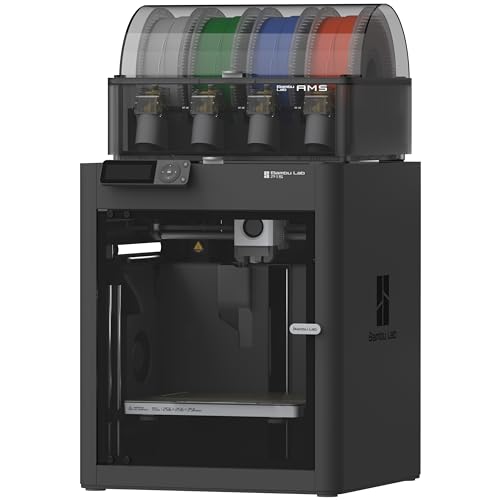
- Up to 16-color printing with AMS
- 500 mm/s high-speed printing
- Enclosed design and auto bed leveling
Best For: Artists creating colorful FDM models and display pieces
Best Fine-Detail Resin Pick

- 7-inch 10K mono LCD resolution
- Uniform LighTurbo light source
- 153.4 × 87 × 165 mm build volume
Best For: Artists producing intricate resin miniatures and models
Best Advanced Multi-Material Pick

- Up to 600 mm/s printing speed
- AMS 2 Pro enables multi-color printing
- Filament drying up to 65°C
Best For: Artists wanting automated, versatile FDM production
Best Fast Prototyping Pick

- Up to 600 mm/s travel speed
- Automatic bed leveling
- Quick three-second nozzle changes
Best For: Artists making rapid FDM prototypes and props
Best Beginner Pick

- Automatic calibration reduces setup work
- Fast, quiet FDM printing
- Multicolor support with optional AMS lite
Best For: Beginners and home-studio artists
Best Multi-Material Choice

- Four toolheads change in about five seconds
- Supports multicolor and mixed-material prints
- 500 mm/s CoreXY speed with 270mm cubed volume
Best For: Professional creators and complex prototypes
Best Automated Color Workflow

- Four-color CANVAS printing with RFID recognition
- Automatic calibration and 22 intelligent sensors
- 500 mm/s CoreXY printing
Best For: Creators wanting guided, automated color printing
Best Multicolor Speed Pick
AD5X Multicolor CoreXY Printer

- Four-color printing for vivid designs
- Up to 600mm/s printing speed
- Auto leveling and flexible nozzle options
Best For: Artists creating colorful models and rapid prototypes
Best Advanced Materials Pick
Creator 5 Pro 4-Toolhead Printer

- Four independent toolheads reduce purge waste
- 65°C heated chamber for advanced filaments
- Built-in filtration and remote monitoring
Best For: Artists using multiple materials or engineering-grade filaments
Best Flexible Filament Value

- Four-color printing for intricate designs
- Automatic Intelligent Filament System
- Supports flexible TPU and 600mm/s speeds
Best For: Artists making colorful models and flexible TPU creations
Best Multi-Color FDM Pick – Bambu Lab P1S Combo
For artists comparing 3d printers for artists, the Bambu Lab P1S Combo stands out for multi-color and multi-material FDM work. Its enclosed design, automatic bed leveling, and fast printing make it practical for producing colorful display pieces and functional creative prototypes.
Best For: Artists who want fast, enclosed FDM printing with multi-color capability.
Pros:
- Supports printing with up to 16 colors when connected to the included AMS system.
- Prints at up to 500 mm/s with 20,000 mm/s² acceleration.
- Automatic bed leveling and a setup time of about 15 minutes simplify operation.
- Enclosed design supports materials including PLA, PETG, TPU, PVA, PET ABS, and ASA.
Cons:
- Multi-color printing requires the Bambu Lab AMS connection.
- Carbon- and glass-fiber-reinforced polymers are not recommended.
- Its 40.8-pound weight and enclosed footprint may require a sturdy workspace.
The P1S Combo is a strong choice when color variety and workflow speed matter more than printing specialty fiber-reinforced materials.
Best Fine-Detail Resin Pick – ANYCUBIC Photon Mono 4
For artists prioritizing surface detail, the ANYCUBIC Photon Mono 4 is a resin option with a 7-inch 10K mono LCD screen. Its high pixel density, uniform light source, and compact build volume suit detailed miniatures, sculptural studies, and small presentation models.
Best For: Artists making highly detailed small-to-medium resin models.
Pros:
- 9024×5120 resolution delivers 17×17μm X/Y pixel size for fine detail.
- LighTurbo light-source technology helps produce smooth surfaces and reduce layer lines.
- Build volume measures 153.4 × 87 × 165 mm for a range of creative projects.
- Four-point leveling is designed to reduce repeated leveling after initial setup.
Cons:
- The build volume is more limited than many larger-format FDM printers.
- The Anycubic app is not supported for this model.
- Resin printing may be less suitable for artists seeking a filament-based workflow.
The Photon Mono 4 is compelling when crisp detail is the priority, particularly for smaller artwork and intricate models rather than large installations.
Best Advanced Multi-Material Pick – Bambu Lab P2S Combo
Among 3d printers for artists, the Bambu Lab P2S Combo is aimed at creators who want a fast, automated FDM workflow with broader material control. The AMS 2 Pro adds multi-color printing and filament drying, while active airflow management helps balance detail and temperature for different materials.
Best For: Artists seeking high-speed, automated multi-color and multi-material FDM printing.
Pros:
- Prints at up to 600 mm/s with active flowrate compensation for consistent layers.
- AMS 2 Pro supports multi-color and multi-material printing and dries filament up to 65°C.
- AI failure detection, automatic calibration, and quick-swap nozzles streamline setup.
- Adaptive airflow can cool overhangs or maintain a 50°C chamber for engineering materials.
Cons:
- The printer alone does not support multi-color printing; the Combo version is required.
- Its 47.5-pound weight and larger footprint need substantial workspace.
- The feature-rich system may be more than necessary for simple single-color projects.
The P2S Combo is best suited to artists building a repeatable, versatile studio workflow where color changes, material handling, and automation justify the larger setup.
Best Fast Prototyping Pick – FLASHFORGE Adventurer 5M
The FLASHFORGE Adventurer 5M is a practical choice for artists who need quick iterations and straightforward FDM operation. Its CoreXY structure, automatic leveling, rapid nozzle changes, and 220 × 220 × 220 mm build area support prototypes, props, and repeat creative experiments.
Best For: Artists who value rapid prototyping and simple day-to-day FDM printing.
Pros:
- Reaches up to 600 mm/s travel speed with 20,000 mm/s² acceleration.
- Fully automatic bed leveling helps simplify first-layer setup.
- Three-second detachable nozzle changes and a 35-second warm-up to 200°C improve workflow speed.
- Direct-drive 280°C extruder, dual-sided PEI platform, and optional nozzle sizes support varied projects.
Cons:
- The standard build volume is 220 × 220 × 220 mm.
- Multi-color printing is not listed among the supplied features.
- Some artists may need optional nozzle sizes for specialized detail or extrusion needs.
The Adventurer 5M makes the most sense for creators who would rather spend less time preparing the printer and more time iterating on physical designs.
Best Beginner Pick – Bambu Lab A1
For artists seeking approachable 3d printers for artists, the Bambu Lab A1 combines automatic calibration, fast FDM printing, and a simple touchscreen interface. It can also support multicolor work with the optional AMS lite system.
Best For: Beginners, families, and artists who want a quiet, low-maintenance printer for detailed everyday projects.
Pros:
- Automatic bed leveling, Z-offset, and other calibration processes simplify setup.
- 10,000 mm/s² acceleration supports fast printing while maintaining detail.
- Active flow-rate compensation helps produce consistently smooth extrusion.
- Quiet operation and a 1-Clip quick-swap nozzle make it convenient for home studios.
Cons:
- Multicolor printing requires the AMS lite, sold separately unless you choose the A1 Combo.
- Its FDM process may not provide the same fine surface detail as specialized resin printing.
The A1 is a practical starting point for artists who prioritize ease of use and reliable results. Choose the Combo or add AMS lite if color work is central to your projects.
Best Multi-Material Choice – Snapmaker U1
The Snapmaker U1 stands out among 3d printers for artists who need true multicolor and mixed-material capability. Its four independent toolheads switch in about five seconds, enabling complex models with less purging and material waste.
Best For: Professional creators, workshops, and artists producing multicolor models, functional prototypes, or mixed-material pieces.
Pros:
- Four preloaded toolheads enable true multicolor and mixed-material printing.
- Fast tool changes reduce purging and can cut filament waste by up to five times compared with traditional changing systems.
- Supports a broad material range, including PLA, TPU, PETG, PVA, ABS, ASA, PA, and PC.
- Automatic calibration, AI print monitoring, and remote app control support a streamlined workflow.
Cons:
- At 57.9 pounds, it is substantially heavier than a basic desktop printer.
- Its advanced toolhead and material features may be more than casual users need.
With a 270mm cubed build volume and 500 mm/s CoreXY printing, the U1 is designed for ambitious creative work. It is especially compelling when material flexibility and reduced color-change waste matter more than compactness.
Best Automated Color Workflow – ELEGOO Centauri 2 Combo
For artists comparing 3d printers for artists, the ELEGOO Centauri 2 Combo offers a beginner-friendly route to four-color printing. Its CANVAS system combines independent motors, RFID filament recognition, auto refill, and automatic calibration to simplify colorful projects.
Best For: Artists and makers who want fast, automated four-color printing with guided software and monitoring features.
Pros:
- CANVAS supports four-color printing with instant switching and RFID filament recognition.
- Full auto calibration, pre-print checks, and 22 sensors help reduce manual adjustments.
- 500 mm/s CoreXY printing and 20,000 mm/s² acceleration support quick production.
- Nexprint, ELEGOOSlicer, and the ELEGOO Matrix app provide an integrated workflow.
Cons:
- The 19.69 x 18.9 x 23.23-inch footprint requires dedicated space.
- Its four-color CANVAS system is focused on four-color workflows rather than the four independent toolheads offered by the Snapmaker U1.
The Centauri 2 Combo is a strong fit for creators who value automation from model discovery through printing. Its touchscreen, sensors, and maintenance-focused design make everyday operation approachable without giving up speed.
Best Multicolor Speed Pick – AD5X Multicolor CoreXY Printer
For artists comparing 3d printers for artists, the FLASHFORGE AD5X is a practical choice when vivid color output and quick iteration matter. Its four-color support, CoreXY design, automatic leveling, and 220 x 220 x 220mm build volume suit detailed creative work as well as rapid prototyping.
Best For: Artists who want fast, colorful prints with straightforward setup and remote monitoring.
Pros:
- Supports up to four colors for vibrant creative projects.
- Prints at speeds up to 600mm/s with 20,000mm/s² acceleration.
- Includes 1-click auto leveling, filament automation, and power-loss resume.
- Supports nozzle sizes from 0.25mm to 0.8mm for detail or faster larger prints.
Cons:
- The 220mm cubed build volume may limit oversized artwork.
- The finest 0.25mm nozzle is an optional upgrade rather than the included nozzle.
The AD5X balances creative color options with speed and convenience. It is especially appealing for artists producing repeated pieces, prototypes, or multicolor models, though larger installations may require a bigger-format printer.
Best Advanced Materials Pick – Creator 5 Pro 4-Toolhead Printer
Among 3d printers for artists, the FLASHFORGE Creator 5 Pro stands out for creators working with demanding materials and frequent color or material changes. Four independent toolheads, a heated chamber, and a near-zero-waste switching system make it suited to complex, production-oriented projects.
Best For: Artists and designers who need multi-material flexibility, advanced filaments, and reduced purge waste.
Pros:
- Four independent toolheads switch in about seven seconds without flushing filament.
- Active heated chamber reaches 65°C and supports ABS, PC, and PA.
- CoreXY motion system supports speeds up to 600mm/s while targeting reduced vibration.
- Dual HEPA 13 and activated carbon filtration helps capture particles and fumes.
Cons:
- Its 39-pound weight and enclosed industrial design may be more than casual users need.
- The supplied notes do not specify the build volume.
The Creator 5 Pro is the most specialized option here. Its heated chamber and four-toolhead setup are valuable for ambitious material experiments, while the filtration and camera add useful control for a dedicated studio workspace.
Best Flexible Filament Value – AD5X Four-Color FDM Printer
The FLASHFORGE AD5X is a versatile option for artists seeking 3d printers for artists with multicolor capability, automatic filament management, and flexible-material support. Its all-metal CoreXY structure and 220 x 220 x 220mm print area provide a useful mix of stability, speed, and creative range.
Best For: Artists and hobbyists making multicolor designs, flexible TPU pieces, and detailed prototypes.
Pros:
- Creates multicolor designs using up to four colors.
- Intelligent Filament System automatically detects and refills filament.
- Reaches up to 600mm/s with 20,000mm/s² acceleration.
- Supports flexible TPU and uses an all-metal CoreXY structure for stability.
Cons:
- The 220 x 220 x 220mm build size is not intended for very large artwork.
- The supplied notes do not mention remote monitoring or power-loss resume.
This AD5X configuration makes a strong case for artists who value material flexibility and automated filament handling. It offers broad creative utility without giving up the speed and stability expected from a CoreXY printer.
How We Picked the Best 3d Printers for Artists
We focused on features that directly affect creative results and day-to-day usability: resolution, color or material handling, build volume, print speed, calibration, software support, and maintenance requirements. The selection includes both FDM and resin printers because they serve different artistic purposes. FDM models are generally better for larger sculptures, props, prototypes, and durable functional pieces, while resin printers can produce exceptionally fine details for miniatures, jewelry, and small models.
We also considered whether each printer suits beginners, supports reliable unattended printing, and offers enough flexibility to remain useful as your skills develop. Multicolor systems received attention for reducing manual painting, although they may add cost, material waste, or setup complexity.
Quick Comparison
For an easy entry into creative FDM printing, the Bambu Lab A1 is designed around straightforward operation. The Bambu Lab P1S Combo and P2S Combo add enclosed printing and automated multicolor workflows. The Snapmaker U1 and Flashforge Creator 5 Pro are aimed at artists who need several toolheads or broader material flexibility. Flashforge’s Adventurer 5M and AD5X models emphasize speed and convenience, while the Elegoo Centauri 2 Combo offers another beginner-friendly multicolor route.
The Anycubic Photon Mono 4 is the specialist option for highly detailed resin work. Remember that resin printing requires washing, curing, ventilation, and careful handling, so it is not automatically the best choice for every studio.
Key Buying Factors for 3d Printers for Artists
Print Detail and Surface Finish
Choose resin when tiny facial features, textures, or sharp miniature details matter most. For larger pieces, FDM quality is influenced by nozzle size, layer height, cooling, and slicer settings. A well-tuned FDM printer can produce excellent art objects while keeping operating costs manageable.
Color and Material Options
Multicolor systems are useful for character models, decorative pieces, and visual prototypes. Check how colors are loaded, whether the system changes tools or feeds filament, and how much purge waste it creates. Artists working with flexible, abrasive, high-temperature, or engineering materials should verify compatibility rather than relying only on advertised color counts.
Build Volume, Speed, and Reliability
Measure your typical projects before buying. A larger build area reduces the need to split sculptures, but it can increase footprint and print time. High speed is helpful only when motion control, extrusion, cooling, and calibration maintain consistent results. Automatic leveling, filament sensors, enclosure features, and remote monitoring can make a bigger practical difference than headline speed.
Studio Safety and Workflow
FDM printers are usually easier to place in a home studio, although ventilation is still sensible. Resin printers need a controlled workspace, protective gloves, wash and cure equipment, and responsible chemical disposal. Also consider slicer compatibility, replacement parts, noise, and how much hands-on finishing you are willing to do.
Who Should Buy Which 3d Printers for Artists?
Beginners and families should prioritize the Bambu Lab A1, Flashforge Adventurer 5M, or a beginner-oriented multicolor model such as the Elegoo Centauri 2 Combo. Artists seeking polished multicolor FDM output with minimal setup should consider the Bambu Lab P1S Combo or P2S Combo. Those focused on maximum miniature detail should choose the Anycubic Photon Mono 4, provided they can manage resin safety and post-processing.
For studios producing varied materials or minimizing color-change waste, the Snapmaker U1 or Flashforge Creator 5 Pro may be more compelling. Choose the Flashforge AD5X models when fast CoreXY printing and multicolor capability are priorities. Ultimately, the best printer is the one whose materials, workflow, and build volume match the artwork you make most often—not simply the model with the highest advertised speed.