A drawing tablet with a screen can make digital art feel more direct by letting you draw on the image instead of looking away at a separate monitor. The right model depends on your preferred screen size, pen response, color needs, and available desk space.
We selected 10 display tablets from Wacom, HUION, XP-PEN, and UGEE, covering compact entry-level options, portable midrange models, and larger screens designed for more demanding creative work.
Best 10 Drawing Tablet with Screen Picks for 2026
Premium Precision Pick
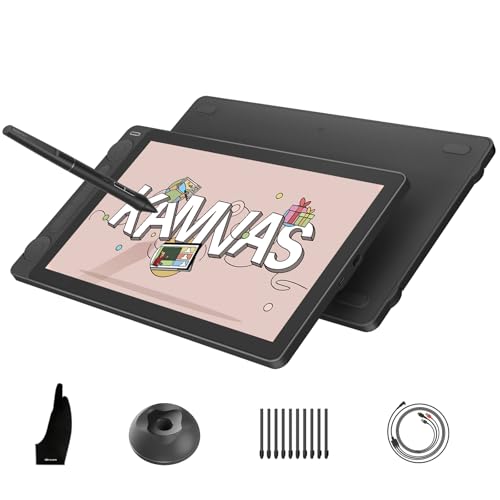
- 16K pressure-sensitive PenTech 4.0 stylus
- Factory-calibrated color with wide gamut coverage
- Dual dials, five keys, and portable design
Best For: Color-focused artists and portable creative setups
Compact Starter Choice

- 11.6-inch Full HD drawing display
- Battery-free pen with 8,192 pressure levels
- Six keys and programmable touch bar
Best For: Beginners, students, and online educators
Large-Screen Workflow Pick

- 15.6-inch Full HD laminated display
- 120% sRGB gamut and anti-glare glass
- Includes adjustable 20°–60° stand
Best For: Desk-based artists wanting more drawing space
Modern Connectivity Pick

- 16K pressure sensitivity with X3 Pro stylus
- USB-C, HDMI, and broad device compatibility
- Red dial, eight keys, and dual working modes
Best For: Flexible creators using modern USB-C devices
Premium Pick

- 16-inch QHD IPS display with wide color coverage
- Pro Pen 3 with 8,192 pressure levels and tilt support
- Built-in 20-degree legs and anti-glare glass
Best For: Serious artists and designers seeking a spacious, color-accurate pen display
Color Specialist

- 143% sRGB gamut with four color-space modes
- 16K pressure sensitivity and full-laminated screen
- Eight hotkeys plus a configurable scroll wheel
Best For: Artists and students wanting vivid color and broad compatibility
Control-Focused Pick
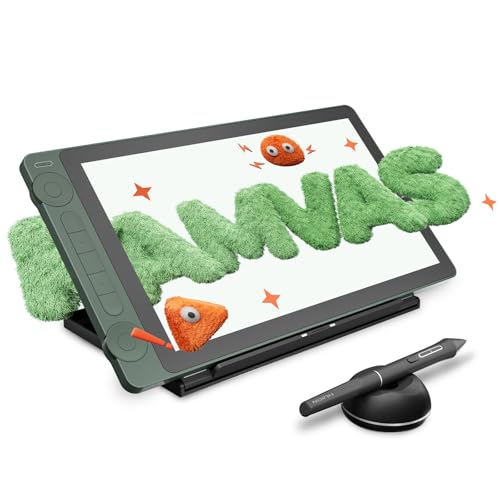
- PenTech 4.0 with 16K pressure sensitivity
- Factory-calibrated display with 99% sRGB coverage
- Dual dials, five silent keys, and adjustable stand
Best For: Creators wanting accurate color and compact, customizable controls
Best Color-Focused Value
UGEE UE12 11.6-inch Drawing Tablet with Screen

- 11.6-inch full-laminated 1080p anti-glare display
- 124% sRGB with three selectable color spaces
- Battery-free 16K stylus and eight shortcut keys
Best For: Color-conscious artists seeking a compact, versatile pen display
Best for Advanced Controls
XPPen Artist 13.3 Pro V2 Drawing Tablet

- 13.3-inch full-laminated FHD display
- Red dial plus eight customizable shortcut keys
- 16K pressure, tilt support, and battery-free stylus
Best For: Creators who want a larger display and tactile workflow controls
Best Budget-Friendly Control Layout
XPPen Artist12 Pro Drawing Tablet

- 11.6-inch full-laminated anti-glare display
- Red dial and eight customizable express keys
- 8,192-pressure battery-free stylus with tilt support
Best For: Artists, teachers, and remote presenters needing physical shortcuts
Premium Precision Pick – HUION Kamvas 13 (Gen 3)
The HUION Kamvas 13 (Gen 3) is a feature-rich drawing tablet with screen for artists who want a portable display, accurate color, and advanced pen control. Its 13.3-inch laminated Canvas Glass 2.0 surface, 16K pressure sensitivity, and dual dials support detailed digital artwork, while its slim profile suits mobile setups. It must be connected to a compatible computer or laptop to work.
Best For: Artists, designers, animators, and students who prioritize color accuracy and portable controls.
Pros:
- 16,384 pressure levels and PenTech 4.0 stylus with tilt support.
- 99% sRGB/Rec.709 and 90% Adobe RGB coverage, with factory calibration to ΔE<1.5.
- Two dials, five press keys, full lamination, and an anti-glare textured surface.
- Supports Windows, macOS, Android, and Linux systems.
Cons:
- Not a standalone device; it requires a connected computer or laptop.
- Android compatibility requires USB 3.1 Gen 1 and DisplayPort 1.2 support.
Choose this model if precise color reproduction and customizable controls matter more than having a larger screen. Its light, symmetrical design also makes it practical for left- or right-handed creators who work in different locations.
Compact Starter Choice – XP-PEN Artist12
The XP-PEN Artist12 is a compact drawing tablet with screen designed for digital drawing, editing, animation, and online teaching. Its 11.6-inch Full HD display provides a direct-on-screen drawing experience, while six customizable keys and a touch bar help streamline common commands. It requires a computer connection and may need an adapter if your computer lacks HDMI and USB-A ports.
Best For: Students, teachers, and beginners seeking a compact, versatile pen display.
Pros:
- 1920×1080 display with 72% NTSC, listed as 100% sRGB color coverage.
- Battery-free stylus with a built-in eraser and 8,192 pressure levels.
- Six customizable shortcut keys and a programmable touch bar.
- Works with Windows, macOS, Linux, and popular creative software.
Cons:
- Requires a connected computer to operate.
- Connection setup needs HDMI and USB-A ports, or suitable adapters.
This is a sensible entry point for users who want an on-screen workflow without moving to a larger display. Its education and video-conferencing compatibility also makes it useful for handwritten notes, lessons, and remote collaboration.
Large-Screen Workflow Pick – HUION Kamvas Pro 16
The HUION Kamvas Pro 16 is a larger drawing tablet with screen for creators who prefer more room for illustration, painting, and design work. Its 15.6-inch fully laminated display combines 120% sRGB color gamut coverage with an anti-glare surface, while six shortcut keys, a touch bar, and the included adjustable stand support a comfortable workflow. The display must be connected to a computer or laptop.
Best For: Digital artists who want a spacious screen, adjustable viewing angle, and dedicated controls.
Pros:
- 15.6-inch Full HD laminated display with anti-glare glass.
- 120% sRGB color gamut volume and a 1000:1 contrast ratio.
- Six customizable keys, a touch bar, and a battery-free pen with 60° tilt recognition.
- Includes an ST200 stand adjustable from 20° to 60°.
Cons:
- Not standalone; it needs a connected computer or laptop.
- Its larger 3-pound form is less portable than smaller pen displays.
The Kamvas Pro 16 is a strong fit when drawing space and an ergonomic workstation matter more than compact portability. The included stand and tactile controls make it especially suitable for longer sessions at a desk.
Modern Connectivity Pick – XP-PEN Artist 13.3 Pro V2
The XP-PEN Artist 13.3 Pro V2 is a versatile drawing tablet with screen that combines a fully laminated 13.3-inch Full HD display with 16K pressure sensitivity and flexible connectivity. A full-featured USB-C connection supports compatible computers, Chromebooks, and Android devices, while the red dial and eight shortcut keys help speed up creative tasks. It is not standalone and must be used with a computer or compatible device.
Best For: Artists and students who want modern USB-C connectivity, strong pen sensitivity, and adaptable working modes.
Pros:
- 16,384 pressure levels with a battery-free X3 Pro stylus and built-in eraser.
- 13.3-inch 1920×1080 fully laminated display with 99% sRGB and 95% P3 coverage.
- Red dial, eight customizable keys, and included foldable stand.
- Supports pen display and traditional pen tablet modes.
Cons:
- Requires a compatible computer, Chromebook, Android device, or laptop.
- Single-cable USB-C use requires USB 3.1 and DisplayPort 1.2 support; HDMI setup uses a separately sold 3-in-1 cable.
This model stands out for users who want a current, flexible setup rather than a basic pen display. Its high pressure sensitivity, broad color coverage, and dual operating modes make it adaptable for illustration, design, and extended creative sessions.
Premium Pick – Wacom Cintiq 16
The Wacom Cintiq 16 is a drawing tablet with screen designed for artists who want a spacious, high-resolution canvas and precise pen control. Its 16-inch QHD display, Pro Pen 3, wide color coverage, and built-in 20-degree legs make it well suited to detailed illustration, animation, design, and 3D work.
Best For: Serious digital artists, illustrators, animators, designers, and 3D creators who use a compatible Windows or Mac computer.
Pros:
- Sharp 2560 x 1600 IPS display with 99% DCI-P3 and 100% sRGB coverage.
- Pro Pen 3 offers 8,192 pressure levels, tilt support, and three shortcut keys.
- Anti-glare glass and built-in fold-out legs support comfortable extended sessions.
Cons:
- Requires a compatible computer connection; it is not presented as a standalone device.
- Computers without DisplayPort Alt Mode or Thunderbolt 3/4 may need additional cables.
- Only a one-year manufacturer warranty is listed.
Choose the Cintiq 16 if display sharpness, color coverage, and Wacom’s pen experience matter more than having a compact or especially simple setup. Confirm your computer’s USB-C video compatibility before buying.
Color Specialist – UGEE UE16 15.4-Inch
The UGEE UE16 is a drawing tablet with screen that emphasizes vivid color, extensive customization, and broad device compatibility. Its 15.4-inch full-laminated display, 143% sRGB gamut, 16,384 pressure levels, and physical shortcut controls give artists a feature-rich workspace for drawing and painting.
Best For: Students, teachers, and digital artists who want strong color coverage, multiple color modes, and tactile controls for use with a PC, Mac, Android device, or other supported system.
Pros:
- 143% sRGB color gamut with sRGB, Adobe RGB, DCI-P3, and black-and-white modes.
- 16,384 pressure levels, tilt support, full lamination, and anti-glare glass.
- Eight shortcut keys and a scroll wheel provide hands-on workflow control.
- Supports Windows, macOS, Chrome OS, Android, and Linux.
Cons:
- Its 1920 x 1080 resolution is lower than some larger high-resolution pen displays.
- The supplied notes specify HDMI and USB connectivity, which may require more cables than a single-cable setup.
- The listing says the three-in-one cable is packed separately, so check the parcel carefully.
The UE16 stands out for users who prioritize expansive color options and shortcut controls. It is a flexible choice, but verify the included cable package and your preferred device’s connection requirements first.
Control-Focused Pick – HUION Kamvas 13 Gen 3 SE
The HUION Kamvas 13 Gen 3 SE is a compact drawing tablet with screen built around accurate pen tracking, calibrated color, and efficient controls. PenTech 4.0, a nano-etched anti-sparkle glass surface, dual dials, and five silent keys make it a practical option for illustration, editing, animation, and design.
Best For: Artists, designers, editors, and students who want a portable 13.3-inch pen display with professional color features and customizable physical controls.
Pros:
- PenTech 4.0 provides 16,384 pressure levels, 2g initial activation force, and tilt auto-alignment.
- 99% sRGB and Rec.709 plus 90% Adobe RGB coverage, with factory calibration and a listed ΔE<1.5.
- Two dial controllers, five silent keys, and three customizable side keys streamline common tasks.
- Includes an adjustable stand and supports USB-C single-cable connection when the device meets requirements.
Cons:
- The 13.3-inch screen provides less working area than larger 15.4- or 16-inch models.
- It must be connected to a computer, laptop, or compatible Android device to work.
- USB-C connection requires support for USB 3.1 Gen 1 and DP 1.2 or above.
The Kamvas 13 Gen 3 SE is a strong fit when accurate color and fast workflow controls are more important than maximum screen size. Its connection requirements make compatibility checking essential, particularly for USB-C setups.
Best Color-Focused Value – UGEE UE12 11.6-inch Drawing Tablet with Screen
The UGEE UE12 is a drawing tablet with screen aimed at artists who want a compact, color-rich display and precise pen control. Its 11.6-inch full-laminated 1080p screen is paired with a battery-free stylus, customizable shortcut keys, and broad Windows, Mac, Android, and Chrome compatibility.
Best For: Artists and students who prioritize vivid color, low-parallax drawing, and flexible device compatibility.
Pros:
- Full-laminated anti-glare display helps reduce the visual gap between pen and cursor.
- 124% sRGB color gamut with selectable sRGB, Adobe RGB, and DCI-P3 modes.
- Battery-free stylus supports 16K pressure sensitivity, 60-degree tilt, and two programmable buttons.
- Eight customizable shortcut keys and dual USB-C ports add workflow flexibility.
Cons:
- Its 11.6-inch workspace may feel compact for users who prefer larger canvases.
- Requires a compatible computer, phone, or tablet connection rather than operating as a standalone device.
The UE12 stands out for combining a portable size with an unusually wide stated color gamut and modern USB-C connectivity. It is a strong fit for digital painting, illustration, image editing, and other creative work where color flexibility matters.
Best for Advanced Controls – XPPen Artist 13.3 Pro V2 Drawing Tablet
The XPPen Artist 13.3 Pro V2 is a drawing tablet with screen for creators who want a larger working area and dedicated physical controls. Its 13.3-inch full-laminated display, red dial, eight shortcut keys, and high-pressure battery-free stylus support detailed drawing and efficient editing.
Best For: Animators, concept artists, illustrators, and advanced hobbyists who value screen size and hands-on workflow controls.
Pros:
- 13.3-inch fully laminated FHD display offers a wider workspace with virtually no parallax.
- Listed color coverage includes 88% NTSC, 123% sRGB, and at least 91% Adobe RGB.
- Red dial and eight customizable keys provide quick access to zoom, brush size, canvas rotation, and other commands.
- Battery-free stylus provides 16,384 pressure levels, 60-degree tilt, and low initial activation force.
Cons:
- Must be connected to a computer or laptop; it is not a standalone tablet.
- The larger display may be less convenient than a smaller model for highly portable setups.
With its dial-based controls and 13.3-inch display, this Artist model is designed for creators who want to minimize keyboard dependence. Broad operating-system and software support also makes it suitable for varied creative workflows, including illustration, animation, photo editing, and 3D work.
Best Budget-Friendly Control Layout – XPPen Artist12 Pro Drawing Tablet
The XPPen Artist12 Pro is a drawing tablet with screen that combines an 11.6-inch full-laminated display with a tactile red dial and eight programmable keys. Its battery-free stylus supports pressure and tilt input, while compatibility with major operating systems and creative software makes it useful beyond drawing.
Best For: Beginners, educators, and digital artists who want dedicated controls for drawing, annotation, and remote teaching.
Pros:
- Full-laminated anti-glare screen is designed for virtually zero parallax and reduced reflections.
- Red dial and eight customizable express keys support quick zooming, brush adjustments, and shortcuts.
- Battery-free stylus offers 8,192 pressure levels and 60-degree tilt support.
- Works with Windows, macOS, ChromeOS, Linux, and major creative software such as Photoshop and Illustrator.
Cons:
- Must connect to a host computer or laptop and cannot be used standalone.
- Its listed 72% NTSC color gamut is more modest than some newer wide-gamut alternatives.
The Artist12 Pro is a practical choice when physical controls matter as much as the display. It can serve for illustration and animation, but its support for document annotation, screen sharing, and online teaching gives it additional productivity value.
How We Picked the Best Drawing Tablet with Screen
We compared these models by looking at the features that most affect day-to-day drawing: display size and resolution, color coverage, pen pressure levels, laminated screen construction, shortcut controls, compatibility, portability, and overall value. We also considered whether each tablet suits beginners, students, hobbyists, or experienced artists.
Specifications can vary by region and bundle, so confirm the current package contents, operating-system support, and connection requirements before buying.
Quick Comparison
| Best For | Recommended Type | What to Prioritize |
|---|---|---|
| Beginners and students | 11.6-inch display | Affordable price, simple setup, battery-free pen |
| Portable workflows | 12- to 13.3-inch display | Compact footprint, USB connectivity, broad compatibility |
| More workspace | 15.4- to 16-inch display | Higher resolution, color accuracy, adjustable stand |
| Professional illustration | Premium pen display | Low parallax, strong color coverage, reliable controls |
Key Buying Factors for a Drawing Tablet with Screen
Screen Size and Resolution
An 11.6-inch tablet is easier to fit on a small desk and usually costs less, while a 13.3-inch model offers a useful balance of workspace and portability. A 15.4- or 16-inch display is more comfortable for detailed illustration, photo editing, animation, and long sessions. Full HD is common at smaller sizes; larger screens benefit from higher resolution when available.
Pen Performance and Parallax
Pressure sensitivity helps control line weight and brush opacity. High pressure-level ratings are useful, but calibration, pen tracking, tilt support, and driver quality matter just as much. A full-laminated display places the drawing surface closer to the image, which can reduce the visible gap between the pen tip and cursor.
Color, Surface, and Viewing Comfort
Artists working for print or color-sensitive clients should look for broad color coverage and dependable calibration. Anti-glare surfaces can reduce reflections, while brightness and viewing angles affect comfort. A stand or compatible adjustable mount is especially valuable for larger tablets.
Connectivity and Compatibility
Check whether the tablet works with your computer, Chromebook, Android device, or preferred creative software. Many display tablets require both video and power connections, and some laptops may need an adapter or powered hub. Confirm driver support before purchase.
Who Should Buy Which Drawing Tablet with Screen?
Choose an 11.6-inch XP-PEN or UGEE model if you are starting out, need a compact setup, or want a lower-cost way to learn digital drawing. A 12- or 13.3-inch HUION or XP-PEN tablet is a strong all-purpose choice for students, hobbyists, and artists who need portability without giving up too much workspace.
Move to a 15.4- or 16-inch model if you create detailed illustrations, edit photos, animate, or prefer drawing at a larger scale. Wacom’s Cintiq line is worth considering if pen feel, software integration, and established professional support are more important than minimizing cost. Finally, prioritize a full-laminated screen, wide color gamut, and comfortable stand when the tablet will be part of your primary daily workstation.