Choosing among the best 3D printers for miniatures means balancing fine detail, print reliability, cleanup, speed, and total ownership cost. Resin printers typically deliver the sharpest facial features, armor, and textures, while modern FDM machines offer easier handling and more practical larger-scale printing.
This roundup compares 10 selected models across both printing approaches, from compact beginner machines to faster multicolor and high-resolution options. Use the guide below to match the printer type, workflow, and features to the miniatures you plan to make.
Best 10 3d Printers for Miniatures Picks for 2026
Best Detail and Speed
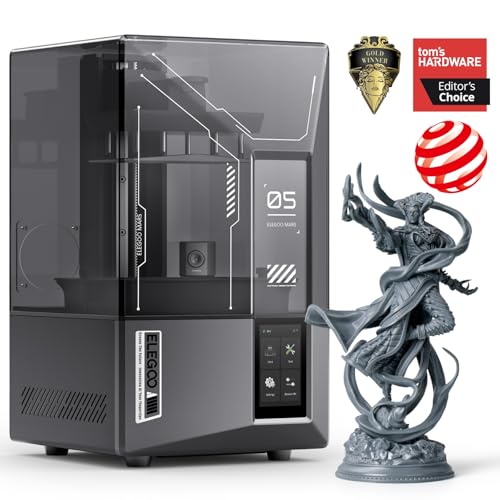
- 9K mono LCD with 18 μm XY resolution
- Up to 150 mm/h with tilt-release technology
- AI camera and smart failure alerts
Best For: High-detail resin miniatures and faster batch printing
Best Beginner-Friendly Setup

- Automatic calibration and simple setup
- Fast, quiet printing for home use
- Includes an LED Lamp Kit
Best For: New makers wanting an easy, connected creative printer
Best Affordable Resin Detail

- 7-inch 10K mono LCD with 17 μm XY pixels
- Uniform LighTurbo light source
- Beginner-friendly four-point leveling
Best For: Detailed resin models with straightforward setup
Best Multicolor Workflow

- Four-color CANVAS printing
- Full auto calibration and 22 sensors
- CoreXY speeds up to 500 mm/s
Best For: Multicolor filament projects and automated workflows
Best High-Detail Resin Pick

- 10K LCD with 17 µm XY resolution
- Uniform LighTurbo matrix light source
- Generous 153.4 × 87 × 165 mm build volume
Best For: Detailed resin miniatures and display models
Best Fast FDM Option

- Up to 600 mm/s travel speed
- Automatic bed leveling
- 220 × 220 × 220 mm build volume
Best For: Fast FDM terrain, props, and larger projects
Best Smart Resin Printer

- 9K LCD with 18 µm XY resolution
- Up to 150 mm/h printing speed
- AI camera and automatic leveling
Best For: Monitored, automated resin miniature printing
Best Multicolor Speed Pick

- Up to four-color printing
- Speeds up to 600mm/s
- Optional 0.25mm nozzle for fine details
Best For: Multicolor projects and fast, flexible printing
Best Heavy-Duty Pick

- 10K resolution with 17μm XY pixels
- Up to 120mm/h print speed
- Multiple intelligent inspections
Best For: Highly detailed resin miniatures
Best Easy-Setup Resin Pick
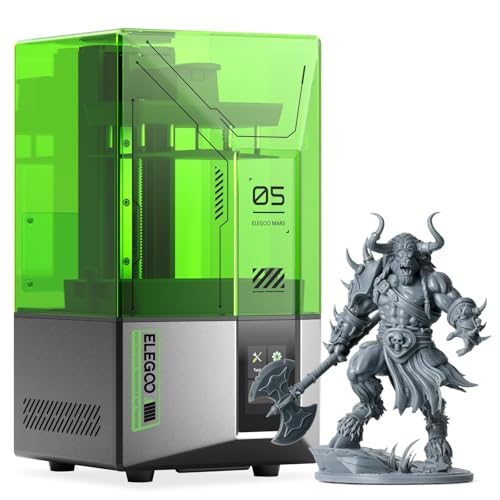
- One-click automatic leveling
- 4K mono LCD for detailed prints
- Self-check and safety monitoring
Best For: Beginners printing detailed resin miniatures
Best Detail and Speed – ELEGOO Mars 5 Ultra
For makers prioritizing fine detail in 3d printers for miniatures, the ELEGOO Mars 5 Ultra combines a 9K mono LCD with 18 μm XY resolution. Its resin-based workflow is suited to reproducing intricate textures, while tilt-release technology supports print speeds up to 150 mm/h.
Best For: Miniature makers who want high-resolution resin prints, faster production, and helpful monitoring features.
Pros:
- 9K resolution and 18 μm XY resolution for detailed models.
- Tilt-release technology and selectable fast or slow print modes.
- AI camera can detect issues such as warping and empty build plates.
- Residue detection, resin alerts, and Wi-Fi cluster printing add convenience.
Cons:
- AI detection results can vary with the environment, models, and resin.
- Resin printing requires a more specialized workflow than the supplied filament models.
The Mars 5 Ultra is a strong fit when miniature detail is the priority, especially for users who can benefit from fast resin production and multi-printer control.
Best Beginner-Friendly Setup – Bambu Lab A1 mini
The Bambu Lab A1 mini is a practical entry point among 3d printers for miniatures for users who value simple setup. Automatic calibration, quiet operation, and access to MakerWorld models make it approachable, while the included LED Lamp Kit adds a creative project option beyond standard prints.
Best For: Beginners seeking a compact, connected printer for toys, decorations, gifts, and easy creative projects.
Pros:
- Automatic calibration and beginner-oriented setup.
- Fast, quiet operation for home, studio, or workspace use.
- MakerWorld library and Bambu Handy app support a connected workflow.
- Included LED Lamp Kit enables functional decorative light projects.
Cons:
- The supplied notes do not specify a miniature-focused resolution or build volume.
- The LED Lamp Kit is most useful with compatible lamp models.
The A1 mini is best when ease of use matters more than specialized miniature detail, offering a low-friction way to start printing and explore ready-to-use designs.
Best Affordable Resin Detail – ANYCUBIC Photon Mono 4
The ANYCUBIC Photon Mono 4 is a compact resin option for 3d printers for miniatures, pairing a 7-inch 10K mono LCD with 17 μm XY pixels. Its uniform LighTurbo light source is designed to reduce layer lines, while the 153.4 × 87 × 165 mm build volume accommodates everyday models and larger projects.
Best For: Beginners and hobbyists who want detailed resin models with a straightforward leveling process.
Pros:
- 10K resolution with 9024 × 5120 pixels and 17 μm XY detail.
- Uniform LighTurbo lighting helps reduce layer lines and rasterization.
- Laser-engraved platform improves adhesion while supporting easier removal.
- Four-point leveling does not need repeating after the initial setup, according to the notes.
Cons:
- Anycubic app service is not supported for this model.
- Four-point leveling still requires an initial manual setup.
Choose the Photon Mono 4 if detailed resin output and a manageable beginner setup are more important than app connectivity or advanced automation.
Best Multicolor Workflow – ELEGOO Centauri 2 Combo
The ELEGOO Centauri 2 Combo stands out among 3d printers for miniatures when color variety and automation are central to the project. Its CANVAS system supports four-color printing, while full auto calibration, pre-print checks, and 22 sensors are designed to reduce manual intervention.
Best For: Makers who want beginner-friendly multicolor printing, high-speed operation, and a connected workflow.
Pros:
- Four-color CANVAS printing with RFID filament recognition and auto refill.
- Full auto calibration and 22 intelligent sensors monitor printing.
- CoreXY system reaches up to 500 mm/s with 20,000 mm/s² acceleration.
- Nexprint, ELEGOOSlicer, and ELEGOO Matrix support the print workflow.
Cons:
- Its 33-pound weight and larger dimensions require substantial workspace.
- The supplied notes do not identify a dedicated resin mode for ultra-fine miniature detail.
- Multicolor printing may be more equipment than needed for single-color models.
The Centauri 2 Combo makes the most sense for creators who want colorful, automated filament prints and have room for a larger, feature-rich machine.
Best High-Detail Resin Pick – Anycubic Photon Mono 4
For highly detailed tabletop figures and display models, the Anycubic Photon Mono 4 is a strong choice among 3d printers for miniatures. Its 10K monochrome LCD, 17 µm XY resolution, and uniform LighTurbo matrix light source are designed to produce crisp details and smooth surfaces.
Best For: Miniature makers who prioritize fine detail, stable resin printing, and a generous build volume.
Pros:
- 10K resolution and 17 µm XY pixel size support highly detailed models.
- LighTurbo illumination helps reduce layer lines and rasterization.
- 153.4 × 87 × 165 mm build volume accommodates multiple or larger miniatures.
- Pre-tested setup, power-loss resume, one-year warranty, and lifetime technical support.
Cons:
- Resin printing requires the additional handling and workflow associated with resin.
- Only the first leveling step is described as manual; automatic leveling is not listed.
The Photon Mono 4 combines miniature-friendly resolution with a useful build area and stability-focused platform design. It is especially appealing when surface detail matters more than the convenience of filament printing.
Best Fast FDM Option – FlashForge Adventurer 5M
The FlashForge Adventurer 5M offers a different route into 3d printers for miniatures, using fast FDM printing with a CoreXY structure and a 280°C direct-drive extruder. Automatic leveling and a 220 × 220 × 220 mm build volume make it practical for larger batches, terrain, and general-purpose projects.
Best For: Makers who want fast, low-adjustment FDM printing for terrain, props, and larger miniature-related projects.
Pros:
- Up to 600 mm/s travel speed and 20,000 mm²/s acceleration support rapid printing.
- Fully automatic bed leveling simplifies first-layer setup.
- 280°C direct extruder and optional 0.25–0.8 mm nozzles provide material and detail flexibility.
- Dual-sided PEI platform, quick nozzle changes, and remote app monitoring improve convenience.
Cons:
- FDM printing generally does not target the same fine surface detail as high-resolution resin printing.
- The listed standard nozzle is 0.4 mm; finer work requires an optional nozzle.
With its speed, automatic leveling, and adaptable nozzle system, the Adventurer 5M is a practical choice for efficient FDM production. Consider it for miniatures where throughput and easy operation are more important than resin-level detail.
Best Smart Resin Printer – ELEGOO Mars 5 Ultra
The ELEGOO Mars 5 Ultra is a feature-rich resin choice among 3d printers for miniatures. Its 9K monochrome LCD and 18 µm XY resolution target sharp textures, while automatic leveling, an AI camera, and built-in sensors add monitoring and failure-detection tools.
Best For: Resin users who want detailed miniatures with automated setup, remote control, and print monitoring.
Pros:
- 9K resolution and 18 µm XY resolution support clear miniature textures.
- Tilting release technology enables printing speeds up to 150 mm/h.
- AI camera supports monitoring, error awareness, and time-lapse recording.
- Automatic leveling, self-checks, foreign-object detection, and Wi-Fi transfer add convenience.
Cons:
- Resin printing involves a more involved handling process than typical FDM printing.
- The supplied notes do not specify the printer’s build volume.
Mars 5 Ultra stands out for combining high-resolution output with useful automation and diagnostics. Its camera, sensors, and Wi-Fi capabilities make it a compelling option for miniature makers who want more visibility and control during resin printing.
Best Multicolor Speed Pick – Flashforge AD5X
For makers who want flexible, efficient 3D printers for miniatures, the Flashforge AD5X combines multicolor capability with fast CoreXY motion. Its 0.25mm nozzle option can help with finer miniature details, while automatic leveling and a direct-drive extruder simplify everyday printing.
Best For: Multicolor miniature projects, batch printing, and users who value speed and convenience.
Pros:
- Supports up to four colors simultaneously for more expressive models.
- CoreXY design reaches speeds up to 600mm/s with 20,000mm/s² acceleration.
- 1-click auto leveling, automatic filament handling, and print-resume support reduce setup and interruption concerns.
- Supports nozzle sizes from 0.25mm to 0.8mm, including a fine-detail option for miniatures.
Cons:
- The supplied 0.4mm nozzle is versatile, but the 0.25mm miniature-detail nozzle is an optional upgrade.
- Its 220 x 220 x 220mm build volume may be more than needed for small projects but still occupies a substantial desktop footprint.
The AD5X is a strong choice when speed, color variety, and convenience matter as much as detail. Choose the finer nozzle for miniature-focused work, or use larger nozzles when prioritizing faster, sturdier prints.
Best Heavy-Duty Pick – Anycubic Photon Mono 4 Ultra
The Anycubic Photon Mono 4 Ultra is one of the detail-focused 3D printers for miniatures, using a 10K monochrome screen and 17 x 17μm XY pixels to reproduce intricate features. Its release system and inspection features are designed to support consistent resin printing with less operational guesswork.
Best For: Hobbyists prioritizing fine miniature detail, crisp textures, and consistent resin-printing workflows.
Pros:
- 10K 7-inch screen with 9024 x 5120 resolution and 17 x 17μm XY pixel size.
- COB light source and Fresnel lenses provide a light angle within 3° and at least 90% light uniformity.
- New-generation ACF film and an intelligent release algorithm support speeds up to 120mm/h.
- Includes inspections for resin levels, failed prints, printer status, and component lifespan.
Cons:
- Resin printing requires handling liquid resin and the associated cleanup process.
- The listed product details do not specify the printer’s build volume, which may matter for larger display pieces.
For miniature makers who care most about surface detail and dimensional consistency, the Photon Mono 4 Ultra offers a strong feature set. Its intelligent monitoring features add reassurance for users who want a more guided resin workflow.
Best Easy-Setup Resin Pick – ELEGOO Mars 5
The ELEGOO Mars 5 is a straightforward option among 3D printers for miniatures, pairing a 4K monochrome LCD with one-click automatic leveling. Its self-check, residue detection, and overheat protection features make it appealing to beginners who want detailed resin prints without extensive setup.
Best For: New resin-printing users who want guided setup, reliable checks, and detailed miniature models.
Pros:
- One-click automatic leveling simplifies initial setup and routine calibration.
- 4K monochrome LCD and COB light source support detailed textures and miniature features.
- One-click self-check verifies component functionality before printing.
- Residue detection, resin-shortage alerts, and overheat protection help reduce avoidable problems.
Cons:
- Its 4K display offers less stated resolution than the 10K Anycubic model in this roundup.
- The supplied notes do not specify print speed or build volume.
The Mars 5 emphasizes a beginner-friendly experience without giving up resin-print detail. It is a practical fit for miniature hobbyists who value easy leveling and built-in safeguards more than advanced speed specifications.
How We Picked These 3d Printers for Miniatures
We selected these models to cover the main ways hobbyists print miniatures in 2026. The list includes resin printers suited to highly detailed figures, plus FDM printers that offer simpler setup, faster production, larger build volumes, or multicolor capability. We also considered resolution, automatic leveling, direct-drive extrusion, enclosed or beginner-friendly workflows, and the practical differences between similarly named models.
Because advertised speed and resolution do not tell the whole story, compare each printer’s workflow as well as its headline specifications. Resin printing requires washing, curing, ventilation, and careful handling; FDM printing is generally cleaner to operate but may need smaller nozzles, careful calibration, and more support cleanup for intricate figures.
Quick Comparison
- Best for maximum miniature detail: Choose a high-resolution MSLA resin model such as the Mars 5 Ultra or Photon Mono 4 Ultra.
- Best for a simpler first printer: The Bambu Lab A1 mini and FlashForge Adventurer 5M emphasize accessible setup and automated features.
- Best for multicolor projects: The ELEGOO Centauri 2 Combo and FlashForge AD5X are designed for color-capable printing.
- Best for larger or faster FDM work: Look to the Adventurer 5M or AD5X, depending on whether you prioritize straightforward operation or multicolor output.
- Best for compact resin printing: The ELEGOO Mars 5 and other Mars models provide a smaller-footprint route to detailed parts and figures.
Key Buying Factors for 3d Printers for Miniatures
Resin Versus FDM
Resin is usually the better choice for tabletop figures with tiny facial details, weapons, scales, and textured clothing. FDM is more suitable for terrain, display pieces, bases, storage accessories, and users who want a less involved material-handling process.
Resolution and Print Quality
For resin printers, pay attention to LCD resolution, pixel size, exposure consistency, and the quality of the included slicing workflow. For FDM machines, nozzle size, layer height, motion control, cooling, and filament compatibility matter more than maximum speed alone.
Workflow and Maintenance
Consider whether you have space for resin washing and curing equipment, ventilation, gloves, and sealed waste handling. FDM printers avoid liquid resin but still require bed preparation, filament storage, nozzle maintenance, and occasional calibration.
Build Volume and Speed
A compact printer can handle individual figures efficiently, while a larger build area is valuable for squads, terrain, bases, or batch production. Fast-printing claims are most useful when the machine can maintain dimensional accuracy and surface quality.
Who Should Buy Which 3d Printers for Miniatures?
Choose a resin printer if miniature detail is your top priority and you are comfortable with washing and curing. High-resolution Mars and Photon models are natural fits for painters, collectors, and tabletop players printing character figures.
Choose an FDM printer if you want easier day-to-day handling, larger objects, terrain, or a broader range of practical projects. The A1 mini is appealing for beginners and compact work, while the Adventurer 5M and AD5X suit users who value speed or a larger build area.
Choose a multicolor model if you want colored terrain, props, signs, or display pieces with less manual painting. Keep in mind that multicolor systems can add material waste, setup complexity, and longer print times. Finally, budget for consumables, replacement parts, safety equipment, and finishing tools—not just the printer itself.